Kirish
The Epson EpiqVision Mini EF11 Laser Projector delivers a versatile and immersive viewing experience. Designed for portability and ease of use, this projector features advanced 3LCD technology for vibrant Full HD 1080p images up to 150 inches. With 1000 lumens of color and white brightness, a built-in dual-speaker audio system, and flexible connectivity options, it's ideal for various entertainment and presentation needs.
Asosiy xususiyatlarga quyidagilar kiradi:
- Ajoyib rasm sifati: Enjoy immersive Full HD 1080p images up to 150 inches.
- Yuqori yorqinlik: Delivers 1000 lumens of color and white brightness for clear visuals.
- Integrated Dual-Speaker Audio System: Features a high-quality internal speaker system for rich audio.
- Elegant ixcham dizayn: Portable and modern design allows for easy placement and transport.
- Epson MicroLaser Array Technology: Provides exceptional brightness and enhanced black density.
- Advanced Scene Adaptive Color Correction: Automatically adjusts color for a natural picture.
- Haqiqiy 3-chipli proyektor dizayni: Ensures outstanding color accuracy and brightness without "rainbowing."
- Avtomatik rasm burilishini tuzatish: Automatically corrects vertical image geometry for optimal viewing.
- Single HDMI Input: Standard HDMI port for video and audio connections.
Qutida nima bor
Upon unboxing your Epson EpiqVision Mini EF11 Laser Projector, ensure all the following items are present:
- Epson EF-11 Laser Projector
- Quvvat kabeli
- Remote Control with AAA Batteries
- Tez sozlash bo'yicha qo'llanma

Image: Contents of the Epson EpiqVision Mini EF11 box, including the projector, remote, power cord, and quick setup guide.
Sozlash; o'rnatish
- Joylashtirish: Position the projector on a stable, flat surface. Ensure there is adequate space around the projector for ventilation. The projector can be placed in front of the screen or wall, or mounted on a ceiling.
- Quvvat ulanishi: Connect the provided power cord to the projector's power input and then to an electrical outlet.
- Ulanadigan qurilmalar:
- HDMI: Connect your streaming device (e.g., Apple TV, Roku, Amazon Fire TV, Android TV, game console) to the projector's HDMI port using an HDMI cable.
- USB: The projector features a USB Type-A port (5V/2A power supply) for connecting compatible devices.
- Yoqilgan: Press the power button on the projector or the remote control to turn on the device. The projector will automatically perform initial setup and image adjustments.
- Rasmni sozlash: The projector features Auto Picture Skew Correction to automatically adjust the vertical geometry of the picture. Manual adjustments for focus and keystone can be made via the projector's settings menu if needed.

Image: The Epson EpiqVision Mini EF11 Projector showcasing its compact design and projected image quality.
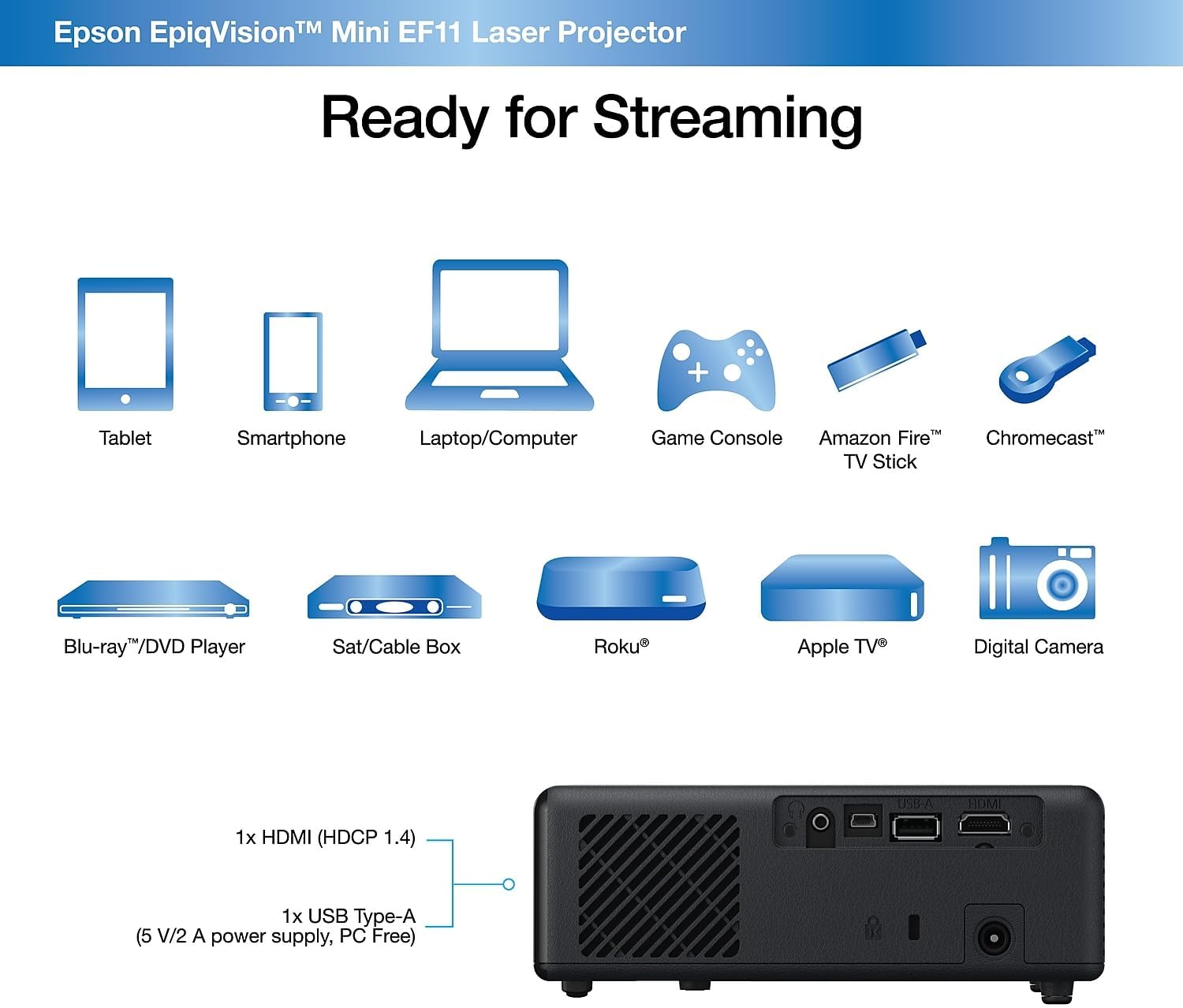
Rasm: orqa view of the Epson EpiqVision Mini EF11 Projector, highlighting the HDMI and USB ports for connecting various devices.
Ishlayotgan
- Quvvatni yoqish/oʻchirish: Press the power button on the projector's top panel or the remote control to turn on the device.
- Manba tanlash: Use the "Source" button on the remote or projector to cycle through available input sources (e.g., HDMI).
- Ovozni boshqarish: Adjust the volume using the '+' and '-' buttons on the remote control or the projector's top panel.
- Kontentga kirish:
- If using an external streaming device, navigate its interface using its remote.
- The projector is compatible with various streaming solutions like Apple TV, Roku, Amazon Fire TV, or Android TV.
- Rasm sozlamalari: Access the projector's menu to adjust picture settings such as color mode, light output, scene adaptive gamma, color temperature, dynamic contrast, and noise reduction.
- Ovoz sozlamalari: Customize your audio experience through sound settings, including sound mode (e.g., Theatre, TV, Studio), virtual surround, clear voice, auto loudness, and bass extension.

Image: The Epson EpiqVision Mini EF11 Laser Projector displaying a high-quality, vibrant image on a wall.

Image: A visual representation of the Epson EpiqVision Mini EF11 Projector's capability to project images at different sizes, from 70 inches to 150 inches.
Media Integration
Official Product Video: EF12 Plug and Play
Video: This official video from Epson America Inc. demonstrates the "Plug and Play" functionality of the EpiqVision Mini EF12 (similar to EF11), highlighting its ease of setup and immediate use for various media content.
Texnik xususiyatlari
| Xususiyat | Tafsilot |
|---|---|
| Mahsulot o'lchamlari | 6.89 x 6.89 x 2.28 dyuym |
| Element og'irligi | 2.7 funt |
| Model raqami | EF11 |
| Brend | Epson |
| Tavsiya etilgan foydalanish | Oʻyin |
| Maxsus xususiyatlar | O'rnatilgan dinamik, engil |
| Ulanish texnologiyasi | HDMI |
| Displey ravshanligi | 1920 x 1080 (Full HD) |
| Yorqinlik | 1000 Lumens (Color and White Brightness) |
| Proyeksiya texnologiyasi | 3LCD, Laser |
Xizmat
To'g'ri parvarishlash projektoringizning uzoq umr ko'rishini va optimal ishlashini ta'minlaydi:
- Ob'ektivni tozalash: Use a soft, dry, lint-free cloth to gently wipe the projector lens. Avoid using abrasive cleaners or solvents.
- Cleaning Air Vents: Regularly check and clean the air vents to prevent dust buildup, which can lead to overheating. Use a soft brush or a vacuum cleaner with a brush attachment.
- Saqlash: Projektorni uzoq vaqt ishlatilmaganda, uni salqin, quruq joyda, to'g'ridan-to'g'ri quyosh nuri va haddan tashqari haroratdan uzoqroq joyda saqlang.
Muammolarni bartaraf qilish; nosozliklarni TUZATISH
Agar proyektor bilan bog'liq muammolarga duch kelsangiz, quyidagi umumiy muammolarni bartaraf etish bosqichlarini sinab ko'ring:
- Quvvat yo'q:
- Ensure the power cord is securely connected to both the projector and the electrical outlet.
- Verify the electrical outlet is functioning by plugging in another device.
- Rasm yo'q:
- Check that the correct input source is selected on the projector.
- Ensure the HDMI cable (or other video cable) is securely connected to both the projector and the source device.
- Manba qurilmasi yoqilganligini va signal chiqarayotganini tekshiring.
- Xira tasvir:
- Adjust the focus using the projector's settings menu.
- Ensure the projector is placed at an appropriate distance from the screen or wall.
- Check for any obstructions in front of the lens.
- Ovoz yo'q:
- Increase the volume on both the projector and the source device.
- Check the audio output settings on your source device to ensure it's sending audio via HDMI.
- Agar tashqi dinamiklardan foydalansangiz, ular to'g'ri ulangan va yoqilganligiga ishonch hosil qiling.
Kafolat va qo'llab-quvvatlash
The Epson EpiqVision Mini EF11 Laser Projector comes with a standard 2-year limited warranty, including full-unit replacement. Free technical phone support is available for the life of the product.
For further assistance or to explore other Epson products, please visit the Epson Store.


