

MANUAL
External CD/DVD Drive
External CD/DVD Driver
Steps:
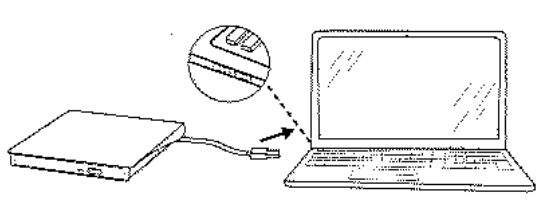
- Pull out the embedded USB cable. After plugging into the USB cable to the computer, the power indicator will flashes.Wait about 10-15 seconds until the drive of this product appears on the computer screen.
- Press the ejection button and pull out the tray to put the disc in.

- After use, right-click ‘pop up’ on the computer.

Tips:
- Download player Software: VLC media player
- Download burning Software: www.nero.com
- Download video player Software: www.videolan.org
- Before using external disk drive, please make sure your computer has “VLC Media Player”.
- Blu ray CD is not supported. Not for TV, car, smartphone.
- To play American discs; please set the area code to #1.
Specification:
| Reading speed | DVD-ROX 8X; CD-ROM 24X |
| Writing speed | DVD-R,DVD+R 8X; DVD-RW 4X; CD-R 24X |
| Supportive Insta?liig System | XP,Win 7,Win8 |
| Compatible Operation System Windows?/8/9/SE/VISTA/XP Linux/MAC 058.6 and more |
Q&A:
– A: This may be a case of poor connectivity. Please check whether the USB cable is correctly inserted into the computer. If it is used with a desktop computer, use the USB port at the back of the computer chassis. If the computer cannot recognize the CD/DVD drive, we will help you fix it.
– A: Try inserting a sharp object into the small hole next to the ejection button. We suggest you right-click “pop up’ on the computer. because if the manual eject button is forcibly pressed, the equipment may be jammed and damaged.
– A: The time for the computer of recognition is usually 10-25s, please don t operate during identification. You need to wait for the optical drive to complete the recognition before it can work normally. The time for the computer to read the disc is about 20-60s(The recognition time will be longer when you use it for the first time. Please wait patiently)
– A: If the light flashes, it means that the product is working normally. For specific use problems, please contact us to help you.
– A: If other normal discs can be played, the greatest possibility is that there is a problem with the disc. Please check that the disc is specially used for burning. because the burned disc also has format requirements. And please make sure your computer has available media software or burning software, such as VLC Media Player, Nero, etc.
– A:The device will be compatible with Chrome Book: but you need to go to The chrome store web page, download the application VLC and download the chrome operating system driver. We recommend that you use an external power supply, otherwise power problems will occur.
– A: CD-R (recordable disc) disc can record music at one time and keep it permanently on the disc (such as commercially produced music CD). CD-RW (rewritable CD-R1N) discs are suitable if you want to be able to write to a disc, then delete music and write to the same disc again.
About use
Thank you very much for purchasing our products this time. Only by strict selection can we create a first-class quality factory to produce this product. Therefore, if you have any questions about the product, please don’t hesitate to contact us. We hope to hear from your. : gotegashop@outlook.com
Documents / Resources
 | External CD/DVD Driver |
References
- User Manualmanual.tools
Dear Sir or Madam, I have had an external Amicool Cd&DVD player for over a year. I could only use it once. He burned a CD with music that was not playable.
Since then he reads and writes on no CD-DVD, everything is no longer usable.
After inserting a recorded CD, the drive rotates briefly and opens again.
I use Amicool external CD&DVD player on my IMac 24″.
I ask for help to be able to use the device again.
Sincerely
Peter Mieth
Sehr geehrte Damen und Herrn, ich besitze seit über einem Jahr einen exrternen Cd&DVD Player der Marke Amicool. Ich konnte ihn nur einmal benutzen. Dabei hat er eine CD mit Musik gebrannt die nicht abspielbar war.
Seitdem liest und schreibt er auf keine CD-DVD, ist alls nicht mehr benutzbar.
Nach einlegen einer bespielten CD dreht sich das Laufwerk kurz und öffnet sich wieder.
Ich benutze den externen CD&DVD Player von Amicool auf meinem IMac 24″.
Ich bitte um Hilfe um das Gerät wieder nutzen zu können.
Mit freundlichem Gruß
Peter Mieth
Since then he reads and writes on no CD-DVD, everything is no longer usable.
After inserting a recorded CD, the drive rotates briefly and opens again.
I use Amicool external CD&DVD player on my IMac 24".
I ask for help to be able to use the device again.
Sincerely
Peter Mieth
Sehr geehrte Damen und Herrn, ich besitze seit über einem Jahr einen exrternen Cd&DVD Player der Marke Amicool. Ich konnte ihn nur einmal benutzen. Dabei hat er eine CD mit Musik gebrannt die nicht abspielbar war.
Seitdem liest und schreibt er auf keine CD-DVD, ist alls nicht mehr benutzbar.
Nach einlegen einer bespielten CD dreht sich das Laufwerk kurz und öffnet sich wieder.
Ich benutze den externen CD&DVD Player von Amicool auf meinem IMac 24".
Ich bitte um Hilfe um das Gerät wieder nutzen zu können.
Mit freundlichem Gruß
Peter Mieth
How do I troubleshoot an Amicool external CD/DVD drive that fails to read or write discs and automatically ejects them on an iMac?
Based on the Amicool External CD/DVD Driver manual and common troubleshooting for macOS, please try the following steps to resolve the issue where your drive ejects discs immediately:
If the drive continues to eject every disc (including commercial ones) after checking the power and cleaning the lens, the internal laser or motor may have failed.
Read the full Q&A page
ноутбук з Windows 10 не бачить підключеного до нього зовнішнього CD/DVD приводу. Що я можу зробити?
My Windows 10 laptop does not recognize the connected external CD/DVD drive. What can I do?
If your Windows 10 laptop does not recognize the external CD/DVD drive, please try the following troubleshooting steps based on the user manual:
Read the full Q&A page