1. تعارف
The Havit MS966SE is a high-performance tri-mode gaming mouse designed for versatility, precision, and comfort. It features a PixArt PMW3325 optical sensor, offering exceptional tracking accuracy and adjustable DPI settings up to 10,000. With its tri-mode connectivity, you can seamlessly switch between 2.4GHz wireless, Bluetooth 5.3, and USB-C wired modes to suit your gaming or work environment. The lightweight and ergonomic design ensures comfortable use during extended sessions, complemented by dynamic RGB lighting for a personalized aesthetic.

Figure 1: Havit MS966SE Gaming Mouse with USB-C cable.
2. سیٹ اپ
2.1 پیک کھولنا
Carefully remove the mouse and all accessories from the packaging. Ensure all components are present:
- Havit MS966SE Gaming Mouse
- USB-C سے USB-A کیبل
- 2.4GHz یوایسبی وصول کنندہ
- صارف دستی (یہ دستاویز)
2.2 ماؤس کو جوڑنا
The MS966SE offers three connectivity options:
2.2.1 2.4GHz وائرلیس موڈ
- Insert the 2.4GHz USB receiver into an available USB-A port on your computer.
- Locate the mode switch on the bottom of the mouse and slide it to the 2.4 جی پوزیشن
- The mouse will automatically connect to your computer.
2.2.2 Bluetooth 5.3 Mode
- Locate the mode switch on the bottom of the mouse and slide it to the BT پوزیشن
- اپنے کمپیوٹر یا موبائل ڈیوائس پر، بلوٹوتھ سیٹنگز کھولیں اور نئے آلات تلاش کریں۔
- Select "Havit MS966SE" from the list of available devices to pair.
2.2.3 USB-C وائرڈ موڈ
- Connect one end of the provided USB-C cable to the mouse and the other end to an available USB-A port on your computer.
- ماؤس خود بخود وائرڈ موڈ میں بدل جائے گا اور چارج کرنا شروع کر دے گا۔
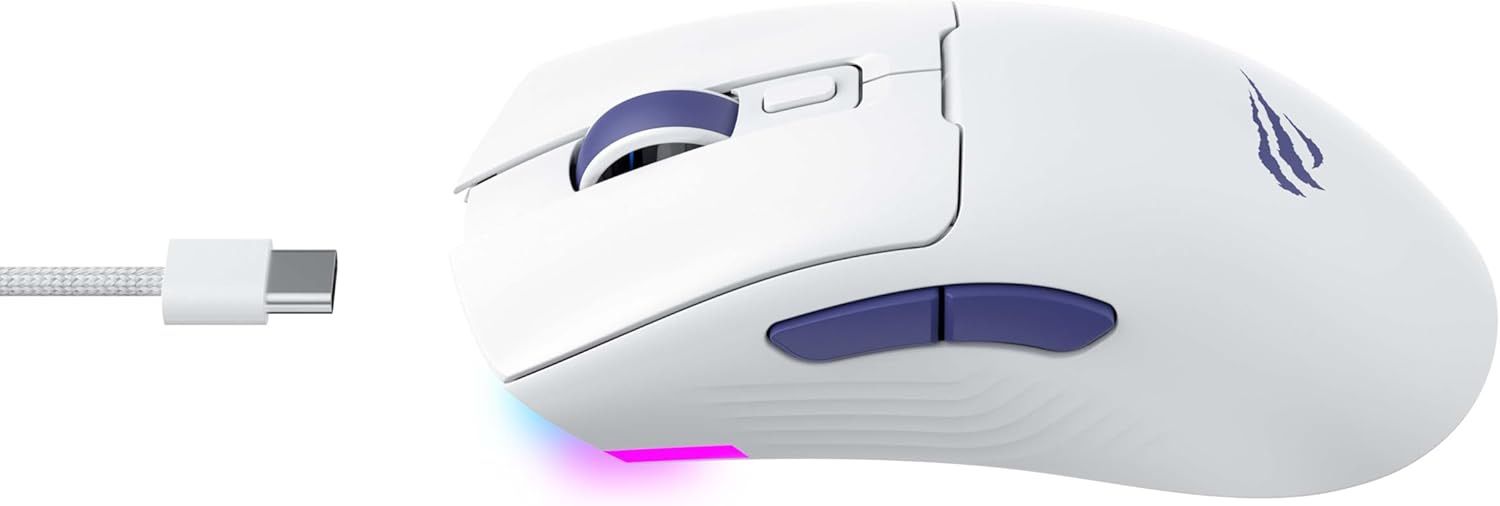
شکل 2: طرف view of the mouse, highlighting the USB-C port.
2.3 ماؤس کو چارج کرنا
To charge the mouse, connect it to your computer using the USB-C cable. The mouse can be used in wired mode while charging. An indicator light on the mouse will show the charging status (refer to the manufacturer's website or product packaging for specific light behaviors).
3. آپریٹنگ ہدایات
3.1 بٹن کے افعال
The Havit MS966SE features several programmable buttons for enhanced control:
- بائیں کلک کے بٹن: معیاری پرائمری کلک فنکشن۔
- دائیں کلک کے بٹن: معیاری ثانوی کلک فنکشن۔
- اسکرول وہیل: Scrolls up/down, and acts as a middle click button.
- DPI سائیکل بٹن: Located behind the scroll wheel, this button cycles through preset DPI sensitivity levels.
- سائیڈ بٹن (آگے/پیچھے): عام طور پر نیویگیشن میں استعمال ہوتا ہے۔ web براؤزرز یا کھیل میں کارروائیوں کے لیے پروگرام کیے جا سکتے ہیں۔

Figure 3: Side buttons and ergonomic design.
3.2 ڈی پی آئی ایڈجسٹمنٹ
The PixArt PMW3325 sensor allows for adjustable DPI settings up to 10,000. Press the DPI cycle button (located behind the scroll wheel) to switch between different sensitivity levels. Each press will cycle to the next preset DPI, allowing you to quickly adapt to various tasks or game scenarios.
3.3 Connectivity Mode Switching
To switch between 2.4GHz wireless, Bluetooth, and wired modes, use the physical switch located on the bottom of the mouse. Ensure the correct mode is selected based on your connection preference.
3.4 آر جی بی لائٹنگ
The mouse features dynamic RGB lighting. Specific controls for RGB lighting effects, colors, and brightness may be available through dedicated software provided by Havit. Please visit the official Havit website for software downloads and further customization options.
4 دیکھ بھال
4.1 صفائی
- صاف کرنے سے پہلے اپنے کمپیوٹر سے ماؤس کو منقطع کریں۔
- ماؤس کی سطح کو صاف کرنے کے لیے نرم، خشک، لنٹ سے پاک کپڑا استعمال کریں۔
- ضدی گندگی کے لیے، قدرے ڈیampur کپڑے میں پانی یا ہلکے صفائی کے محلول سے۔ سخت کیمیکلز سے پرہیز کریں۔
- بٹنوں اور اسکرول وہیل کے ارد گرد صاف کرنے کے لیے روئی کی جھاڑی یا کمپریسڈ ہوا کا استعمال کریں۔
- Do not immerse the mouse in water or any liquid.
4.2 اسٹوریج
When not in use for extended periods, store the mouse in a cool, dry place away from direct sunlight and extreme temperatures. If storing for a long time, ensure the mouse is fully charged to maintain battery health.
5 خرابیوں کا سراغ لگانا
5.1 ماؤس جواب نہیں دے رہا ہے۔
- پاور چیک کریں: Ensure the mouse is turned on and has sufficient battery charge.
- رابطہ چیک کریں:
- وائرڈ موڈ: Ensure the USB-C cable is securely connected to both the mouse and the computer. Try a different USB port.
- 2.4GHz وائرلیس: Ensure the USB receiver is properly inserted and the mouse is set to 2.4G mode. Try a different USB port for the receiver.
- بلوٹوت وضع: Ensure Bluetooth is enabled on your device and the mouse is paired. Try unpairing and re-pairing the mouse.
- دوبارہ شروع کریں: Restart your computer and the mouse.
5.2 DPI تبدیل نہیں ہو رہا ہے۔
- Ensure you are pressing the correct DPI cycle button.
- If using custom software, check the DPI settings within the software.
5.3 وائرلیس موڈ میں وقفہ یا منقطع
- مداخلت: Move the mouse closer to the receiver/device. Avoid obstacles between the mouse and receiver.
- بیٹری کی سطح: Low battery can affect wireless performance. Charge the mouse.
- USB پورٹ: Try connecting the 2.4GHz receiver to a different USB port, preferably a USB 2.0 port if available, as some USB 3.0 ports can cause interference.
6. وضاحتیں
| برانڈ | حوت |
| ماڈل | MS966SE |
| کنیکٹوٹی ٹیکنالوجی | Tri-Mode: 2.4GHz Wireless, Bluetooth 5.3, USB-C Wired |
| سینسر ٹیکنالوجی | آپٹیکل (PixArt PMW3325) |
| ڈی پی آئی لیولز | Up to 10,000 adjustable DPI |
| خصوصی خصوصیات | Ergonomic Design, Dynamic RGB Lighting |
| ہم آہنگ آپریٹنگ سسٹمز | ونڈوز، میک او ایس، لینکس |
| ہم آہنگ آلات | Notebook, Personal Computer, Tablet, Smartphone |
| ماؤس کا وزن | تقریباً 68 گرام |
| بیٹری کی قسم | لیتھیم آئن |
7. وارنٹی اور سپورٹ
7.1 وارنٹی کی معلومات
This Havit MS966SE Gaming Mouse comes with a 1 سال کی مینوفیکچرر وارنٹی. وارنٹی کے دعووں کے لیے براہ کرم اپنی خریداری کا ثبوت اپنے پاس رکھیں۔ وارنٹی عام استعمال کے تحت مواد اور کاریگری میں نقائص کا احاطہ کرتی ہے۔
7.2 کسٹمر سپورٹ
For technical assistance, troubleshooting beyond this manual, or warranty inquiries, please contact Havit customer service directly. You can find the most up-to-date contact information and support resources on the official Havit webسائٹ (www.havit.com).


