1. تعارف
The Havit H2002BG Wireless Gaming Headphones are designed to provide a versatile audio experience for gaming and entertainment. Featuring tri-mode connectivity, these headphones offer seamless switching between 2.4GHz wireless, Bluetooth, and wired connections (3.5mm and Type-C). Enjoy immersive sound with 53mm dynamic drivers and virtual 7.1 surround sound support, all while benefiting from a comfortable design with an adjustable head beam and memory foam earcups. The detachable omnidirectional microphone ensures clear communication.
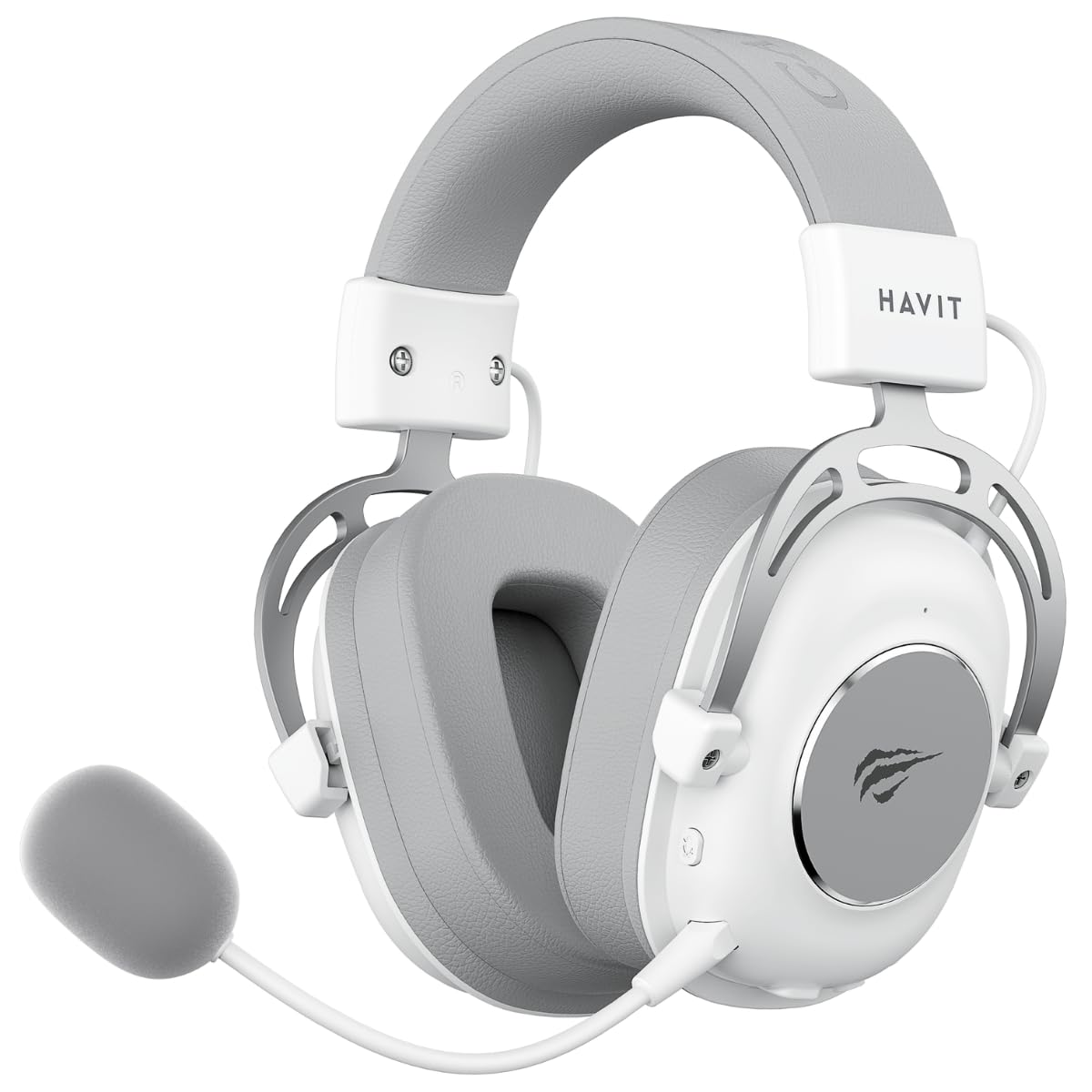
Figure 1: Havit H2002BG Wireless Gaming Headphones
2. مصنوعات کی خصوصیات
- ٹرائی موڈ کنیکٹیویٹی: Supports 2.4GHz wireless, Bluetooth, 3.5mm audio jack, and Type-C wired connections for broad compatibility.
- 53 ملی میٹر متحرک ڈرائیور: Delivers powerful and clear audio for an immersive experience.
- ورچوئل 7.1 سراؤنڈ ساؤنڈ: Enhances spatial audio awareness for gaming.
- آرام دہ ڈیزائن: Features an adjustable head beam and memory foam earcups for extended wear comfort.
- Detachable Omnidirectional Microphone: Provides clear voice communication and can be removed when not needed.
- لمبی بیٹری کی زندگی: Up to 26 hours of playtime on a single charge with a 1200mAh battery.

Figure 2: Tri-Mode Connection Capabilities

Figure 3: Virtual 7.1 Surround Sound Feature
3. پیکیج کے مشمولات
براہ کرم درج ذیل اشیاء کے لیے پیکج چیک کریں:
- 1 x Havit H2002BG Wireless Gaming Headphones
- 1 x Detachable Omnidirectional Microphone
- 1 x 2.4GHz USB Dongle
- 1 x 3.5 ملی میٹر آڈیو کیبل
- 1 x Type-C چارجنگ کیبل
- 1 ایکس یوزر مینوئل (یہ دستاویز)
4. سیٹ اپ
4.1 ابتدائی چارجنگ
- Type-C چارجنگ کیبل کو ہیڈ فون پر چارجنگ پورٹ سے جوڑیں۔
- Plug the other end of the Type-C cable into a USB power source (e.g., computer USB port, USB wall adapter).
- Allow the headphones to fully charge before first use. The LED indicator will show charging status.
4.2 Microphone Attachment
- Locate the microphone port on the left earcup of the headphones.
- Insert the detachable microphone firmly into the port until it clicks into place.
4.3 ہیڈ فون کو جوڑنا
The Havit H2002BG offers multiple connection options:

شکل 4: ہیڈ فون کنٹرولز اور پورٹس
4.3.1 2.4GHz Wireless Connection (PC/Console with USB-A)
- Plug the 2.4GHz USB dongle into an available USB-A port on your PC or compatible gaming console.
- Power on the headphones by pressing and holding the power button.
- The headphones should automatically connect to the dongle. The LED indicator will confirm connection.
- On your device, ensure the Havit H2002BG is selected as the audio output and input device.
4.3.2 Bluetooth Connection (Mobile Devices/PC with Bluetooth)
- Power on the headphones and switch to Bluetooth mode (refer to Operating Instructions for mode switching). The LED indicator will flash, indicating pairing mode.
- On your mobile device or PC, enable Bluetooth and search for new devices.
- Select "Havit H2002BG" from the list of available devices to pair.
- ایک بار جوڑا بننے کے بعد، LED اشارے ایک مستحکم روشنی دکھائے گا۔
4.3.3 Wired Connection (3.5mm Audio Jack)
- Connect one end of the 3.5mm audio cable to the 3.5mm port on the headphones.
- Plug the other end of the 3.5mm audio cable into the audio output jack of your device (e.g., gaming console controller, PC, smartphone).
- The headphones will operate in passive wired mode.
4.3.4 Wired Connection (Type-C Cable)
- Connect the Type-C cable to the Type-C port on the headphones.
- Plug the other end of the Type-C cable into a compatible Type-C port on your device. This connection can provide both audio and charging simultaneously.
5. آپریٹنگ ہدایات
5.1 پاور آن/آف
- پاور آن: LED اشارے روشن ہونے تک تقریباً 3 سیکنڈز تک پاور بٹن کو دبائے رکھیں۔
- بجلی بند: پاور بٹن کو تقریباً 3 سیکنڈ تک دبائے رکھیں جب تک کہ LED اشارے بند نہ ہو جائے۔
5.2 والیوم کنٹرول
- Use the volume wheel or dedicated volume buttons on the earcup to adjust the audio output level.
5.3 Microphone Mute/Unmute
- Press the microphone mute button to toggle the microphone on or off. An indicator light on the microphone or headphones may show its status.
5.4 موڈ سوئچنگ
- Use the mode button to cycle between 2.4GHz wireless, Bluetooth, and wired (3.5mm/Type-C) connection modes. The LED indicator will change to reflect the active mode.
5.5 Virtual 7.1 Surround Sound
- Activate or deactivate the virtual 7.1 surround sound feature using the dedicated button on the headphones or through compatible software on your PC.
5.6 آر جی بی لائٹنگ کنٹرول
- If applicable, use the designated button to cycle through different RGB lighting effects or turn them off.
6 دیکھ بھال
6.1 صفائی
- ہیڈ فون کو نرم، خشک، لنٹ فری کپڑے سے صاف کریں۔
- سخت کیمیکلز ، صفائی سالوینٹس ، یا مضبوط ڈٹرجنٹ استعمال نہ کریں۔
- کسی بھی سوراخ میں نمی حاصل کرنے سے گریز کریں۔
6.2 اسٹوریج
- ہیڈ فونز کو کسی ٹھنڈی، خشک جگہ پر براہ راست سورج کی روشنی اور انتہائی درجہ حرارت سے دور رکھیں۔
- If storing for an extended period, ensure the battery is partially charged (around 50%) to maintain battery health.
6.3 بیٹری کی دیکھ بھال
- بیٹری کو بار بار مکمل طور پر خارج کرنے سے گریز کریں۔
- Charge the headphones regularly, even if not in frequent use, to prevent deep discharge.
7 خرابیوں کا سراغ لگانا
7.1 کوئی آواز نہیں۔
- یقینی بنائیں کہ ہیڈ فون آن اور چارج ہیں۔
- ہیڈ فونز اور منسلک ڈیوائس دونوں پر والیوم لیول چیک کریں۔
- Verify that the headphones are correctly connected (2.4GHz dongle, Bluetooth paired, or wired cable securely inserted).
- Confirm that the Havit H2002BG is selected as the primary audio output device in your PC or console settings.
7.2 مائیکروفون کام نہیں کر رہا ہے۔
- Ensure the detachable microphone is securely attached to the headphones.
- Check if the microphone mute function is active.
- Verify microphone input settings on your connected device and ensure Havit H2002BG is selected.
- Test the microphone in different applications or communication software.
7.3 کنکشن کے مسائل
- 2.4GHz: Ensure the USB dongle is fully inserted and there are no significant obstructions or interference sources nearby. Try re-pairing by restarting both headphones and the device.
- بلوٹوتھ: Ensure the headphones are in Bluetooth pairing mode and within the effective range (typically 10 meters). Try unpairing and re-pairing the device.
- وائرڈ: Ensure all cables (3.5mm or Type-C) are fully inserted into their respective ports and are not damaged.
7.4 چارجنگ کے مسائل
- Ensure the Type-C charging cable is properly connected to both the headphones and the power source.
- Try using a different Type-C charging cable or a different USB power adapter/port.
- Check if the charging port on the headphones is clean and free of debris.
8. وضاحتیں
| فیچر | تفصیلات |
|---|---|
| ماڈل | H2002BG |
| ڈرائیور قطر | 53 ملی میٹر |
| رکاوٹ | 64 ± 15% Ω |
| حساسیت | 111 ± 3dB |
| تعدد رسپانس | 20Hz - 20kHz |
| بیٹری کی صلاحیت | 1200mAh |
| پلے ٹائم | 26 گھنٹے تک |
| کنیکٹوٹی | 2.4GHz Wireless, Bluetooth, 3.5mm, Type-C |
| مائیکروفون | Omnidirectional, Detachable |
| فارم فیکٹر | کان کے اوپر |
| مواد | دھات، پلاسٹک |
| رنگ | سفید/گرے |
9. وارنٹی اور سپورٹ
9.1 وارنٹی کی معلومات
The Havit H2002BG Wireless Gaming Headphones are covered by a 1 سال کی محدود وارنٹی from the date of purchase. This warranty covers manufacturing defects and workmanship under normal use. It does not cover damage caused by misuse, accidents, unauthorized modifications, or normal wear and tear. Please retain your proof of purchase (receipt or invoice) for any warranty claims.
9.2 کسٹمر سپورٹ
For further assistance, technical support, or warranty inquiries, please contact Havit customer service or visit the official Havit website. You may find FAQs, additional troubleshooting guides, and contact information there.
سرکاری حوایت Webسائٹ: www.havit.com


