1. تعارف
This manual provides instructions for the proper use and maintenance of your ttec SoundFlow OWS Wireless Bluetooth Earphones, model KM156. Please read this manual thoroughly before using the product to ensure optimal performance and longevity.
The ttec SoundFlow OWS earphones feature an open-ear design for situational awareness, dynamic acoustic system for clear sound, and Bluetooth 5.4 for stable wireless connectivity.
2. پیکیج کے مشمولات
تصدیق کریں کہ تمام اشیاء آپ کے پروڈکٹ پیکج میں موجود ہیں:
- ttec SoundFlow OWS Wireless Bluetooth Earphones (Left and Right)
- چارجنگ کیس
- USB-C چارجنگ کیبل
- صارف دستی
3. پروڈکٹ ختمview
Familiarize yourself with the components of your ttec SoundFlow OWS earphones.

Image 3.1: ttec SoundFlow OWS Earphones and Charging Case. The image displays the two black earphones with ear hooks, positioned above their open black charging case.
ائرفون کے اجزاء:
- کان کا کانٹا: کان کے اوپر ایک محفوظ اور آرام دہ فٹ فراہم کرتا ہے۔
- اسپیکر یونٹ: آڈیو آؤٹ پٹ فراہم کرتا ہے۔
- مائیکروفون: کالز اور وائس کمانڈز کے لیے۔
- Touch Sensor Area: For controlling music, calls, and other functions.
- چارجنگ رابطے: Connects with the charging case for power.

Image 3.2: Close-up of an earbud highlighting the touch sensor area. The image shows a detailed view of the earbud's outer surface, indicating the touch-sensitive zone for controls.
چارجنگ کیس کے اجزاء:
- Earphone Slots: ائرفون کو محفوظ طریقے سے رکھتا ہے اور چارج کرتا ہے۔
- USB-C چارجنگ پورٹ: کیس چارج کرنے کے لیے۔
- ایل ای ڈی اشارے: چارجنگ اسٹیٹس اور بیٹری لیول دکھاتا ہے۔
4. سیٹ اپ
4.1 ائرفون اور کیس چارج کرنا
پہلے استعمال سے پہلے، ائرفون اور چارجنگ کیس کو پوری طرح سے چارج کریں۔
- Place the earphones into the charging case. Ensure the charging contacts align.
- USB-C چارجنگ کیبل کو کیس پر چارجنگ پورٹ سے اور دوسرے سرے کو پاور سورس (جیسے USB وال اڈاپٹر، کمپیوٹر USB پورٹ) سے جوڑیں۔
- The LED indicator on the case will show the charging status. Once fully charged, the indicator will change or turn off.
A full charge provides up to 6 hours of earphone use, and the charging case provides up to 30 hours of additional battery life. The Charge&Go feature allows 2.5 hours of use from a 15-minute charge.
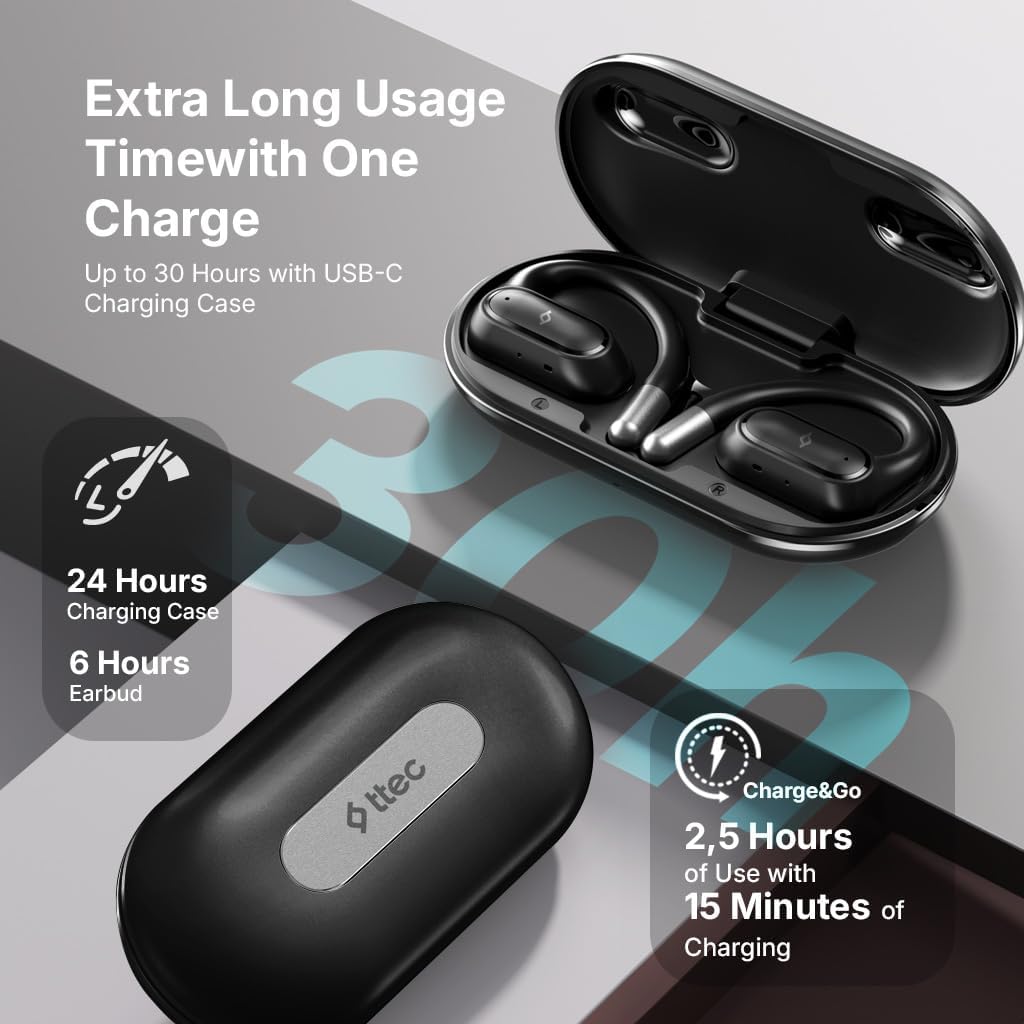
Image 4.1: Charging case displaying battery life. The image illustrates the charging case with text indicating 24 hours from the charging case, 6 hours from earbuds, and 2.5 hours of use from 15 minutes of charging.
4.2 بلوٹوتھ ڈیوائس کے ساتھ جوڑا بنانا
To connect your earphones to a smartphone or other Bluetooth-enabled device:
- یقینی بنائیں کہ ائرفون چارج کیے گئے ہیں اور چارجنگ کیس میں رکھے گئے ہیں۔
- Open the charging case. The earphones will automatically enter pairing mode, and their LED indicators will flash.
- اپنے آلے پر، بلوٹوتھ کو فعال کریں اور دستیاب آلات تلاش کریں۔
- Select "ttec SoundFlow" from the list of found devices.
- Once connected, the earphone LED indicators will stop flashing or turn off, and you will hear a confirmation tone.
کیس سے ہٹائے جانے پر ائرفونز خود بخود آخری جوڑی والے آلے سے دوبارہ جڑ جائیں گے، اگر ڈیوائس پر بلوٹوتھ فعال ہے۔
5. آپریٹنگ ہدایات
5.1 ائرفون پہننا
Gently place the ear hook over your ear and position the speaker unit comfortably in front of your ear canal. The open-ear design allows you to remain aware of your surroundings.

Image 5.1: A person cycling while wearing the ttec SoundFlow OWS earphones. The image highlights the open-ear design, allowing the user to stay connected to their surroundings.

Image 5.2: A woman wearing a ttec SoundFlow earbud, demonstrating the comfortable and secure fit. The image also indicates the lightweight design: 8.2g per earbud and 52g for the charging case.
5.2 ٹچ کنٹرولز
The earphones feature touch sensors for easy control of various functions:
| ایکشن | فنکشن |
|---|---|
| سنگل ٹیپ (L/R) | میوزک چلائیں/روکیں، کال کا جواب دیں۔ |
| ڈبل تھپتھپائیں (L) | پچھلا ٹریک |
| ڈبل تھپتھپائیں (R) | اگلا ٹریک |
| ٹرپل ٹیپ (L/R) | وائس اسسٹنٹ کو فعال کریں۔ |
| لانگ پریس (L/R) | Reject Call, End Call |
5.3 گیم موڈ
The earphones feature a low-latency game mode for an enhanced gaming and video experience. This mode reduces audio delay to 50ms.
- To activate Game Mode: Refer to the specific instructions in the quick start guide or product packaging for the exact touch gesture to enable/disable game mode. (Typically a specific tap sequence or long press).
- When Game Mode is active, you may notice a slight change in audio profile, optimized for lower latency.

Image 5.3: ttec SoundFlow earphones and charging case, surrounded by gaming console symbols, highlighting the 50ms low latency feature for an optimized gaming and video experience.
6 دیکھ بھال
6.1 صفائی
- ائرفون اور چارجنگ کیس کو نرم، خشک، لنٹ فری کپڑے سے صاف کریں۔
- کھرچنے والے کلینر، الکحل یا کیمیائی سالوینٹس کا استعمال نہ کریں۔
- یقینی بنائیں کہ چارجنگ کے مسائل کو روکنے کے لیے چارجنگ رابطے صاف اور خشک ہیں۔
6.2 پانی اور پسینے کی مزاحمت
The ttec SoundFlow OWS earphones are IPX6 rated, meaning they are resistant to high-pressure water jets from any direction. This makes them suitable for use during workouts and in light rain.
- ائرفون کو پانی میں نہ ڈوبیں۔
- Ensure the earphones are dry before placing them back into the charging case to prevent damage.

Image 6.1: A man running outdoors, illustrating the sweat and water-resistant design of the ttec SoundFlow earphones, which are IPX6 rated.
6.3 اسٹوریج
جب استعمال میں نہ ہو، تو ائرفون کو چارجنگ کیس میں محفوظ کریں تاکہ ان کی حفاظت ہو اور انہیں چارج کیا جا سکے۔ انتہائی درجہ حرارت سے دور ٹھنڈی، خشک جگہ پر اسٹور کریں۔
7 خرابیوں کا سراغ لگانا
اگر آپ کو اپنے ائرفون کے ساتھ مسائل کا سامنا ہے، تو درج ذیل عام حلوں سے رجوع کریں:
| مسئلہ | حل |
|---|---|
| ائرفون جوڑ نہیں رہے ہیں۔ | Ensure earphones are charged. Turn off and on Bluetooth on your device. Forget the device in your Bluetooth settings and re-pair. |
| صرف ایک ائرفون کام کر رہا ہے۔ | Place both earphones back in the case, close the lid, then open again. Ensure both are charged. |
| کوئی آواز نہیں۔ | Check device volume. Ensure earphones are connected. Try playing different audio. |
| چارجنگ کے مسائل | Ensure charging cable is securely connected. Clean charging contacts on earphones and case. Try a different USB-C cable or power source. |
اگر مسئلہ برقرار رہتا ہے، تو براہ کرم کسٹمر سپورٹ سے رابطہ کریں۔
8. وضاحتیں
| فیچر | تفصیل |
|---|---|
| ماڈل کا نام | SoundFlow |
| ماڈل نمبر | KM156 |
| کنیکٹوٹی ٹیکنالوجی | وائرلیس (بلوٹوتھ 5.4) |
| فارم فیکٹر | True Wireless, Open-Ear |
| ایربود وزن | 8.2 گرام (ہر ایک) |
| چارجنگ کیس کا وزن | 52 گرام |
| ایئربڈ بیٹری لائف | 6 گھنٹے تک (سنگل چارج) |
| بیٹری کی کل زندگی (کیس کے ساتھ) | 30 گھنٹے تک |
| فاسٹ چارجنگ | 15 min charge for 2.5 hours use (Charge&Go) |
| پانی کی مزاحمت | IPX6 Rated (Sweat and Water Resistant) |
| کم تاخیر | 50ms (گیم موڈ) |
| کارخانہ دار | ٹی ٹی سی |
9. وارنٹی اور سپورٹ
Your ttec SoundFlow OWS Wireless Bluetooth Earphones are covered by a manufacturer's warranty. For detailed warranty information, please refer to the warranty card included in your product packaging or visit the official ttec webسائٹ
For technical support, troubleshooting assistance, or to inquire about replacement parts, please contact ttec customer service through their official channels. Contact information can typically be found on the product packaging or the official ttec webسائٹ


