تعارف
This manual provides detailed instructions for the JOMAA 20-Key Macro Programmable Numeric Gaming Keyboard. It covers setup, operation, maintenance, troubleshooting, and product specifications to ensure optimal use of your device. Please read this manual thoroughly before using the keyboard.
پیکیج کے مشمولات
- JOMAA 20-Key Macro Programmable Numeric Gaming Keyboard
- USB ٹائپ سی کیبل
- صارف دستی (یہ دستاویز)
سیٹ اپ کی ہدایات
1. کی بورڈ کو جوڑنا
- Locate the USB Type-C port on the back of the JOMAA 20-Key Keyboard.
- فراہم کردہ USB Type-C کیبل کے ایک سرے کو کی بورڈ کے پورٹ سے جوڑیں۔
- Connect the other end of the USB cable to an available USB port on your computer (PC, Laptop, or Gaming Console).
- The keyboard is plug-and-play for basic functionality.

This image highlights the detachable Type-C cable for easy portability and connectivity. It also shows the physical switch used to toggle between office and gaming modes.
2. Driver and Software Installation (Windows Only)
For advanced features such as macro programming and detailed RGB lighting customization, a dedicated driver and software are required. This software is compatible with Windows XP/Vista/7/8/10 systems only.
- Visit the official JOMAA support website to download the latest driver and software for your keyboard.
- انسٹالیشن مکمل کرنے کے لیے آن اسکرین ہدایات پر عمل کریں۔
- نوٹ: If you configure settings on a Windows system, the keyboard will save these memory settings and retain them when connected to other compatible devices (e.g., Mac systems), although the driver itself cannot run on non-Windows operating systems.

A visual representation of the macro programming software, which allows users to define custom functions and macros for the keyboard's 19 programmable keys.
آپریٹنگ ہدایات
1 بنیادی کلیدی افعال
The JOMAA 20-Key Keyboard functions as a standard numeric keypad or macro pad. Keys are pre-assigned with numeric and basic arithmetic functions by default.
2 میکرو پروگرامنگ
The keyboard supports macro definition for 19 keys. This feature allows you to assign complex sequences of commands or single key presses to a single key, enhancing efficiency in gaming or productivity tasks.
- Install the JOMAA software on a Windows PC.
- Launch the software and select the key you wish to program.
- Record or input the desired macro sequence.
- Save the changes to the keyboard. The programmed macros will be stored on the keyboard's internal memory.
3. آرجیبی لائٹنگ موڈز
The keyboard features 12 distinct RGB lighting modes. These modes can be cycled through using a dedicated key on the keyboard.
- Locate the 'Mode Switching Key' (often indicated by a gear or light icon).
- Press this key to cycle through the available lighting effects.
- Further customization of lighting effects may be available through the JOMAA software.
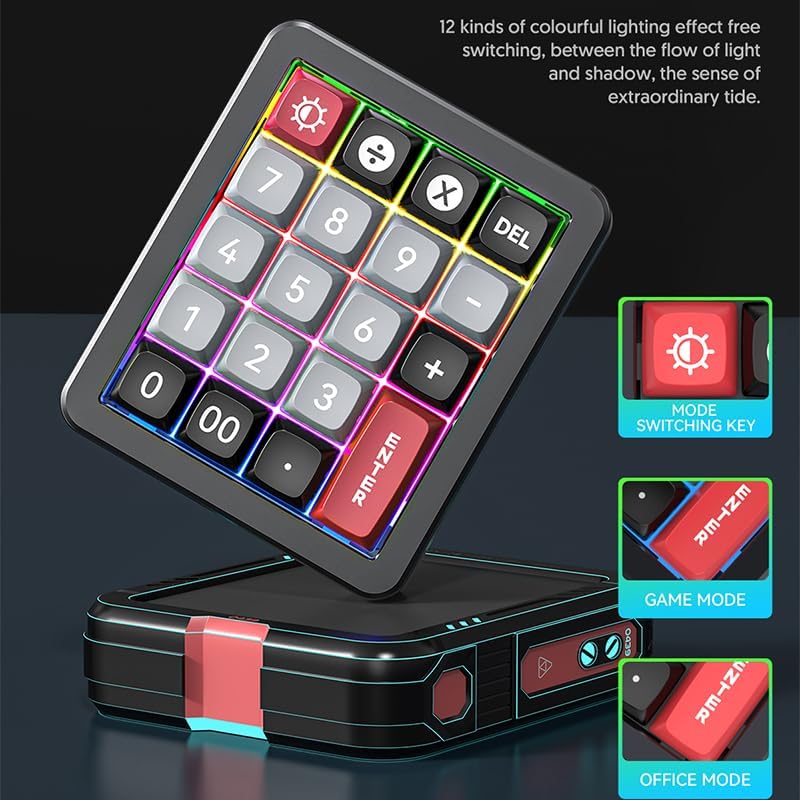
The keyboard features 12 distinct colorful lighting effects. The image also points out the dedicated mode switching key, allowing users to cycle through different lighting presets.
4. Hot-Swappable Keys
The JOMAA 20-Key Keyboard features hot-swappable switches, allowing users to replace individual key switches without soldering. This enables customization of typing feel and sound.
- Use a switch puller tool (not included) to carefully remove the keycap.
- Using the switch puller, gently grip the switch and pull it straight up to remove it from the PCB.
- نئے سوئچ کے پنوں کو پی سی بی کے سوراخوں کے ساتھ سیدھ میں رکھیں اور اسے مضبوطی سے دبائیں جب تک کہ یہ جگہ پر نہ آجائے۔
- کی کیپ کو تبدیل کریں۔
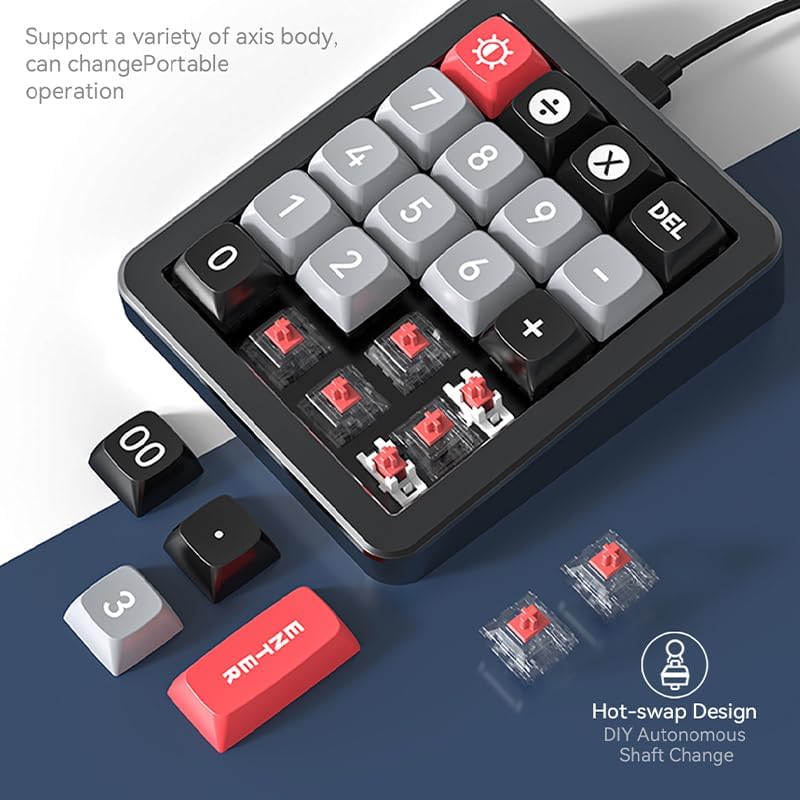
This image illustrates the hot-swappable design of the keyboard, showing how individual key switches can be easily removed and replaced without soldering, enabling customization.
5. Gasket Structure and Aluminum Alloy Body
The keyboard is constructed with an aluminum alloy body and features a gasket structure. The aluminum alloy provides durability and a stable base, while the gasket structure offers a cushioned typing experience, reducing impact noise and improving key feel.

The image emphasizes the keyboard's durable aluminum alloy construction, contributing to its premium feel and stability.

ایک دھماکہ ہوا۔ view diagram detailing the internal gasket structure of the keyboard, which provides a softer, more cushioned typing experience and reduces noise.
دیکھ بھال
کی بورڈ کی صفائی
- صاف کرنے سے پہلے کی بورڈ کو اپنے کمپیوٹر سے منقطع کریں۔
- تھوڑا سا نرم، لنٹ سے پاک کپڑا استعمال کریں۔ampکی بورڈ کی سطح کو صاف کرنے کے لیے پانی یا صفائی کے ہلکے محلول سے بند کریں۔
- کی کیپس کے درمیان صفائی کے لیے، دھول اور ملبہ ہٹانے کے لیے کمپریسڈ ہوا کا استعمال کریں۔
- سخت کیمیکلز، کھرچنے والے کلینر، یا براہ راست کی بورڈ پر مائع چھڑکنے سے گریز کریں۔
جنرل کیئر
- Avoid exposing the keyboard to extreme temperatures, direct sunlight, or high humidity.
- Do not drop or subject the keyboard to strong impacts.
- Keep liquids away from the keyboard to prevent damage.
خرابی کا سراغ لگانا
کی بورڈ جواب نہیں دے رہا ہے۔
- یقینی بنائیں کہ USB Type-C کیبل کی بورڈ اور کمپیوٹر دونوں سے محفوظ طریقے سے جڑی ہوئی ہے۔
- اپنے کمپیوٹر پر کی بورڈ کو کسی دوسرے USB پورٹ سے جوڑنے کی کوشش کریں۔
- سسٹم کے لیے مخصوص مسائل کو مسترد کرنے کے لیے دوسرے کمپیوٹر پر کی بورڈ کی جانچ کریں۔
- اگر USB ہب استعمال کر رہے ہیں، تو براہ راست کمپیوٹر سے جڑنے کی کوشش کریں۔
آر جی بی لائٹنگ کے مسائل
- یقینی بنائیں کہ کی بورڈ مناسب طریقے سے چل رہا ہے۔
- Press the 'Mode Switching Key' to cycle through different lighting effects.
- If using the software, verify that lighting settings are correctly applied and saved.
Macro Programming Difficulties
- Confirm that the JOMAA software is correctly installed on a Windows PC.
- Ensure you are following the software's instructions for macro recording and saving.
- Be aware that the software may be slow or clunky, requiring patience during configuration. Allow several seconds for changes to apply.
- If macros are not working on a non-Windows device, ensure they were programmed and saved on a Windows PC first, as the driver does not run on other operating systems.
وضاحتیں
| فیچر | تفصیل |
|---|---|
| برانڈ | JOMAA |
| ماڈل | 20-Key Macro Programmable Numeric Gaming Keyboard |
| کنیکٹوٹی ٹیکنالوجی | USB-C (Detachable Cable) |
| کلیدی قسم | گرم بدلنے کے قابل مکینیکل سوئچز |
| جسمانی مواد | ایلومینیم کھوٹ |
| ساخت | گسکیٹ کا ڈھانچہ |
| لائٹنگ | RGB (12 modes) |
| قابل پروگرام چابیاں | 19 keys for macro definition |
| ہم آہنگ آلات | Gaming Console, Laptop, PC |
| سسٹم کی مطابقت | Windows XP/Vista/7/8/10, Mac (driver for Windows only) |
| شے کا وزن | 15.5 اونس |
| پیکیج کے طول و عرض | 6.3 x 4.72 x 1.97 انچ |
| شامل اجزاء | USB کیبل |
وارنٹی کی معلومات
JOMAA products are typically covered by a manufacturer's warranty. For specific details regarding the warranty period and terms for your 20-Key Macro Programmable Numeric Gaming Keyboard, please refer to the warranty card included with your product or visit the official JOMAA webسائٹ وارنٹی کے دعووں کے لیے اپنی خریداری کا ثبوت رکھیں۔
کسٹمر سپورٹ
If you encounter any issues or have questions not addressed in this manual, please contact JOMAA customer support. Contact information can typically be found on the official JOMAA webسائٹ یا مصنوعات کی پیکیجنگ پر۔


