1. پروڈکٹ ختمview
The Nokia G310 5G Smartphone (Model TA-1573) offers lightning-fast 5G connectivity and modern mobile technology. It features a vibrant display for various tasks, a powerful processor for smooth performance, and an advanced camera system for detailed photos. Designed for daily use, it provides a comfortable grip and durable build quality. Enjoy extensive network compatibility, ample storage, a long-lasting battery with quick charging, and a user-friendly interface with regular software updates.
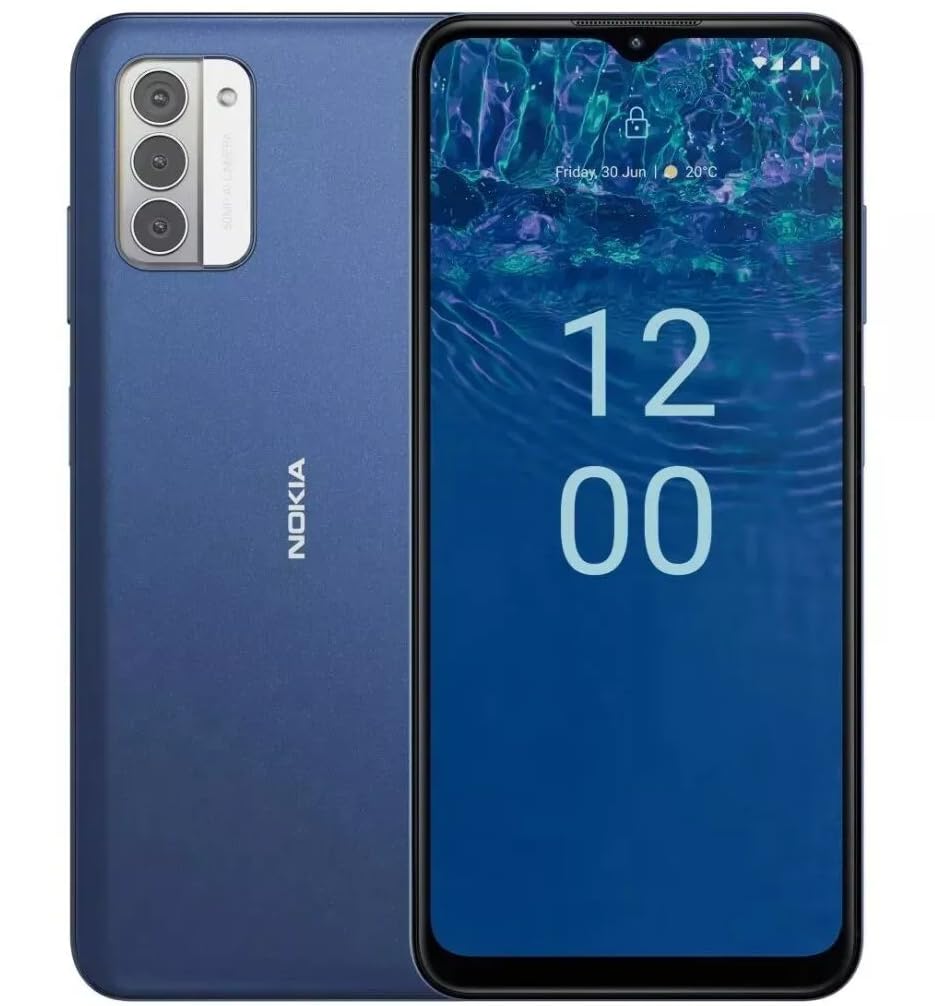
تصویر: پیچھے view of the Nokia G310 5G Smartphone, showcasing the triple camera module and Nokia branding.
کلیدی خصوصیات
- 5G کنیکٹیویٹی: Experience ultra-fast mobile data speeds and low latency.
- متحرک ڈسپلے: Large touchscreen display delivers vibrant colors and sharp visuals.
- موثر کارکردگی: Processor handles everyday tasks smoothly, from browsing to gaming.
- پائیدار ڈیزائن: Sleek and modern smartphone design with durable construction.
2. شروع کرنا
باکس میں کیا ہے۔
- Nokia G310 5G اسمارٹ فون
- چارجر
سم اور مائیکرو ایس ڈی کارڈ کی تنصیب
Locate the SIM/MicroSD card tray on the side of your device. Use the provided SIM ejector tool to open the tray. Insert your Nano-SIM card(s) and/or MicroSD card into the designated slots. Ensure the cards are correctly oriented. Gently push the tray back into the device until it clicks into place.
پاورنگ آن/آف
To power on your Nokia G310, press and hold the Power/Fingerprint Sensor button located on the right side of the device until the Nokia logo appears. To power off, press and hold the Power/Fingerprint Sensor button, then select 'Power off' from the options that appear on the screen.
3. ڈیوائس لے آؤٹ
فزیکل بٹن اور پورٹس
- والیوم بٹن: Located on the right side, above the Power/Fingerprint Sensor button, for adjusting media and call volume.
- Power/Fingerprint Sensor Button: Located on the right side, used for powering the device on/off, locking/unlocking the screen, and fingerprint authentication.
- USB-C پورٹ: نچلے حصے میں واقع ہے، چارج کرنے اور ڈیٹا کی منتقلی کے لیے استعمال کیا جاتا ہے۔
- 3.5 ملی میٹر آڈیو جیک: Located at the bottom, for connecting wired headphones.
- اسپیکر: آڈیو آؤٹ پٹ کے لیے نیچے واقع ہے۔
- مائیکروفون: کالز اور وائس کمانڈز کے لیے مربوط۔
کیمرہ ماڈیول
The rear of the device features a multi-lens camera module, including a main camera, along with a flash for low-light photography. The front-facing camera is discreetly placed within a notch at the top of the display.
4. آپریٹنگ ہدایات
بنیادی نیویگیشن
The Nokia G310 operates on the Android operating system, offering an intuitive touchscreen interface. Swipe up from the bottom of the screen to access the app drawer, swipe down from the top for notifications and quick settings, and use gestures or navigation buttons (configurable in settings) to move between apps and screens.
کنیکٹوٹی
- 5G Cellular Data: The device supports 5G connectivity for ultra-fast mobile data speeds. Ensure your SIM card and plan support 5G.
- وائی فائی: انٹرنیٹ تک رسائی کے لیے وائرلیس نیٹ ورکس سے جڑیں۔ کنکشنز کا نظم کرنے کے لیے ترتیبات > نیٹ ورک اور انٹرنیٹ > Wi-Fi پر جائیں۔
- بلوٹوتھ: Pair with other Bluetooth-enabled devices like headphones or speakers. Go to Settings > Connected devices > Bluetooth.
- GPS: Utilize built-in GPS for location services and navigation.
5. کیمرے کا استعمال
The Nokia G310 features an advanced camera system designed to capture memorable moments. Access the camera app from your home screen or app drawer.
فوٹو کھینچنا
Open the Camera app, frame your shot, and tap the shutter button on the screen to take a picture. The advanced AI camera assists in optimizing settings for various scenes.
ریکارڈنگ ویڈیوز
In the Camera app, switch to video mode, then tap the record button to start and stop recording. The phone supports various video resolutions.
کیمرہ موڈز
Explore different camera modes available in the camera app, such as Portrait, Panorama, and Night mode, to enhance your photography experience.
6. بیٹری کا انتظام
آپ کے آلے کو چارج کرنا
The Nokia G310 is equipped with a 5000 Milliamp Hours (5000.0 Battery Power Rating) battery. Connect the provided USB-C charger to the port at the bottom of the device. The phone supports quick charging for reduced downtime.
بیٹری کی زندگی کو بہتر بنانا
- اسکرین کی چمک کو آرام دہ سطح پر ایڈجسٹ کریں۔
- بیٹری کم ہونے پر بیٹری سیور موڈ کو فعال کریں۔
- پس منظر میں چلنے والی غیر استعمال شدہ ایپس کو بند کریں۔
- استعمال میں نہ ہونے پر Wi-Fi، بلوٹوتھ، یا GPS کو غیر فعال کریں۔
7. تکنیکی تفصیلات
| ماڈل نمبر | ٹا 1573 |
| آپریٹنگ سسٹم | اینڈرائیڈ |
| سی پی یو ماڈل | میڈیا ٹیک ہیلیو پی 60 ٹی |
| سیلولر ٹیکنالوجی | 5G |
| وائرلیس کیریئر | غیر مقفل |
| میموری ذخیرہ کرنے کی صلاحیت | 4 جی بی |
| قرارداد | 1080 x 2340 |
| ہیومین انٹرفیس ان پٹ | ٹچ اسکرین |
| بیٹری کی صلاحیت | 5000 ملی۔amp گھنٹے |
| آڈیو جیک | 3.5 ملی میٹر |
| رنگ | نیلا |
| کارخانہ دار | نوکیا |
| پہلی تاریخ دستیاب ہے۔ | 31 جنوری 2025 |
8 خرابیوں کا سراغ لگانا
If you encounter issues with your Nokia G310, try the following common troubleshooting steps:
- آلہ جواب نہیں دے رہا ہے: زبردستی دوبارہ شروع کرنے کے لیے پاور بٹن کو تقریباً 10-15 سیکنڈ تک دبائے رکھیں۔
- رابطے کے مسائل: Toggle Wi-Fi or Bluetooth off and on. Restart your device. Check network settings.
- ایپ کام نہیں کر رہی: سیٹنگز > ایپس میں ایپ کا کیش اور ڈیٹا صاف کریں۔ اگر مسئلہ برقرار رہتا ہے تو ایپ کو ان انسٹال اور دوبارہ انسٹال کریں۔
- بیٹری تیزی سے ختم ہو رہی ہے: Review battery usage in Settings > Battery to identify power-hungry apps. Adjust screen brightness and enable Battery Saver.
- اسٹوریج بھرا ہوا: غیر ضروری حذف کریں۔ files, photos, or apps. Transfer media to a computer or cloud storage. Consider using a MicroSD card for additional storage.
9. دیکھ بھال اور دیکھ بھال
- صفائی: اپنے آلے کو صاف کرنے کے لیے نرم، لنٹ سے پاک کپڑا استعمال کریں۔ سخت کیمیکلز یا کھرچنے والے مواد سے پرہیز کریں۔
- سافٹ ویئر اپ ڈیٹس: Regularly check for and install software updates to ensure your device runs optimally and has the latest security features. Go to Settings > System > System update.
- اسٹوریج مینجمنٹ: وقتاً فوقتاً دوبارہview your device's storage to free up space and maintain performance.
- ماحولیاتی حالات: Avoid exposing your device to extreme temperatures, direct sunlight, or excessive moisture.
10. وارنٹی اور سپورٹ
For warranty information, please refer to the warranty card included in your product packaging or visit the official Nokia support website. For further assistance, contact Nokia customer support.


