1. تعارف
This manual provides detailed instructions for setting up, operating, and maintaining your MOFII Wireless Keyboard and Mouse Combo. Please read this manual thoroughly before use to ensure optimal performance and longevity of your device.

Image 1.1: MOFII Wireless Keyboard and Mouse Combo, showcasing the full-sized keyboard, ergonomic mouse, and the compact 2.4G USB receiver.
2. پیکیج کے مشمولات
- MOFII Wireless Keyboard
- MOFII Wireless Mouse
- USB Nano Receiver (located in the mouse battery compartment)
- صارف دستی
نوٹ: AA batteries are not included and must be purchased separately for both the keyboard and mouse.
3. سیٹ اپ ہدایات
3.1 بیٹری کی تنصیب
- ماؤس کے لیے: Open the battery compartment cover located on the underside of the mouse. Insert one (1) AA battery, ensuring correct polarity (+/-). Close the cover. The USB Nano receiver is typically stored in this compartment for safekeeping during transport.
- کی بورڈ کے لیے: Open the battery compartment cover on the underside of the keyboard. Insert one (1) AA battery, ensuring correct polarity (+/-). Close the cover.

Image 3.1: Illustration of battery installation for both the keyboard and mouse, highlighting the AA battery slots.
3.2 اپنے آلے سے جڑنا
- Locate the USB Nano receiver. It is usually stored in the battery compartment of the mouse.
- Plug the USB Nano receiver into an available USB port on your computer (PC, Laptop, Desktop, Mac, Smart TV, etc.).
- Your operating system will automatically detect and install the necessary drivers. This is a plug-and-play device, so no additional software installation is required.
- Once the drivers are installed, the keyboard and mouse are ready for use.

Image 3.2: The USB Nano receiver connected to a laptop, demonstrating the single receiver solution for both keyboard and mouse.
The wireless connection operates on a 2.4GHz frequency, providing a stable connection up to 10 meters (33 feet).
4. آپریٹنگ ہدایات
4.1 کی بورڈ کے افعال
- معیاری ٹائپنگ: The keyboard features a full 104-key layout with round keycaps for comfortable typing.
- ملٹی میڈیا ہاٹکیز: The F1-F12 keys have secondary multimedia functions. These can be accessed by pressing the Fn key simultaneously with the desired F-key. Refer to the keycap legends for specific functions (e.g., volume control, media playback).

Image 4.1: The keyboard layout highlighting the multimedia hotkeys (F1-F12) for quick access to various functions.
4.2 ماؤس کے افعال
- بائیں/دائیں کلک کریں: معیاری ماؤس کے بٹن۔
- اسکرول وہیل: For vertical scrolling.
- ڈی پی آئی ایڈجسٹمنٹ: The mouse features adjustable DPI settings (800/1200/1600). Press the DPI button (usually located near the scroll wheel) to cycle through the sensitivity levels.
- خاموش کلک: ماؤس کو خاموش آپریشن کے لیے ڈیزائن کیا گیا ہے، کلک شور کو کم کرنا۔

Image 4.2: Diagram illustrating the mouse's adjustable DPI settings (800/1200/1600) and silent click feature, along with its ergonomic design.
4.3 آٹو سلیپ فنکشن
To conserve battery life, both the keyboard and mouse will enter an auto-sleep mode after approximately one minute of inactivity. To wake the devices, simply click the mouse or press any key on the keyboard.

Image 4.3: Visual representation of the auto-sleep function, indicating that pressing any key or clicking the mouse will wake the devices.
5 دیکھ بھال
5.1 بیٹری کی تبدیلی
When the keyboard or mouse stops responding or exhibits intermittent connectivity, it is likely time to replace the batteries. Follow the battery installation steps in Section 3.1.
5.2 صفائی
- Use a soft, dry cloth to wipe the surfaces of the keyboard and mouse.
- ضدی گندگی کے لیے، قدرے ڈیampur کپڑے میں پانی یا ہلکے صفائی کے محلول سے۔ ضرورت سے زیادہ نمی سے بچیں۔
- Do not use harsh chemicals, abrasive cleaners, or solvents, as these may damage the finish.
- The keycaps are removable for deeper cleaning if necessary. Gently pry them off, clean, and then press them back into place.

Image 5.1: The keyboard featuring removable keycaps for easy cleaning and adjustable feet for ergonomic positioning.
6 خرابیوں کا سراغ لگانا
- کی بورڈ/ماؤس سے کوئی جواب نہیں:
- Ensure fresh AA batteries are correctly installed in both devices.
- Verify the USB Nano receiver is securely plugged into a working USB port on your computer.
- ریسیور کو کسی مختلف USB پورٹ میں لگانے کی کوشش کریں۔
- رینج کے مسائل کو مسترد کرنے کے لیے کی بورڈ اور ماؤس کو ریسیور کے قریب لے جائیں۔
- اپنے کمپیوٹر کو دوبارہ شروع کریں۔
- وقفے وقفے سے رابطہ:
- بیٹریاں تبدیل کریں۔
- Ensure there are no large metal objects or other wireless devices causing interference between the devices and the receiver.
- Keys Not Registering / Mouse Not Moving Smoothly:
- Clean the keycaps or mouse sensor.
- یقینی بنائیں کہ ماؤس کو مناسب سطح پر استعمال کیا گیا ہے۔
7. وضاحتیں
| فیچر | تفصیل |
|---|---|
| برانڈ | MOFII |
| ماڈل | وائرلیس کی بورڈ اور ماؤس کومبو |
| کنیکٹوٹی ٹیکنالوجی | 2.4G وائرلیس |
| وائرلیس رینج | 10 میٹر (33 فٹ) تک |
| کی بورڈ لے آؤٹ | Full-sized, 104 keys, Round Keycaps |
| ماؤس ڈی پی آئی کی ترتیبات | 800/1200/1600 |
| ہم آہنگ آلات | Laptop, Personal Computer, Desktop, Chrome-Book, Mac, Smart TV |
| آپریٹنگ سسٹمز | Windows XP/X/7/8/10/2000/ME Vista, iOS OS |
| طاقت کا منبع | 1x AA battery for Keyboard, 1x AA battery for Mouse (not included) |
| شے کا وزن | 1.98 پاؤنڈ (تقریباً 0.9 کلوگرام) |
| پیکیج کے طول و عرض | 17.95 x 5.55 x 2.83 انچ |

Image 7.1: The MOFII Wireless Keyboard and Mouse Combo is compatible with a wide range of devices and operating systems, including Desktop, Laptop, and Windows.
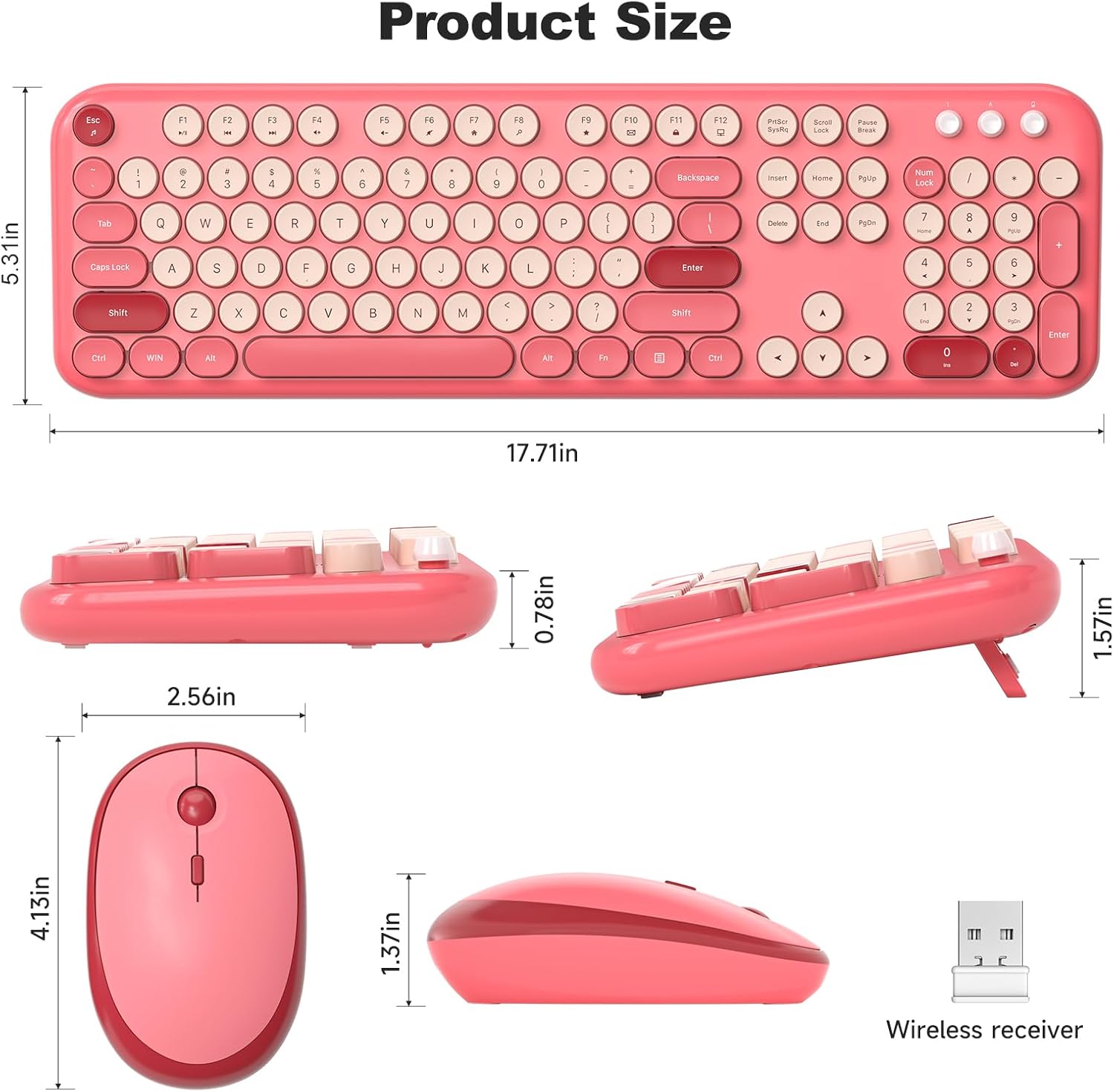
Image 7.2: Detailed product dimensions for both the keyboard and mouse, including height, width, and depth measurements.
8. معاون معلومات
If you encounter any issues or have questions regarding your MOFII Wireless Keyboard and Mouse Combo that are not addressed in this manual, please contact MOFII customer support via Amazon email. We aim to respond within 24 hours and provide satisfactory solutions.


