پروڈکٹ ختمview
The Goldtouch Elite Numeric Keypad is a compact, wired numeric keypad designed to enhance data entry efficiency for both PC and Mac users. It features industry-leading Cherry MX Red mechanical keys for a tactile and responsive typing experience. Its plug-and-play USB connectivity ensures easy setup and immediate use.

شکل 1: اوپر سے نیچے view of the Goldtouch Elite Numeric Keypad, showcasing اس کا کمپیکٹ ڈیزائن اور کلیدی ترتیب۔
سیٹ اپ
The Goldtouch Elite Numeric Keypad is designed for simple plug-and-play installation. No additional drivers are typically required for basic functionality on compatible operating systems.
کی پیڈ کو جوڑنا
- Locate the USB-A to USB-C cable included with your keypad.
- Connect the USB-C end of the cable to the USB-C port on the Goldtouch Elite Numeric Keypad.
- Connect the USB-A end of the cable to an available USB-A port on your computer (PC or Mac).
- For Mac users, ensure the switch on the side of the keypad is set to 'MAC'. For PC users, set it to 'PC'.
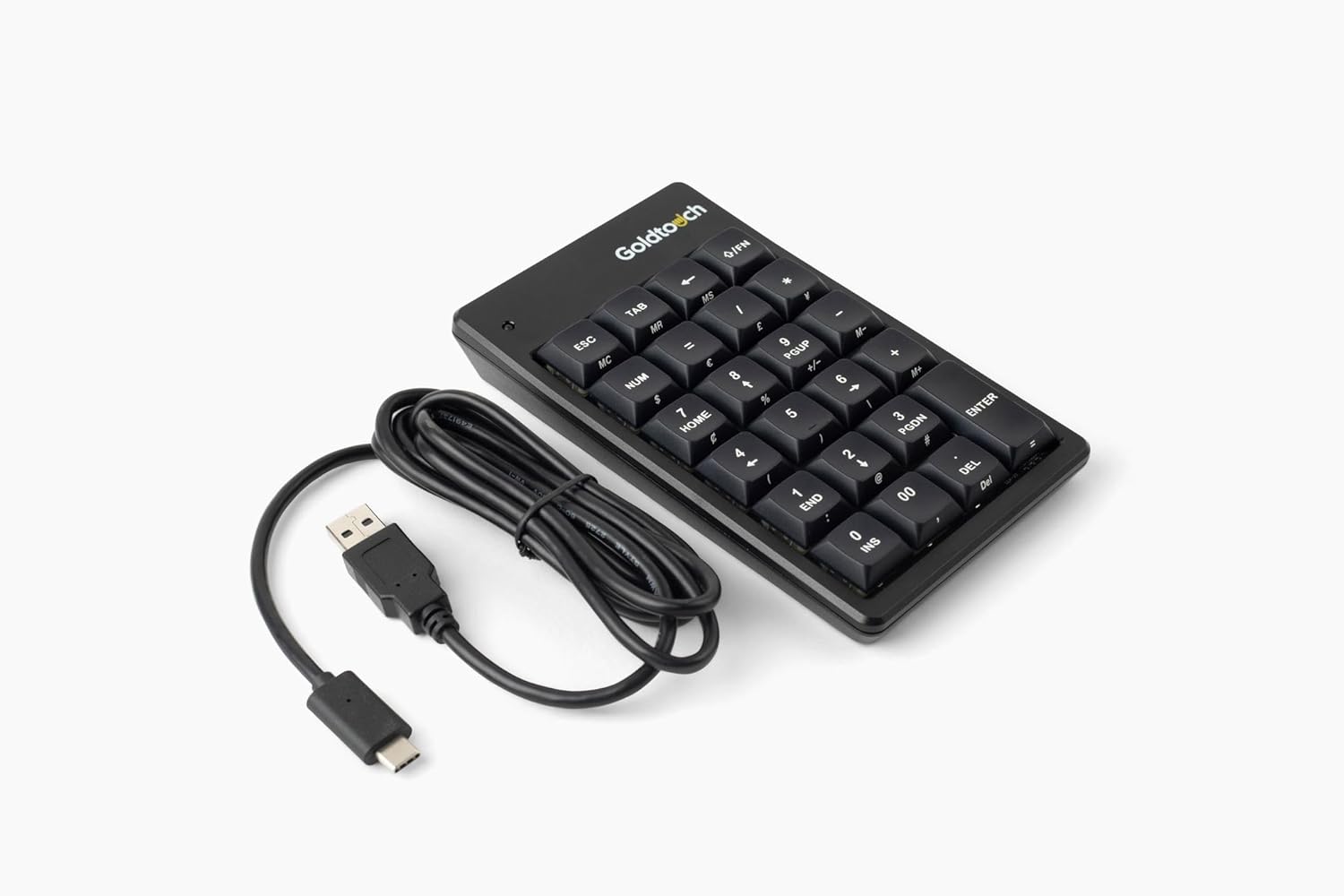
Figure 2: The Goldtouch Elite Numeric Keypad connected via its USB-A to USB-C cable.
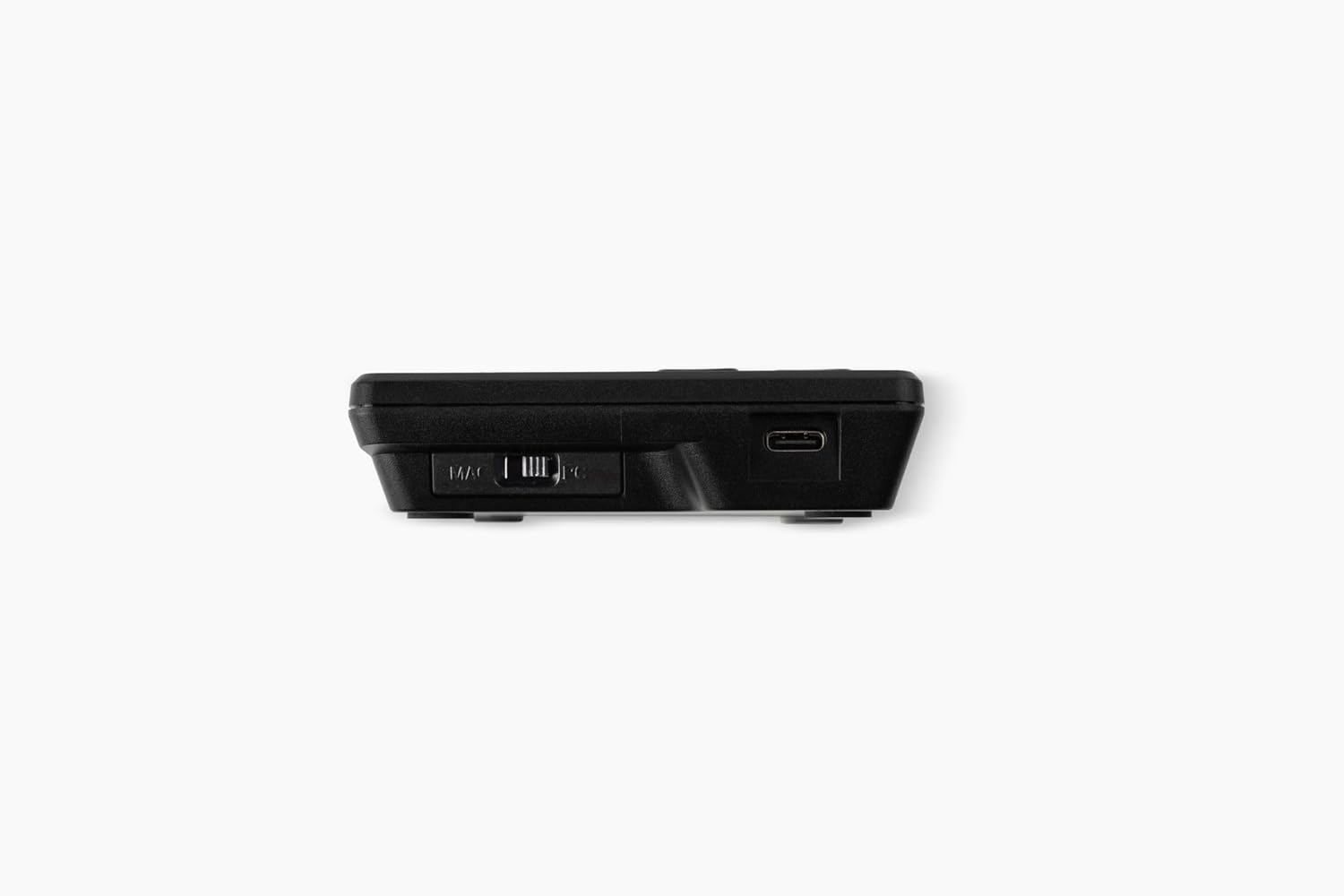
شکل 3: طرف view illustrating the Mac/PC compatibility switch and the USB-C port for connection.
Your operating system should automatically detect the keypad, and it will be ready for use.
آپریٹنگ ہدایات
The Goldtouch Elite Numeric Keypad functions as a standard numeric input device, compatible with most applications requiring numerical data entry.
کی پیڈ کے بنیادی افعال
- عددی ان پٹ: Use the number keys (0-9) for numerical data entry.
- ریاضی کے عمل: Utilize the +, -, *, / keys for calculations.
- کلید درج کریں: Functions as a standard Enter key for confirming input or moving to the next field.
- نمبر لاک: The 'NUM' key toggles the numeric lock function, enabling or disabling the numeric input. An indicator light on the keypad will show its status.
- خصوصی چابیاں: Keys like 'ESC', 'TAB', 'DEL', 'INS', 'HOME', 'END', 'PGUP', 'PGDN' provide additional functionality commonly found on full-size keyboards.
پی سی اور میک مطابقت
The keypad includes a physical switch to optimize its functionality for either PC or Mac operating systems. Ensure this switch is set correctly for your system to ensure proper key mapping and performance.

Figure 4: The Goldtouch Elite Numeric Keypad positioned for use alongside an ergonomic keyboard, demonstrating its integration into a workspace.
دیکھ بھال
Proper maintenance will extend the lifespan of your Goldtouch Elite Numeric Keypad.
- صفائی: تھوڑا سا نرم، لنٹ سے پاک کپڑا استعمال کریں۔ampened with water or a mild cleaning solution to wipe the surface of the keypad. Avoid harsh chemicals, abrasive cleaners, or excessive moisture.
- دھول ہٹانا: چابیاں کے درمیان سے دھول اور ملبہ ہٹانے کے لیے کمپریسڈ ہوا کا استعمال کریں۔
- ذخیرہ: When not in use for extended periods, store the keypad in a clean, dry environment away from extreme temperatures.
- کیبل کی دیکھ بھال: اندرونی نقصان کو روکنے کے لیے USB کیبل میں تیز موڑ یا کنکس سے بچیں۔
خرابی کا سراغ لگانا
If you encounter issues with your Goldtouch Elite Numeric Keypad, refer to the following common troubleshooting steps:
| مسئلہ | ممکنہ وجہ | حل |
|---|---|---|
| Keypad not recognized by computer. | Loose USB connection, incorrect Mac/PC switch setting, faulty USB port. |
|
| Keys are not responding or typing incorrect characters. | Num Lock is off, software conflict, debris under keys. |
|
| Keypad disconnects intermittently. | Loose cable, power management settings, faulty cable. |
|
وضاحتیں
Detailed technical specifications for the Goldtouch Elite Numeric Keypad:
| ماڈل نمبر | GTC-ELITE |
| مصنوعات کے طول و عرض | 5.75"L x 3.5"W x 1"H (14.6 cm x 8.9 cm x 2.5 cm) |
| شے کا وزن | 8 اونس (226.8 گرام) |
| کنیکٹوٹی ٹیکنالوجی | Wired USB-A (via USB-C port on keypad) |
| کلیدی قسم | Cherry MX Red Mechanical Keys |
| ہم آہنگ آلات | Laptop, PC (Windows), Mac |
| رنگ | سیاہ |
| مواد | پلاسٹک |
| شامل اجزاء | USB-A سے USB-C کیبل |

Figure 5: Dimensional diagram of the Goldtouch Elite Numeric Keypad, including width, depth, height, weight, and cable length.
وارنٹی اور سپورٹ
Goldtouch products are designed for durability and performance. For information regarding product warranty, please refer to the warranty card included with your purchase or visit the official Goldtouch webسائٹ
For technical support, troubleshooting assistance beyond this manual, or to inquire about replacement parts, please contact Goldtouch customer service through their official support channels. Contact information can typically be found on the Goldtouch webسائٹ یا مصنوعات کی پیکیجنگ پر۔
آن لائن وسائل:


