1. اہم حفاظتی معلومات
Please read this manual carefully before assembly and use to ensure safe and correct operation of your MAIDeSITe EL2 Pro Art adjustable height desk frame.
- اوورلوڈ وارننگ: کی زیادہ سے زیادہ بوجھ کی صلاحیت سے تجاوز نہ کریں۔ 180 کلوگرام (396 پونڈ). Overloading can cause damage to the frame and potential injury.
- اونچائی ایڈجسٹمنٹ: Avoid adjusting the height while objects are unstable on the desktop or if there is a risk of collision with surrounding furniture or walls.
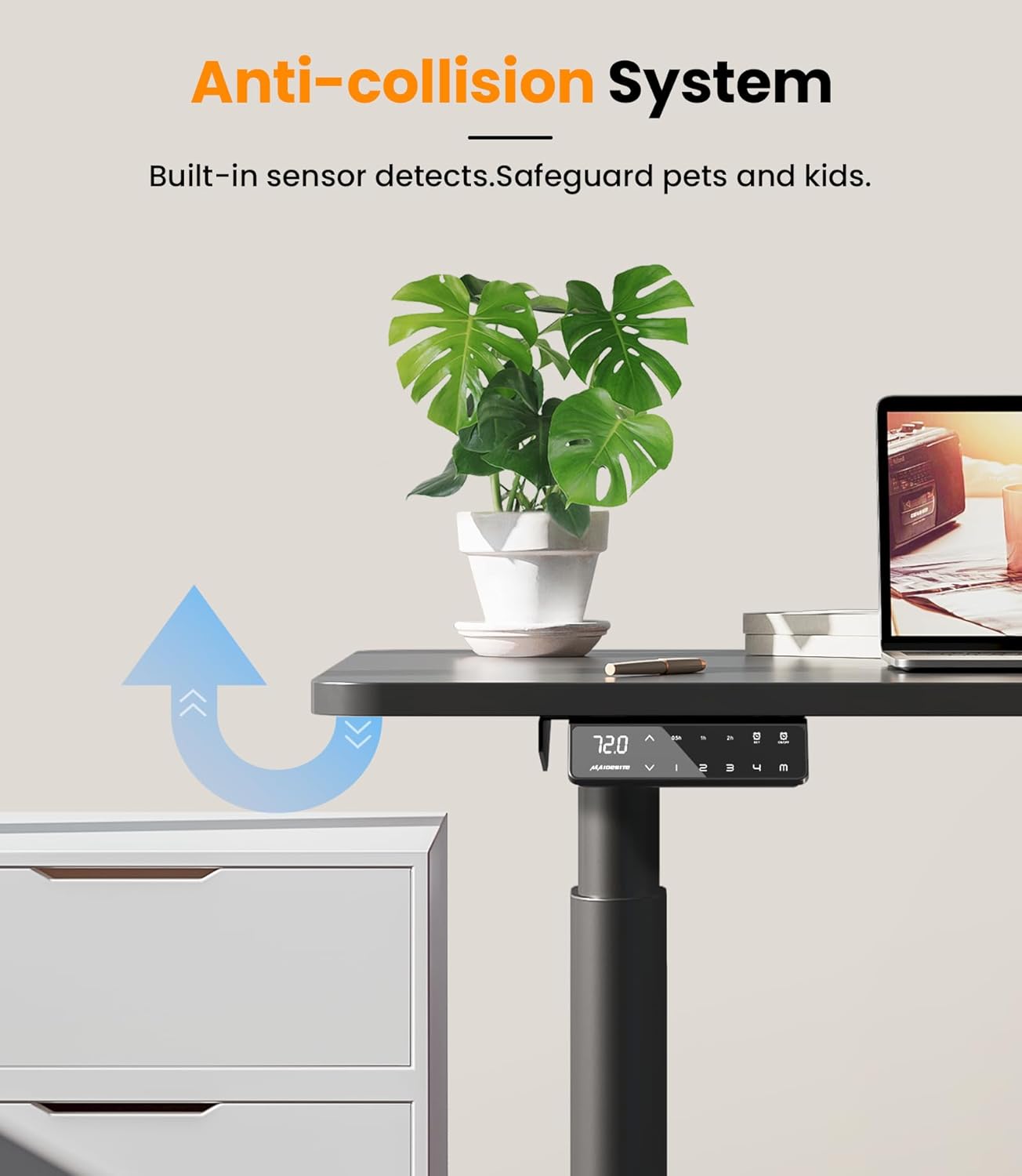
- بچے اور پالتو جانور: Keep children and pets away from the desk during operation. The anti-collision system helps prevent accidents, but supervision is recommended.
- بجلی کی فراہمی: Ensure the power cable is properly connected and not damaged. Do not operate the desk with a damaged cable or plug.
- دیکھ بھال: Do not attempt to disassemble or repair the motor or control system yourself. Contact customer support for assistance.
2. پروڈکٹ ختمview
The MAIDeSITe EL2 Pro Art is an electric adjustable height desk frame designed for ergonomic workspaces. It features a robust dual-motor system, a wide height adjustment range, and an elegant oval leg design.

The unique oval-shaped legs provide both stability and a distinctive aesthetic, setting it apart from conventional desk frames.

3. پیکیج کے مشمولات
Before assembly, ensure all components are present and undamaged. Refer to the included assembly instructions for a detailed parts list.
- Desk Frame Components (legs, crossbars, feet)
- LCD ڈسپلے کے ساتھ کنٹرول پینل
- پاور اڈاپٹر اور کیبل
- Mounting Hardware (screws, Allen keys)
- Cable Management Tray (metal)
- 4 Lockable Universal Casters (optional installation)
- صارف دستی (یہ دستاویز)
4. سیٹ اپ اور اسمبلی
The MAIDeSITe EL2 Pro Art frame is designed for straightforward assembly, typically taking around 20 minutes. Detailed instructions are provided in a separate guide in 5 languages.

4.1 اسمبلی کے مراحل (جنرل اوورview)
- ان پیک اجزاء: احتیاط سے پیکیجنگ سے تمام حصوں کو ہٹا دیں اور انہیں صاف، نرم سطح پر ڈالیں تاکہ خروںچ سے بچا جا سکے۔
- Assemble Legs and Crossbars: Follow the specific instructions to connect the lifting columns to the crossbars.
- پاؤں منسلک کریں: Secure the feet to the bottom of the lifting columns. You may choose to install the optional lockable casters at this stage for mobility.
- کنٹرول پینل انسٹال کریں: Mount the control panel to the underside of the desktop frame.
- ڈیسک ٹاپ منسلک کریں: Place your chosen desktop onto the assembled frame. The frame is extensible and supports tabletops from 100-220 cm (39.4-86.6 inches) in length and 60-100 cm (23.6-39.4 inches) in width. Secure the desktop using appropriate screws (not always included, depending on desktop purchase).
- کیبلز کو جوڑیں: Connect the motor cables to the control box and then connect the control box to the power adapter.
- کیبل مینجمنٹ: Utilize the included metal cable management tray (39 x 12 x 10 cm) to organize cables neatly.
4.2 Desktop Compatibility
The EL2 Pro Art frame features an extensible width from 100 cm to 180 cm (39.4 to 70.9 inches), accommodating a wide range of desktop sizes. Ensure your desktop meets the following dimensions:
- Desktop Length: 100 سینٹی میٹر سے 220 سینٹی میٹر (39.4 سے 86.6 انچ)
- ڈیسک ٹاپ کی چوڑائی: 60 سینٹی میٹر سے 100 سینٹی میٹر (23.6 سے 39.4 انچ)

5. آپریٹنگ ہدایات
The EL2 Pro Art features an intelligent control panel for easy height adjustment and personalized settings.

5.1 کنٹرول پینل کے افعال
- LCD ڈسپلے: موجودہ ڈیسک کی اونچائی سینٹی میٹر میں دکھاتا ہے۔
- اوپر/نیچے بٹن (▲ / ▼): Press and hold to continuously adjust the desk height. Release to stop.
- میموری پرسیٹس (1, 2, 3, 4): اپنی پسندیدہ بیٹھنے اور کھڑے ہونے والی بلندیوں کو ذخیرہ کریں اور یاد رکھیں۔
- سیٹ بٹن: میموری presets کو بچانے کے لیے استعمال کیا جاتا ہے.
- Sit-Stand Reminder (0.5h, 1h, 2h): Set a timer to remind you to change your working posture.
- چائلڈ سیفٹی لاک: Prevents unintentional adjustments.
- USB چارجنگ پورٹ: Conveniently charge your devices.
5.2 میموری پرسیٹس سیٹ کرنا
- اوپر/نیچے بٹنوں کا استعمال کرتے ہوئے ڈیسک کو اپنی مطلوبہ اونچائی پر ایڈجسٹ کریں۔
- دبائیں سیٹ بٹن ڈسپلے چمک جائے گا۔
- 3 سیکنڈ کے اندر، میموری بٹن میں سے ایک دبائیں (1، 2، 3، یا 4) to save the current height to that position. The display will show 'S-' followed by the number to confirm.
5.3 میموری پرسیٹس کا استعمال
Simply press the desired memory button (1، 2، 3، یا 4)۔ ڈیسک خود بخود محفوظ شدہ اونچائی پر چلا جائے گا۔
5.4 Sit-Stand Reminder
To activate the reminder, press the timer button (often labeled with a clock icon or 'M' for memory/mode, then cycle through 0.5h, 1h, 2h). The desk will beep or display a reminder after the set time to encourage posture changes.
5.5 چائلڈ سیفٹی لاک
To engage or disengage the child safety lock, refer to the specific instructions in your detailed assembly guide. This feature prevents accidental height adjustments.
5.6 اینٹی تصادم کا نظام
The EL2 Pro Art is equipped with a built-in anti-collision system. If the desk encounters an obstacle during height adjustment, it will automatically stop and reverse slightly to prevent damage or injury.
6 دیکھ بھال
باقاعدگی سے دیکھ بھال آپ کے ڈیسک فریم کی لمبی عمر اور بہترین کارکردگی کو یقینی بناتی ہے۔
- صفائی: میز کے فریم کو نرم سے صاف کریں، ڈیamp کپڑا سخت کیمیکلز یا کھرچنے والے کلینر استعمال کرنے سے گریز کریں، جو ختم کو نقصان پہنچا سکتے ہیں۔
- کیبل مینجمنٹ: الجھنے سے بچنے کے لیے وقتاً فوقتاً کیبلز کو چیک کریں اور ان کو دوبارہ ترتیب دیں اور یقینی بنائیں کہ وہ ڈیسک کی نقل و حرکت میں مداخلت نہیں کرتے ہیں۔
- بندھن: کبھی کبھار تمام پیچ اور بولٹ چیک کریں تاکہ یہ یقینی بنایا جا سکے کہ وہ سخت ہیں۔ اگر ضروری ہو تو دوبارہ سخت کریں۔
- رکاوٹ کلیئرنس: Ensure the area around the desk is clear of obstacles before adjusting height to allow the anti-collision system to function effectively.
7 خرابیوں کا سراغ لگانا
اگر آپ کو اپنے ڈیسک کے فریم کے ساتھ مسائل کا سامنا کرنا پڑتا ہے، تو درج ذیل عام مسائل اور حل دیکھیں:
| مسئلہ | ممکنہ وجہ | حل |
|---|---|---|
| ڈیسک حرکت نہیں کرتا اور نہ ہی کنٹرولز کا جواب دیتا ہے۔ | Power disconnected, cable loose, child lock engaged. | Check power cable connection. Ensure all motor cables are securely plugged into the control box. Disengage child safety lock if active. |
| ڈیسک غیر مساوی طور پر حرکت کرتا ہے یا غیر معمولی شور کرتا ہے۔ | Overload, loose connections, uneven weight distribution. | Reduce load on the desk (ensure it's below 180 kg). Check all assembly screws for tightness. Redistribute weight evenly on the desktop. |
| کنٹرول پینل پر خرابی کا کوڈ ظاہر ہوتا ہے۔ | مخصوص نظام کی خرابی۔ | Refer to the detailed assembly manual for specific error code meanings and troubleshooting steps. Often, a power cycle (unplug for 30 seconds, then replug) can resolve minor errors. |
| Anti-collision system triggers too easily or not at all. | Sensitivity setting, sensor obstruction. | Ensure no objects are near the sensors. Some models allow sensitivity adjustment; refer to your detailed manual. |
If the problem persists after attempting these solutions, please contact MAIDeSITe customer support.
8. وضاحتیں
Key technical specifications for the MAIDeSITe EL2 Pro Art adjustable height desk frame:
| فیچر | تفصیلات |
|---|---|
| برانڈ | MAIdeSITEe |
| ماڈل نمبر | EL2 Pro Art |
| رنگ | سیاہ |
| موٹر کی قسم | دوہری موٹر |
| Load Capacity (Max) | 180 کلوگرام (396 پونڈ) |
| اونچائی کی ایڈجسٹمنٹ کی حد | 72 cm - 120 cm (28.3 inches - 47.2 inches) |
| Frame Width Adjustment Range | 100 cm - 180 cm (39.4 inches - 70.9 inches) |
| مطابقت پذیر ڈیسک ٹاپ کی لمبائی | 100 cm - 220 cm (39.4 inches - 86.6 inches) |
| ہم آہنگ ڈیسک ٹاپ چوڑائی | 60 cm - 100 cm (23.6 inches - 39.4 inches) |
| لفٹنگ کی رفتار | 35 ملی میٹر فی سیکنڈ |
| شور کی سطح | <45 ڈی بی |
| کنٹرول پینل | Smart panel with LCD, 4 memory presets, sit-stand reminder, child safety lock, USB charging. |
| پروڈکٹ کے طول و عرض (L x W x H) | 60 x 180 x 120 cm (approximate maximum extended dimensions) |
| شے کا وزن | 24 کلوگرام |


9. وارنٹی اور سپورٹ
MAIDeSITe is committed to providing high-quality products and excellent customer service.
9.1 پروڈکٹ وارنٹی
Your MAIDeSITe EL2 Pro Art desk frame comes with a 5 سال کی وارنٹی, ensuring peace of mind regarding its quality and durability. Please retain your proof of purchase for warranty claims.
9.2 کسٹمر سپورٹ
For any questions, technical assistance, or warranty claims, please contact MAIDeSITe customer support. Our team is available to provide support and ensure your satisfaction.
You can find contact information on the official MAIDeSITe webسائٹ یا آپ کے خریداری کے پلیٹ فارم کے ذریعے۔


