1. اہم حفاظتی ہدایات
Please read all instructions carefully before assembly and operation. Keep this manual for future reference.
- اس بات کو یقینی بنائیں کہ اسمبلی سے پہلے تمام اجزاء موجود ہیں اور بغیر کسی نقصان کے ہیں۔ اگر کوئی پرزہ غائب یا خراب ہو تو استعمال نہ کریں۔
- آپریشن کے دوران بچوں اور پالتو جانوروں کو میز سے دور رکھیں۔
- Do not place hands or other objects near the moving parts of the desk frame during height adjustment.
- Ensure the power cord is not pinched or damaged. Only use the provided power adapter.
- ڈیسک کو اوورلوڈ نہ کریں۔ زیادہ سے زیادہ وزن کی گنجائش کے لیے وضاحتیں دیکھیں۔
- Avoid spilling liquids on the control panel or motor components.
- If the desk malfunctions or makes unusual noises, disconnect power immediately and contact customer support.
- یہ ڈیسک صرف اندرونی استعمال کے لیے ڈیزائن کیا گیا ہے۔
2. پروڈکٹ ختمview
The MAIDeSITe Dual Motor Standing Desk is an adjustable height desk designed for home and office use. It features a robust dual-motor lifting system, a spacious tabletop, and a smart memory handset for convenient operation.
سایڈست اونچائی کی حد

This desk offers a wide height adjustment range, allowing users to easily switch between sitting and standing positions. The dual motor system ensures smooth and quiet transitions, operating at less than 45 dB.
Spacious Tabletop
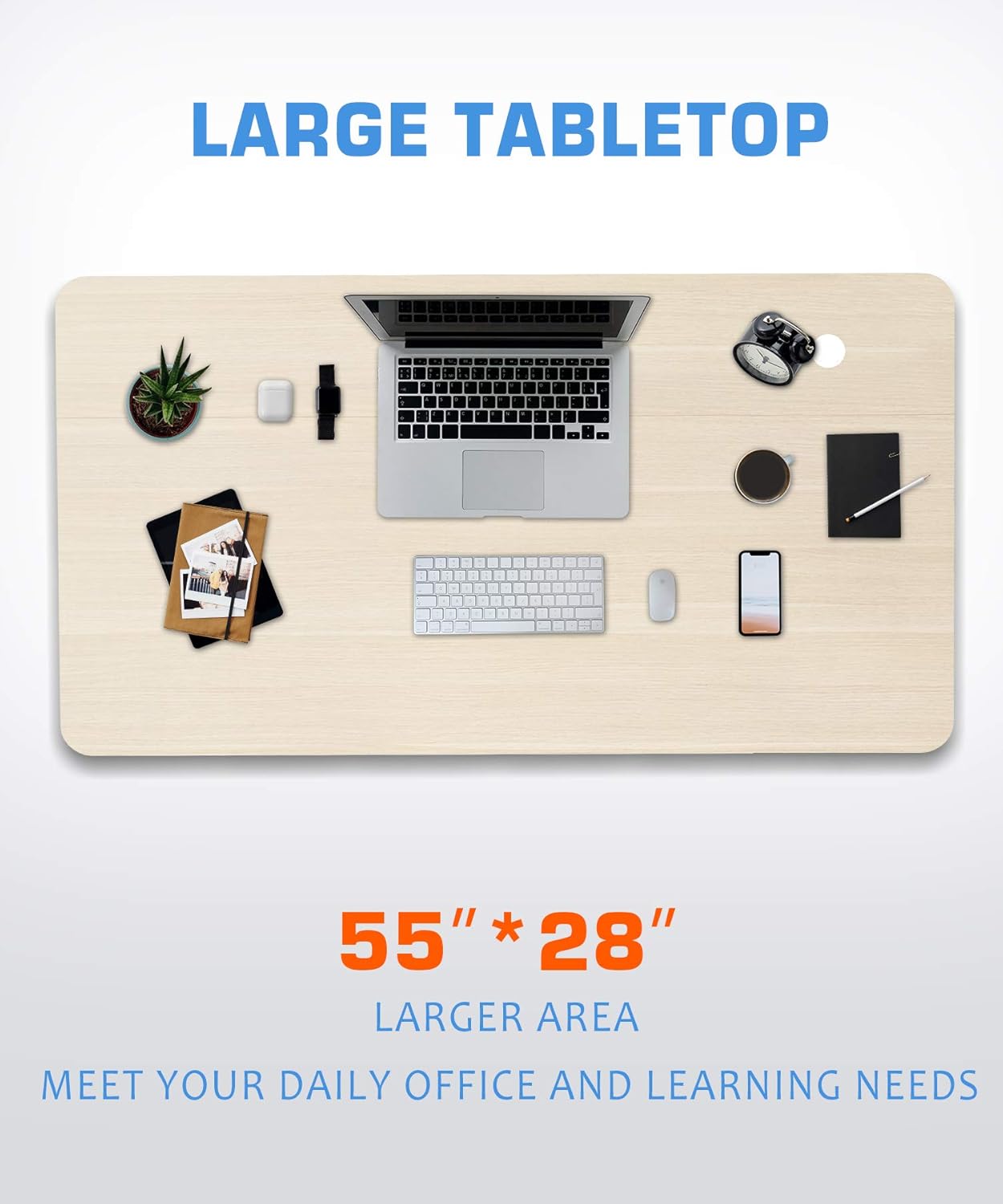
The generous 55" x 28" tabletop provides ample space for multiple monitors, laptops, and other office essentials, accommodating various work and learning needs.
Smart Memory Handset
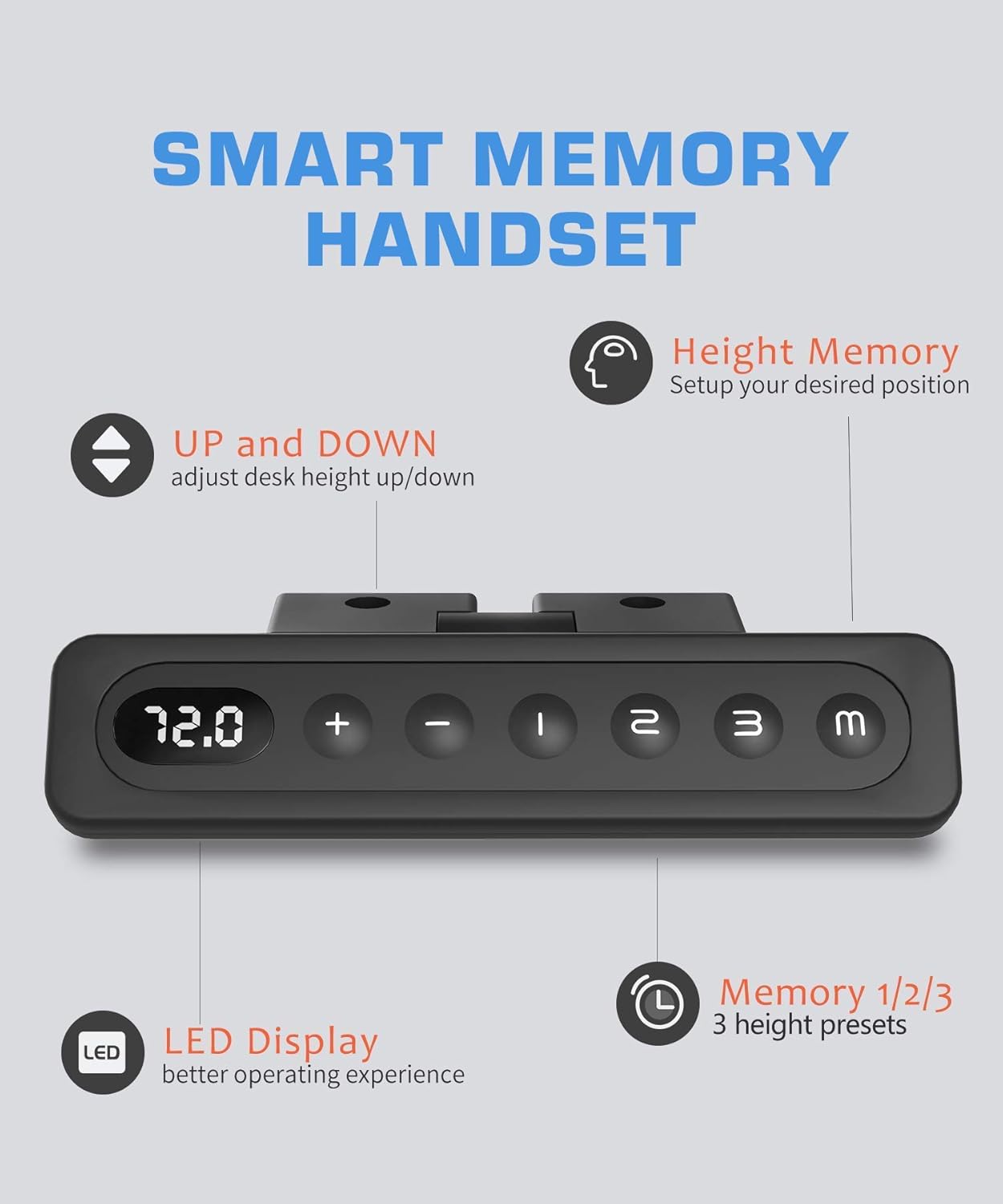
The intuitive control panel features an LED display and three programmable memory presets, allowing you to save your preferred sitting and standing heights for quick adjustments.
مضبوط تعمیر

Constructed with a 100% steel frame and wide desk feet (26.8"), the desk provides exceptional stability. It also includes an anti-collision patch and adjustable feet levelers for uneven floors.
3. اسمبلی کی ہدایات
Assembly is required for this product. Please follow the steps below. It is recommended to have two people for assembly.
- ان پیک اجزاء: Carefully remove all parts from the packaging and lay them out on a clean, soft surface to prevent scratches. Verify all parts listed in the packing list are present.
- Attach Desk Feet: Secure the desk feet to the lifting columns using the provided screws.
- فریم جمع کریں: Connect the lifting columns to the crossbar/frame components. Ensure all connections are tight and secure.
- Mount Tabletop: Carefully place the tabletop upside down on a soft surface. Position the assembled frame onto the tabletop, aligning the pre-drilled holes. Secure the frame to the tabletop using the appropriate screws.
- کنٹرول پینل انسٹال کریں: Attach the smart memory handset to the underside of the tabletop in the designated location.
- کیبلز کو جوڑیں: Connect the motor cables to the control box, and then connect the control panel cable to the control box. Finally, connect the power adapter to the control box.
- کیبل مینجمنٹ: Use the included cable ties or clips to organize and secure all cables, preventing them from dangling or getting caught.
- پوزیشن ڈیسک: Carefully flip the desk upright and place it in its desired location. Ensure it is stable and level. Adjust the foot levelers if necessary.
Note: Detailed diagrams and specific screw types are typically provided in the physical assembly manual included with the product. This section provides a general guide.
4. آپریٹنگ ہدایات
The MAIDeSITe standing desk is equipped with an intuitive control panel for easy height adjustment and memory functions.
4.1 بنیادی اونچائی ایڈجسٹمنٹ
- بڑھانا: دبائیں اور تھامیں۔ یوپی (▲) button. The desk will move upwards. Release the button to stop at your desired height.
- نیچے کرنا: دبائیں اور تھامیں۔ نیچے (▼) button. The desk will move downwards. Release the button to stop at your desired height.
- The current height will be displayed on the LED screen.
4.2 میموری پرسیٹس سیٹ کرنا
The desk allows you to save three preferred height settings for quick recall.
- UP یا DOWN بٹنوں کا استعمال کرتے ہوئے ڈیسک کو اپنی مطلوبہ اونچائی پر ایڈجسٹ کریں۔
- دبائیں "ایم" بٹن ایل ای ڈی ڈسپلے "S-" دکھائے گا۔
- Within 3 seconds, press one of the preset buttons ("1", "2"، یا "3") to save the current height to that memory slot. The display will show "S-1", "S-2", or "S-3" to confirm.
4.3 میموری پری سیٹ کا استعمال
- Simply press the desired preset button ("1", "2"، یا "3")۔ ڈیسک خود بخود محفوظ شدہ اونچائی پر چلا جائے گا۔
- Press any button during automatic movement to stop the desk.
4.4. Anti-Collision Feature
The desk is equipped with an anti-collision system. If the desk encounters an obstacle during movement, it will automatically stop and reverse slightly to prevent damage. Remove the obstacle before resuming operation.
5. دیکھ بھال اور دیکھ بھال
- صفائی: میز کی سطح اور فریم کو نرم سے صاف کریں، ڈیamp کپڑا سخت کیمیکلز یا کھرچنے والے کلینر کے استعمال سے پرہیز کریں۔
- معائنہ: وقتاً فوقتاً تمام پیچ اور کنکشن چیک کریں تاکہ یہ یقینی بنایا جا سکے کہ وہ سخت ہیں۔ اگر ضروری ہو تو دوبارہ سخت کریں۔
- کیبل مینجمنٹ: Ensure cables remain tidy and are not pinched or damaged.
- ماحولیات: Keep the desk in a dry environment. Avoid extreme temperatures or humidity.
6 خرابیوں کا سراغ لگانا
| مسئلہ | ممکنہ وجہ | حل |
|---|---|---|
| ڈیسک حرکت نہیں کرتا۔ | Power cord disconnected; Control box issue; Overload. | Check power connections. Ensure desk is not overloaded. Unplug for 10 minutes, then plug back in. |
| ڈیسک غیر مساوی طور پر حرکت کرتا ہے یا غیر معمولی شور کرتا ہے۔ | Loose connections; Obstruction; Damaged component. | Check all screws and connections. Ensure no obstructions. Disconnect power and contact support if issue persists. |
| Error code on display (e.g., E01, E02). | Overheat protection; Motor fault; Sensor issue. | Unplug the desk for at least 20 minutes to allow it to cool down and reset. If the error persists, contact customer support. |
| میموری پری سیٹ کام نہیں کر رہے ہیں۔ | پیش سیٹیں صحیح طریقے سے محفوظ نہیں ہیں۔ | Re-save the memory presets following the instructions in Section 4.2. |
If you encounter problems not listed here or if the suggested solutions do not resolve the issue, please contact MAIDeSITe customer support.
7. وضاحتیں
- برانڈ: MAIdeSITEe
- ماڈل: Dual Motor Standing Desk (55"x28", White+Oak)
- Tabletop Dimensions: 55 انچ x 28 انچ
- اونچائی ایڈجسٹمنٹ کی حد: Approximately 27 inches to 46.7 inches
- اٹھانے کی رفتار: Approximately 1.4 inches per second
- شور کی سطح: 45 ڈی بی سے کم
- موٹر کی قسم: دوہری موٹر
- فریم مواد: 100% سٹیل
- کنٹرول پینل: Smart Memory Handset with LED Display and 3 Presets
- اسمبلی کی ضرورت ہے: جی ہاں
- خصوصی خصوصیات: Adjustable Height, Anti-Collision System, Adjustable Feet Levelers
- رنگ: White+Oak
8. وارنٹی اور سپورٹ
MAIDeSITe products are manufactured to high-quality standards. For specific warranty information regarding your Dual Motor Standing Desk, please refer to the warranty card included with your product or visit the official MAIDeSITe webسائٹ
If you require technical assistance, have questions about assembly, operation, or troubleshooting, please contact MAIDeSITe customer support through their official channels. Contact information can typically be found on the manufacturer's webسائٹ یا مصنوعات کی پیکیجنگ پر۔
کسٹمر سپورٹ کے لیے، آپ بھی حوالہ دے سکتے ہیں۔ MAIDeSITe Store on Amazon.


