تعارف
خریداری کے لیے آپ کا شکریہasing the Havit IX-102 Wired In-Ear Headphones with Microphone. This manual provides essential information for the proper setup, operation, and maintenance of your new earphones. Please read this guide thoroughly before use to ensure optimal performance and longevity of your product.
پروڈکٹ ختمview
The Havit IX-102 headphones are designed for clear audio and convenient communication. Familiarize yourself with the components:
- In-Ear Earphones (Left and Right)
- Integrated Microphone and Control Module (on cable)
- 3.5mm آڈیو جیک
- کان کے کشن کے متعدد سائز
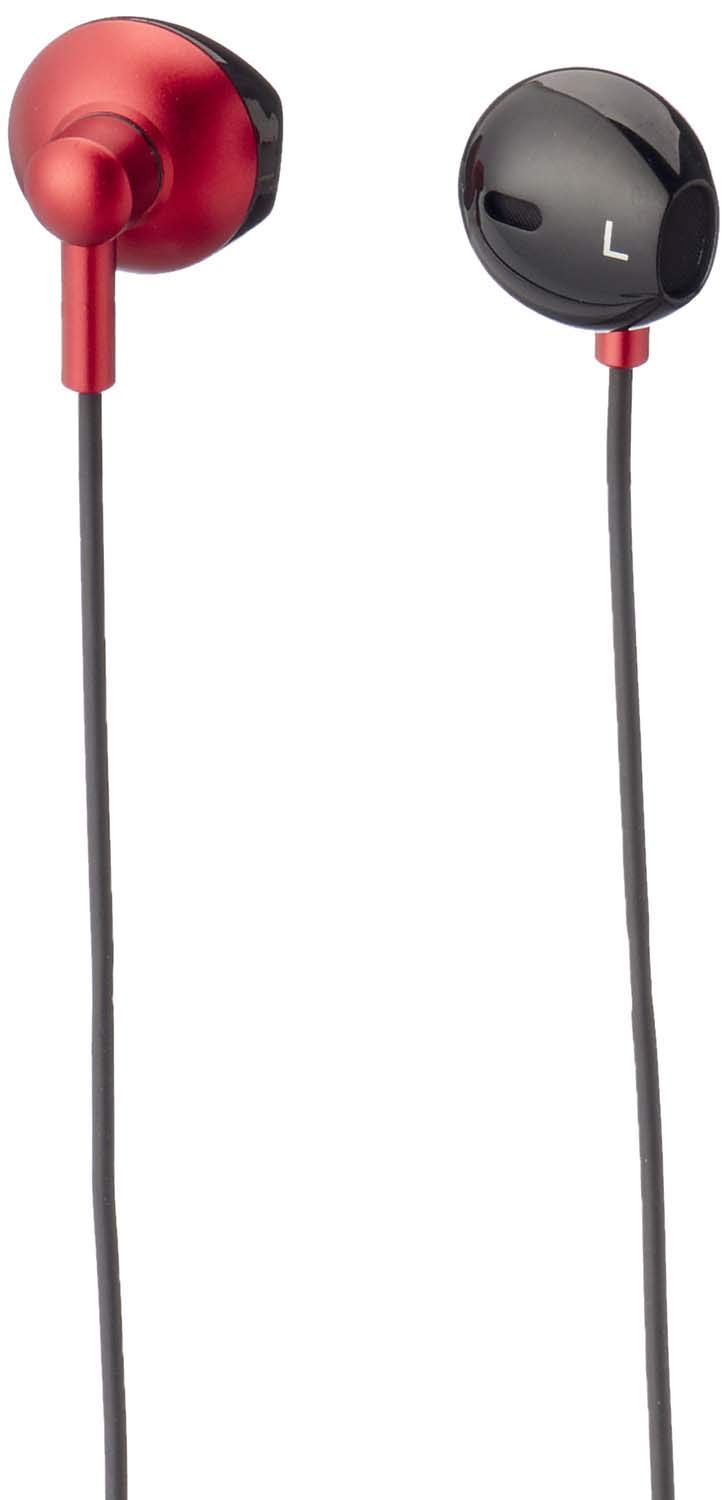
تصویر 1: Havit IX-102 Wired In-Ear Headphones. This image shows the complete set of in-ear headphones, featuring the earbuds, cable, and 3.5mm audio jack.

تصویر 2: Cable with Integrated Control Module. This image highlights the cable section that includes the microphone and a potential control button for managing audio and calls.

تصویر 3: 3.5mm Audio Jack. A close-up view of the standard 3.5mm connector used to plug the headphones into compatible audio devices.

تصویر 4: Replacement Ear Cushions. This image displays the various sizes of silicone ear cushions provided for a comfortable and secure fit.
سیٹ اپ
- کان کے کشن منتخب کریں: Choose the ear cushion size that provides the most comfortable and secure fit for your ears. A good seal enhances sound quality and bass response. Gently attach the selected ear cushions to the earphone nozzles.
- ڈیوائس سے جڑیں: Insert the 3.5mm audio jack firmly into the headphone port of your audio device (smartphone, tablet, laptop, MP3 player, etc.). Ensure the jack is fully inserted to prevent audio issues.
- ائرفون پہنیں: Place the earphones into your ears. Adjust them until they feel comfortable and provide a good seal.
آپریٹنگ ہدایات
The Havit IX-102 headphones feature an in-line control module for basic audio and call management. Functionality may vary slightly depending on your connected device.
- موسیقی چلائیں/روکیں: Press the button on the control module once to play or pause the current track.
- جواب / کال ختم کریں: When a call comes in, press the button once to answer. During a call, press the button once to end the call.
- کال مسترد کریں: آنے والی کال کو مسترد کرنے کے لیے بٹن کو تقریباً 2 سیکنڈ تک دبائے رکھیں۔
- اگلا ٹریک: Press the button twice quickly to skip to the next song.
- پچھلا ٹریک: Press the button three times quickly to go back to the previous song.
- مائیکروفون کا استعمال: The integrated microphone allows for hands-free communication during calls. Ensure the microphone is positioned clearly for optimal voice pickup.
Note: Volume control is typically managed directly on your connected audio device.
دیکھ بھال
Proper care will extend the life of your Havit IX-102 headphones.
- کان کے کشن کی صفائی: Remove the silicone ear cushions and wash them gently with mild soap and water. Rinse thoroughly and allow them to air dry completely before reattaching.
- ائرفون کی صفائی: Use a soft, dry, lint-free cloth to wipe the earphone bodies. Do not use harsh chemicals or abrasive materials. Avoid getting moisture into the speaker grilles.
- کیبل کی دیکھ بھال: Avoid sharp bends, twists, or excessive pulling on the cable. Store the headphones neatly to prevent tangling.
- ذخیرہ: When not in use, store your headphones in a clean, dry place, away from extreme temperatures and direct sunlight.
خرابی کا سراغ لگانا
اگر آپ کو اپنے ہیڈ فون کے ساتھ مسائل کا سامنا کرنا پڑتا ہے، تو درج ذیل عام مسائل اور حل دیکھیں:
| مسئلہ | ممکنہ وجہ | حل |
|---|---|---|
| کوئی آواز یا کم حجم نہیں |
|
|
| آواز مسخ یا وقفے وقفے سے ہوتی ہے۔ |
|
|
| مائکروفون کام نہیں کر رہا ہے۔ |
|
|
وضاحتیں
| برانڈ | حوت |
| ماڈل نمبر | IX-102 |
| رنگ | سیاہ اور سرخ |
| ہیڈ فون فارم فیکٹر | کان میں |
| کنیکٹوٹی ٹیکنالوجی | وائرڈ |
| کنیکٹر کی قسم | 3.5 ملی میٹر جیک |
| کیبل کی لمبائی | 1.2 میٹر |
| مواد کی قسم | پلاسٹک |
| شے کا وزن | 60 گرام |
| شامل اجزاء | کان کے کشن |
| ہم آہنگ آلات | Multiple devices with 3.5mm audio jack |
وارنٹی اور سپورٹ
For warranty information or technical support, please refer to the documentation included with your purchase or contact Havit customer service directly. Contact details can typically be found on the manufacturer's official webسائٹ یا مصنوعات کی پیکیجنگ۔
کسی بھی وارنٹی دعووں کے لیے اپنی خریداری کا ثبوت رکھیں۔


