1. تعارف
The DJI Mini 4 Pro is a compact and advanced folding drone designed for aerial photography and videography. Weighing under 249 grams, it offers a user-friendly experience without requiring registration in many regions. Key features include a 4K HDR video camera, omnidirectional obstacle sensing for enhanced safety, and intelligent flight modes.
2. باکس میں کیا ہے۔
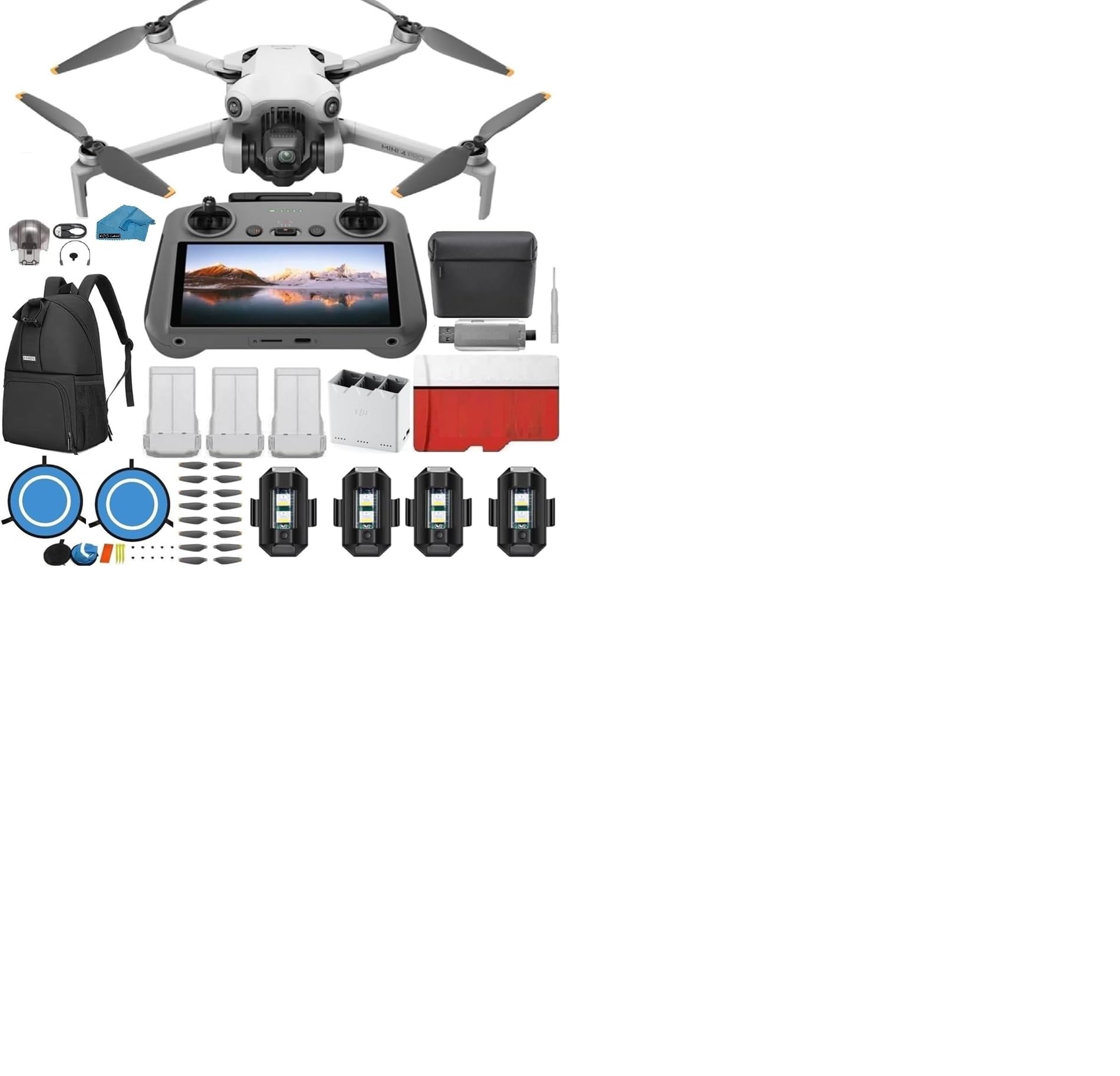
The DJI Mini 4 Pro (DJI RC) package includes the following components:
- 1x DJI Mini 4 Pro (DJI RC2) with Built-In Monitor Controller
- 3x DJI Batteries
- 1x Two-way Charging Hub
- 1x Shoulder Bag
- 1x Battery charger with AC cable
- 2 Pairs (10 pieces) of propellers
- 1x Gimbal holder
- کیبلز اور اڈاپٹر
- Quick Start Manuals
- 1x 128GB SD کارڈ
- 1x USB 3.0 SD Card Reader (For video/photo transfer)
- 1x Micro Fiber Cleaning Cloth
- 1x کیس
- 1x Landing Pad
- 1x سکریو ڈرایور
- 6x پیچ
- 4x Strobe Lights


3. سیٹ اپ
3.1 ڈرون کو کھولنا
Carefully unfold the drone arms. The front arms unfold outwards, and the rear arms unfold backwards. Ensure all arms are fully extended before flight.

3.2 بیٹری کی تنصیب اور چارجنگ
Insert a fully charged battery into the drone until it clicks securely into place. Use the provided charging hub and AC cable to charge the intelligent flight batteries. Ensure batteries are fully charged before each flight.
3.3 ریموٹ کنٹرولر سیٹ اپ
The DJI RC 2 remote controller features a built-in screen. Extend the antennas for optimal signal. Power on the remote controller by pressing the power button once, then pressing and holding it until it powers on. The remote will automatically connect to the drone once both are powered on and within range.

3.4 Gimbal Protector and Memory Card
Always remove the gimbal protector before powering on the drone. Failure to do so can damage the gimbal. Insert the 128GB SD card into the drone's designated slot for recording footage. Ensure the drone is powered off when inserting or removing the SD card.

4. ڈرون چلانا
4.1 پاور آن/آف۔
To power on or off the drone and remote controller, press the power button once, then press and hold it for a few seconds until the device powers on or off.
4.2 Basic Flight and Safety Features
The DJI Mini 4 Pro features automatic takeoff and landing. It is equipped with omnidirectional obstacle sensing, which helps prevent collisions by detecting obstacles in all directions. Always ensure you are flying in a safe and legal area.
4.3 انٹیلجنٹ فلائٹ موڈز
Utilize various flight modes for different scenarios:
- نارمل موڈ: Standard flight for general use.
- سنیما موڈ: Slows down movements for smoother, more cinematic footage.
- کھیل موڈ: Increases drone speed and responsiveness for dynamic shots.
- ActiveTrack 360°: Allows the drone to automatically follow and orbit a selected subject.
- Advanced Return-to-Home (RTH): The drone can automatically return to its takeoff point, avoiding obstacles along the way.
4.4 کیمرہ آپریشن
The drone features a 4K/60fps HDR video camera capable of true vertical shooting and 48 MP RAW photos. Adjust camera settings via the remote controller's screen to optimize for lighting conditions and desired effects.

5 دیکھ بھال
- باقاعدگی سے صاف کریں: Use the micro fiber cleaning cloth to gently clean the drone, camera lens, and remote controller.
- پروپیلرز کا معائنہ کریں: Before each flight, check propellers for any cracks, bends, or damage. Replace damaged propellers immediately using the provided spare parts and screwdriver.
- بیٹری کی دیکھ بھال: Store batteries in a cool, dry place. Do not overcharge or fully discharge batteries.
- Gimbal تحفظ: Always attach the gimbal protector when transporting or storing the drone to prevent damage.
6 خرابیوں کا سراغ لگانا
- ڈرون پاور آن نہیں ہے: Ensure the battery is fully charged and correctly installed. Press the power button once, then press and hold.
- Remote Controller Not Connecting: Ensure both the drone and remote controller are powered on and within range. Check for any interference.
- Poor Video Feed: Check the connection between the remote controller and the drone. Ensure antennas are properly positioned.
- Obstacle Avoidance Warnings: The drone will provide warnings in restricted flight zones or near obstacles. Always adhere to local regulations and fly responsibly.
- Gimbal Malfunction: Ensure the gimbal protector was removed before powering on. If issues persist, refer to the official DJI support resources.
7. وضاحتیں
| فیچر | تفصیل |
|---|---|
| برانڈ | DJI |
| ماڈل کا نام | Mini 4 Pro |
| شے کا وزن | Under 249g (with standard battery) |
| ویڈیو کیپچر ریزولوشن | 4K/60fps HDR, 2.7K: 2720×1530 25/30p, FHD: 1920×1080 25/30/50/60p |
| موثر پھر بھی قرارداد | 12 MP (48 MP RAW photos) |
| خصوصی خصوصیت | Omnidirectional Obstacle Sensing, 4K HDR Video Camera, Three Batteries Bundle |
| کنیکٹوٹی ٹیکنالوجی | Lightning, Micro USB (Type-B), USB Type-C, Wi-Fi |
| کنٹرول کی قسم | Remote Control (DJI RC 2 with Built-In Monitor) |
| بیٹری سیل کمپوزیشن | لتیم آئن (3 بیٹریاں شامل ہیں) |
| مصنوعات کے طول و عرض | 4"L x 4"W x 4"H (جوڑا ہوا) |
8. وارنٹی اور سپورٹ
وارنٹی کی تفصیلی معلومات کے لیے، براہ کرم آفیشل DJI سے رجوع کریں۔ website or the warranty card included with your product. For technical support, firmware updates, or service inquiries, visit the official DJI support page or contact their customer service.
You can visit the official DJI Store for more information and accessories: ایمیزون پر DJI اسٹور


