تعارف
خریداری کے لیے آپ کا شکریہasing the Havit HV-MS991GT Wireless Mouse. This manual provides essential information for setting up, operating, maintaining, and troubleshooting your device. Please read it carefully before use to ensure optimal performance and longevity of your mouse.
سیٹ اپ کی ہدایات
- ماؤس کو کھولیں: Carefully remove the mouse and the USB receiver from the packaging.
- بیٹریاں انسٹال کریں:
Locate the battery compartment on the underside of the mouse. Open the cover and insert one AA battery (not included), ensuring correct polarity (+/-). Close the battery compartment cover.
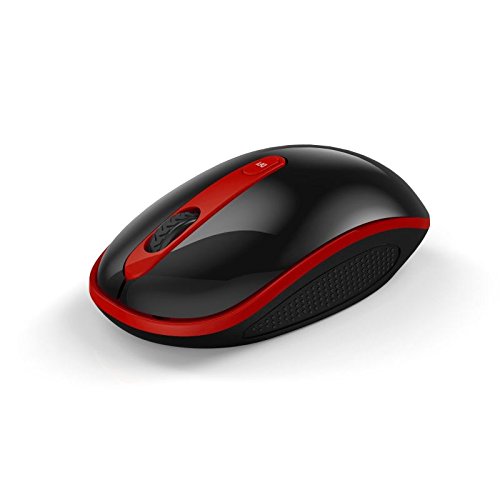
Image: The Havit HV-MS991GT Wireless Mouse, featuring a black body with red accents and a scroll wheel. This image illustrates the overall design of the mouse.
- USB وصول کنندہ کو جوڑیں: Plug the mini USB receiver into an available USB port on your computer. The system will automatically detect and install the necessary drivers.
- ماؤس پر طاقت: Locate the power switch on the underside of the mouse and slide it to the "ON" position. The mouse is now ready for use.
آپریٹنگ ہدایات
The Havit HV-MS991GT Wireless Mouse is designed for intuitive use with standard mouse functions.
- بنیادی افعال:
- بائیں کلک: بنیادی انتخاب اور ایکٹیویشن۔
- دائیں کلک کریں: سیاق و سباق کے مینو تک رسائی حاصل کرتا ہے۔
- اسکرول وہیل: اسکرول دستاویزات اور web عمودی صفحات. اسکرول وہیل مڈل کلک بٹن کے طور پر بھی کام کرتا ہے۔
- ڈی پی آئی ایڈجسٹمنٹ: This mouse features adjustable DPI settings (1000-1600 DPI) for varying cursor speeds and precision. A dedicated DPI button, usually located near the scroll wheel, allows you to cycle through these settings. Press the button to switch between DPI levels.
- وائرلیس رینج: The advanced 2.4GHz wireless technology provides an effective working distance of up to 15 meters (approximately 49 feet) from the USB receiver.
- سسٹم کی مطابقت: This mouse is compatible with Windows 2000, Windows XP, Windows Vista, Windows 7, and Windows 8 operating systems.
دیکھ بھال
- صفائی: To clean the mouse, gently wipe its surface with a soft, dry cloth. For stubborn dirt, slightly dampen the cloth with water. Avoid using harsh chemicals or abrasive cleaners, as these can damage the mouse's finish.
- بیٹری کی تبدیلی: When the mouse performance degrades or it stops responding, it is likely time to replace the battery. Follow the battery installation steps in the "Setup Instructions" section.
- آٹو سلیپ فنکشن: The mouse features a built-in auto sleep function to conserve battery life. If the mouse is inactive for a period, it will enter a low-power sleep mode. To wake it up, simply move the mouse or click any button.
- وصول کنندہ کا ذخیرہ: The mini USB receiver can be stored inside the mouse's battery compartment when not in use, making it convenient for travel and preventing loss.
خرابی کا سراغ لگانا
| مسئلہ | حل |
|---|---|
| ماؤس جواب نہیں دے رہا ہے۔ |
|
| Cursor movement is erratic or slow. |
|
| وائرلیس کنکشن غیر مستحکم ہے۔ |
|
وضاحتیں
| فیچر | تفصیل |
|---|---|
| برانڈ | حوت |
| ماڈل نمبر | HV-MS991GT |
| کنیکٹوٹی ٹیکنالوجی | 2.4GHz وائرلیس |
| DPI کی ترتیبات | 1000-1600 DPI |
| بٹنوں کی تعداد | 4 |
| کلیدی زندگی | 1,000,000 بار |
| وائرلیس رینج | 15 میٹر تک |
| آپریٹنگ سسٹم سپورٹ | ونڈوز 2000/XP/Vista/7/8 |
| بیٹری کی اوسط زندگی | 12 ماہ |
| بیٹریاں شامل ہیں۔ | No (Requires 1x AA battery) |
| شے کا وزن | 120 گرام |
| پیکیج کے طول و عرض | 16.2 x 10.8 x 6 سینٹی میٹر |
وارنٹی اور سپورٹ
Specific warranty information for the Havit HV-MS991GT Wireless Mouse is not provided in this manual. Please refer to the product packaging or the manufacturer's official website for details regarding warranty coverage and customer support contact information.


