1. Вступ
Thank you for choosing the HTC GT-288 Electric Shaver. This manual provides essential information for the safe and effective operation, maintenance, and care of your new shaver. Please read these instructions thoroughly before first use and retain them for future reference.
2. Інформація про безпеку
Щоб зменшити ризик ураження електричним струмом, травмування або пошкодження, завжди дотримуйтесь цих основних запобіжних заходів безпеки:
- Do not immerse the charging cable or power adapter in water or other liquids.
- Тримайте прилад подалі від дітей.
- Переконайтеся, що бритва повністю суха, перш ніж підключати її до зарядного кабелю.
- Do not use the shaver if the blade or foil is damaged, as this may cause injury.
- Використовуйте лише кабель для зарядки USB, що додається.
- This appliance is designed for personal use only.
3. Вміст упаковки
Будь ласка, перевірте упаковку на наявність наступних предметів:
- 1 x HTC GT-288 Electric Shaver
- 1 x USB-кабель для зарядки
- 3 x Precision Combs (1mm, 3mm, 5mm)
- 1 x Щітка для чищення
- 1 х мастильна олія
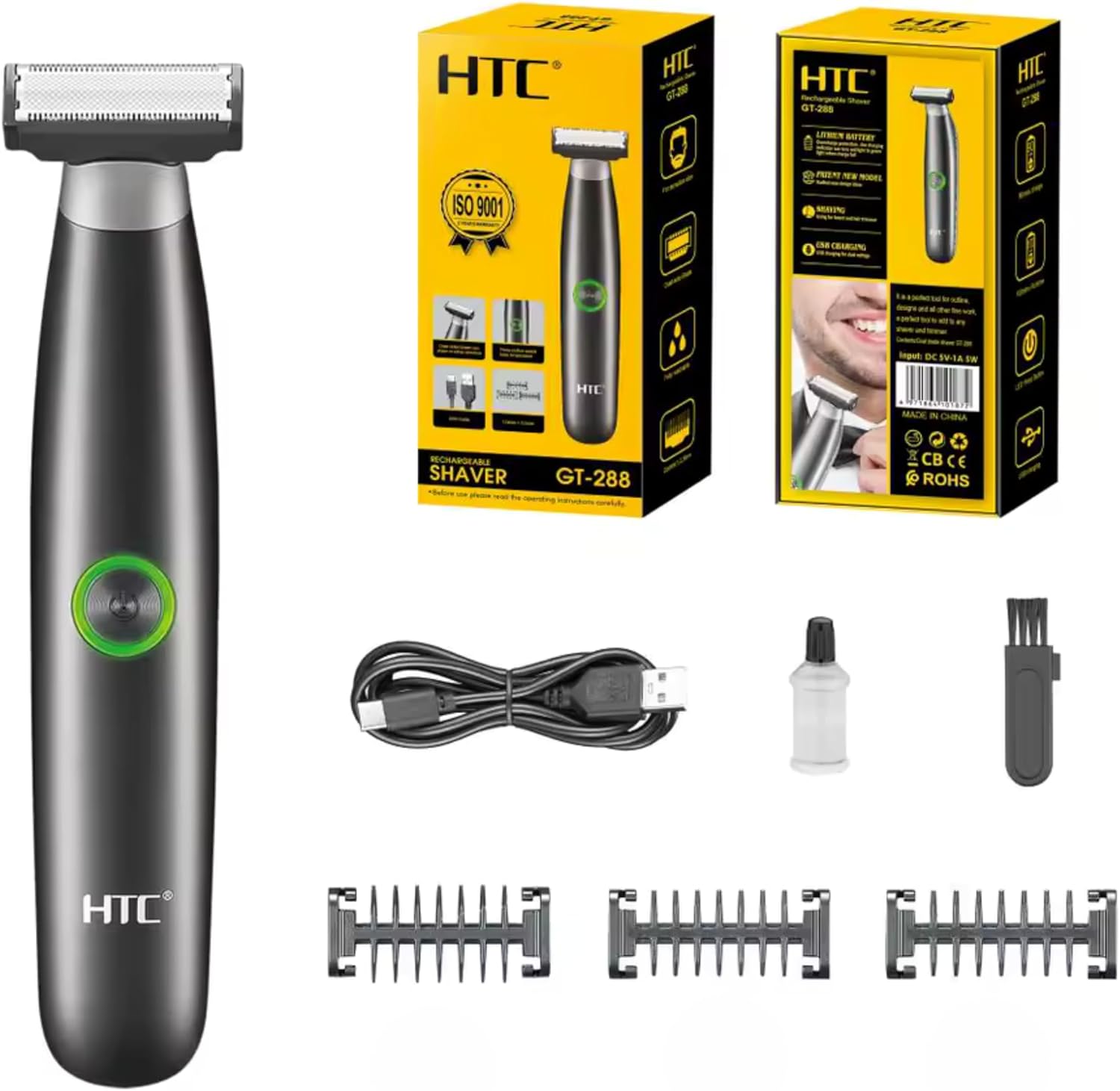
Image 3.1: Contents of the HTC GT-288 Electric Shaver package, including the shaver, USB cable, three precision combs, cleaning brush, and lubricating oil.
4. Продукт закінчивсяview
The HTC GT-288 Electric Shaver features a sleek design with a dual-sided blade for efficient trimming and shaving. It includes an easy-to-operate press-button switch and is fully washable for convenient cleaning.
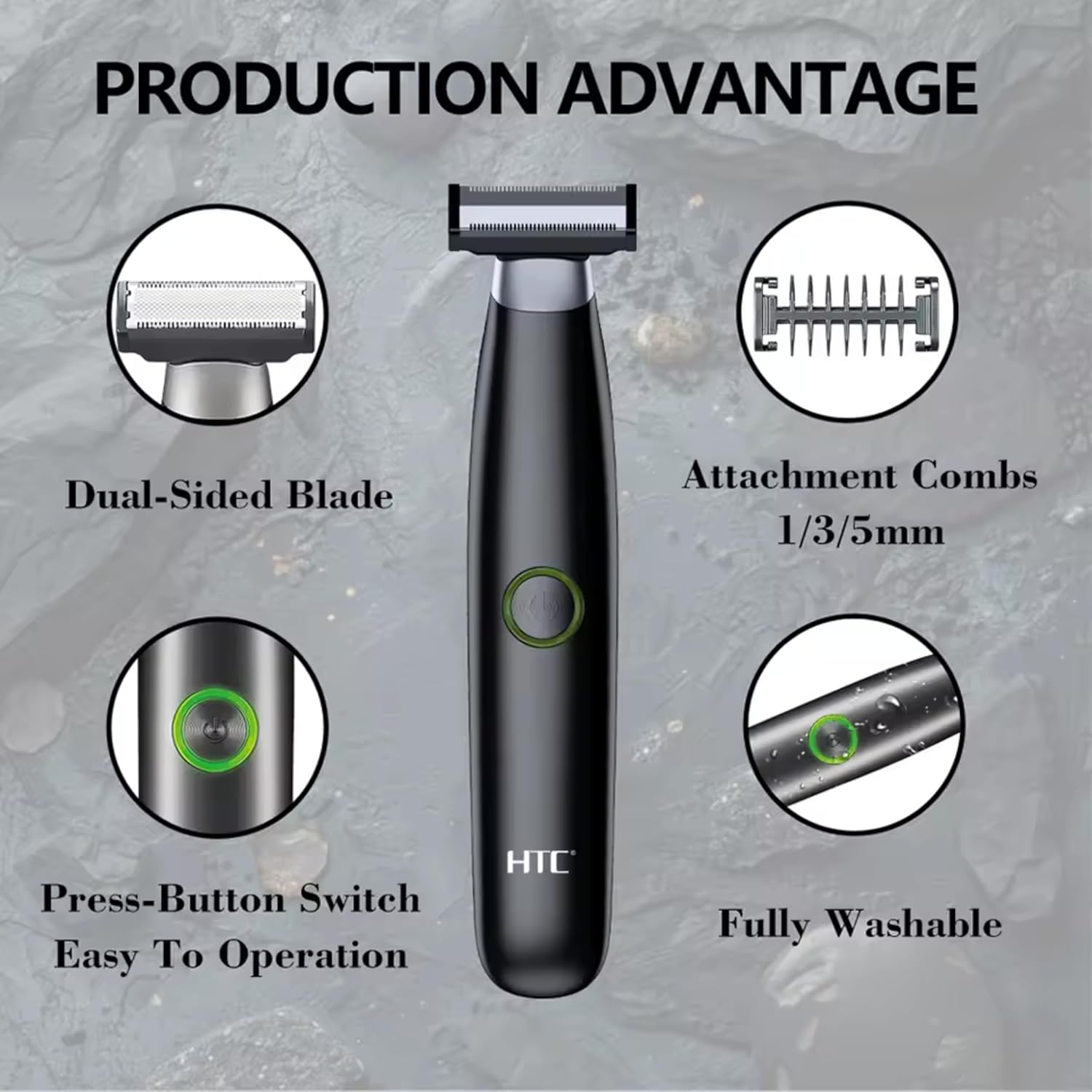
Зображення 4.1: закінченоview of the HTC GT-288 Electric Shaver's key features, highlighting the dual-sided blade, attachment combs (1/3/5mm), press-button switch, and fully washable design.

Image 4.2: Detail of the LED press button, which serves as the on/off switch for easy operation.
5. Налаштування
- Розпакувати: Акуратно вийміть усі компоненти з упаковки.
- Початкова оплата: Before first use, fully charge the shaver. Refer to Section 6 for charging instructions.
- Attach Comb (Optional): If desired, select one of the three precision combs (1mm, 3mm, or 5mm) and slide it onto the shaver head until it clicks into place. Ensure it is securely attached.
6. Зарядка
The HTC GT-288 Electric Shaver is equipped with a rechargeable battery for cordless operation.
- Переконайтеся, що бритва вимкнена.
- Connect the small end of the USB charging cable to the charging port on the shaver.
- Connect the larger end of the USB cable to a compatible USB power source (e.g., computer, USB wall adapter).
- The LED indicator on the shaver will illuminate to show that it is charging.
- Allow the shaver to charge completely before its first use. A full charge typically takes several hours.
- Після повної зарядки від’єднайте USB-кабель.
7. Інструкція з експлуатації
The HTC GT-288 shaver can be used for both wet and dry shaving.
- Увімкнення: Press the LED button to turn on the shaver.
- Сухе гоління: For dry shaving, ensure your skin is clean and dry. Gently press the shaver against your skin and move it in slow, even strokes against the direction of hair growth.
- Вологе гоління: For wet shaving, apply shaving foam or gel to your skin. The shaver is waterproof, allowing for use in the shower or with water. Move the shaver in gentle, even strokes.
- Using Precision Combs: Attach the desired 1mm, 3mm, or 5mm comb for trimming beards, sideburns, or other facial hair to a specific length. Move the shaver with the comb attached against the direction of hair growth for an even trim.
- Вимкнення живлення: Press the LED button again to turn off the shaver after use.
8. Технічне обслуговування та очищення
Регулярне чищення забезпечує оптимальну продуктивність та подовжує термін служби вашої бритви.
- Вимкнути: Завжди вимикайте бритву перед чищенням.
- Промивна головка: The shaver is fully washable (IPX6 rated). You can rinse the shaver head directly under running water to remove hair clippings.
- Використовуйте щітку для чищення: For more thorough cleaning, use the provided cleaning brush to remove stubborn hair particles from the blade and comb attachments.
- Змащення лез: After cleaning and drying, apply a small drop of the provided lubricating oil to the blades. Turn on the shaver for a few seconds to distribute the oil evenly. This helps maintain blade performance.
- Сухий: Дайте бритві повністю висохнути перед зберіганням або заряджанням.

Image 8.1: The HTC GT-288 Electric Shaver being rinsed under a faucet, illustrating its IPX6 fully washable design for easy cleaning.
9. Вирішення проблем
| проблема | Можлива причина | Рішення |
|---|---|---|
| Бритва не вмикається. | Акумулятор розрядився. | Повністю зарядіть бритву. |
| Shaver does not cut effectively. | Леза забиті волоссям або затуплені. | Clean the shaver head thoroughly. Apply lubricating oil. If problem persists, blades may need replacement. |
| Бритва витягує волосся. | Battery is low or blades are clogged. | Charge the shaver. Clean the shaver head. |
| Бритва зупиняється під час використання. | Акумулятор розрядився. | Перезарядіть бритву. |
10. Технічні характеристики
- Бренд: HTC
- Назва моделі: ГТ-288
- Джерело живлення: Перезаряджається USB
- Особливості: USB Cable, Adjustable Combs, Rechargeable, Water Resistant, Wet & Dry Use
- Рекомендоване використання: Facial Shaving, Beard Trimming, Daily Use, Travel
- Включені компоненти: Electric Shaver, USB Cable, 3 Precision Combs, Cleaning Brush, Lubricating Oil
- Вага продукту: 250 грамів
- колір: чорний
- Матеріал леза: Нержавіюча сталь
- Тип голови: Точний тример
11. Гарантія та підтримка
This product is manufactured by HTC. For any questions, technical support, or warranty claims, please contact the seller or manufacturer directly through your purchase platform. Please retain your proof of purchase for warranty purposes.


