1. Вступ
This manual provides comprehensive instructions for the installation, operation, and maintenance of the Hanwha Vision ANO-L7012R 4MP IR Bullet Camera. Please read this manual thoroughly before using the product to ensure correct usage and optimal performance. Keep this manual for future reference.
The Hanwha Vision ANO-L7012R is a compact 4MP IR bullet camera designed for reliable outdoor surveillance. Featuring a 3mm fixed lens with a 98.3° horizontal field of view, this camera captures sharp video at 2560x1440 resolution and 30fps. It includes intelligent motion detection, defocus, tampering, and directional detection capabilities. With a 20-meter IR range, H.265 compression, and IP66 weatherproof protection, this camera is suitable for high-performance surveillance installations.
2. Інформація про безпеку
- Джерело живлення: Use only the specified power adapter or Power over Ethernet (PoE) compliant devices. Incorrect power sources can damage the camera and void the warranty.
- Установка: Installation should be performed by qualified personnel and comply with all local codes. Ensure the mounting surface can support the camera's weight.
- Вода і вологість: Although the camera is IP66-rated for outdoor use, avoid submerging it in water or exposing it to high-pressure water jets.
- Прибирання: Do not use liquid or aerosol cleaners. Use a soft, dry cloth for cleaning.
- Робоча температура: Operate the camera within the specified temperature range to prevent malfunction.
- Розбирання: Не намагайтеся розбирати або модифікувати камеру. Це призведе до анулювання гарантії та може призвести до пошкодження.
3. Вміст упаковки
Перевірте наявність усіх компонентів в упаковці:
- Hanwha Vision ANO-L7012R 4MP IR Bullet Camera
- Інструкція з експлуатації
- Mounting Screws and Anchors (may vary by region)
- Водонепроникний ковпачок для кабелю Ethernet (за наявності)
4. Продукт закінчивсяview
The Hanwha Vision ANO-L7012R is a high-performance bullet-style network camera designed for robust surveillance applications.
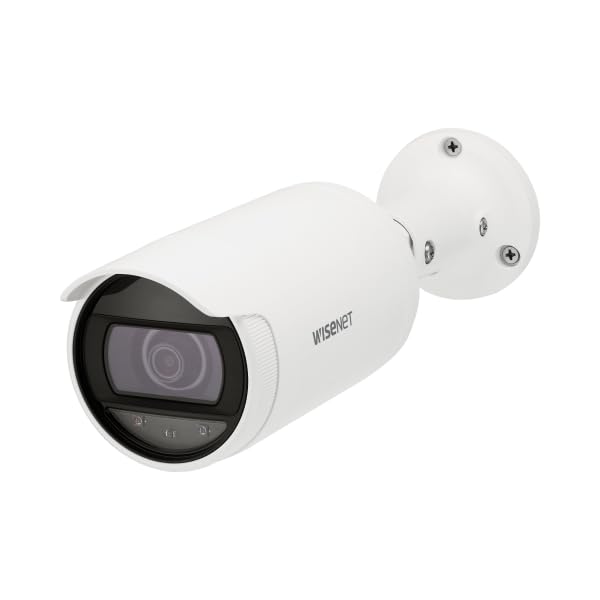
Figure 4.1: Hanwha Vision ANO-L7012R 4MP IR Bullet Camera. A white bullet-style security camera with a dark lens and a mounting base. The camera body has 'WISENET' printed on its side.
Ключові характеристики:
- Роздільна здатність 4 МП: Captures clear video at 2560x1440.
- Фіксований об'єктив: 3mm lens with a 98.3° Horizontal Field of View (HFoV).
- ІЧ-нічне бачення: Up to 20 meters (65.6ft) in low-light conditions.
- Intelligent Analytics: Motion detection, directional detection, tampering, and defocus detection.
- Efficient Compression: Supports H.265/H.264/MJPEG with WiseStream II for optimized bandwidth and storage.
- Edge Storage: MicroSD slot (up to 128GB) with SD encryption.
- Стійкий до погодних умов: IP66-rated housing for outdoor durability.
- Живлення через Ethernet (PoE): Simplifies installation by providing power and data over a single cable.
5. Налаштування та встановлення
5.1 Встановлення камери
- Виберіть місце розташування: Choose a suitable indoor or outdoor location, typically a ceiling or wall, ensuring a clear field of view та доступ до мережевого кабелю.
- Підготувати поверхню: Use the mounting template (if provided) to mark drill holes. Drill pilot holes for the mounting screws.
- Безпечна база: Надійно прикріпіть монтажну основу камери до поверхні за допомогою наданих гвинтів та анкерів.
- Відрегулювати кут: Loosen the adjustment screws on the camera body to position the camera for the desired viewing angle. Tighten screws once adjusted.
5.2 Проводка та підключення до мережі
- Підключення Ethernet: Connect a standard Ethernet cable from your PoE-enabled network switch or injector to the camera's RJ45 port. If not using PoE, connect a separate 12V DC power adapter (not included) to the camera's power input.
- Водонепроникний захист: For outdoor installations, ensure the Ethernet cable connection is protected using the provided waterproof cap or appropriate sealing methods to maintain the IP66 rating.
- Конфігурація мережі: Once powered, the camera will obtain an IP address via DHCP (if available). Use the Hanwha Vision Device Manager software (available on the manufacturer's website) to discover the camera, change its default IP address, and configure network settings.
- Початковий вхід: Доступ до камери web інтерфейс за допомогою a web browser and its IP address. The default login credentials are typically provided in a separate quick start guide or on the camera itself. Change default passwords immediately for security.
6. Робота з камерою
6.1 Основна операція
- Жити View: Доступ до камери web interface or a compatible Video Management System (VMS) to view прямі відеопотоки.
- Запис: Configure recording settings via the web interface. Options include continuous recording, scheduled recording, and event-triggered recording (e.g., motion detection). Recordings can be stored on a microSD card (if installed) or a Network Video Recorder (NVR).
- Нічне бачення: The camera automatically switches to IR night vision mode in low-light conditions, providing clear black and white video up to 20 meters.
6.2 Додаткові функції
- Виявлення руху: Configure detection zones and sensitivity to trigger alarms or recordings when movement is detected.
- Виявлення напрямку: Set up rules to detect objects moving in specific directions across a virtual line.
- TampВиявлення подразнення: Receive alerts if the camera's view is obstructed or if the camera is tampеред с.
- Виявлення розфокусування: Alerts if the image becomes out of focus, indicating a potential issue or tampering.
- WiseStream II: Enable this feature to dynamically control encoding, reducing bandwidth and storage requirements without compromising image quality.
- Картка MicroSD: Insert a microSD card (up to 128GB) for local storage. Ensure SD encryption is enabled for data security.
7. Технічне обслуговування
- Прибирання: Periodically clean the camera lens and housing with a soft, dry cloth to remove dust and dirt. Do not use abrasive cleaners or solvents.
- Оновлення прошивки: Regularly check the Hanwha Vision webсайт для оновлень прошивки. Оновлення прошивки забезпечує оптимальну продуктивність, безпеку та доступ до нових функцій.
- Перевірка кабелю: Періодично перевіряйте всі кабелі на наявність ознак зносу або пошкоджень, особливо при зовнішньому монтажі.
- Резервне копіювання конфігурації: Back up your camera's configuration settings regularly to easily restore them if needed.
8. Вирішення проблем
| проблема | Можлива причина | Рішення |
|---|---|---|
| Немає живлення/Камера не вмикається | Incorrect power source; PoE not active; faulty cable. | Verify power connection and source. Ensure PoE switch/injector is active. Check Ethernet cable for damage. |
| No video stream | Network connectivity issue; incorrect IP address; firewall blocking. | Check network cable. Verify camera's IP address. Ensure no firewall is blocking ports. Restart camera and network devices. |
| Погана якість зображення | Dirty lens; improper focus; low light conditions; network bandwidth issues. | Clean the lens. Check camera settings for focus (if adjustable) and exposure. Ensure sufficient lighting or proper IR function. Check network bandwidth. |
| Виявлення руху не працює | Incorrect sensitivity settings; detection zones not configured; firmware issue. | Adjust motion detection sensitivity and configure detection zones in the web interface. Update firmware if available. |
9. Технічні характеристики
| Особливість | Деталь |
|---|---|
| Назва моделі | ANO-L7012R |
| роздільна здатність | 4 МП (2560x1440) |
| Датчик зображення | 1/3-дюймовий КМОП |
| Об'єктив | 3мм фіксований об'єктив |
| Горизонтальне поле View (HFoV) | 98.3° |
| Діапазон нічного бачення | 20 meters (65.6ft) IR |
| Стиснення відео | H.265, H.264, MJPEG (з WiseStream II) |
| Широкий динамічний діапазон (WDR) | 120 дБ |
| Зберігання | MicroSD slot (up to 128GB) with SD encryption |
| Клас захисту від проникнення (IP). | IP66 (захищений від атмосферних впливів) |
| Джерело живлення | PoE (живлення через Ethernet) |
| Розміри (Д x Ш x В) | 3.07 x 10.31 x 10.31 дюймів |
| вага | 0.86 фунтів |
| Протокол підключення | RTSP |
| Рекомендоване використання | Охорона в приміщенні, охорона на вулиці |
10. Гарантія та підтримка
For warranty information, please refer to the warranty card included with your product or visit the official Hanwha Vision webсайт.
For technical support, software downloads, and additional resources, please visit the Hanwha Vision support portal.
- Офіційний Webсайт: www.hanwhavision.com (Вихampпосилання, фактичне посилання може відрізнятися)
- підтримка: Зверніться до упаковки продукту або до офіційних website for specific support contact details.


