1. Вступ
Thank you for choosing the Petory Automatic Wi-Fi Pet Feeder. This device is designed to provide scheduled and controlled feeding for your cats and dogs, ensuring they receive their meals consistently. This manual provides detailed instructions for setting up, operating, and maintaining your feeder.
Бренд: Петорі
модель: F01W
2. Продукт закінчивсяview
The Petory Automatic Wi-Fi Pet Feeder is a 4-liter dry food dispenser featuring smart controls via a mobile application. Key features include:
- App-Controlled Programming: Connects to 2.4GHz Wi-Fi via Bluetooth for flexible feeding schedules.
- Customizable Meals: Up to 10 meals daily with 1-50 portions per meal (approximately 1/10 cup per portion).
- Timely Notifications: Receive alerts for low food levels, food blockages, or Wi-Fi interruptions.
- Подвійне джерело живлення: Operates with external power and includes a backup battery option to ensure continuous feeding during power outagес.
- Велика ємність: Stores up to 16.9 cups of dry food (kibble diameter under 0.7 inches), sufficient for extended periods. Includes a desiccant bag to maintain food freshness.
- Диктофон: A 10-second voice recording feature to call your pet at meal times.
- Легке обслуговування: Removable hopper and bowl are dishwasher-safe for convenient cleaning. Constructed from BPA-free plastic and stainless steel.

Figure 1: Petory Automatic Wi-Fi Pet Feeder and its accompanying mobile application interface.
3. Налаштування
3.1 Розпакування та складання
- Вийміть усі компоненти з упаковки.
- Ensure all parts are present: feeder base, food hopper, stainless steel bowl, bowl holder, power adapter, and desiccant bag.
- Insert the stainless steel bowl into the bowl holder.
- Place the assembled bowl unit in front of the feeder base.
- Open the lid of the food hopper and insert the desiccant bag into its designated holder to keep food fresh.
- Fill the food hopper with dry kibble. Ensure kibble diameter is under 0.7 inches to prevent blockages.
- Надійно закрийте кришку.
3.2 Джерело живлення
The feeder supports dual power supply for reliability.
- Зовнішнє живлення: Connect the provided 5V power adapter to the feeder and a wall outlet.
- Backup Battery (Optional, Not Included): Для безперебійної роботи під час відключення електроенергіїtages, install 3 D-size batteries in the battery compartment located at the bottom of the feeder.

Figure 2: Power supply options for the feeder, including external adapter and D-size battery backup.
3.3 Встановлення програми та підключення до Wi-Fi
- Завантажте додаток: Scan the QR code below or search for "Petory Smart" in your mobile app store (iOS/Android) to download the application.
- Реєстрація/Увійти: Відкрийте програму та створіть новий обліковий запис або увійдіть, якщо він у вас уже є.
- Додати пристрій: Follow the in-app instructions to add your new feeder. Ensure your phone's Bluetooth is enabled and the feeder is in pairing mode. The app will search for nearby devices.
- Підключіться до Wi-Fi: Select your 2.4GHz Wi-Fi network and enter the password when prompted. The feeder does not support 5GHz Wi-Fi networks.
- Once connected, the feeder's Wi-Fi indicator light will confirm the connection.

Figure 3: Scan this QR code to download the Petory Smart application.
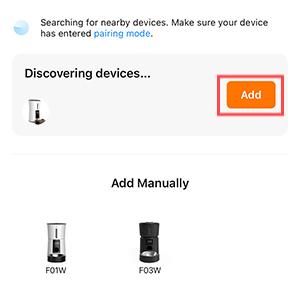
Figure 4: The app interface during device discovery, prompting to add the feeder.

Figure 5: App screen for entering Wi-Fi network details.
4. Інструкція з експлуатації
4.1 Setting a Feeding Schedule
Use the Petory Smart app to program your pet's feeding schedule.
- Open the Petory Smart app and select your feeder.
- Navigate to the "Schedule" or "Meal Plan" section.
- Встановіть бажаний час прийому їжі (до 10 прийомів їжі на день).
- For each meal, specify the number of portions (1-50 portions, where 1 portion is approximately 1/10 cup).
- The app also allows for a "Slow Feed Choice" to dispense food gradually.
- Save your settings. The feeder will now dispense food according to the programmed schedule.

Figure 6: Programming feeding schedules via the mobile application.
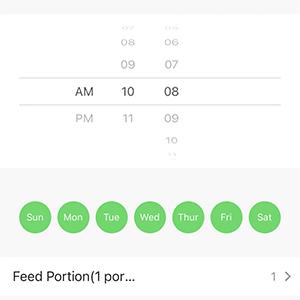
Малюнок 7: Детально view of setting meal times and portions within the app.
4.2 Годування вручну
You can dispense food manually at any time using the app or the physical button on the feeder.
- Через додаток: On the main screen of the Petory Smart app, locate the "Manual Feed" option and select the number of portions to dispense.
- Через кнопку подачі: Press the manual feed button on the feeder's control panel to dispense one portion.
4.3 Запис голосу
Record a 10-second message to play at meal times to call your pet.
- Locate the voice recording button on the feeder's control panel.
- Press and hold the button to begin recording your message.
- Release the button to save the recording. The recorded message will play automatically before each scheduled meal.
4.4 Блокування панелі керування
The feeder features a control panel lock to prevent accidental changes by pets or children.

Figure 8: The lock icon on the control panel indicates the panel is locked.
5. Технічне обслуговування
5.1 Очищення подавача
Регулярне очищення забезпечує гігієну та належне функціонування годівниці.
- Розбирання: Rotate the food hopper counter-clockwise to separate it from the feeder base. Remove the stainless steel bowl from its holder.
- прання: The food hopper and the stainless steel bowl are dishwasher-safe. Alternatively, wash them by hand with mild soap and water.
- Сушка: Ensure all parts are completely dry before reassembly to prevent moisture from affecting the kibble or electronics.
- Очищення основи: Wipe the feeder base with a damp cloth. Do not submerge the base in water.
- Повторне складання: Reattach the food hopper by aligning it with the base and rotating clockwise until secure. Place the clean bowl back into its holder.

Figure 9: Detaching the food hopper by rotating it counter-clockwise.

Figure 10: Removable parts of the feeder suitable for washing.
5.2 Заміна пакета з осушувачем
The desiccant bag helps keep the dry food fresh. Replace it periodically (e.g., every 1-2 months) for optimal performance.

Figure 11: Location of the desiccant bag holder within the feeder lid.
6. Вирішення проблем
| проблема | Можлива причина | Рішення |
|---|---|---|
| Годівниця не видає корм. |
|
|
| Немає сповіщень від додатків. |
|
|
| Feeder offline/Wi-Fi disconnected. |
|
|
| Power drops out/resets. |
|
|

Малюнок 12: Впрample of a food blockage notification received on the mobile app.
7. Технічні характеристики
| Особливість | Деталь |
|---|---|
| Номер моделі | F01W |
| Ємність | 4 Liters (approx. 16.9 cups dry food) |
| матеріал | BPA-free Plastic, Stainless Steel (bowl) |
| Колір | Білий |
| Розміри (ДxШxВ) | 13 x 7.5 x 13 дюймів |
| Вага товару | 4.44 фунта |
| Джерело живлення | 5V Power Adapter (included), 3 x D-size Batteries (not included) |
| Підключення Wi-Fi | 2.4GHz Wi-Fi (Bluetooth for initial pairing) |
| Максимальна кількість прийомів їжі на день | 10 |
| Порції на прийом їжі | 1-50 (approx. 1/10 cup per portion) |
| Розмір крокет | Under 0.7 inches diameter |
| Особливості | Voice Recording, Desiccant Bag Holder, App Control, Dual Power |
| Цільові види | Cats, Dogs (Small Breeds) |
| Інструкція по догляду | Hand Wash Only (base), Dishwasher-safe (hopper, bowl) |

Figure 13: Dimensions of the stainless steel food bowl.
8. Гарантія та підтримка
Гарантія: This Petory Automatic Wi-Fi Pet Feeder (Model F01W) comes with a 1-Year Warranty from the date of purchase.
For technical support, troubleshooting assistance, or warranty claims, please contact Petory customer service through the contact information provided on the official Petory webсайт або через вашу платформу для покупок.


