вступ
Thank you for choosing the PELONIS 16" Height Adjustable Silent Oscillating Pedestal Fan. This manual provides important information regarding the safe operation, assembly, maintenance, and troubleshooting of your fan. Please read it thoroughly before use and retain it for future reference.
Важливі інструкції з безпеки
Користуючись електричними приладами, слід завжди дотримуватися основних запобіжних заходів, щоб зменшити ризик виникнення пожежі, ураження електричним струмом і травмування людей, зокрема:
- Прочитайте всі інструкції перед використанням цього вентилятора.
- Використовуйте цей вентилятор лише так, як описано в цьому посібнику. Інше використання, не рекомендоване, може призвести до пожежі, ураження електричним струмом або травмування людей.
- Щоб запобігти ураженню електричним струмом, не ставте вентилятор у вікно, не занурюйте пристрій, вилку чи шнур у воду та не розпилюйте на них рідини.
- Необхідний ретельний нагляд, коли будь-який прилад використовується дітьми або поблизу них.
- Від’єднуйте вилку від розетки, коли не використовуєте вентилятор, коли переміщуєте вентилятор з одного місця на інше та перед чищенням.
- Не використовуйте вентилятор з пошкодженим шнуром живлення або вилкою, або після того, як вентилятор вийшов з ладу, впав чи був пошкоджений будь-яким чином.
- Не прокладайте шнур під килимовим покриттям. Не накривайте шнур килимками, доріжками або подібними покриттями. Не прокладайте шнур під меблями чи технікою. Розташуйте шнур подалі від зони руху, де за нього не можна буде спіткнутися.
- Не вставляйте сторонні предмети та не допускайте їх потрапляння у вентиляційні або витяжні отвори, оскільки це може призвести до ураження електричним струмом, пожежі або пошкодження вентилятора.
- Не блокуйте повітрозабірники або випускні отвори жодним чином. Не використовуйте на м’яких поверхнях, таких як ліжко, де отвори можуть бути заблоковані.
- Цей вентилятор призначений лише для домашнього використання.
Продукт закінченийview
The PELONIS PSPF18AR40B fan is designed for efficient air circulation with multiple features for user convenience.
Ключові характеристики:
- 12-speed fan configuration for precise airflow control.
- Remote control included for convenient operation from a distance.
- Adjustable height settings: 28", 40", and 52" to suit various needs.
- Clear LED display on the fan for easy monitoring of settings.
- 12-Hour Programmable Timer for automatic shut-off.
- Oscillation function for wide area coverage or static adjustment for direct airflow.
- Power off memory function retains last settings upon restart.
- Easy to carry handle for portability.
Компоненти:

Фронт view of the assembled PELONIS 16-inch Pedestal Fan, showcasing its sleek black design and stable round base.

Під кутом view of the PELONIS Pedestal Fan, highlighting its height-adjustable pole and the fan head's position.
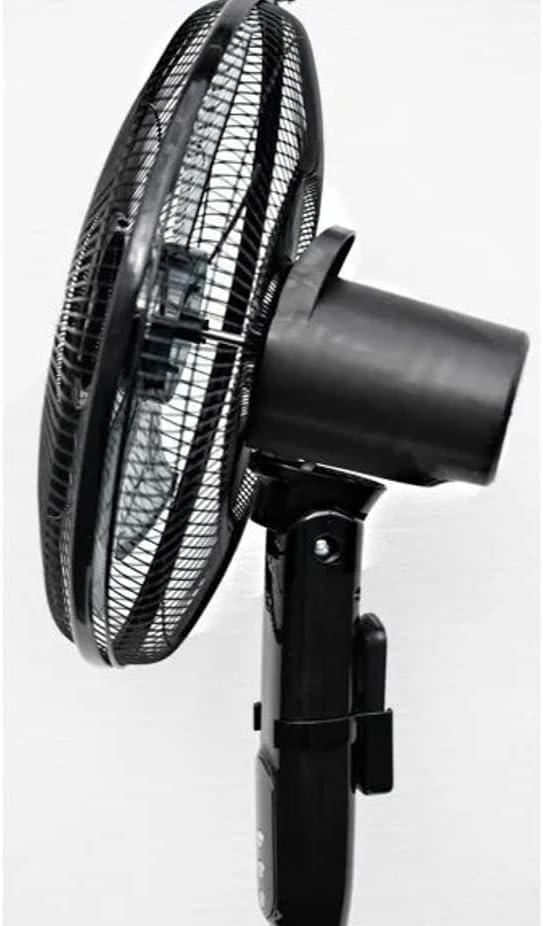
сторона view of the fan head, demonstrating the adjustable tilt mechanism for directing airflow up or down.

Крупним планом view of the fan's protective grill and internal blades, designed for silent and efficient air movement.

Детальний view of the control panel on the fan's stand, showing the power, oscillation, and mode buttons.
Налаштування та збірка
Please follow these steps to assemble your PELONIS Pedestal Fan:
- Carefully unpack all components from the box and ensure all parts are present: fan head, front and rear grills, fan blade, motor shaft nut, grill retaining nut, stand pole, base, and remote control.
- Attach the stand pole to the base. Secure it firmly using the provided screws or locking mechanism.
- Mount the motor housing onto the top of the stand pole. Ensure it clicks securely into place.
- Remove the grill retaining nut and motor shaft nut from the motor shaft.
- Place the rear grill onto the motor housing, aligning the locating pins. Secure it with the grill retaining nut.
- Slide the fan blade onto the motor shaft, ensuring the notch on the blade aligns with the pin on the shaft. Secure it with the motor shaft nut, tightening it counter-clockwise.
- Attach the front grill to the rear grill, ensuring the clips snap together firmly around the edge. Secure with any provided screws or clips.
- Adjust the height of the fan by loosening the height adjustment collar on the stand pole, extending or retracting the pole, and then tightening the collar firmly.
- Встановіть вентилятор на твердій, рівній поверхні.
- Підключіть шнур живлення до стандартної електричної розетки.
Інструкція з експлуатації
Панель керування та пульт дистанційного керування:
The fan can be operated using the control buttons on the fan's stand or the included remote control. The LED display will show current settings.
- Кнопка живлення (ⓘ): Натисніть, щоб увімкнути або вимкнути вентилятор.
- Кнопка швидкості (✴): Press repeatedly to cycle through the 12 available fan speeds. The current speed will be indicated on the LED display.
- Кнопка коливання (⌣): Натисніть, щоб активувати або деактивувати функцію коливання, яка дозволяє головці вентилятора рухатися з боку в бік.
- Timer Button (on Remote): Press to set the auto-off timer in 1-hour increments, up to 12 hours. The fan will automatically turn off after the set time.
- Mode Button (on Remote): Cycles through different fan modes (e.g., Normal, Natural, Sleep, if available). Refer to the LED display for the active mode.
Adjusting Fan Height and Tilt:
- Регулювання висоти: Loosen the height adjustment collar on the main pole, extend or retract the inner pole to the desired height (28", 40", or 52"), and then firmly tighten the collar.
- Регулювання нахилу: Gently push the fan head up or down to adjust the vertical angle of airflow. The fan head will hold its position once set.
Технічне обслуговування та очищення
Регулярне чищення допоможе підтримувати продуктивність вашого вентилятора та продовжити термін його служби.
- Завжди відключайте вентилятор від розетки перед чищенням.
- Використовуйте м'який, damp тканиною для протирання зовнішніх поверхонь вентилятора. Не використовуйте абразивні засоби для чищення або розчинники.
- To clean the fan blades and inside the grills, you may need to disassemble the front grill. Refer to the assembly instructions in reverse. Use a soft cloth or a vacuum cleaner with a brush attachment to remove dust and debris.
- Ensure all parts are completely dry before reassembling and plugging the fan back in.
- Зберігайте вентилятор у прохолодному, сухому місці, коли він не використовується, бажано в оригінальній упаковці.
Усунення несправностей
Якщо у вас виникли проблеми з вентилятором, будь ласка, ознайомтеся з наступними поширеними проблемами та способами їх вирішення:
| проблема | Можлива причина | Рішення |
|---|---|---|
| Вентилятор не вмикається. | Not plugged in; power outlet not working; fan not assembled correctly. | Ensure the power cord is securely plugged into a working outlet. Check circuit breaker. Verify all assembly steps are correct. |
| Вентилятор шумить. | Loose parts; fan not on a level surface; dust accumulation. | Check for any loose screws or components. Place fan on a stable, level surface. Clean fan blades and grills. |
| Коливання не працює. | Функція коливань не активована; перешкода. | Press the oscillation button. Ensure there are no obstructions preventing the fan head from turning. |
| Не працює пульт дистанційного керування. | Батарейки розряджені або неправильно вставлені; пульт дистанційного керування поза зоною досяжності. | Replace batteries (ensure correct polarity). Point remote directly at the fan's receiver. Ensure you are within effective range. |
Технічні характеристики
| Бренд | ПЕЛОНІС |
| Номер моделі | PSPF18AR40B / VES760 |
| колір | чорний |
| Розміри продукту | 38.1 x 12.7 x 88.9 см (15 x 5 x 35 дюйма) |
| Вага товару | 3.5 кг (7.7 фунта) |
| Кількість швидкостей | 12 |
| Особливості | Oscillating, Digital Display, Remote Control, 12-Hour Timer, Power Off Memory |
| Джерело живлення | Провідний електричний |
Гарантія та підтримка
This PELONIS Pedestal Fan is an Amazon Renewed product and comes with a 90-day Amazon Renewed warranty. This warranty covers any defects in material or workmanship under normal use during the warranty period.
For warranty claims or technical support, please contact Amazon Renewed customer service directly through your Amazon purchase history. They will assist you with troubleshooting or arranging a replacement/refund as per the warranty terms.


