1. Вступ
The Kungber SPS3010B is a professional-grade adjustable DC power supply designed for various applications including laboratory research, production line testing, electrical maintenance, and battery charging. It provides a stable and precise output of 0-30V and 0-10A, with a high-resolution 4-digit LED display for accurate readings of voltage, current, and power. This manual provides essential information for the safe and efficient operation of your device.
Ключові характеристики:
- High precision 4-digit LED display for voltage, струм і потужність.
- Adjustable output from 0-32V and 0-10A with 0.01V/0.01A resolution.
- Automatic switching between Constant Voltage (C.V.) and Constant Current (C.C.) modes.
- Coarse and fine adjustment knobs for precise control.
- Comprehensive safety protections: Ground wire, overvoltage (OVP), overcurrent (OCP), overpower (OPP), overtemperature (OTP), and short-circuit protection (SCP).
- Integrated 5V/2A USB-A and USB-C fast charging ports.
2. Техніка безпеки
To ensure safe operation and prevent damage to the device or injury, please read and follow these safety instructions carefully:
- Завжди підключайте блок живлення до заземленої розетки.
- Не використовуйте пристрій у вологих або damp умови.
- Ensure proper ventilation; do not block the cooling fan or vents.
- Не відкривайте casinг; всередині немає деталей, які може обслуговувати користувач. Звертайтеся до кваліфікованого персоналу з будь-яким обслуговуванням.
- Before connecting or disconnecting any load, ensure the power supply is turned off or the output is disabled.
- Перевірте томtage and current settings before applying power to your circuit or device.
- Avoid short-circuiting the output terminals for extended periods, even with protection enabled.
- Keep the device away from flammable materials and explosive gases.
3. Вміст упаковки
Будь ласка, перевірте вміст упаковки після отримання:
- 1 x Kungber SPS3010B DC Laboratory Power Supply
- 1 x Output Power Cable (test leads)
- 1 x Input Power Cable (AC power cord)
- 1 х посібник користувача
4. Продукт закінчивсяview

This image displays the front panel of the Kungber SPS3010B power supply, highlighting the digital display, coarse and fine adjustment knobs for voltage and current, output terminals (positive, negative, and ground), and the integrated USB-A and USB-C fast charging ports. Buttons for OCP (Overcurrent Protection), Battery mode, and Output control are also visible.

Детальний view of the 4-digit LED display, which simultaneously shows the set or measured voltage (V), current (A), and calculated power (W). The display also indicates the active mode (C.V. for Constant Voltage, C.C. for Constant Current) and includes an Ah (Ampere-hour) reading for battery charging.

This image shows the rear panel of the power supply, specifically highlighting the integrated cooling fan. The fan is crucial for dissipating heat generated during operation, ensuring the device maintains optimal performance and longevity. Proper airflow around this area is essential.
Компоненти передньої панелі:
- Світлодіодний дисплей: Показує томtage (V), Current (A), Power (W), and Ampere-hours (Ah). Indicates C.V. (Constant Voltage) and C.C. (Constant Current) modes.
- Кнопка OCP: Activates/deactivates Overcurrent Protection.
- BATTERY Button: Toggles battery charging mode.
- OUTPUT Button: Enables/disables the DC output.
- A-COARSE Knob: Coarse adjustment for output current.
- V-COARSE Knob: Coarse adjustment for output voltage.
- A-FINE Knob: Fine adjustment for output current.
- V-FINE Knob: Fine adjustment for output voltage.
- Порт USB-A: 5V/2A fast charging output.
- Порт USB-C: 5V/2A fast charging output.
- Вихідні клеми: GND (Ground), - (Negative), + (Positive) for connecting loads.
5. Налаштування
Follow these steps to set up your power supply:
- Розміщення: Place the power supply on a stable, flat surface with adequate ventilation. Ensure the rear cooling fan is not obstructed.
- Підключення живлення: Connect the supplied AC input power cable to the power input socket on the rear of the unit and then to a grounded wall outlet.
- Первинна перевірка: Before connecting any load, ensure the OUTPUT button is in the OFF position (output disabled).
6. Інструкція з експлуатації
6.1 Увімкнення/вимкнення
- Щоб увімкнути: Locate the power switch on the rear panel of the unit and flip it to the 'ON' position. The LED display will illuminate.
- Щоб вимкнути: Flip the power switch on the rear panel to the 'OFF' position.
6.2 Регулювання гучностіtagе і Струм

This diagram illustrates the function of the coarse and fine adjustment knobs. The coarse knobs (A-COARSE, V-COARSE) are used for large adjustments, affecting the first two digits of the display. The fine knobs (A-FINE, V-FINE) allow for precise adjustments, controlling the last two digits, enabling accurate setting of voltage та поточні значення.
- Налаштування Voltage: Використовуйте V-COARSE knob for large adjustments and the V-FINE knob for precise, small adjustments. The voltage value will be displayed on the LED screen.
- Налаштування струму: Використовуйте A-COARSE knob for large adjustments and the A-FINE knob for precise, small adjustments. The current value will be displayed on the LED screen.
- Pre-setting Output: It is recommended to set the desired voltage and current limits before enabling the output to the load.
6.3 Постійний обсягtage (C.V.) and Constant Current (C.C.) Modes
The power supply automatically switches between C.V. and C.C. modes depending on the load and the set limits:
- Постtage (C.V.): When the load resistance is high, the output voltage remains constant at the set value, and the output current is determined by the load. The 'C.V.' indicator on the display will be lit.
- Constant Current (C.C.): When the load resistance is low or a short circuit occurs, the output current remains constant at the set limit, and the output voltage drops. The 'C.C.' indicator on the display will be lit.
6.4 Enabling/Disabling Output
- Після встановлення потрібної гучностіtagе та струм, натисніть кнопку ВИХІД button to enable the DC output. The 'OUTPUT' indicator will light up.
- Щоб вимкнути вихід, натисніть кнопку ВИХІД button again. The 'OUTPUT' indicator will turn off.
6.5 Захист від надструму (OCP)
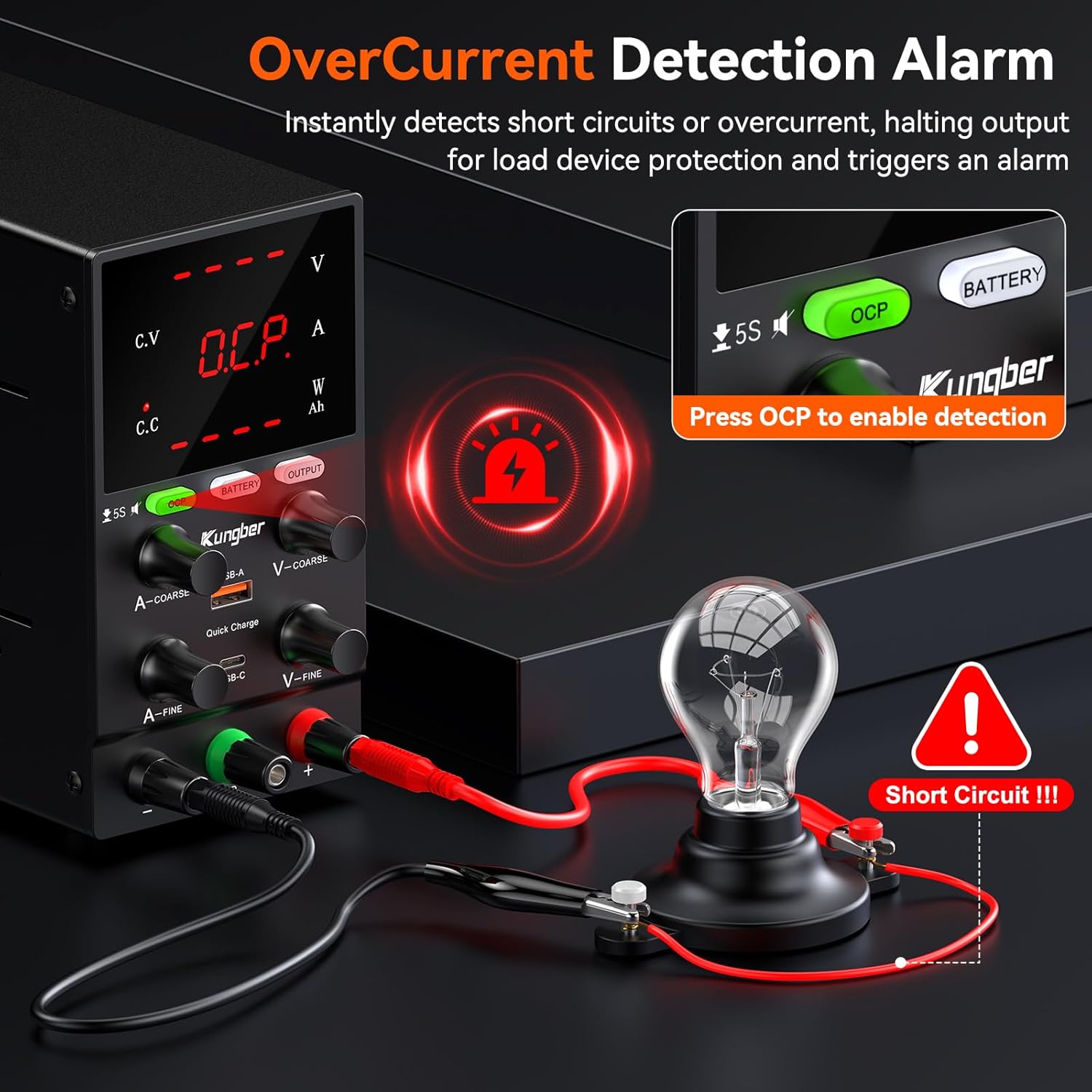
This image demonstrates the Overcurrent Protection (OCP) feature. When OCP is enabled by pressing the OCP button, the power supply instantly detects short circuits or overcurrent conditions, halting output to protect the connected load device and triggering an alarm. This ensures safety during operation.
- Натисніть OCP button to activate the Overcurrent Protection function. The 'OCP' indicator will light up.
- When OCP is active and an overcurrent condition is detected, the output will automatically shut down, and an alarm may sound to protect the connected device.
- To reset after an OCP event, resolve the overcurrent condition and then press the OCP button again or cycle the power.
6.6 Battery Charging Mode
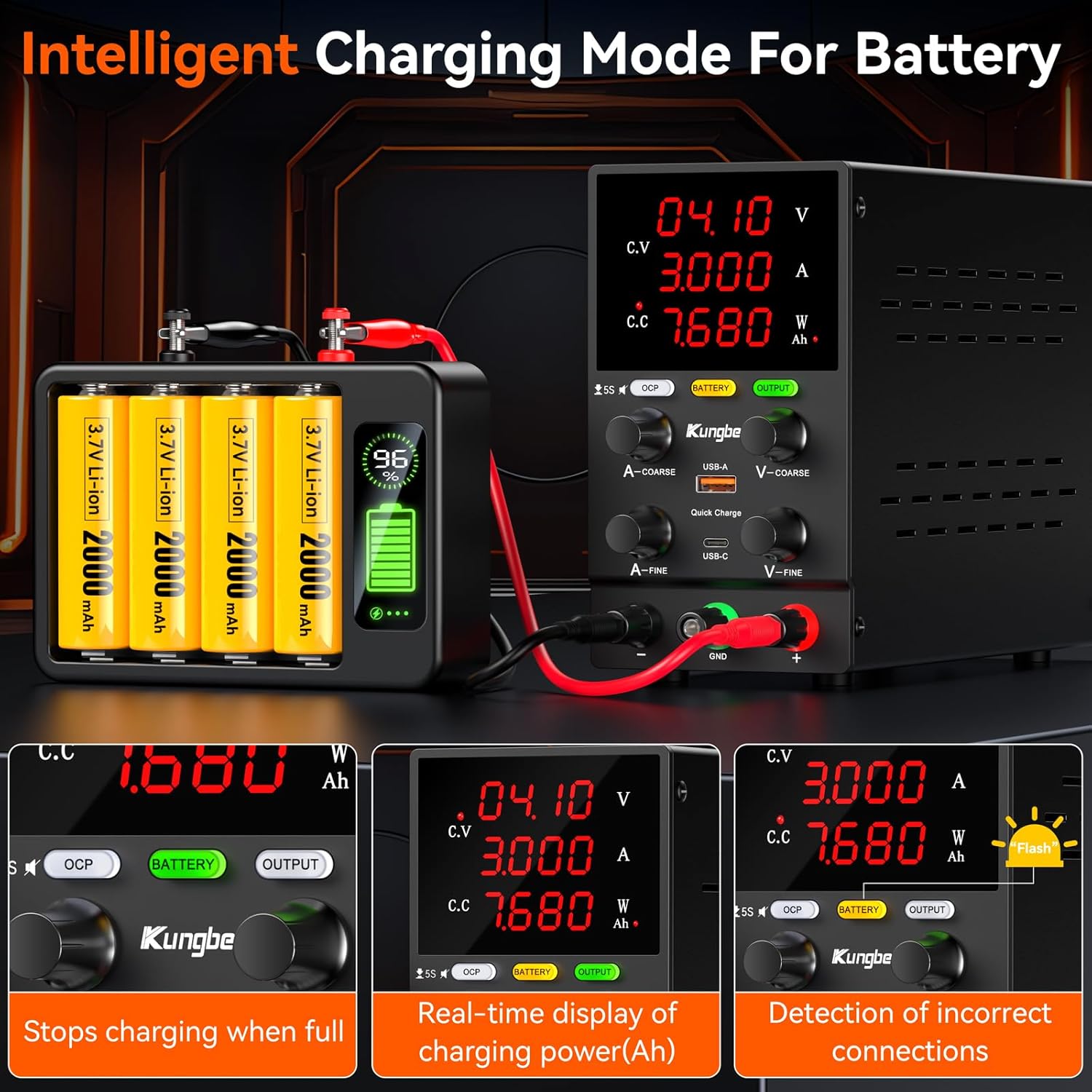
This image illustrates the intelligent battery charging mode. The power supply can detect incorrect connections, display real-time charging power in Ampere-hours (Ah), and automatically stop charging when the battery is full, ensuring safe and efficient battery management.
- Натисніть АКУМУЛЯТОР button to enter battery charging mode. The 'BATTERY' indicator will light up.
- In this mode, the power supply can intelligently manage battery charging, including displaying real-time Ah (Ampere-hour) readings and automatically stopping charging when the battery is full.
- Ensure correct polarity when connecting batteries to the output terminals.
6.7 USB Fast Charging Ports

This image highlights the convenience of the integrated USB-A and USB-C fast charging ports. These ports provide a 5V/2A output, allowing users to quickly charge mobile phones or power other USB-compatible devices directly from the power supply, even while it's being used for other tasks.
- The integrated USB-A and USB-C ports provide a 5V/2A output for charging mobile devices or powering small USB-compatible electronics.
- These ports operate independently of the main DC output.
7. Технічне обслуговування
Proper maintenance ensures the longevity and reliable operation of your power supply:
- Прибирання: Disconnect the power supply from the main power outlet before cleaning. Use a soft, dry cloth to wipe the exterior. Do not use abrasive cleaners or solvents.
- Вентиляція: Регулярно перевіряйте, чи вентилятор охолодження та вентиляційні отвори не містять пилу та сміття. Заблоковані вентиляційні отвори можуть призвести до перегріву.
- Зберігання: Якщо блок живлення не використовується протягом тривалого часу, зберігайте його в прохолодному, сухому місці, подалі від прямих сонячних променів та екстремальних температур.
- Немає частин, які обслуговуються користувачем: Do not attempt to open or repair the unit yourself. This will void the warranty and may pose a safety hazard.
8. Вирішення проблем
Якщо у вас виникли проблеми з блоком живлення, зверніться до наступних поширених проблем та способів їх вирішення:
| проблема | Можлива причина | Рішення |
|---|---|---|
| Немає дисплея/немає живлення | Кабель живлення не підключено; живлення вимкнено; перегорів запобіжник. | Ensure power cable is securely connected. Turn power switch ON. Check and replace fuse if necessary (refer to qualified technician). |
| Вихідний об'єм відсутнійtagе/струм | OUTPUT button is OFF; OCP activated; Short circuit in load. | Press OUTPUT button to enable. Check if OCP indicator is on, resolve load issue, then reset OCP. Check load for short circuits. |
| Вихід обtagнестабільний електричний струм | Poor connection; Overload; Internal fault. | Check all cable connections. Reduce load. If problem persists, contact support. |
| Пристрій перегрівається | Заблокована вентиляція; Надмірне навантаження. | Ensure vents are clear. Reduce load or operating time. |
9. Технічні характеристики
| Параметр | Значення |
|---|---|
| Бренд | Кунгбер |
| Номер моделі | SPS3010B |
| Вхідний об'ємtage | 230 вольт |
| Вихідний випtage | 0-30 Вольт |
| Вихідний струм | 0-10 Amperes |
| Максимальна потужність | 300 Watts (calculated from 30V * 10A) |
| Дисплей | 4-розрядний світлодіод |
| роздільна здатність | 0.01 В, 0.01 А |
| USB порти | 1 x USB-A, 1 x USB-C (5V/2A) |
| Колір | чорний |
| Вага товару | 2.3 фунта (приблизно 1.04 кг) |
| Розміри (Д x Ш x В) | 19.3 х 8.5 х 15.5 сантиметрів |
10. Гарантія та підтримка
Kungber provides lifetime technical support for this product. If you encounter any issues or have questions regarding the operation, maintenance, or troubleshooting of your SPS3010B power supply, please contact Kungber customer service. Refer to the product packaging or the official Kungber webсайт для контактної інформації.