Snom M18 KLE SIP DECT 4-Line Desk Office Phone User Manual
Model: M18 KLE
This manual provides comprehensive instructions for the setup, operation, and maintenance of your Snom M18 KLE SIP DECT 4-Line Desk Office Phone.
Посібник із налаштування
Вміст упаковки
- Snom M18 KLE Desk Phone Unit
- Слухавка
- Шнур слухавки
- Кабель Ethernet
- Адаптер змінного струму
Фізичне встановлення
Підключіть телефон: Plug one end of the coiled handset cord into the handset and the other end into the port labeled with a handset icon on the side of the phone base.
Підключення до мережі: Connect one end of the Ethernet cable to the LAN port on the back of the phone and the other end to your network router or switch.
Підключіть живлення: Plug the AC power adapter into the power port on the back of the phone, then plug the adapter into a standard electrical outlet. The phone will power on automatically.
Початкова конфігурація
Upon first power-on, the phone may display a setup wizard or attempt to obtain network settings via DHCP. Follow the on-screen prompts to configure basic settings such as language, time zone, and network parameters if not automatically assigned.
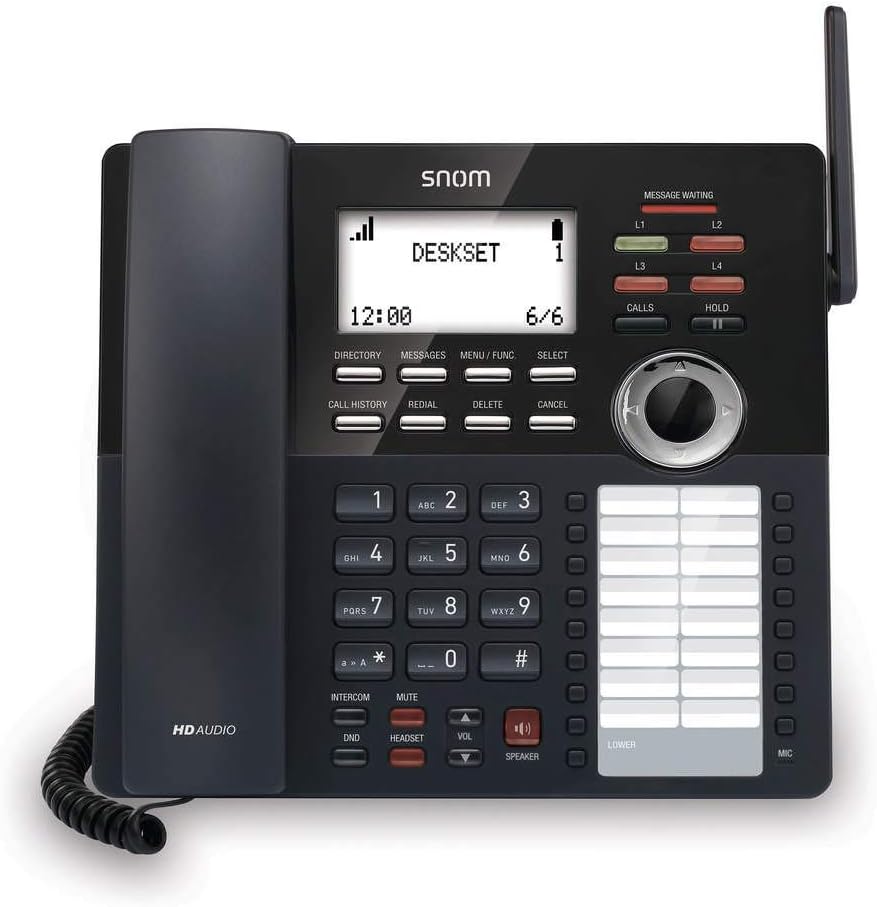
Зображення: спереду view of the Snom M18 KLE Desk Office Phone, showing the display, keypad, and function buttons. The handset is cradled on the left side, and a DECT antenna is visible on the right.
Інструкція з експлуатації
Основні функції викликів
Здійснення дзвінка:
Візьміть слухавку або натисніть СПІКЕР кнопку.
Наберіть потрібний номер телефону за допомогою клавіатури.
Натисніть ДЗВІНКИ button or wait a few seconds for the call to connect automatically.
Відповідь на дзвінок:
Коли дзвонить телефон, підніміть слухавку або натисніть СПІКЕР кнопку для відповіді.
Завершення дзвінка:
Поставте слухавку назад у тримач або натисніть СПІКЕР кнопку знову.
Розширені функції виклику
Тримайте: Під час активного дзвінка натисніть кнопку ТРИМАТИ button to place the call on hold. Press ТРИМАТИ знову, щоб продовжити дзвінок.
Передача:
Під час активного дзвінка натисніть кнопку ПЕРЕДАЧА soft key (may be labeled differently on screen).
Наберіть номер, на який ви хочете перевести дзвінок.
Для виконання a сліпа передача, натисніть ПЕРЕДАЧА soft key again before the recipient answers. To perform an attended transfer, wait for the recipient to answer, announce the call, then press ПЕРЕДАЧА.
Конференція: The phone supports 3-way local conferencing. During an active call:
Натисніть КОНФ soft key (or similar). The first call is placed on hold.
Наберіть номер третьої особи.
Після того, як третя сторона відповість, натисніть КОНФ ще раз натисніть програмну клавішу, щоб об’єднати всіх учасників.
Вимкнути звук: Натисніть ВИМКНЕНО кнопку, щоб вимкнути мікрофон під час дзвінка. Натисніть її ще раз, щоб увімкнути звук.
Не турбувати (DND): Натисніть DND button to activate or deactivate Do Not Disturb mode. When active, incoming calls will be redirected or sent to voicemail without ringing the phone.
Навігація по меню
Use the 4-way navigational pad and the ВИБРАТИ soft key to navigate through the phone's menus. Soft keys below the display change functionality based on the current screen.
Phonebook and Call History
каталог: Натисніть ДОВІДНИК soft key to access your local phonebook. You can add, edit, and delete contacts.
Історія викликів: Натисніть ІСТОРІЯ Дзвонів кнопку до view a list of dialed, received, and missed calls.
Технічне обслуговування та догляд
Очищення пристрою
Для очищення телефону використовуйте м’яку губкуamp cloth. Avoid using abrasive cleaners or solvents, as these can damage the phone's surface. Ensure the phone is unplugged before cleaning.
Заміна батареї
The deskset contains a 2.4V/750 mAh Ni-MH battery. If battery performance degrades significantly over time, contact Snom support or a qualified technician for replacement. Do not attempt to replace the battery yourself unless specifically instructed by Snom.
Оновлення мікропрограми
Periodically, Snom may release firmware updates to improve performance and add new features. Consult your system administrator or the Snom website for instructions on how to update your phone's firmware.
Усунення несправностей
| проблема | Можлива причина | Рішення |
|---|---|---|
| Немає гудка | Phone not powered, network cable disconnected, or SIP registration failure. | Check power connection. Ensure Ethernet cable is securely connected. Verify SIP account registration status on the display. Restart the phone. |
| Не вдається здійснювати/приймати дзвінки | SIP registration issue, DND active, or network problem. | Check SIP registration. Deactivate DND. Verify network connectivity. Contact your IT administrator. |
| Дисплей порожній або завислий | Power issue or software error. | Unplug the power adapter, wait 10 seconds, then plug it back in. If the issue persists, contact support. |
| Погана якість звуку | Network congestion, faulty cable, or handset issue. | Check network connection and bandwidth. Try a different handset or headset. |
Технічні характеристики
- Дисплей: 3.5-inch 102 x 66 pixels (w x h) mono LCD with blue/white backlighting
- Лінійні клавіші: 4 програмовані клавіші ліній зі світлодіодним підсвічуванням
- Feature Keys: 17 спеціальних функціональних клавіш
- Навігація: 4-way navigational pad
- Швидкий набір: 32 speed dial keys (2 pages x 16)
- Voice Quality: HD voice for receiver and speakerphone, Full-duplex speakerphone
- Підтримка гарнітури: HAC receiver, 2.5mm corded headset jack
- Обробка викликів: 4-line call handling (active and held), 3-way local conference, N-way network conference, Intercom, Call transfer (blind/attended), Call hold, Call forwarding, Mute, Redial, Caller ID
- Телефонна книга: Local up to 1,000 entries, XML/LDAP remote phonebook
- Історія викликів: До 200 записів
- Батарея: Deskset battery: 2.4v/750 mAh Ni-MH
- Джерело живлення: Corded Electric (Included AC Adapter)
- Standby/Talk Time: 36 hours standby / 7 hours talk time
Інформація про гарантію
The Snom M18 KLE SIP DECT 4-Line Desk Office Phone comes with a 3-year limited warranty from the date of purchase. This warranty covers defects in materials and workmanship under normal use. For full terms and conditions, please refer to the official Snom warranty policy available on their webсайту або зв’яжіться зі службою підтримки клієнтів.
Підтримка клієнтів
For technical assistance, warranty claims, or further information, please visit the official Snom website or contact their customer support department. Keep your product model number (M18 KLE) and purchase details ready when contacting support.