1. Вступ
The Denver MRD-51 is a versatile multi-function music system designed to play various audio formats. It integrates a record player, DAB+ and FM/AM radio tuner, CD player, and cassette deck into a single unit. Additionally, it features a USB port for digitizing audio from CDs, records, or cassettes, and an AUX input for connecting external devices. The system includes two integrated stereo speakers for a complete audio experience.
2. Техніка безпеки
- Перед використанням пристрою уважно прочитайте всі інструкції.
- Збережіть цей посібник для подальшого використання.
- Не піддавайте пристрій впливу дощу або вологи, щоб запобігти пожежі або ураженню електричним струмом.
- Забезпечте належну вентиляцію; не блокуйте вентиляційні отвори.
- Поставте пристрій на стійку рівну поверхню.
- Від’єднайте штекер живлення від розетки, якщо пристрій не використовуватиметься протягом тривалого часу.
- Не намагайтеся обслуговувати пристрій самостійно. Довірте всі послуги кваліфікованому сервісному персоналу.
3. Вміст упаковки
Переконайтеся, що всі предмети присутні під час розпакування:
- Denver MRD-51 Multi-Function Music System
- Кабель живлення
- Пульт дистанційного керування
- Посібник користувача
4. Продукт закінчивсяview

малюнок 4.1: Denver MRD-51 Multi-Function Music System with turntable open. This image displays the Denver MRD-51 music system from a front-top perspective, with the turntable lid open and a vinyl record placed on the platter. The control panel, including the LCD display, knobs, and buttons, is visible below the turntable.

малюнок 4.2: Denver MRD-51 Multi-Function Music System, front view. A front view of the Denver MRD-51 music system with the turntable lid closed. This image highlights the integrated stereo speakers on the sides and the central control panel, emphasizing its classic design.
4.1 Елементи керування передньої панелі
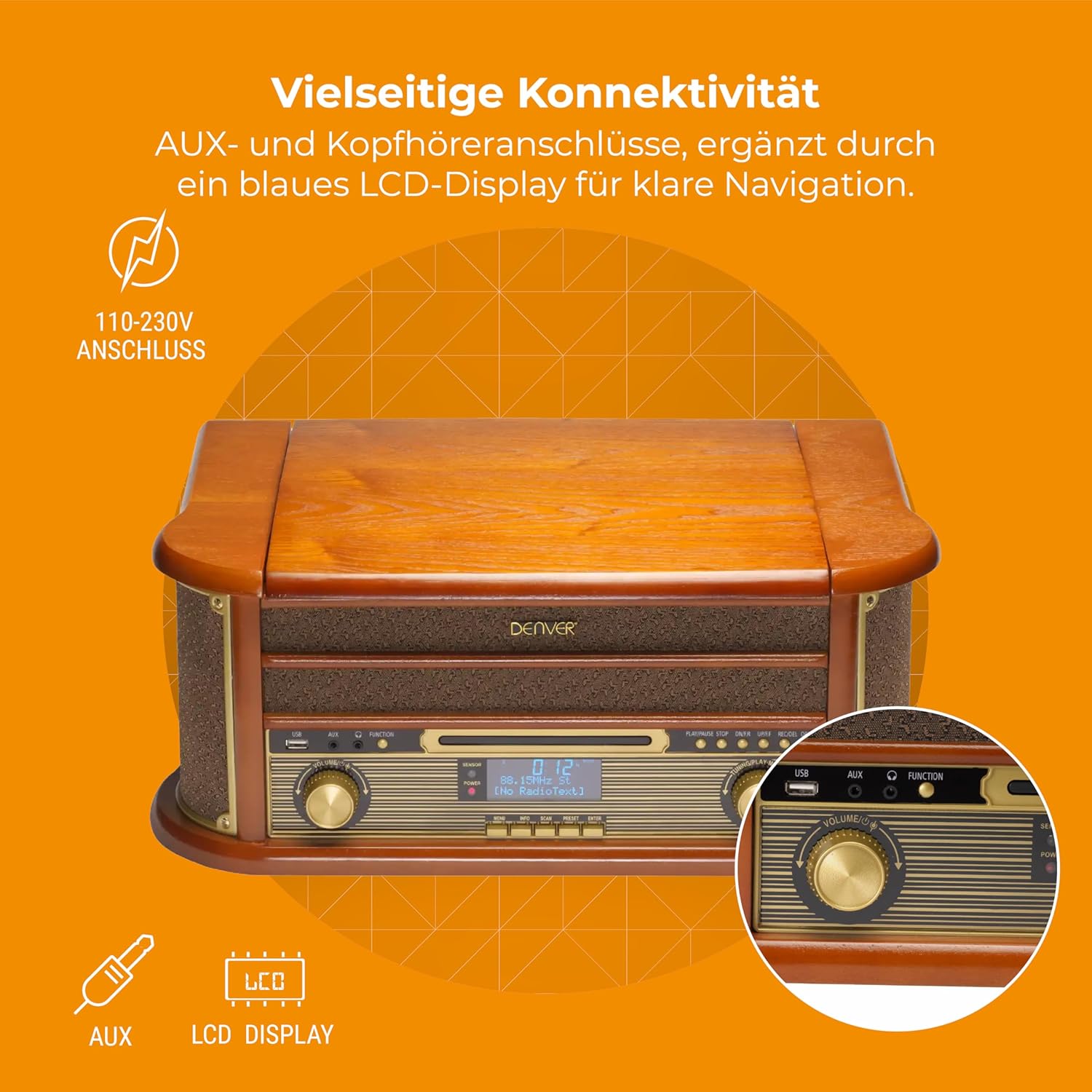
малюнок 4.3: Denver MRD-51 front panel with USB, AUX, and LCD display. A close-up of the Denver MRD-51's front control panel, showcasing the USB port, AUX input, and the blue LCD display for clear navigation. This view details the various connectivity options available.
- Кнопка живлення: Вмикає або вимикає пристрій.
- Кнопка FUNCTION: Selects between Turntable, CD, Cassette, DAB+, FM, AM, AUX, and USB modes.
- Порт USB: For connecting USB storage devices for playback or recording.
- Вхід AUX: 3.5-мм роз'єм для підключення зовнішніх аудіоджерел.
- РК-дисплей: Shows current mode, track information, radio frequency, and other system status.
- Кнопка PLAY/PAUSE: Starts or pauses playback for CD, Cassette, or USB.
- Кнопка СТОП: Зупинка відтворення.
- Кнопки ПРОПУСТИТИ (◀◀ / ▶▶): Пропускає треки або перемотує вперед/назад.
- Кнопка ЗАПИСУ: Initiates recording to USB.
- Регулятор гучності: Регулює загальну гучність виводу.
- Ручка налаштування: Adjusts radio frequency in FM/AM mode or navigates menus in DAB+ mode.
4.2 Turntable and Cassette Deck

малюнок 4.4: Denver MRD-51 showing open turntable and cassette deck. This image illustrates the versatility of the Denver MRD-51, featuring the open turntable with a record and an arrow pointing to the cassette deck slot on the side, indicating its multi-format playback capabilities.
- Поворотний стіл: Для програвання вінілових платівок.
- Tone Arm with Stylus: Reads the grooves of vinyl records.
- Перемикач швидкості: Allows selection of 33, 45, or 78 RPM.
- Cassette Deck Slot: Для вставки аудіокасет.
4.3 CD-плеєр

малюнок 4.5: Denver MRD-51 with CD tray open and remote control. This image shows the Denver MRD-51 with its CD tray open, ready for disc insertion. A remote control is also pictured, indicating convenient operation of the system's functions.
- Лоток для CD: Для вставки компакт-дисків.
- Кнопка ВІДКРИТИ/ЗАКРИТИ: Opens and closes the CD tray.
5. Налаштування
5.1 Розпакування та розміщення
- Обережно вийміть пристрій з упаковки.
- Розмістіть пристрій на рівній, стійкій поверхні подалі від прямих сонячних променів, джерел тепла та надмірного пилу чи вологи.
- Ensure there is adequate space around the unit for ventilation.
5.2 Підключення живлення
- Connect the power cable to the AC IN socket on the rear of the unit.
- Plug the other end of the power cable into a standard wall outlet (110-230V).
5.3 Підключення антени
For optimal radio reception, extend the telescopic antenna fully for FM/DAB+ or adjust its position for AM.
6. Інструкція з експлуатації
6.1 Загальні операції
- Натисніть ПОТУЖНІСТЬ кнопку, щоб увімкнути пристрій.
- Натисніть ФУНКЦІЯ button repeatedly to cycle through available modes: Turntable, CD, Cassette, DAB+, FM, AM, AUX, USB.
- Відрегулюйте ОБ'ЄМ встановіть потрібний рівень прослуховування.
6.2 Експлуатація програвача
- Select the 'Turntable' function.
- Open the turntable lid.
- Помістіть вінілову платівку на тарілку.
- Set the speed selector to match the record's speed (33, 45, or 78 RPM). For 45 RPM records, use the included adapter if necessary.
- Обережно підніміть тонарм і розташуйте стилус над потрібною доріжкою на платівці.
- Повільно опустіть тонарм на платівку. Розпочнеться відтворення.
- At the end of the record, the tone arm may automatically return to its rest, or you may need to manually lift and return it.
6.3 Робота CD-програвача
- Виберіть функцію «CD».
- Натисніть ВІДКРИТИ/ЗАКРИТИ кнопку, щоб відкрити лоток для компакт-дисків.
- Place a CD (CD/CD-R/CD-RW compatible) with the label side facing up into the tray.
- Натисніть ВІДКРИТИ/ЗАКРИТИ знову натисніть кнопку, щоб закрити лоток. Пристрій зчитає диск.
- Прес ВІДТВОРЕННЯ/ПАУЗА щоб почати відтворення.
- Використовуйте ПРОПУСТИТИ кнопки (◀◀ / ▶▶) для навігації між треками.
- Прес СТІЙ щоб завершити відтворення.
6.4 Робота касетного програвача
- Виберіть функцію «Касета».
- Insert an audio cassette into the cassette deck slot until it clicks into place.
- Натисніть ГРАТИ button (often integrated with the cassette mechanism) to start playback.
- Використовуйте СТІЙ button to end playback. Fast forward and rewind functions are typically available via dedicated buttons on the cassette deck.
6.5 Робота радіо (DAB+/FM/AM)
- Select the desired radio function (DAB+, FM, or AM).
- For DAB+ Radio: The unit will typically perform an automatic scan for available stations upon first use. Use the ТЮНІНГ ручка або ПРОПУСТИТИ buttons to navigate through the list of stations.
- For FM/AM Radio: Використовуйте ТЮНІНГ knob to manually tune to a station. The frequency will be displayed on the LCD.
6.6 Запис USB
The MRD-51 allows you to digitize audio from your records, CDs, or cassettes directly to a USB storage device.
- Вставте USB флешку в порт USB.
- Select the source function you wish to record from (Turntable, CD, or Cassette).
- Start playback of the audio source (e.g., play a record, CD, or cassette).
- Натисніть ЗАПИС button. The recording indicator on the display will illuminate, and recording will begin.
- Натисніть ЗАПИС знову кнопку або СТІЙ кнопку, щоб завершити запис. Записаний file буде збережено на USB-носій.
6.7 Вхід AUX
- Підключіть зовнішній аудіопристрій (наприклад, смартфон, MP3-плеєр) до Вхід AUX using a 3.5mm audio cable.
- Select the 'AUX' function.
- Start playback on your external device. The audio will be played through the MRD-51's speakers.
7. Технічне обслуговування
7.1 Очищення пристрою
- Завжди відключайте пристрій від розетки перед очищенням.
- Використовуйте м’яку, суху тканину для протирання зовнішніх поверхонь.
- Не використовуйте абразивні засоби для чищення, віск або розчинники.
7.2 Turntable Stylus Care
- Gently clean the stylus regularly with a soft brush, brushing from back to front.
- Уникайте дотику до стилуса пальцями.
- Replace the stylus when sound quality deteriorates or if it is visibly damaged.
7.3 CD/Cassette Player Care
- Handle CDs and cassettes by their edges to avoid fingerprints and scratches.
- Тримайте лоток для компакт-дисків та касетну деку чистою від пилу та сміття.
8. Вирішення проблем
| проблема | Можлива причина | Рішення |
|---|---|---|
| Немає живлення | Power cable not connected; Wall outlet not active | Переконайтеся, що кабель живлення надійно підключений; спробуйте іншу розетку |
| Ні звуку | Volume too low; Incorrect function selected; External device not playing | Increase volume; Select correct function; Ensure external device is playing and connected properly |
| Програвач не обертається або поганий звук | Speed setting incorrect; Stylus dirty or damaged; Record dirty | Adjust speed selector; Clean or replace stylus; Clean record |
| Компакт-диск не відтворюється | CD inserted incorrectly; CD scratched or dirty; CD format not supported | Reinsert CD correctly; Clean or replace CD; Ensure CD is CD/CD-R/CD-RW format |
| Поганий радіоприйом | Антена неправильно висунута/розташована; слабкий сигнал | Розтягніть та відрегулюйте антену; спробуйте змінити положення пристрою |
| Запис на USB не працює | USB drive full or incompatible; Source not playing | Use a different USB drive or clear space; Ensure audio source is playing during recording |
9. Технічні характеристики
| Особливість | Специфікація |
|---|---|
| Розміри продукту | 20.08 x 13.39 x 8.46 дюймів |
| Вага товару | 15.18 фунта (6.9 кілограма) |
| Номер моделі | MRD-51 (Internal: 111201210000) |
| Бренд | Денвер |
| Максимальна швидкість обертання | 78 об/хв (підтримує 33, 45, 78 об/хв) |
| Включені компоненти | MRD-51 unit |
| Особливості | Adjustable Speed, Digital Recorder, Integrated Speakers |
| матеріал | Aluminum (internal components), Wood (housing) |
| Колір | Деревина |
| Сумісні пристрої | Personal Computer (for USB transfer) |
| Радіо тюнер | DAB+, FM, AM |
| CD плеєр | Supports CD/CD-R/CD-RW |
| Аудіовихід | Стереодинаміки 2 х 2.5 Вт |
10. Гарантія та підтримка
For warranty information and technical support, please refer to the documentation provided with your purchase or contact Denver customer service through their official webсайт. Зберігайте чек про покупку для будь-яких гарантійних претензій.


