1. Вступ
This manual provides detailed instructions for the proper installation, operation, and maintenance of your Sony MEX-N4200BT Single-Din Car Stereo Receiver. Please read this manual thoroughly before using the unit to ensure correct usage and to prevent damage. Keep this manual for future reference.
2. Інформація про безпеку
- Безпека водіння: Always operate the unit safely. Distracted driving can lead to accidents.
- Рівень гучності: Keep the volume at a level where you can still hear outside sounds, such as emergency vehicles.
- Джерело живлення: Підключайте пристрій лише до автомобільного акумулятора постійного струму 12 В з негативним заземленням.
- Електропроводка: Ensure all wiring is correctly connected to prevent short circuits or damage. Refer to the wiring diagram carefully.
- Професійна установка: If you are unsure about installation, consult a qualified professional.
- Уникайте вологи: Не піддавайте пристрій впливу дощу або вологи, щоб запобігти пожежі або ураженню електричним струмом.
3. Вміст упаковки
Перевірте наявність усіх елементів в упаковці:
- Sony MEX-N4200BT Car Stereo Receiver
- Джгут
- Зовнішній мікрофон
- Пульт дистанційного керування
- Installation Hardware (Screws, Mounting Sleeve)
- Посібник користувача (цей документ)
4. Налаштування та встановлення
Proper installation is crucial for optimal performance. Disconnect the vehicle's negative battery terminal before starting installation.
4.1 Схема підключення
Refer to the diagram below for correct wiring connections. Ensure all connections are secure and insulated.

малюнок 4.1: Задня view of the Sony MEX-N4200BT receiver, illustrating the wiring harness connection points, RCA pre-outputs for front, rear, and subwoofer, the external microphone input, and the 10A fuse. The multi-colored wires of the harness are visible, indicating connections for power, ground, speakers, and accessories.
- Живлення (жовтий): Підключіть до постійної напруги 12 В.
- Аксесуар (червоний): Підключіть до комутованого живлення 12 В (замок запалювання).
- Мелений (чорний): Підключіть до чистої точки заземлення шасі.
- Провід динаміка: Connect to vehicle's speaker wires, observing polarity.
- Дистанційне ввімкнення (синій/білий): Підключитися до amplifier remote input (if applicable).
- Мікрофон: Plug the external microphone into the designated input on the rear panel. Position the microphone in a clear area for optimal voice pickup.
- Виходи перед виходом: Використовуйте кабелі RCA для підключення зовнішніх ampослаблювачі для фронтальних, задніх та сабвуферних каналів.
4.2 Монтаж
Insert the mounting sleeve into the dashboard opening. Bend the tabs to secure it. Slide the receiver into the mounting sleeve until it locks into place.
4.3 Початкове ввімкнення
After all connections are made and the unit is mounted, reconnect the vehicle's negative battery terminal. Turn on the vehicle's ignition. The unit should power on. Follow any on-screen prompts for initial setup, such as language selection or clock setting.
5. Операція
5.1 Основні елементи керування
Ознайомтеся з елементами керування на передній панелі для зручності використання.

малюнок 5.1: Front panel of the Sony MEX-N4200BT receiver, displaying the main rotary knob (volume/enter), source button, call buttons, seek buttons, display button, and numbered preset buttons. The unit features blue illumination around the main controls.
- Rotary Knob (Volume/Enter): Turn to adjust volume. Press to select menu items or confirm actions.
- Кнопка SRC (Джерело): Press to cycle through available audio sources (Tuner, CD, USB, Bluetooth Audio, AUX).
- CALL Buttons: Use for hands-free calling (answer/end calls).
- SEEK +/- Buttons: Use to change radio stations, tracks, or navigate menus.
- Кнопка МЕНЮ: Access the main menu for settings and adjustments.
- Нумеровані кнопки (1-6): Used for radio station presets, direct track selection, or menu navigation.
- DSPL (Display) Button: Changes display information or illumination settings.
5.2 Підключення Bluetooth
The MEX-N4200BT features built-in Bluetooth for hands-free calling and audio streaming.
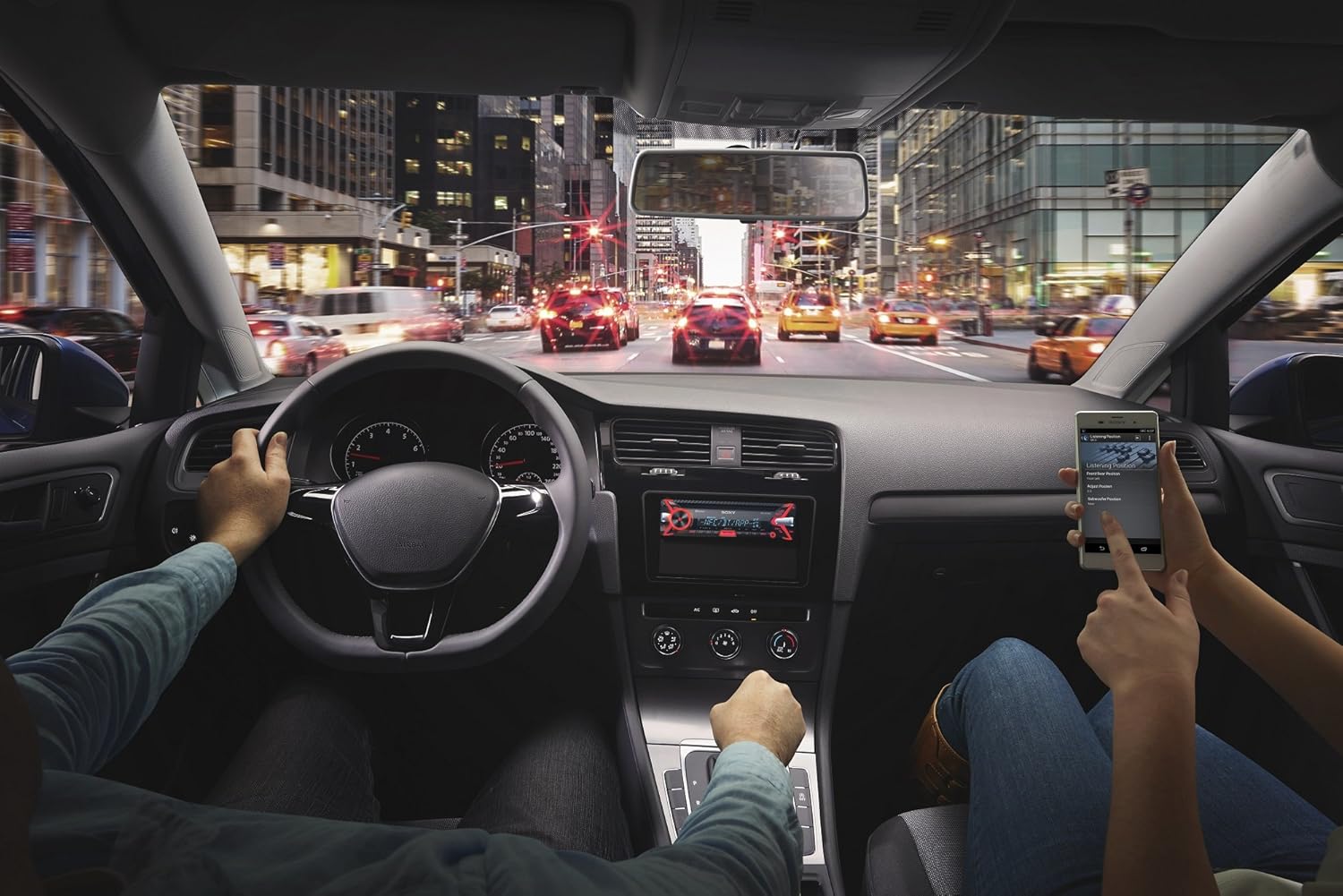
малюнок 5.2: An in-car scene demonstrating smartphone integration with the car stereo. The driver is focused on the road, while a passenger interacts with a smartphone, likely controlling music or navigation through the Sony MEX-N4200BT receiver.
- Сполучення:
- Увімкніть Bluetooth на своєму смартфоні.
- На приймачі виберіть джерело Bluetooth.
- шукати available devices on your smartphone and select "MEX-N4200BT".
- Підтвердьте код сполучення, якщо буде запропоновано.
- Hands-Free Calling (HFP, PBAP):
- Once paired, you can make and receive calls through the receiver.
- Use the CALL buttons on the front panel.
- The external microphone ensures clear voice transmission.
- The unit supports Phone Book Access Profile (PBAP) to display caller names.
- Audio Streaming (A2DP, AVRCP):
- Stream music wirelessly from your smartphone to the receiver.
- Use the receiver's controls (SEEK buttons) or your smartphone to play, pause, and skip tracks.
- Підтримує Advanced Audio Distribution Profile (A2DP) for high-quality audio and Audio/Video Remote Control Profile (AVRCP) for basic remote functions.
- Dual Bluetooth Connectivity: The unit allows connecting two Bluetooth devices simultaneously. One for full functionality (hands-free, audio streaming) and a second for hands-free calling only.
5.3 Відтворення з USB
Connect a USB device (flash drive, smartphone) to the front USB port for audio playback.
- Supported audio formats include MP3, WMA, and FLAC.
- Use the SEEK buttons to navigate folders and tracks.
- The USB port also provides charging for connected devices.
5.4 Відтворення компакт-дисків/MP3
Insert a CD into the disc slot. The unit will automatically switch to the CD source and begin playback.
- Supports CD, CD-R, and CD-RW discs.
- Plays MP3/WMA files burned onto CDs.
- Press the EJECT button to remove a disc.
5.5 Радіо (AM/FM)
Select the Tuner source to listen to AM/FM radio.
- Ручна настройка: Press and hold SEEK buttons to manually tune.
- Шукати тюнінг: Press SEEK buttons briefly to automatically search for the next strong station.
- Пресети: Store your favorite stations using the numbered buttons (1-6). Press and hold a numbered button to save the current station.
5.6 Допоміжний вхід
Connect external audio devices (e.g., portable music players) to the front 3.5mm auxiliary input jack using a stereo mini-plug cable.
5.7 Параметри звуку
Customize your audio experience using the built-in sound adjustment features.

малюнок 5.3: A smartphone screen showing a graphic equalizer interface, allowing precise adjustment of audio frequencies across 10 bands, from 32 Hz to 16 kHz. This illustrates the detailed sound customization available through the unit or its companion app.
- 10-смуговий графічний еквалайзер: Access through the MENU button to fine-tune audio frequencies for optimal sound quality. Adjust bass, mid-range, and treble levels.
- Mega Bass: This feature enhances low-frequency sounds for a more powerful bass response.
- попередньоamp Виходи: The unit provides 2 sets of preamp outputs (front, rear, and subwoofer) for connecting external amplifiers, allowing for a more powerful and customizable sound system.

малюнок 5.4: A close-up of the Sony MEX-N4200BT front panel, with a finger pressing the prominent 'MEGA BASS' button, indicating activation of the bass enhancement feature.
5.8 Інтеграція зі смартфонами
The receiver is compatible with Apple iPhone (iOS) and Android devices, offering control over various applications.
- Контроль програми: Use compatible apps like Pandora, Spotify, and iHeartRadio directly through the receiver's controls or via the Sony SongPal app (if installed on your smartphone).
- Голосове керування: Utilize your smartphone's voice assistant (e.g., Siri, Google Assistant) through the receiver for hands-free commands, navigation, and communication.
6. Технічне обслуговування
- Очищення пристрою: Використовуйте м’яку суху тканину для протирання передньої панелі. Для видалення стійкого брудуampпромийте тканину водою. Уникайте абразивних мийних засобів або розчинників.
- Detaching the Faceplate: The faceplate is detachable for theft deterrence. Press the release button (usually near the top left of the faceplate) and gently pull the faceplate off. Store it in the provided case.
- Слот для компакт -дисків: Keep the CD slot free of dust and debris. Do not insert anything other than standard CDs.
7. Вирішення проблем
If you encounter issues, refer to the table below for common problems and solutions before contacting support.
| проблема | Можлива причина | Рішення |
|---|---|---|
| Немає живлення | Перегорілий запобіжник; неправильна проводка; розряджений акумулятор автомобіля. | Check and replace fuse (10A); verify wiring connections; charge vehicle battery. |
| Ні звуку | Volume too low; mute activated; speaker wires disconnected; incorrect source selected. | Increase volume; deactivate mute; check speaker connections; select correct audio source. |
| Bluetooth не підключається/не встановлюється пара | Bluetooth off on phone/receiver; device out of range; pairing mode not active. | Ensure Bluetooth is on; bring devices closer; activate pairing mode on receiver. |
| CD error | Dirty or scratched disc; disc inserted incorrectly. | Clean disc; ensure disc is inserted correctly with label side up. |
| USB-пристрій не розпізнано | Не підтримується file format; damaged USB device; improper connection. | Забезпечити files are MP3/WMA/FLAC; try a different USB device; re-insert USB device. |
8. Технічні характеристики
| Особливість | Деталь |
|---|---|
| Номер моделі | MEX-N4200BT |
| Розмір шасі | Одно-DIN |
| Вихідна потужність (пікова) | 55 Вт х 4 канали |
| Вихідна потужність (середньоквадратичне значення) | 20 Вт х 4 канали |
| попередньоamp томtage | 2 вольт |
| попередньоamp Виходи | 2 Sets (Front, Rear, Subwoofer) |
| Тип дисплея | ЖК |
| Технологія підключення | Допоміжний, Bluetooth, USB |
| Версія Bluetooth | 3.0 + EDR certified |
| Bluetooth Profiles Підтримується | HFP, PBAP, A2DP, AVRCP, SPP |
| Підтримується відтворення медіа | CD, CD-R/RW, MP3, WMA, WAV, AAC, FLAC (via USB) |
| Еквалайзер | 10-смуговий графічний еквалайзер |
| USB-вхід | Фронт USB |
| Допоміжний вхід | Передні 3.5 мм |
| Сумісні пристрої | Смартфон (Android, iOS) |
| Вага товару | 2.64 фунта (приблизно 1.2 кг) |
| Розміри продукту | 9.82 x 9.5 x 9.07 дюймів (приблизно 24.9 x 24.1 x 23.0 см) |
9. Гарантія та підтримка
9.1 Гарантія виробника
This Sony MEX-N4200BT receiver comes with a 1-річна гарантія виробникаБудь ласка, збережіть чек про покупку для пред'явлення гарантійних претензій. Гарантія поширюється на дефекти матеріалів та виготовлення за умов нормального використання. Вона не поширюється на пошкодження, спричинені неправильним використанням, нещасним випадком, несанкціонованою модифікацією або неправильним встановленням.
9.2 Підтримка клієнтів
For technical assistance, troubleshooting beyond this manual, or warranty service, please contact Sony customer support. Refer to the official Sony webсайт для отримання найактуальнішої контактної інформації, включаючи номери телефонів та онлайн-ресурси підтримки.