вступ
This manual provides comprehensive instructions for the installation, operation, and maintenance of your Sony XM-GTX6041 600W Amplifier. Designed for car audio systems, this 4-channel amplifier delivers clear, precise, and distortion-free sound. It features advanced thermal control and a high-capacity air cooling system to ensure stable performance even under demanding conditions. Please read this manual thoroughly before using the amplifier to ensure proper setup and to maximize its performance and longevity.
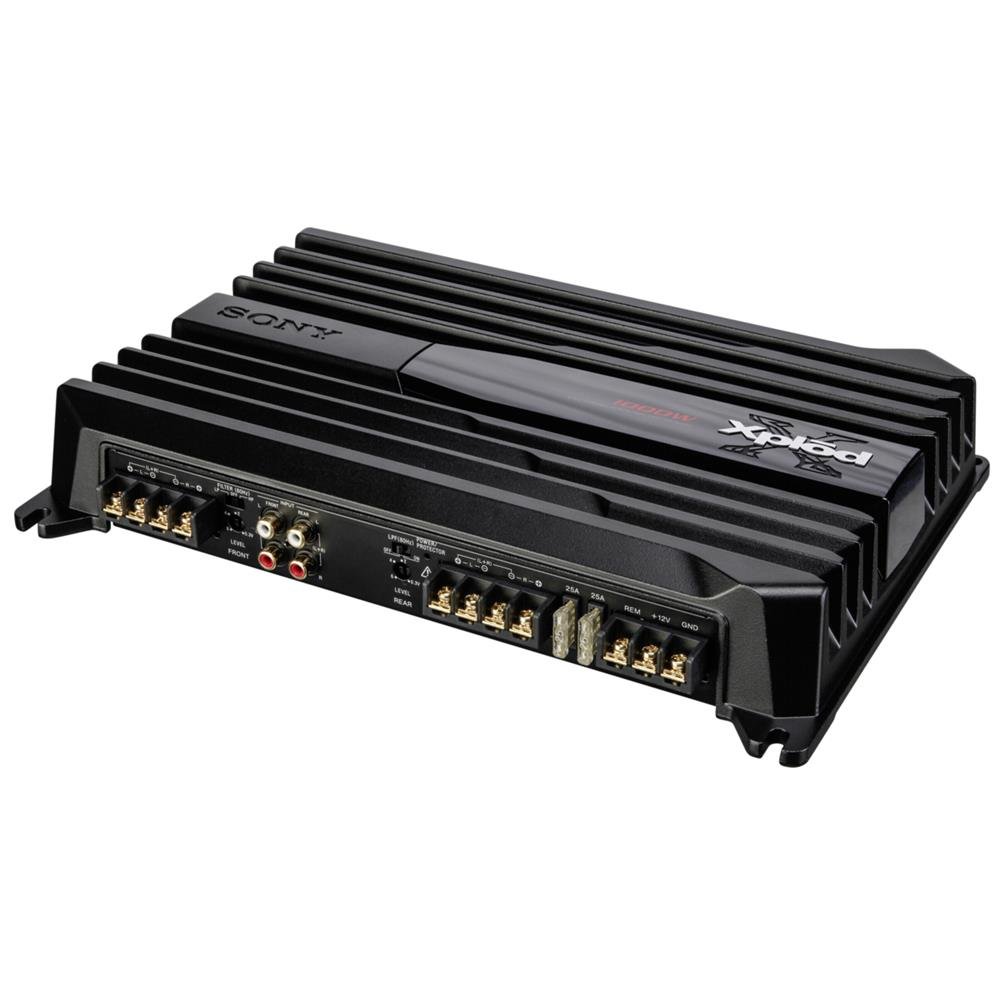
Image: Sony XM-GTX6041 600W Ampрятувальник. На цьому зображенні показано верхню частину view з amplifier unit, highlighting its compact design and connection terminals.
Інформація про безпеку
- Джерело живлення: Підключіть amplifier only to a 12V DC car battery with a negative ground.
- Електропроводка: Ensure all wiring is correctly connected and insulated to prevent short circuits and electrical hazards. Use appropriate gauge wires for power and ground connections.
- Монтаж: Змонтуйте ampнадійно закріпіть виріб у місці з належною вентиляцією, захищеному від вологи та надмірного тепла.
- Рівні гучності: Avoid prolonged listening at extremely high volume levels to prevent hearing damage.
- Професійна установка: Якщо ви не впевнені щодо будь-яких кроків встановлення, зверніться до кваліфікованого професійного установника автомобільної аудіосистеми.
Налаштування
1. Розпакування
Обережно вийміть amplifier and all accessories from the packaging. Verify that all components are present before proceeding with installation.
2. Місце встановлення
Виберіть місце монтажу, яке:
- Сухий та захищений від вологи.
- Добре вентильований для забезпечення належного розсіювання тепла.
- Secure and stable to prevent movement during vehicle operation.
- Подалі від прямих сонячних променів або джерел тепла.
Common locations include under a seat, in the trunk, or behind a panel.
3. Підключення проводів
Follow these general guidelines for wiring your ampліфтер:
- Живлення (BATT+): Connect a heavy-gauge power cable directly from the positive terminal of your car battery to the BATT+ terminal on the amplifier. Install an in-line fuse (not supplied) as close to the battery as possible.
- Земля (GND): Підключіть товстий кабель заземлення до клеми GND на ampПідключіть запальник до чистої, нефарбованої металевої поверхні шасі автомобіля. Забезпечте надійне електричне з'єднання.
- Дистанційний (REM): Підключіть провід дистанційного ввімкнення від виходу дистанційного керування головного пристрою до терміналу REM на ampрятувальник. Це перетворить ampвмикати та вимикати ліхтар за допомогою головного пристрою.
- Вхід RCA: Connect RCA cables from your head unit's pre-out outputs to the RCA input jacks on the ampліфірник.
- Вихід динаміка: Connect your speakers to the speaker output terminals on the amplifier. Ensure correct polarity (+ to + and - to -) for each speaker. The XM-GTX6041 supports 4-channel speaker configurations.
Always double-check all connections before applying power to the ampліфірник.
Інструкція з експлуатації
1. Увімкнення/вимкнення живлення
The amplifier will automatically power on when your head unit is turned on (via the remote wire connection) and power off when the head unit is turned off.
2. Регулювання посилення
Регулятор посилення (часто позначений як «LEVEL» або «GAIN») відповідає ampвхідну чутливість охолоджувача до рівня вихідного сигналу вашого головного пристрою. Щоб налаштувати підсилення:
- Поверніть ampВстановіть регулятор підсилення ліхтарика на мінімальне значення (повністю проти годинникової стрілки).
- Збільште гучність головного пристрою приблизно до 75-80% від його максимального рівня.
- Повільно збільшуйте amplifier's gain control until you hear distortion, then back it off slightly until the sound is clear.
The gain control is not a volume control; it is for matching signal levels.
3. Crossover Settings (High-Pass / Low-Pass Filters)
The XM-GTX6041 features built-in high-pass (HPF) and low-pass (LPF) filters to optimize sound output for different speakers:
- Фільтр високих частот (HPF): Allows frequencies вище the set point to pass through. Use for full-range speakers or tweeters to prevent them from playing low bass frequencies they cannot reproduce effectively.
- Фільтр низьких частот (LPF): Allows frequencies нижче the set point to pass through. Use for subwoofers to ensure they only reproduce bass frequencies.
Adjust these filters according to your speaker types and desired sound profileЗверніться до технічних характеристик вашого динаміка, щоб дізнатися про рекомендовані точки кросовера.
Технічне обслуговування
1. прибирання
Періодично очищуйте зовнішню частину amplifier with a soft, dry cloth. Do not use harsh chemicals or abrasive cleaners. Ensure that the cooling fins and ventilation openings are free from dust and debris to maintain optimal airflow.
2. Тепловий менеджмент
The XM-GTX6041 features an advanced thermal control system and high-capacity air cooling to prevent overheating. Ensure that the amplifier is mounted in a location with sufficient air circulation. Avoid blocking any ventilation openings. If the amplifier enters thermal protection mode (indicated by a protection light, if present), reduce the volume or allow it to cool down before continued use.
Усунення несправностей
| проблема | Можлива причина | Рішення |
|---|---|---|
| Немає живлення / Ampліфтер не включається |
|
|
| Немає звуку |
|
|
| Спотворений звук |
|
|
| Amplifier overheats / Enters protection mode |
|
|
Технічні характеристики
| Особливість | Деталь |
|---|---|
| Бренд | Sony |
| Номер моделі | XMGTX6041 |
| Кількість каналів | 4 |
| Максимальна вихідна потужність | 600 Вт |
| томtage | 12 вольт (постійний струм) |
| Тип монтажу | Поверхневий монтаж |
| Робоча температура | До 125 градусів за Цельсієм |
| Розміри (Д x Ш x В) | 10 х 10 х 10 сантиметрів |
| Міжнародний артикулярний код (UPC) | 04905524761740 |
Гарантія та підтримка
Інформація про гарантію
Specific warranty details for the Sony XM-GTX6041 amplifier are typically provided with the product at the time of purchase or can be found on the official Sony webсайт. Будь ласка, збережіть підтвердження покупки для гарантійних претензій.
Підтримка клієнтів
For further assistance, technical support, or service inquiries, please contact Sony customer support through their official webсайт або контактну інформацію, надану в документації до вашого продукту.


