

TYREDOG TD2200A Programming Replacement Sensor

ENTERING LEARN MODE
- Hold the MUTE button until the settings menu is shown.
- Press NEXT until ‘SET SENSOR ID’ is highlighted.
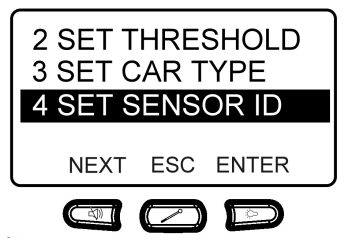
- Press ENTER and the following screen will be displayed.
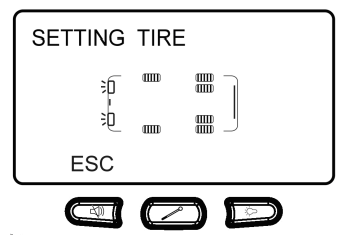
- Insert the battery into your new ‘learnable sensor’ and the corresponding tyre icon will flash, and the monitor will beep. If the monitor doesn’t beep try removing and inserting the battery several times. Only learnable sensors can be used for this function and they must be 433 MHz sensors designed to suit the TD-2200A.
- Once the sensor is programmed, press the ESC button to exit learn mode.
WARNING: KEEP BATTERIES OUT OF REACH OF CHILDREN
Swallowing may lead to serious injury in as little as 2 hours or death due to chemical burns and potential perforation of the oesophagus.
If you suspect your child has swallowed or placed a button battery inside any part of the body seek medical advice immediately.
Australia Poisons Hotline: 13 11 26
New Zealand Poisons Hotline: 080o POISON (0800 764 766)
Documents / Resources
 | TD2200A Programming Replacement Sensor |
References
- User Manualmanual.tools
Published: July 2, 2022
Updated: July 3, 2022
is there any other information related to this article if any please let me know
Is there any additional information or specific requirements for programming replacement sensors for the TYREDOG TD2200A?
Based on the provided manual for the TYREDOG TD2200A, here are the critical details for programming replacement sensors:
Read the full Q&A page