1. Giriş
This manual provides comprehensive instructions for the setup, operation, and maintenance of your GOBOULT Mustang Racer Smart Watch. Please read this manual thoroughly before using the device to ensure proper functionality and to maximize your user experience. Keep this manual for future reference.
2. Kutuda Neler Var?
Paketin içinde tüm öğelerin mevcut olduğundan emin olun:
- GOBOULT Mustang Racer Smart Watch
- Şarj kablosu
- Kullanım Kılavuzu (bu belge)
- Garanti Kartı
3. Ürün Bittiview
Familiarize yourself with the key components of your GOBOULT Mustang Racer Smart Watch.
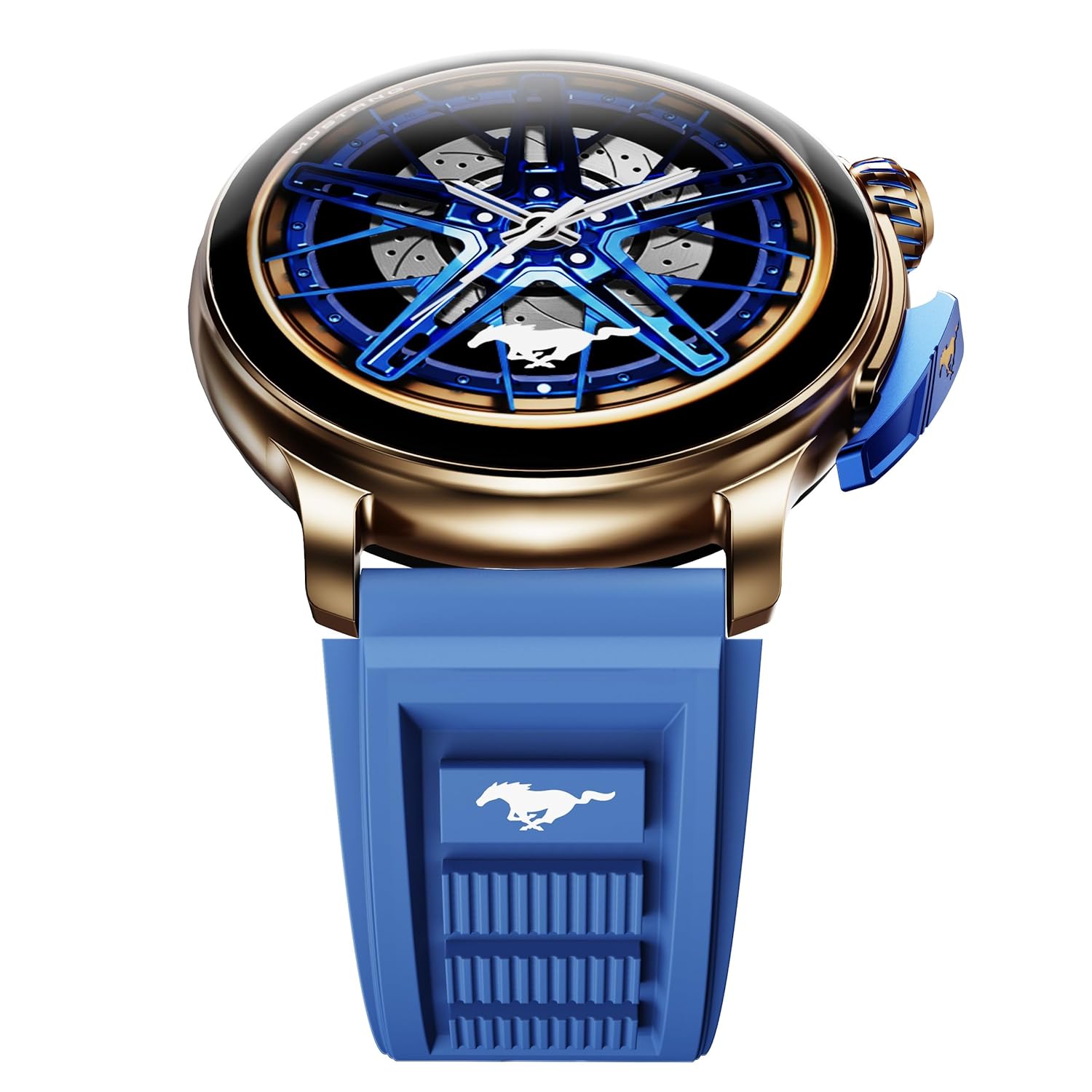
Image: The GOBOULT Mustang Racer Smart Watch, showcasing its 1.43-inch AMOLED display and overall design.
Display and Bezel
The watch features a 1.43-inch AMOLED display with 500 Nits brightness for clear visibility. The functional rotating bezel allows for intuitive navigation through menus and features.

Resim: Ayrıntılı view of the smartwatch's 1.43-inch AMOLED display and the rotating bezel, highlighting its design and brightness.
Buttons and Crown
The watch includes a rotating tyre-tread crown for navigation and selection, along with a functional paddle shifter button for quick access to features.

Image: The smartwatch featuring its functional paddle shifter and rotating crown, designed for enhanced control.
4. Kurulum
4.1. Akıllı Saati Şarj Etme
Before initial use, fully charge your smartwatch. Connect the magnetic charging cable to the charging pins on the back of the watch and plug the USB end into a compatible power adapter (not included) or a computer's USB port. The watch will display a charging indicator. A full charge takes approximately 120 minutes.
4.2. Açma/Kapama
- Güç Açık: Press and hold the main power button (crown) for a few seconds until the GOBOULT logo appears.
- Kapat: From the watch face, swipe down to access quick settings, or navigate to the settings menu. Select "Power Off" and confirm. Alternatively, press and hold the main power button until the power-off option appears.
4.3. Akıllı Telefonunuzla Eşleştirme
To unlock all features, pair your GOBOULT Mustang Racer Smart Watch with the companion app on your smartphone via Bluetooth.
- Download the official GOBOULT app from your smartphone's app store (iOS App Store or Google Play Store).
- Akıllı telefonunuzda Bluetooth'un etkinleştirildiğinden emin olun.
- Open the GOBOULT app and follow the on-screen instructions to create an account or log in.
- In the app, select "Add Device" or similar option.
- Select "GOBOULT Mustang Racer" from the list of available devices.
- Eşleştirme isteğini hem akıllı telefonunuzdan hem de akıllı saatinizden onaylayın.
Eşleştirme işlemi tamamlandıktan sonra, saat verileri telefonunuzla senkronize edecek ve uygulama üzerinden ayarları özelleştirebileceksiniz.

Image: The smartwatch highlighting its Bluetooth V5.3 connectivity for quick syncing and IP67 water resistance.
5. Kullanım Talimatları
5.1. Gezinme
- Yukarı/Aşağı/Sola/Sağa Kaydırın: Navigate through menus, notifications, and quick access panels.
- Musluk: Bir öğeyi seçin veya bir eylemi onaylayın.
- Rotating Bezel/Crown: Rotate to scroll through lists or adjust settings. Press to select or return to the home screen.
- Paddle Shifter Button: Customizable shortcut for frequently used functions (e.g., sports modes).
5.2. Bluetooth Arama
With integrated speaker and microphone, you can make and receive calls directly from your wrist after pairing with your smartphone.
- Saatinizin Bluetooth aracılığıyla telefonunuza bağlı olduğundan emin olun.
- Arama yapmak için: Saatinizdeki arama ekranına veya kişi listesine erişin.
- Gelen aramayı almak için: Saatinizde gelen arama bildirimi görünecektir. Cevaplamak veya reddetmek için dokunun.
5.3. Saat Kadranları
Customize your watch's appearance with over 150 watch faces, including exclusive Mustang designs. Long-press the watch face to change it, or use the companion app for more options.

Resim: Akıllı saat tanıtımıasing multiple watch face options, including exclusive Mustang designs.
5.4. Spor Modları
The watch supports over 120 sports modes to track your physical activities. Access sports modes from the main menu or via the paddle shifter shortcut (if configured).
- Select your desired sport.
- Start the activity. The watch will record metrics such as duration, calories burned, and heart rate.
- End the activity to save data. Review your performance in the app.

Image: The smartwatch displaying a sports tracking interface, indicating its capability to monitor various physical activities.
5.5. Sağlık İzleme
The GOBOULT Mustang Racer Smart Watch provides comprehensive health tracking features:
- 7/24 Kalp Atış Hızı İzleme: Kalp atış hızınızı sürekli olarak takip eder.
- SpO2 Kan Oksijen Doygunluğu Ölçüm Cihazı: Kan oksijen seviyesini ölçer.
- Uyku İzleme: Analyzes sleep patterns (deep sleep, light sleep, awake time).
- Stres İzleme Cihazı: Stres seviyeniz hakkında bilgi sağlar.
- Tansiyon: (Note: Smartwatch blood pressure measurements are for reference only and should not be used for medical diagnosis.)
Access these features from the watch's health menu or view Yardımcı uygulamada ayrıntılı raporlar bulunmaktadır.

Resim: Dahili view of the smartwatch highlighting its health tracking sensors, with text indicating features like heart rate, SpO2, sleep, and stress monitoring.
5.6. Yapay Zeka Sesli Asistanı
Activate the AI Voice Assistant on your watch to perform tasks, set reminders, or get information using voice commands. Ensure your watch is connected to your phone for this feature to function.
5.7. Akıllı Bildirimler
Receive notifications for calls, messages, and app alerts directly on your watch. Manage notification settings through the GOBOULT app.
5.8. Always On Display
The Always On Display feature allows the time and essential information to remain visible on the screen without needing to raise your wrist or press a button. This feature can be enabled or disabled in the watch settings to manage battery consumption.

Image: The smartwatch displaying the time and a car image, illustrating the Always On Display functionality.
6. Özellikler ve Teknik Özellikler
Temel Özellikler:
- 1.43" AMOLED Display with 500 Nits Brightness
- Bluetooth Calling (BT V5.3)
- Rotating Bezel for intuitive control
- 150+ Watch Faces, including exclusive Mustang designs
- AI Ses Yardımcısı
- Health Monitoring: SpO2, Heart Rate, Sleep, Stress, Blood Pressure
- 120+ Spor Modu
- IP67 Suya Dayanıklı
- Up to 7-day battery runtime with fast charging
Teknik Özellikler:
| Marka | GOBOULT |
| Model Numarası | GOBOULT Mustang Racer |
| Ekran Boyutu | 1.43 inç |
| Kablosuz Tip | Bluetooth V5.3 |
| Pil Şarj Süresi | 120 Dakika |
| Pil Enerji İçeriği | 1.11 Watt Saat |
| Suya Dayanıklılık | IP67 |
| Ürün Ağırlığı | 55 gr |
| Menşei ülke | Çin |
7. Bakım
7.1. Akıllı Saatinizi Temizleme
Düzenli temizlik, saatin görünümünü ve işlevselliğini korumaya yardımcı olur:
- Ekranı ve gövdeyi yumuşak, tiftiksiz bir bezle silin.
- İnatçı lekeler için hafifçeampBezi suyla yıkayın. Sert kimyasallar veya aşındırıcı malzemeler kullanmaktan kaçının.
- Şarj işleminin düzgün bir şekilde gerçekleşmesi için şarj temas noktalarını düzenli aralıklarla kuru bir bezle temizleyin.
7.2. Suya Dayanıklılık (IP67)
The GOBOULT Mustang Racer Smart Watch is IP67 water resistant, meaning it can withstand immersion in up to 1 meter of fresh water for up to 30 minutes. It is suitable for daily use and light splashes. However, it is not recommended for swimming, showering with hot water, or diving. Avoid exposure to saltwater or chemicals, as this may damage the device.
7.3. Pil Bakımı
- Pilin sık sık tamamen boşaltılmasından kaçının.
- Uzun süre kullanılmayacaksa saati serin ve kuru bir yerde saklayın.
- Yalnızca birlikte verilen şarj kablosunu kullanın.
8. Sorun Giderme
| Sorun | Olası Çözüm |
|---|---|
| Saat açılmıyor. | Saatinizin tam şarjlı olduğundan emin olun. Saatinizi en az 30 dakika şarj cihazına takın. |
| Akıllı telefonla eşleştirilemiyor. |
|
| Yanlış sağlık verileri. |
|
| Kısa pil ömrü. |
|
9. Garanti ve Destek
Your GOBOULT Mustang Racer Smart Watch comes with a warranty as specified on the included Warranty Card. Please refer to the card for details regarding warranty period, coverage, and terms and conditions.
For technical support, product inquiries, or warranty claims, please contact GOBOULT customer service through the contact information provided on your Warranty Card or visit the official GOBOULT webalan.
Dahil Bileşenler: Charging Cable, Mustang Racer Apex Blue Smart watch, User Manual, Warranty Card


