1. Giriş
Thank you for choosing the GREATEN AP 500 Pro Electronic Wind Instrument. This manual provides essential information for setting up, operating, and maintaining your instrument to ensure optimal performance and enjoyment. The AP 500 Pro is designed for musicians of all skill levels, offering a versatile range of sounds and expressive controls.
2. Kutuda Neler Var?
- GREATEN AP 500 Pro Electronic Wind Instrument
- Taşıma Çantası
- Kullanıcı Kılavuzu
- USB kablosu
- Dahili Kayıt Kablosu
- Yedek Ağızlık
3. Ürün Bittiview
The GREATEN AP 500 Pro features an OLED color screen, dual sound mode, an upgraded mouthpiece, a built-in metronome, and voice control for a rich and expressive musical experience.

Şekil 1: Üzeriview GREATEN AP 500 Pro Elektronik Üflemeli Çalgı ve başlıca özellikleri.
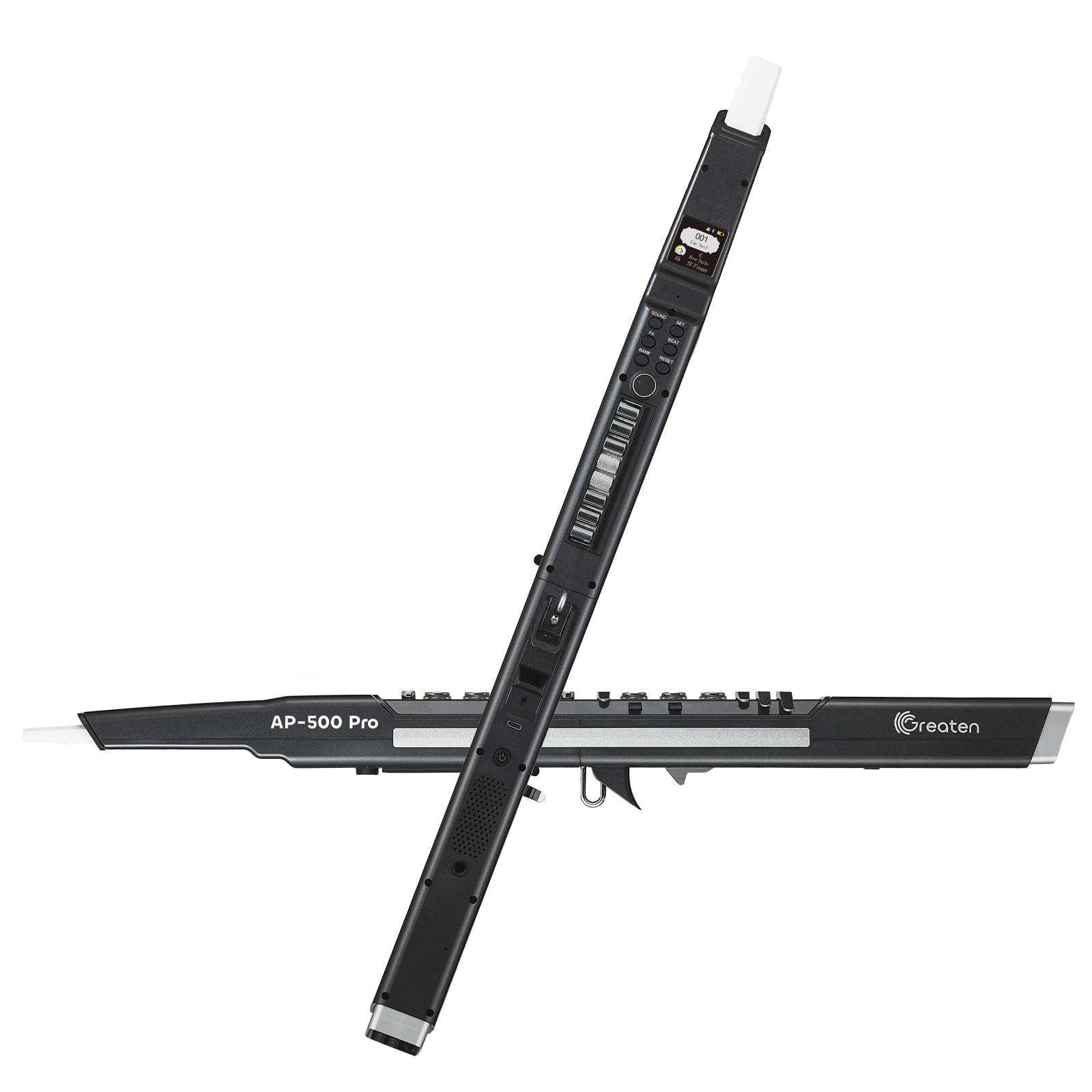
Figure 2: The GREATEN AP 500 Pro Electronic Wind Instrument in black.
4. Kurulum
4.1 Güç Açma/Kapatma
To power on your AP 500 Pro, press and hold the power button until the light turns on. To turn it off, press and hold the power button again.
Video 1: Demonstrates how to power on and off the GREATEN AP 500 Pro.
4.2 Boyun Askısının Takılması
Secure the neck strap by clipping it onto the instrument. Hold the instrument vertically in front of you, similar to how you would hold a saxophone or clarinet.
4.3 Adjusting the Thumb Hook
Place your left thumb on the octave rollers on the back and your right thumb under the thumb hook. This ensures optimal conductivity and performance. If you need more space between your right thumb and the thumb controller, you can adjust the position of the thumb hook and controller. Loosen the screw, adjust the thumb hook to a comfortable position, and then tighten the screw. For the thumb controller, you can pull it off, reverse it, and install it again to suit your preference.
Video 2: Guide on adjusting the thumb hook for comfortable playing.

Figure 3: Illustration of the functional key position for optimal grip.
5. Çalıştırma
5.1 Playing Basics
When playing, simply touch the buttons; there's no need to press hard as they are touch-sensitive. The AP 500 Pro offers a variety of sounds and fingerings to explore.
5.2 Ses Seçimi
The AP 500 Pro offers 120 tones, including tenor saxophone, soprano saxophone, violin, and English horn. You can find a complete list of all available sounds in the user manual. Experiment with different instrument sounds and have fun!
Video 3: Demonstrates how to change sounds and volume on the GREATEN AP 500 Pro.
5.3 Fingering Settings
As a beginner, it is recommended to start with the standard fingering, which is designed to be easy for new wind instrument players. You can select your preferred fingering system through the "FINGER" option in the menu. The saxophone fingering offers additional alternative fingerings.

Figure 4: The AP 500 Pro offers a familiar feel for experienced wind players and a fun challenge for beginners.

Figure 5: Saxophone Fingering Chart.

Figure 6: Standard Fingering Chart.

Figure 7: Flute Fingering Chart.

Figure 8: Trumpet Fingering Chart.
5.4 Breath Sensitivity
The instrument's breath sensor captures your breath and adjusts the sound volume. You can adjust the breath sensor sensitivity to make sound production easier, especially for beginners. To do this, hold the SET button, use the rotary button to find "Breath", and adjust the sense value to above 100.
Video 4: Instructions on how to adjust the breath sensitivity.

Figure 9: Adjusting breath settings via the OLED display.
5.5 Reverb Settings
Enhancing your sound with reverb can create a better output effect. To adjust reverb, press and hold the FX button, use the rotary button to find "Reverb", and adjust the level as you like.
5.6 Octave Rollers
Using the octave rollers is straightforward. Use your left thumb to switch octaves from C1 up to C7, depending on your needs. Try to hold still to the octave rollers while playing. If your left thumb accidentally moves on different rollers, it will change the tune.
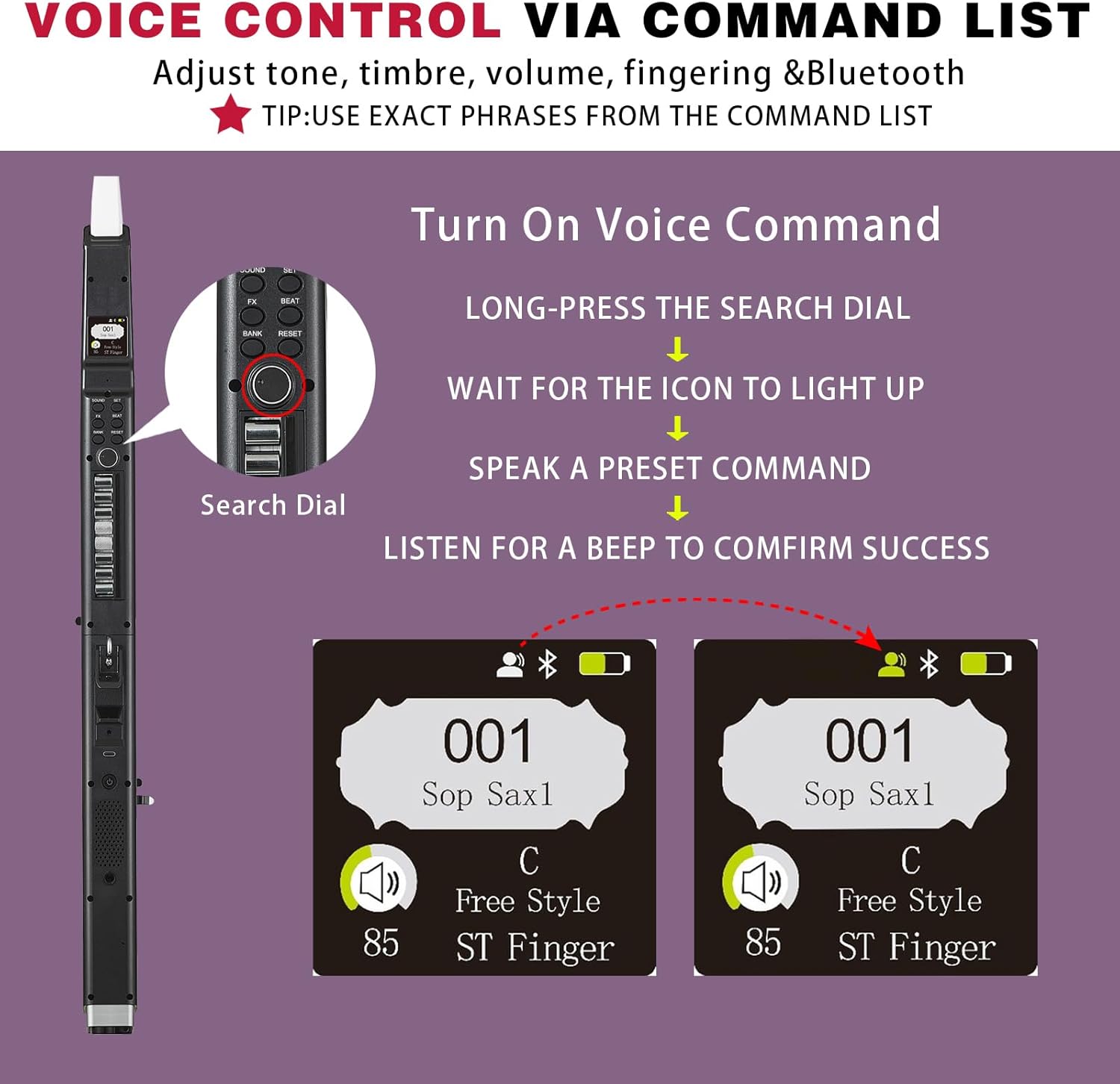
Figure 10: Close-up of the octave rollers on the back of the instrument.
5.7 Touch Bend Plate (Glide Bar)
The touch bend plate allows you to add expressive glide effects to your music, much like a portamento on a string instrument. Simply slide your finger up and down on the bar while playing a note. You can adjust the pitch bend effect by holding the SET button, using the rotary button to find "Pitch Bend", and adjusting the value. Push the thumb controller up to bend the pitch up, or down to bend it down.
Video 5: Demonstrates the pitch bend functionality using the thumb controller.
5.8 Vibrato Techniques
Adding vibrato can make your performance stand out. There are three modes: Free Vibrato (bite mouthpiece repeatedly), Bite Vibrato (hold steady bite), and Auto Vibrato (produces automatically after holding a long note). For beginners, practicing with Semi Auto is suggested as vibrato takes time to master.
5.9 Growl Effect
The growl effect adds a raspy, vibrant texture to your sound. To enable it, press and hold SET, use the rotary button to find "Skill Set", and release SET. Then select "Open" for the growl effect. If you don't require the Growl Effect, you can turn it off to avoid disrupting your regular practice.
5.10 Ayarları Kaydetme ve Geri Çağırma
If you have favorite settings (sound types, breath settings, etc.) that you'd like to save for quick access, you can use the four bank buttons. Once your settings are configured, press and hold one of the bank buttons to save. Press briefly to recall them.
Video 6: Learn how to set shortcut key operations for quick access to your favorite settings.
5.11 Ses Kontrolü
The AP 500 Pro supports voice control to simplify your playing experience. Quickly check tones, modes, and voice commands with the bright, easy-to-read OLED display.

Figure 11: Instructions for using voice commands to control instrument settings.
5.12 Çift Ses Modu
The Dual Sound Mode allows you to blend two different tones simultaneously for a richer, more expressive performance.

Figure 12: The Dual Mode Sound feature allows mixing two tones for unique sounds.
5.13 Built-in Metronome
Master your rhythm with ease using the built-in metronome. You can adjust the beat/tempo settings directly on the OLED display.
Video 7: How to adjust metronome settings on the GREATEN AP 500 Pro.

Figure 13: Adjusting Beat/Tempo settings for the built-in metronome.
6. Bağlantı
6.1 Kulaklık Çıkışı
For silent practice, you can connect your headphones using a standard 1/8" (3.5mm) stereo headphone jack. Remember to use headphones without a mic jack to ensure the best sound quality.
6.2 Harici Ampcankurtaran
For a more robust sound, you can connect to an external amplifier using a standard 1/4" (6.35mm) cable. Note that the line out is mono, so use a TS cable if connecting to a mono input like most keyboard amplifiers or audio interfaces.
6.3 Bluetooth Bağlantısı
The AP 500 Pro can connect to your phone or tablet via Bluetooth for playing background music. It's important to note that it's Bluetooth IN, meaning other devices can send sound to the instrument, not the other way around.
6.4 MIDI Bağlantısı
The AP 500 Pro can be connected to a computer for MIDI use. This allows you to use the instrument as a MIDI controller with supported software like Ableton Live.
Video 8: How to connect the GREATEN AP 500 Pro to a computer for MIDI use.

Figure 14: Location of the OTG port for connectivity.
7. Bakım
7.1 Mouthpiece Cleaning
Don't forget to clean the mouthpiece regularly to keep your instrument in top shape. Use a soft, damp cloth to gently wipe the mouthpiece after each use.
8. Sorun Giderme
8.1 Pitch Changes Suddenly
If the pitch changes suddenly during play, ensure your left thumb is held still on the octave rollers. Accidental movement can cause pitch shifts.
Video 9: How to fix sudden pitch changes during play.
8.2 Note Keys Not Responding
If the note keys are not responding as expected, ensure proper finger placement and light touch, as they are touch-sensitive. Adjusting breath sensitivity can also help.
Video 10: Guide on how to make the note keys respond effectively.
9. Özellikler
| Özellik | Detay |
|---|---|
| Model Adı | AP-500 Pro |
| Boyutlar | 29.4 x 1.77 x 1.65 inç |
| Ürün Ağırlığı | 1.79 Pound |
| Güç Kaynağı | Pil ile çalışır |
| Bağlantı Teknolojisi | USB, Bluetooth |
| Özel Özellikler | Touch-Sensitive Bend Plate, OLED Color Display, Built-in Metronome, MIDI Output, Voice Control |
| Anahtar Sayısı | 23 |
| Beceri Seviyesi | Tüm |
| Gövde Malzemesi | Plastik |
| Desteklenen Yazılımlar | Ableton Canlı |
10. Garanti ve Destek
For warranty information and customer support, please refer to the contact details provided in the packaging or visit the official GREATEN website. Our customer service team is dedicated to assisting you with any questions or issues you may encounter.

