1. Giriş
This manual provides detailed instructions for the AULA S99 99-Key Tri-Mode Wireless RGB Gaming Keyboard. Please read this manual thoroughly before use to ensure proper operation and to maximize your experience with the product.
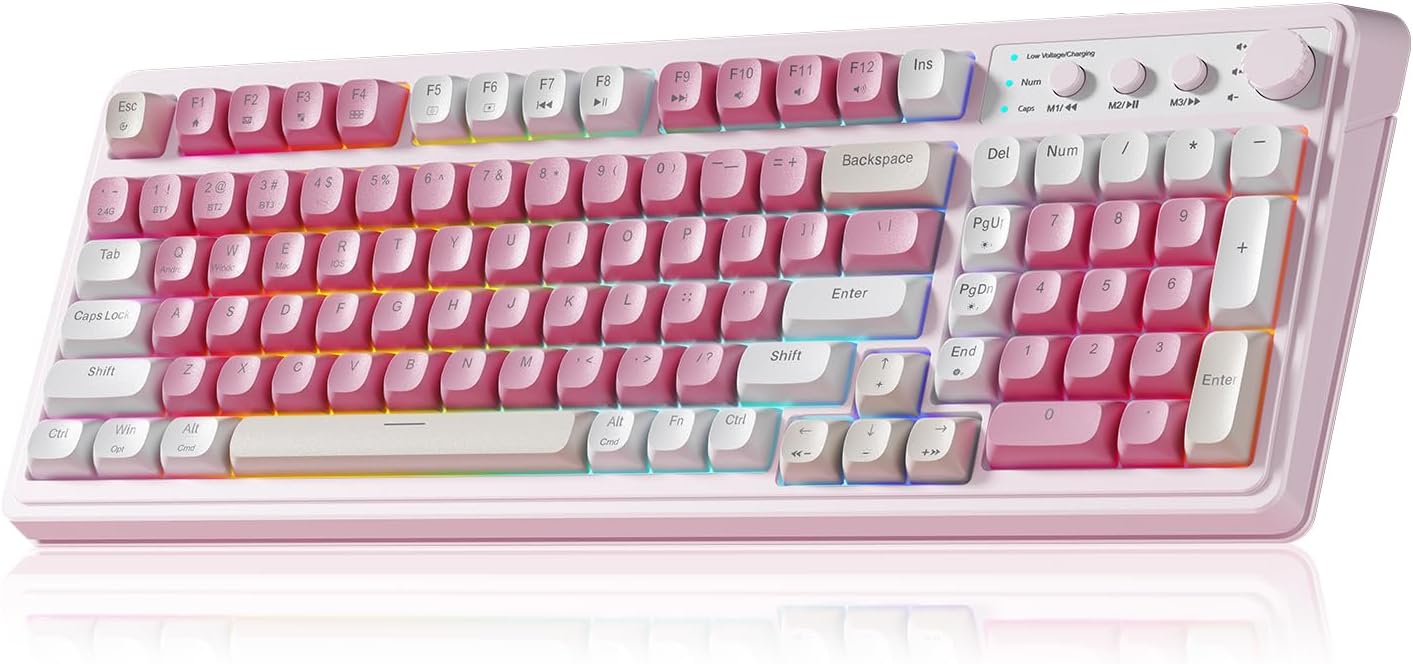
Figure 1: AULA S99 99-Key Tri-Mode Wireless RGB Gaming Keyboard (Pink variant).
2. Kutuda Neler Var?
- 1x AULA S99 99-Key Tri-Mode Wireless RGB Gaming Keyboard - Pink
- 1x Type-C Cable (Please use our original charging cable, otherwise it may damage the keyboard)
- 1x Tuş Çektirmesi
- 1x Kullanım Kılavuzu
3. Ürün Bittiview
The AULA S99 keyboard is designed for versatility and performance, featuring a compact 99-key layout that includes a number pad. It offers multiple connectivity options, vibrant RGB backlighting, and ergonomic considerations for extended use.

Figure 2: Key features of the AULA S99 keyboard.
Temel Özellikler:
- 99-Tuş Düzeni: Compact design with a dedicated number pad.
- Üç Modlu Bağlantı: Supports Bluetooth 5.0, 2.4GHz wireless, and USB wired connections.
- RGB Arka Aydınlatma: 16.8 million colors with 16 pre-set lighting effects, adjustable brightness and speed.
- Programlanabilir Tuşlar: M1/M2/M3 buttons for macro customization.
- Çok fonksiyonlu Düğme: Adjusts volume, connection mode, and backlight settings.
- Ergonomik Tasarım: Features a foldable 2-stage kickstand for adjustable tilt angles.
- Uzun Ömürlü Pil: Equipped with a 2000mAh battery.
- Not: This is a membrane keyboard and does not support hot-swapping of switches.
4. Kurulum
The AULA S99 keyboard offers three connection modes: Bluetooth, 2.4GHz wireless, and USB wired. Follow the instructions below to set up your preferred connection.

Figure 3: Triple Mode Connection options for the AULA S99 keyboard.
4.1. Bağlantı Modlarını Değiştirme
Fabrika ayarlarını geri yüklemek için, tuşuna basın FN + Esc. Then, quickly switch keyboard modes using FN + ' ~ ! 1(1) / @ 2(#) / # 3($) anahtarlar.
4.2. 2.4 GHz Kablosuz Bağlantı
- Switch the mode button on the keyboard to 2.4G.
- Basmak FN + 4($). The Num indicator (blue) will flash rapidly.
- Insert the 2.4GHz USB receiver into your device.
- The Num indicator will flash slowly upon successful connection.
4.3. Bluetooth Bağlantısı
- Switch the mode button on the keyboard to BT.
- Basmak FN + 1(!), FN + 2(@), veya FN + 3(#) to select a Bluetooth channel. The CAP indicator will flash rapidly.
- On your device, search for
İlgili Belgeler - S99

AULA Wolf Spider SC100 Kablosuz Oyun Faresi Kullanım Kılavuzu
AULA Wolf Spider SC100 kablosuz oyun faresine ait detaylı kullanım kılavuzu; tuş düzeni, ürün özellikleri, kurulum, kullanım talimatları, çevre koruma sertifikası ve garanti bilgilerini kapsamaktadır.
AULA Mountain S99 Gaming Keyboard User Manual
Discover the features and functions of the AULA Mountain S99 Gaming Keyboard. This manual provides detailed information on connectivity, shortcuts, charging, and mode switching for an optimal gaming experience.
AULA F87 Mekanik Klavye Kullanım Kılavuzu
AULA F87 Mekanik Klavye'nin 3 modlu bağlantısını (USB Type-C, 2.4G, Bluetooth), anti-ghosting özelliklerini, manuel eşleştirme işlemini, şarj göstergelerini ve RGB aydınlatmasını ayrıntılı olarak açıklayan kullanıcı kılavuzu.
AULA S99Pro Tri-Mode Gaming Keyboard User Manual
Comprehensive guide for the AULA S99Pro Tri-Mode Gaming Keyboard, covering wired, 2.4G wireless, and Bluetooth connections, key functions, backlight adjustments, and charging instructions.
AULA F98 Pro User Manual: Setup, Features, and Customization
Comprehensive user manual for the AULA F98 Pro wireless mechanical keyboard. Learn how to turn the keyboard on/off, navigate the LCD screen and knob functions, connect via Bluetooth, 2.4GHz, or USB-C, customize RGB lighting, and utilize software features.
AULA F87 3-Mode Mechanical Keyboard Quick Operation Guidelines
A comprehensive guide to operating the AULA F87 3-Mode Mechanical Keyboard, covering 2.4G and Bluetooth connectivity, as well as wired connection.