giriiş
Satın aldığınız için teşekkür ederizasing the DOSS Extreme Boom Pro D100 Bluetooth Speaker. This manual provides essential information for setting up, operating, and maintaining your speaker to ensure optimal performance and longevity. The DOSS Extreme Boom Pro D100 delivers powerful 70W sound with enhanced bass, features beat-sync lights, and is IPX6 waterproof, making it ideal for both indoor and outdoor use.
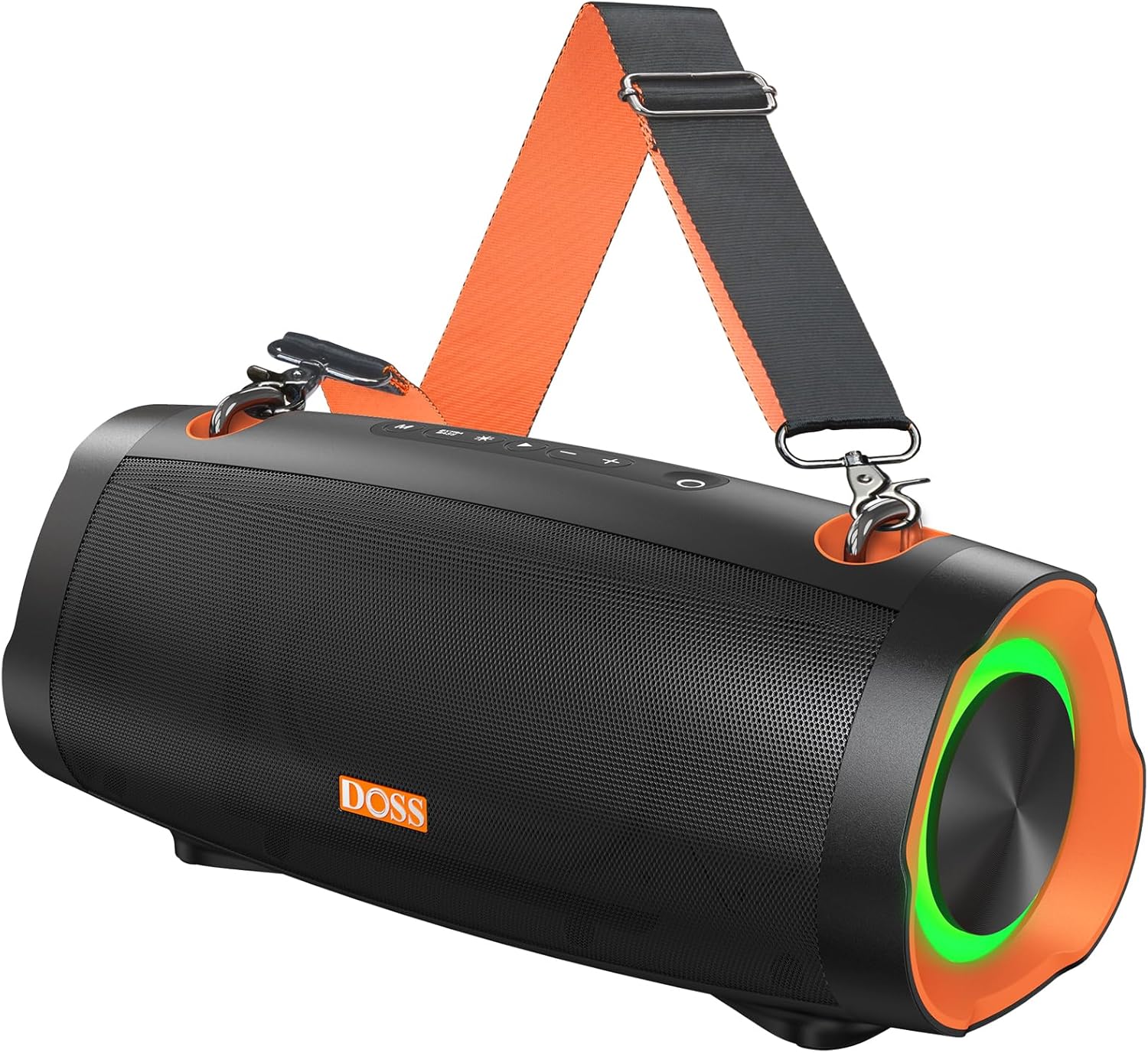
Image: The DOSS Extreme Boom Pro D100 Bluetooth Speaker, showcasing its robust design and integrated shoulder strap for portability.
Paket İçeriği
Lütfen paketi aşağıdaki öğeler açısından kontrol edin:
- DOSS Extreme Boom Pro D100 Bluetooth Speaker
- USB-C Şarj Kablosu
- Ayarlanabilir Omuz Askısı
- Kullanım Kılavuzu (bu belge)
Ürün Bittiview ve Kontroller
Hoparlörün yerleşimini ve kontrollerini iyice öğrenin:

Resim: Patlamış bir view illustrating the internal components of the DOSS Extreme Boom Pro D100, highlighting its 70W sound system with full-range drivers and tweeters.
Kontrol Paneli (Üst) View)
- Güç Düğmesi: Açmak/kapatmak için basılı tutun. Pil durumunu kontrol etmek için kısa süre basın.
- Bluetooth Düğmesi: Bluetooth eşleştirme moduna girmek için kısa basın. Mevcut cihazı bağlantısını kesmek için basılı tutun.
- Sesi kıs (-): Sesi kısmak için kısa basın. Önceki parçaya geçmek için basılı tutun.
- Oynat/Duraklat Düğmesi: Müziği çalmak/duraklatmak için kısa basın.
- Sesi Aç (+): Sesi açmak için kısa basın. Sonraki parça için basılı tutun.
- Bas Güçlendirme Düğmesi: Short press to activate/deactivate Extra Bass mode.
- Işık Modu Düğmesi: Short press to cycle through light modes. Press and hold to turn lights on/off.
- TWS Düğmesi: Press to initiate True Wireless Stereo pairing.
Ports (Rear/Side View)
- USB-C Şarj Portu: Hoparlörü şarj etmek için.
- USB-A Çıkış Bağlantı Noktası: Hoparlörü diğer cihazları şarj etmek için taşınabilir şarj cihazı olarak kullanmak amacıyla.
- AUX-in Portu: Kablolu ses bağlantısı için.
Kurmak
1. Hoparlörü Şarj Etme
Before first use, fully charge the speaker. Connect the provided USB-C charging cable to the speaker's USB-C port and the other end to a compatible USB power adapter (not included). The LED indicator will show charging status and turn off when fully charged.
2. Açma/Kapama
Basılı tutun Güç Düğmesi for 2 seconds to turn the speaker on or off. A sound prompt will indicate the power status.
3. Bluetooth Eşleştirme
- Hoparlörü açın. Yanıp sönen mavi LED ile belirtildiği gibi otomatik olarak Bluetooth eşleştirme moduna girecektir.
- Cihazınızda (akıllı telefon, tablet vb.) Bluetooth özelliğini etkinleştirin.
- Select "DOSS Extreme Boom Pro D100" from the list of available devices.
- Bağlantı kurulduktan sonra LED göstergesi sabit mavi renkte yanacak ve bir onay sesi duyacaksınız.
If the speaker does not appear, ensure it is not connected to another device or press the Bluetooth button to force pairing mode.
Kullanım Talimatları
Müzik Çalma
- Oynat/Duraklat: Kısa basın Oynat/Duraklat Düğmesi.
- Sesi Aç/Kapat: Kısa basın Cilt + or Hacim - düğmeler.
- Sonraki Parça: Basılı tutun Cilt + düğme.
- Önceki parça: Basılı tutun Hacim - düğme.
Ekstra Bas Modu
Basın Bas Güçlendirme Düğmesi to toggle the Extra Bass mode on or off. This enhances low frequencies for a deeper, richer sound experience.
Dinamik Işık Gösterisi
The speaker features dynamic LED lights that sync with the music. Short press the Işık Modu Düğmesi to cycle through different light patterns. Press and hold the Işık Modu Düğmesi Işıkları açmak veya kapatmak için.

Image: The DOSS Extreme Boom Pro D100 speaker displaying its dynamic light show, enhancing the atmosphere at a social gathering by a pool.
Gerçek Kablosuz Stereo (TWS) Eşleştirme
You can pair two DOSS Extreme Boom Pro D100 speakers together for an immersive stereo sound experience.
- Her iki hoparlörün de açık olduğundan ve herhangi bir Bluetooth cihazına bağlı olmadığından emin olun.
- Hoparlörlerden birinde (bu ana hoparlör olacaktır), kısa bir süre basılı tutun. TWS DüğmesiHoparlör TWS eşleştirme moduna girecektir.
- The primary speaker will automatically search for the secondary speaker. Once connected, you will hear a confirmation sound, and the TWS indicator will illuminate on both speakers.
- Şimdi, "Bluetooth Eşleştirme" bölümünde açıklandığı gibi cihazınızı Bluetooth aracılığıyla ana hoparlöre bağlayın.

Image: Two DOSS Extreme Boom Pro D100 speakers positioned outdoors, demonstrating their True Wireless Stereo (TWS) capability for enhanced audio.
Güç Bankası olarak kullanma
The DOSS Extreme Boom Pro D100 can charge other devices using its built-in battery.
- Connect your device's charging cable to the USB-A output port on the speaker.
- The speaker will automatically begin charging your device.
Note: Using the speaker as a power bank will reduce its audio playback time.
Shoulder Strap Usage
Attach the adjustable shoulder strap to the designated loops on the speaker for convenient portability, especially during outdoor activities like hiking or campIng.

Image: A person carrying the DOSS Extreme Boom Pro D100 speaker using its detachable shoulder strap, highlighting its portability for outdoor use.
Bakım
Temizlik
Hoparlörü yumuşak bir bezle silin.amp cloth. Do not use harsh chemicals or abrasive cleaners. Ensure all ports are dry before charging or connecting other devices.
IPX6 Su Geçirmezlik Derecesi
The DOSS Extreme Boom Pro D100 is IPX6 waterproof, meaning it is protected against high-pressure water jets from any direction. It is suitable for use in rainy conditions or near water bodies like pools and beaches. However, it is suya batırılmak üzere tasarlanmamıştır. Ensure the charging port cover is securely closed before exposing the speaker to water.

Image: The DOSS Extreme Boom Pro D100 speaker being splashed with water, illustrating its IPX6 waterproof capability, suitable for outdoor environments.
Depolamak
Store the speaker in a cool, dry place away from extreme temperatures and direct sunlight. If storing for an extended period, charge the battery to about 50% every few months to preserve battery life.
Sorun giderme
| Sorun | Olası Neden | Çözüm |
|---|---|---|
| Hoparlör açılmıyor. | Pil zayıf; Güç düğmesine yeterince uzun süre basılmamış. | Hoparlörü tamamen şarj edin. Güç düğmesini 2 saniye basılı tutun. |
| Bluetooth üzerinden eşleştirme yapılamıyor. | Speaker is already connected to another device; Bluetooth is off on your device; Speaker is too far from device. | Disconnect from previous device or press Bluetooth button to force pairing. Ensure Bluetooth is enabled on your device. Move speaker closer to device (within 10 meters). |
| Ses yok veya ses seviyesi düşük. | Volume too low on speaker or device; Speaker not connected properly. | Increase volume on both speaker and connected device. Re-pair Bluetooth connection. |
| TWS eşleştirmesi başarısız. | Speakers are too far apart; One speaker is already connected to a Bluetooth device. | Ensure both speakers are within 5 meters of each other. Disconnect any Bluetooth devices from both speakers before initiating TWS pairing. |
| Işık gösterisi çalışmıyor. | Lights are turned off; Speaker is in a mode that doesn't support lights. | Press the Light Mode button to cycle through modes or press and hold to turn lights on. |
Özellikler
| Özellik | Detay |
|---|---|
| Model Adı | Extreme Boom Pro D100 |
| Hoparlör Tipi | Dış mekan |
| Ses Çıkışı | 70W RMS (140W Tepe) |
| Özel Özellik | Bass Boost, Beat-Sync Lights, Power Bank Function |
| Bağlantı Teknolojisi | Bluetooth |
| Ses Çıkışı Modu | Stereo (TWS ile) |
| Pil Ömrü | 24 Saate Kadar |
| Su Geçirmezlik Derecesi | IPX6 |
| Ürün Boyutları | 34.7D x 16.4G x 17.4Y Santimetre |
| Ağırlık | 2.39 kilo |
| Uyumlu Cihazlar | Gaming Console, Karaoke Machine, Laptop, Smartphone, Tablet, Television |
Güvenlik Bilgileri
- Hoparlörü aşırı sıcaklıklara, doğrudan güneş ışığına veya açık aleve maruz bırakmayın.
- Hoparlörü sökmeyin, tamir etmeyin veya üzerinde değişiklik yapmayın. Bu, garantiyi geçersiz kılacaktır.
- Hoparlörü çocuklardan ve evcil hayvanlardan uzak tutun.
- Yalnızca verilen şarj kablosunu veya sertifikalı bir eşdeğerini kullanın.
- Hoparlörü düşürmekten veya sert darbelere maruz bırakmaktan kaçının.
- Ensure the charging port cover is securely closed when not charging, especially when near water.
Garanti ve Destek
DOSS products come with a limited warranty. For detailed warranty information, product support, or technical assistance, please visit the official DOSS webSite üzerinden satın alabilir veya müşteri hizmetleriyle iletişime geçebilirsiniz. Satın alma belgenizi saklayın.
Official DOSS Store: Amazon'daki DOSS Mağazasını ziyaret edin.


