giriiş
Thank you for choosing the MEGATEK Portable CD Player. This device is designed to provide a versatile and high-quality audio experience, supporting various media formats and offering multiple connectivity options. Please read this manual carefully to ensure proper use and maintenance of your new CD player.

Image: The MEGATEK Portable CD Player, showcasing its compact design, integrated speakers, control buttons, and included accessories like headphones and USB-C charging cables.
Güvenlik Bilgileri
Güvenli çalışmayı sağlamak ve hasarı önlemek için lütfen aşağıdaki önlemlere uyun:
- Cihazı aşırı sıcaklıklara, neme veya doğrudan güneş ışığına maruz bırakmayın.
- Cihazı düşürmekten veya güçlü darbelere maruz bırakmaktan kaçının.
- Cihazı kendiniz sökmeyin veya tamir etmeye çalışmayın. Tüm servis işlemlerini yetkili personele yaptırın.
- Yalnızca ürünle birlikte verilen şarj kablosunu ve uyumlu bir güç adaptörünü kullanın.
- Cihazınızı su ve diğer sıvılardan uzak tutunuz.
- Cihazı yumuşak ve kuru bir bezle temizleyin. Aşındırıcı temizleyiciler veya çözücüler kullanmayın.
- Uzun süre yüksek seste dinlemek işitme kaybına yol açabilir. Ses seviyesini güvenli bir seviyeye ayarlayın.
Paket İçeriği
Paketin içinde tüm öğelerin mevcut olduğundan emin olun:
- MEGATEK Portable CD Player - Black
- Kablolu Kulaklıklar
- USB-C Şarj Kablosu
- Kullanıcı Kılavuzu

Image: A visual representation of the package contents, including the CD player, headphones, USB-C cable, and user manual.
Ürün Bittiview
Familiarize yourself with the various parts and controls of your MEGATEK Portable CD Player.
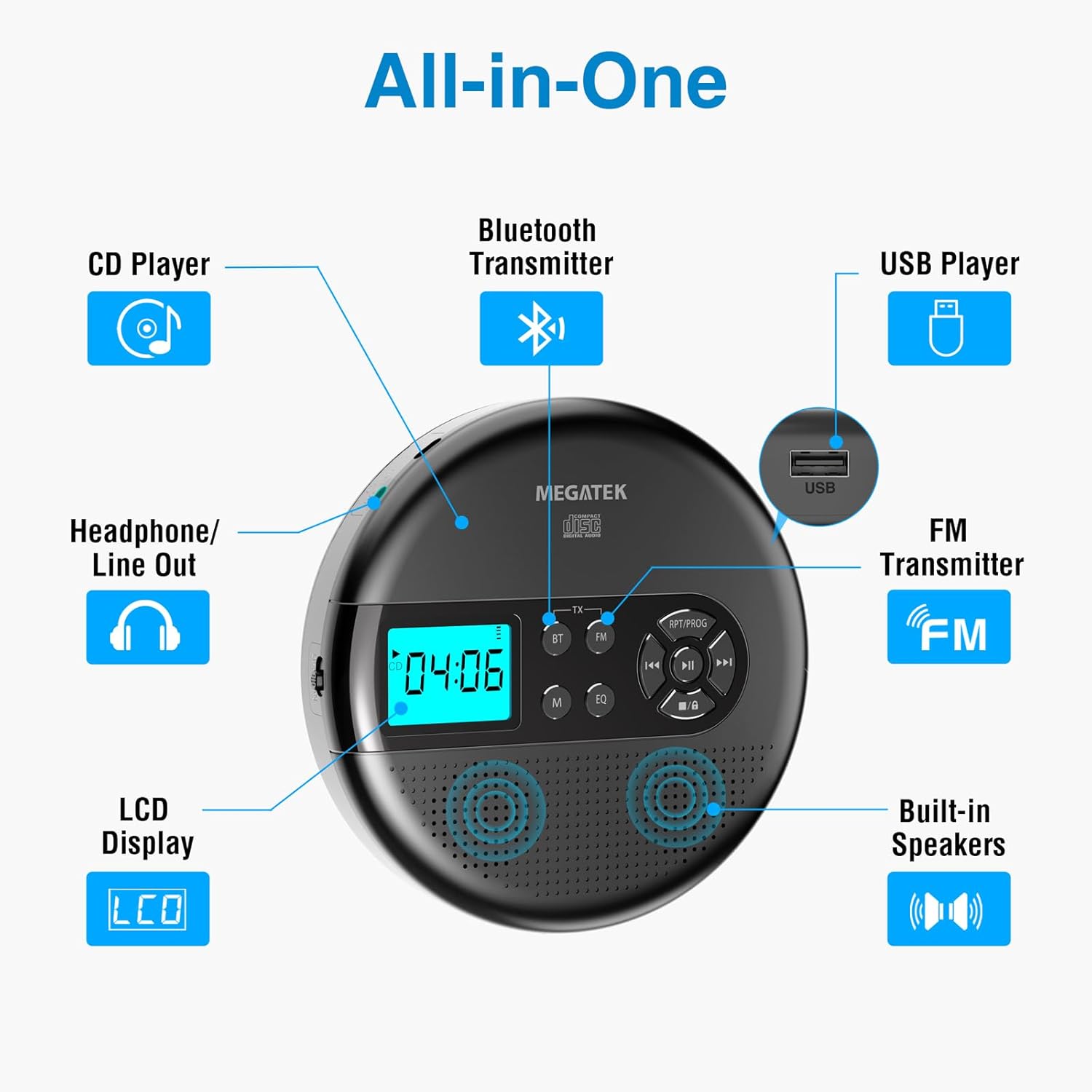
Image: An "All-in-One" diagram highlighting key features such as the CD Player, Bluetooth Transmitter, USB Player, FM Transmitter, Built-in Speakers, LCD Display, and Headphone/Line Out port.
Kontroller ve Bağlantı Noktaları:
- LCD Ekran: Shows track number, time, mode, and battery status.
- Oynat/Duraklat Düğmesi: Oynatmayı başlatır veya duraklatır.
- Önceki/Sonraki Düğmeleri: Parçaları atlar veya ileri/geri sarar.
- Durdurma düğmesi: Oynatmayı durdurur.
- RPT/PROG Button: Controls repeat modes and programming tracks.
- BT Düğmesi: Bluetooth iletim modunu etkinleştirir.
- FM Düğmesi: Activates FM transmission mode.
- M (Mod) Düğmesi: Switches between CD, USB, Bluetooth, and FM modes.
- EQ Düğmesi: Ekolayzır ön ayarları arasında geçiş yapar.
- Ses Kontrolü: Ses çıkış seviyesini ayarlar.
- USB Bağlantı Noktası: Ses oynatmak için files bir USB sürücüsünden.
- C Tipi Şarj Bağlantı Noktası: Dahili bataryayı şarj etmek için.
- 3.5mm Audio Out Jack: Kulaklık veya harici hoparlör bağlamak için.
- Dahili Stereo Hoparlörler: Doğrudan ses oynatımı için.
Kurmak
Pilin Şarj Edilmesi:
The device is equipped with a built-in 2000mAh rechargeable Li-ion battery. Before first use, fully charge the player.
- Connect the provided USB-C charging cable to the Type-C charging port on the player.
- USB-C kablosunun diğer ucunu bir USB güç adaptörüne (dahil değildir) veya bilgisayarın USB portuna bağlayın.
- The battery indicator on the LCD display will show charging status. A full charge provides up to 15 hours of playtime at medium volume.

Image: The portable CD player connected to a power source via its USB-C cable, resting on a nightstand next to a bed.
CD takma:
- Locate the CD compartment latch/button on the side of the player and slide/press it to open the lid.
- Carefully place the CD onto the center spindle with the label side facing up.
- CD'yi yerine oturana kadar yavaşça bastırın.
- CD bölmesinin kapağını yerine oturana kadar sıkıca kapatın.

Image: The portable CD player with its lid open, showing a blue CD disc inserted into the compartment, ready for playback.
Kullanım Talimatları
CD Oynatma:
- Kurulum bölümünde açıklandığı gibi bir CD takın.
- Basın Oynat/Duraklat Oynatmayı başlatmak için düğmesine basın.
- Kullanın Önceki/Sonraki buttons to navigate between tracks. Hold to fast-forward or rewind.
- Basın RPT/PROG button to cycle through repeat modes (repeat one, repeat all, random) or to program a custom playback order.
- Basın Durmak Oynatmayı sonlandırmak için düğme.
- Adjust volume using the dedicated volume control.
USB Oynatma:
The player supports MP3, WMA, and WAV audio files bir USB sürücüsünden.
- USB flash sürücüyü USB bağlantı noktasına takın.
- Basın M (Mod) USB moduna geçmek için düğmesine basın.
- Kullanın Oynat/Duraklat, Önceki/Sonraki, Ve RPT/PROG buttons as you would for CD playback.
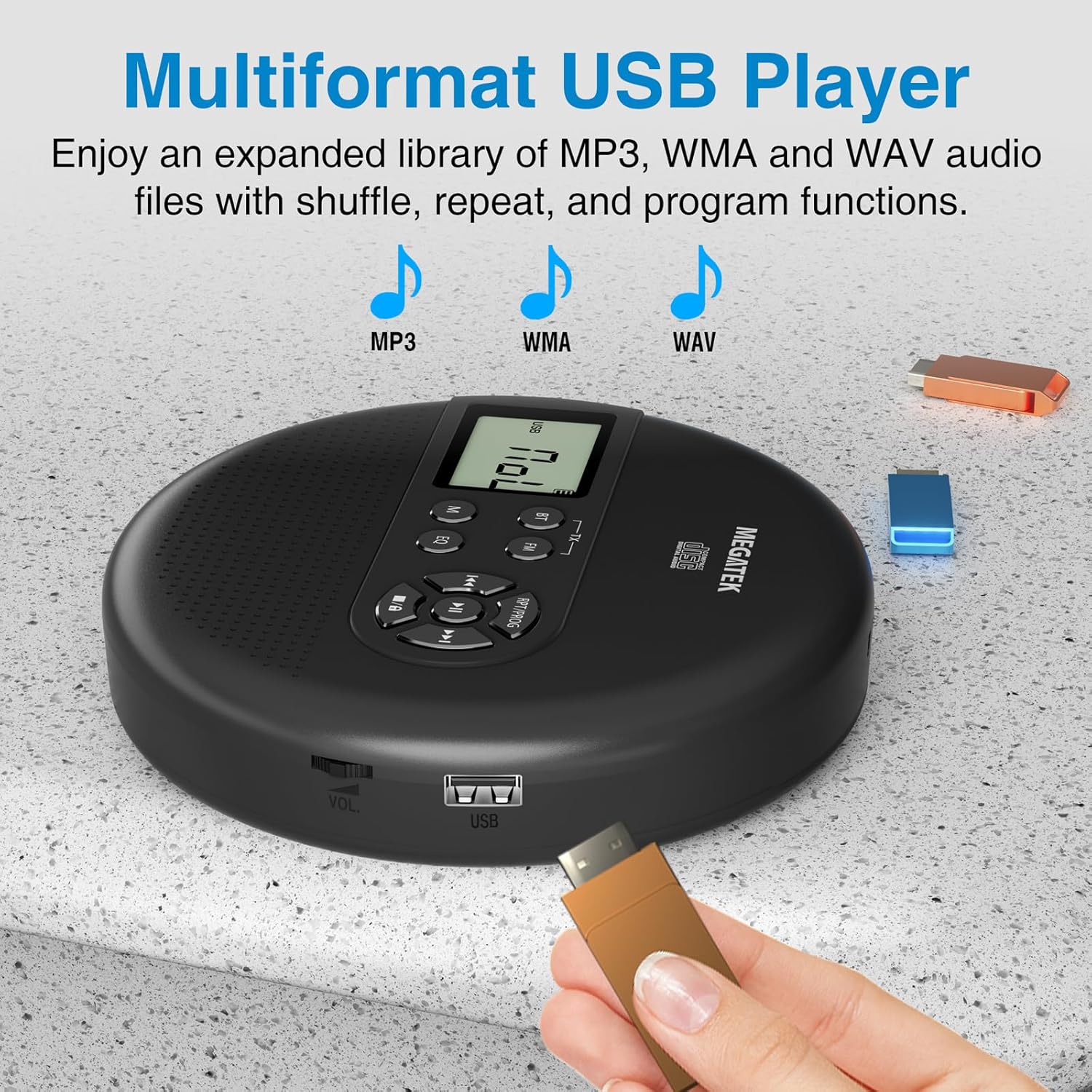
Image: The portable CD player with a USB flash drive inserted into its side port, illustrating its multi-format USB playback capability.
Bluetooth İletimi:
Stream audio wirelessly to Bluetooth-enabled headphones or speakers. Note: This feature does not support connections to car stereo systems.
- Bluetooth kulaklığınızın veya hoparlörünüzün eşleştirme modunda olduğundan emin olun.
- On the CD player, press the BT button. The Bluetooth indicator on the display will flash.
- The player will automatically search for and connect to nearby Bluetooth devices. Once connected, the indicator will stop flashing.

Image: The portable CD player wirelessly transmitting audio to two external Bluetooth speakers, demonstrating its Bluetooth transmission capability.
FM İletimi:
Transmit audio signals to nearby FM radios, including car FM stereos and home stereo systems.
- Basın FM button on the CD player. The display will show an FM frequency.
- Tune your FM radio (car stereo, home stereo) to the same frequency displayed on the CD player.
- Adjust the frequency on the CD player using the Önceki/Sonraki buttons if interference occurs or to find a clearer channel.

Image: The portable CD player placed on a car dashboard, transmitting audio to the car's FM stereo system, indicated by an FM frequency on the car's display.
Using Headphones/External Speakers:
For private listening or connecting to wired audio systems:
- Plug the included wired headphones into the 3.5mm audio out jack.
- Alternatively, connect an audio cable (not included) from the 3.5mm audio out jack to the AUX input of external speakers or an audio system.
- The built-in speakers will automatically mute when headphones or external speakers are connected.

Image: A close-up of the portable CD player, visually representing sound waves emitting from its dual stereo speakers, emphasizing the built-in audio capability.
Bakım
- Temizlik: Use a soft, dry, lint-free cloth to clean the exterior of the player. For the CD lens, use a specialized CD lens cleaner. Do not use liquids or aerosol cleaners directly on the device.
- Depolamak: Uzun süre kullanılmadığı zamanlarda, oynatıcıyı serin, kuru bir yerde, doğrudan güneş ışığından ve aşırı sıcaklıklardan uzakta saklayın.
- Pil Bakım: Pil ömrünü uzatmak için pili sık sık tamamen boşaltmaktan kaçının. Cihaz aktif olarak kullanılmasa bile düzenli olarak şarj edin.
Sorun giderme
| Sorun | Olası Neden | Çözüm |
|---|---|---|
| Oynatıcı açılmıyor. | Pil bitmiş. | Charge the player using the USB-C cable. |
| Hoparlörlerden/kulaklıklardan ses gelmiyor. | Volume is too low; headphones not fully plugged in; incorrect mode selected. | Increase volume; ensure headphones are securely connected; press the M (Mod) Doğru kaynağı seçmek için düğme. |
| CD atlıyor veya çalmıyor. | CD is dirty, scratched, or inserted incorrectly; anti-skip function overwhelmed. | Clean the CD; ensure CD is properly seated; avoid strong vibrations. |
| Bluetooth bağlantı sorunları. | Device not in pairing mode; too far from player; interference. | Ensure receiving device is in pairing mode; move closer to the player; restart both devices. |
| FM transmission static/poor quality. | Interference; incorrect frequency. | Adjust the FM frequency on the player and receiver to find a clear channel. |
Özellikler
| Özellik | Detay |
|---|---|
| Model Numarası | CP27BR |
| Ürün Boyutları | 5.91 x 5.91 x 1.32 inç |
| Ürün Ağırlığı | 10.9 ons |
| Pil | 2000mAh Lityum İyon (şarj edilebilir) |
| Oyun zamanı | 15 saate kadar (orta hacimde) |
| Desteklenen CD Formatları | CD, CD-R/RW, MP3 CD, Audio Book CD |
| Desteklenen USB Formatları | MP3, WMA, WAV |
| Atlamayı Önleyici Koruma | 60 saniye |
| Bağlantı | USB, Bluetooth Transmitter, FM Transmitter, 3.5mm Audio Out |
| Özel Özellikler | Built-in Stereo Speakers, Resume Play, Shuffle, Repeat, Program Functions, 5 EQ Options |
Garanti ve Destek
MEGATEK offers comprehensive support for its products:
- 12 Aylık Değişim Garantisi: In case of product defects or issues within 12 months of purchase.
- Ömür Boyu Teknik Destek: Assistance with product usage, troubleshooting, and general inquiries.
- 24/7 Müşteri Hizmetleri: Available through Amazon buyer-seller messaging.
For any questions or problems, please contact MEGATEK customer service via the Amazon platform or refer to the contact information provided in the product packaging.
Image: A graphic detailing MEGATEK's customer support, including 12-month replacement, lifetime technical support, and 24/7 Amazon buyer-seller messaging, alongside an image of customer service representatives.


