giriiş
Thank you for choosing the GOBOULT Z60 Wireless Earbuds. This manual provides detailed instructions to help you set up, operate, and maintain your earbuds for an optimal audio experience. Please read this manual thoroughly before use and retain it for future reference.

Image: GOBOULT Z60 Earbuds, illustrating the brand transition from BOULT to GOBOULT, highlighting the new logo and packaging while assuring consistent product performance.
Kutuda Neler Var?
Paketin içerisinde tüm ürünlerin mevcut olduğundan emin olun:
- GOBOULT Z60 Wireless Earbuds (Left and Right)
- Şarj Kutusu
- USB Type-C Şarj Kablosu
- Kulak uçları (çeşitli boyutlarda)
- Kullanıcı Kılavuzu
- Garanti Kartı

Image: The GOBOULT Z60 Wireless Earbuds and their charging case, showcasing the product's design and included accessories.
Ürün Bittiview
The GOBOULT Z60 earbuds are designed for comfort and high-quality audio. Each earbud features a 13mm bass driver and multiple microphones for clear calls. The charging case provides extended battery life.
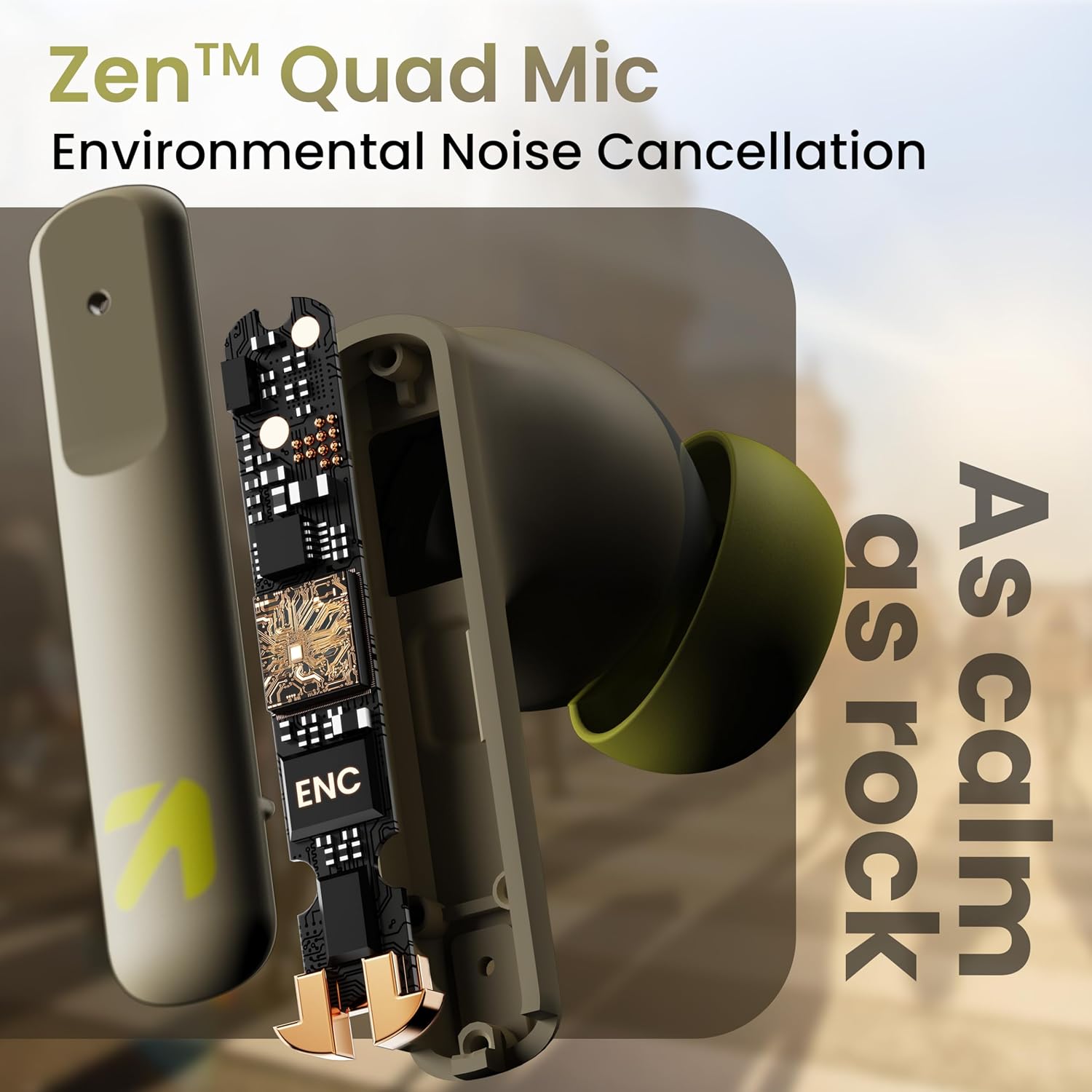
Resim: Dahili view of a GOBOULT Z60 earbud, highlighting the Zen Quad Mic Environmental Noise Cancellation (ENC) technology for clear audio.

Image: A close-up of a GOBOULT Z60 earbud, emphasizing the 13mm BoomX Drivers responsible for rich bass and superior sound quality.
Şarj etme
To charge your GOBOULT Z60 earbuds and charging case:
- Kulaklıkları şarj kutusuna yerleştirin. Yerlerine doğru şekilde oturduğundan emin olun.
- USB Type-C şarj kablosunu kasanın üzerindeki şarj portuna ve bir güç kaynağına bağlayın.
- Kılıf üzerindeki LED gösterge şarj durumunu gösterecektir.
A full charge provides up to 60 hours of total playtime with the charging case. A quick 10-minute charge can provide up to 150 minutes of playtime.

Image: The GOBOULT Z60 charging case connected via a Type-C cable, illustrating the fast charging capability with indicators for 10 minutes charge yielding 150 minutes playtime.

Image: GOBOULT Z60 earbuds in their charging case, highlighting the impressive 60 hours of total playtime and 8 hours of playtime on a single earbud charge.
Setup: Pairing with Your Device
The GOBOULT Z60 earbuds utilize Bluetooth 5.3 for stable and efficient wireless connectivity.
- İlk Eşleştirme:
- Şarj kutusunu açın. Kulaklıklar otomatik olarak eşleştirme moduna geçecektir.
- Cihazınızda (akıllı telefon, tablet, dizüstü bilgisayar) Bluetooth'u etkinleştirin.
- Arama "GOBOULT Z60" in the list of available Bluetooth devices and select it to connect.
- Once connected, you will hear an audio prompt, and the LED indicator on the case will change.
- Yeniden eşleştirme: The earbuds will automatically connect to the last paired device when taken out of the case, if Bluetooth is enabled on the device.

Image: GOBOULT Z60 earbuds and their open charging case next to a smartphone, illustrating the Bluetooth 5.3 "Blink & Pair" feature for quick and stable connection.
Kulaklıklarınızı Çalıştırma
Dokunmatik Kontroller
The GOBOULT Z60 earbuds feature intuitive touch controls. The specific functions are:
- Müzik Çalma:
- Tek dokunuş: Oynat/Duraklat
- Double tap (Right earbud): Next track
- Double tap (Left earbud): Previous track
- Triple tap (Right earbud): Volume Up
- Triple tap (Left earbud): Volume Down
- Çağrı Yönetimi:
- Single tap: Answer/End call
- Long press: Reject call
- Sesli Asistan: Long press (either earbud) to activate Google Assistant or Siri.
- Oyun Modu: Tap 4 times on either earbud to activate/deactivate Combat Gaming Mode (50ms low latency).

Image: A visual guide to the GOBOULT Z60's touch controls, detailing actions for music playback (play/pause, next/back, volume), call management, activating voice assistance, and toggling game/music mode.
Oyun Modu
Activate the 50ms low latency Combat Gaming Mode for a synchronized audio-visual experience during gaming. Tap 4 times on either earbud to switch between gaming and normal modes.

Image: GOBOULT Z60 earbuds in use with a smartphone displaying a racing game, emphasizing the "Combat Gaming Mode" with 50ms ultra-low latency, activated by tapping the earbud 4 times.
Sesli asistan
Access your device's voice assistant (Google Assistant or Siri) by long-pressing either earbud. This allows for hands-free control of your device.

Image: GOBOULT Z60 earbuds and their charging case, illustrating how to activate voice assistance (Ok Google, Hey Siri) with a long press on an earbud.
Bakım
To ensure the longevity and optimal performance of your GOBOULT Z60 earbuds:
- Temizlik: Kulaklıklarınızı ve şarj kutusunu düzenli olarak yumuşak ve kuru bir bezle temizleyin. Sert kimyasallar veya aşındırıcı malzemeler kullanmaktan kaçının.
- Kulaklık uçları: Remove and clean the eartips periodically. Ensure they are dry before reattaching.
- Suya Dayanıklılık: The earbuds are IPX5 water-resistant, meaning they can withstand sweat and light rain. Do not submerge them in water or expose them to heavy downpours. Ensure the charging port is dry before charging.
- Depolamak: Kullanmadığınız zamanlarda kulaklıklarınızı şarj kutusunda saklayarak hem koruyun hem de şarjlı kalmasını sağlayın.

Image: A GOBOULT Z60 earbud with water droplets on its surface, illustrating its IPX5 water resistance, suitable for protection against sweat, rain, and splashes.
Sorun giderme
If you encounter issues with your GOBOULT Z60 earbuds, refer to the following common solutions:
| Sorun | Olası Çözüm |
|---|---|
| Kulaklıklar eşleşmiyor |
|
| Bir kulaklıktan ses gelmiyor |
|
| Kulaklıklar şarj olmuyor |
|
| Düşük ses seviyesi veya zayıf ses kalitesi |
|
Özellikler
| Özellik | Detay |
|---|---|
| Model Adı | AirBass (Z60) |
| Bağlantı Teknolojisi | Kablosuz (Bluetooth) |
| Bluetooth Sürümü | 5.3 |
| Bluetooth Menzili | 10 Metre |
| Ses Sürücüsü Boyutu | 13 Milimetre |
| Ses Sürücüsü Türü | Dinamik Sürücü |
| Pil Ömrü (Toplam) | 60 Saate Kadar (şarj kutusu ile) |
| Şarj Süresi | Yaklaşık 90 Dakika |
| Hızlı Şarj | 10 dakika şarj = 150 dakika oyun süresi |
| Şarj Portu | Tip-C |
| Mikrofonlar | 4 ENC Mics for Clear Calling |
| Ses Gecikmesi | 50 Milisaniye (Oyun Modu) |
| Suya Dayanıklılık | IPX5 (Sweatproof, Rainproof, Splashproof) |
| Kontrol Yöntemi | Dokunma, Ses |
| Ürün Ağırlığı | 41.5 Gram |
| Menşei ülke | Hindistan |
Garanti ve Destek
Your GOBOULT Z60 Wireless Earbuds come with a 1 Yıl Üretici Garantisi satın alma tarihinden itibaren.
For any support, warranty claims, or technical assistance, please refer to the contact information provided on your warranty card or visit the official GOBOULT support webalan.


