giriiş
This manual provides detailed instructions for the installation, operation, and maintenance of the Supermicro MBD-X12DPI-N6-B E-ATX Server Motherboard. It is designed to assist users in setting up their server system correctly and efficiently. Please read this manual thoroughly before proceeding with any installation or configuration.
Güvenlik Bilgileri
Observe the following safety precautions to prevent damage to the motherboard and ensure personal safety:
- Always disconnect the power cord from the power supply before installing or removing any components.
- Wear an anti-static wrist strap and work on an anti-static mat to prevent electrostatic discharge (ESD) damage to sensitive components.
- Anakartı, bileşenlere doğrudan temas etmemek için kenarlarından tutarak çıkarın.
- Aşırı ısınmayı önlemek için sunucu kasasının içinde yeterli havalandırma olduğundan emin olun.
- Refer to the power supply unit's manual for specific safety guidelines related to power connections.
Paket İçeriği
Paketin içinde tüm öğelerin mevcut olduğundan emin olun:
- Supermicro MBD-X12DPI-N6-B E-ATX Server Motherboard
- I / O Kalkanı
- SATA Kabloları (miktar değişebilir)
- Hızlı Başvuru Kılavuzu
- Driver and Utility DVD/USB (if included)
Kurulum ve Yükleme
Bu bölüm anakartın ve ana bileşenlerinin fiziksel kurulumunda size rehberlik eder.
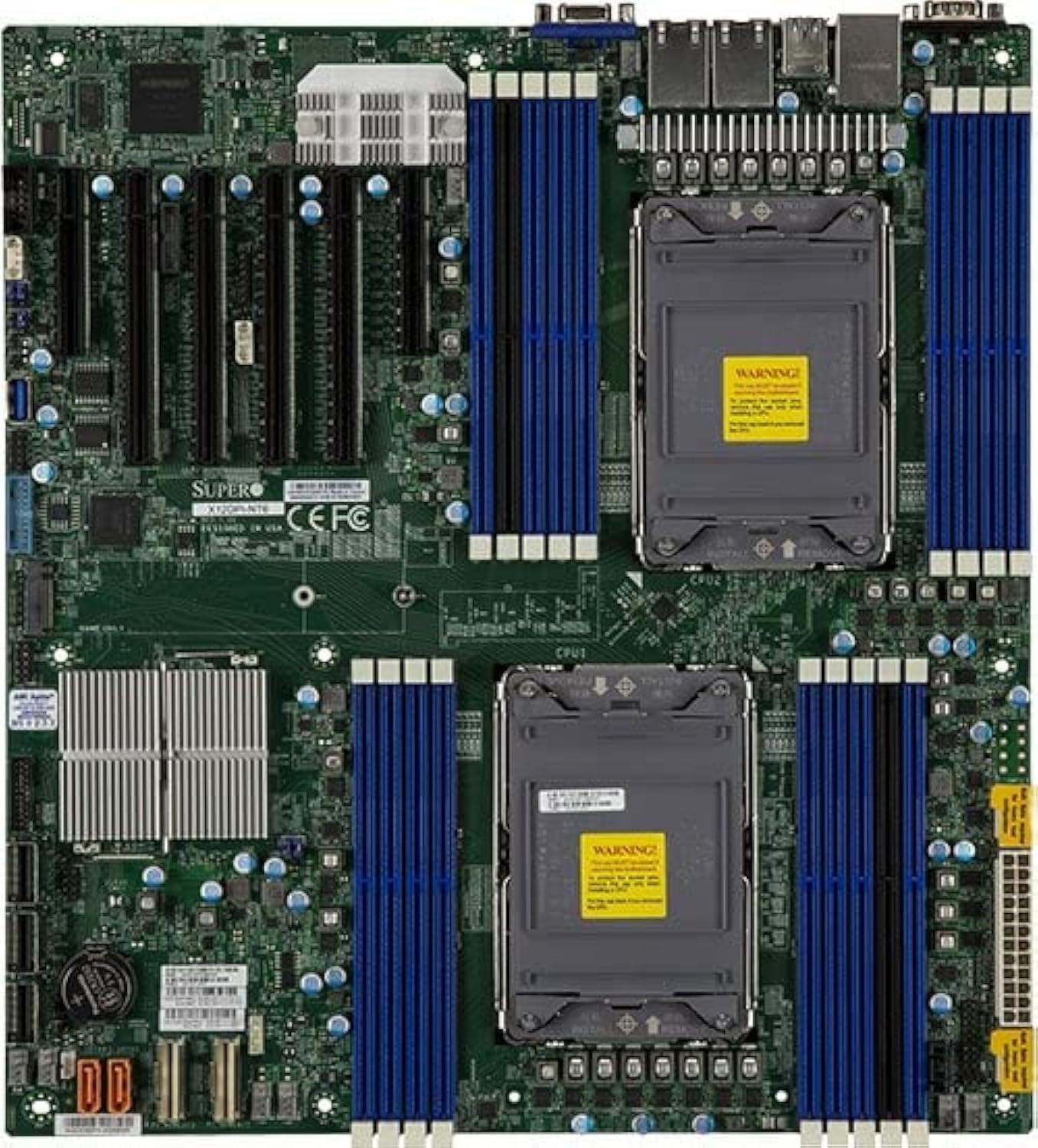
Şekil 1: Yukarıdan aşağıya view of the Supermicro MBD-X12DPI-N6-B E-ATX Server Motherboard, showcasing its dual LGA 4189 CPU sockets, 18 DDR4 DIMM slots, multiple PCIe 4.0 expansion slots, and various connectors for storage and peripherals. The board features a green PCB with blue and black DIMM slots, and silver heatsinks for chipset and VRMs.
1. İşlemci Kurulumu (LGA 4189)
- Carefully open the CPU socket retention mechanism by releasing the levers.
- CPU üzerindeki üçgen işaretini soket üzerindeki karşılık gelen işaretle hizalayın.
- CPU'yu zorlamadan yavaşça sokete yerleştirin.
- Close the socket retention mechanism, ensuring the CPU is securely seated.
- İşlemciye termal macun uygulayın ve işlemci soğutucusunu üreticinin talimatlarına göre takın.
2. Memory (DIMM) Installation
The motherboard supports up to 4TB of 3DS ECC RDIMM/LRDIMM DDR4-3200MHz memory across 18 DIMM slots. Intel Optane Persistent Memory 200 Series is supported in specific slots (P1-DIMMB2 and P2-DIMMB2).
- DIMM yuvasının her iki ucundaki sabitleme klipslerini açın.
- Bellek modülündeki çentiği DIMM yuvasındaki anahtarla hizalayın.
- Modülü, sabitleme klipsleri yerine oturana kadar yuvaya sıkıca yerleştirin.
- Ensure all modules are seated correctly and evenly.
3. PCIe Kart Kurulumu
The motherboard features 2 PCIe 4.0 x8 and 4 PCIe 4.0 x16 slots.
- Select an appropriate PCIe slot for your expansion card.
- Remove the corresponding metal bracket cover from the server chassis.
- Kartı yuvaya hizalayın ve tamamen oturana kadar sıkıca bastırın.
- Secure the card with a screw or retention clip to the chassis.
4. Depolama Aygıtı Bağlantısı
The Intel C621A controller provides 14 SATA3 (6 Gbps) ports with RAID 0, 1, 5, 10 support. There is also 1 PCIe 4.0 x4 M.2 slot (2280/22110 form factor, M-Key).
- SATA Aygıtları: Connect SATA data cables from your storage drives to the SATA ports on the motherboard. Connect power cables from the power supply to the drives.
- M.2 Devices: Insert the M.2 SSD into the M.2 slot, securing it with the provided screw.
5. Güç Kaynağı Bağlantısı
Connect the main 24-pin ATX power connector and the 8-pin (or 4+4 pin) CPU power connectors from your power supply unit to the corresponding ports on the motherboard. Ensure all power connections are secure.
Kullanım Talimatları
1. İlk Önyükleme
- After all components are installed, connect the power cord to the power supply and turn on the system.
- The system will perform a Power-On Self-Test (POST). Monitor for any error codes or beeps.
2. BIOS/UEFI Yapılandırması
During POST, press the designated key (usually SİL or F2) to enter the BIOS/UEFI setup utility. Here you can configure boot order, system time, and various hardware settings.
3. İşletim Sistemi Kurulumu
Insert your operating system installation media (USB drive or DVD) and configure the BIOS/UEFI to boot from it. Follow the on-screen instructions to install your preferred operating system.
Bakım
1. Temizlik
Regularly clean the interior of your server chassis to prevent dust buildup, which can lead to overheating. Use compressed air to remove dust from heatsinks, fans, and other components. Ensure the system is powered off and unplugged before cleaning.
2. Firmware and Driver Updates
Periodically check the Supermicro official website for the latest BIOS/UEFI firmware and driver updates for your motherboard. Keeping your system updated ensures optimal performance, stability, and security.
Sorun giderme
Sorunlarla karşılaşırsanız aşağıdaki genel sorun giderme adımlarına bakın:
- Güç Yok: Ensure all power cables (24-pin ATX, 8-pin CPU) are securely connected. Check the power supply unit and wall outlet.
- Görüntü yok: Verify that the monitor is connected and powered on. Reseat the graphics card (if applicable) and memory modules. Try booting with minimal components.
- Sistemden gelen bip sesleri: Consult the motherboard's beep code table (usually found in the full manual on the Supermicro website) to diagnose hardware issues indicated by specific beep patterns.
- İşletim Sistemi Başlatılmıyor: Check the boot order in BIOS/UEFI. Ensure the storage drive with the OS is detected and functional.
- Aşırı Isınma: Ensure CPU coolers and chassis fans are properly installed and functioning. Clean dust from heatsinks and vents.
Özellikler
| Özellik | Detay |
|---|---|
| CPU Soketi | Dual LGA 4189 (Socket P+) |
| Uyumlu İşlemciler | 3rd Gen Intel Xeon Scalable processors (up to 270W TDP) |
| Yonga seti | Intel C621A |
| Bellek Türü | DDR4 3DS ECC RDIMM/LRDIMM, Intel Optane Persistent Memory 200 Series |
| Bellek Hızı | 3200MHz |
| Bellek Yuvaları | 18 DIMM slots (up to 4TB total) |
| PCIe Genişleme Yuvaları | 2 x PCIe 4.0 x8, 4 x PCIe 4.0 x16 |
| NVMe Desteği | 2 x PCIe 4.0 NVMe x8 Internal Port(s) |
| M.2 Arayüzü | 1 x PCIe 4.0 x4 (2280/22110, M-Key) |
| SATA Bağlantı Noktaları | 14 x SATA3 (6 Gbps) with RAID 0, 1, 5, 10 |
| Yerel Ağ | Dual LAN with Intel i350 Gigabit Ethernet Controller |
| Video Çıkışı | 2 x VGA (1 rear bezel, 1 front panel) |
| Form Faktörü | E-ATX |
| Boyutlar | 16 x 12 x 5 inç |
Destek ve Garanti
For technical support, driver downloads, and the latest BIOS updates, please visit the official Supermicro website. Information regarding product warranty terms and conditions can also be found on the Supermicro support portal or by contacting your point of purchase.
Always refer to the official Supermicro documentation for the most accurate and up-to-date information.


