Ürün Bittiview
The Sofucor 52-inch Low Profile Ceiling Fan with Lights and Remote Control is designed to provide optimal airflow and lighting for various indoor and outdoor spaces. Featuring three modern wood blades and a noiseless DC motor, it offers quiet operation and energy efficiency. The integrated LED lights are dimmable and offer multiple color temperature options to suit your preference.
This manual provides detailed instructions for the setup, operation, and maintenance of your Sofucor ceiling fan.
Kurulum ve Yükleme
Proper installation is crucial for the safe and efficient operation of your ceiling fan. Please follow these steps carefully.
Kutudan Çıkarma ve Bileşen Kontrolü
Carefully unbox your ceiling fan and verify all components are present according to the packing list. The package includes the DC Motor, LED and Lampshade, and 3 Fan Blades, along with a user manual and remote.

Figure 1: Sofucor 52-inch Low Profile Ceiling Fan with included remote control and various downrod lengths.
Şekil 2: Ayrıntılı view of the fan's internal components and accessories, including the motor, remote, and light kit.
Kurulum Video Kılavuzu
For a comprehensive visual guide, please refer to the official installation video provided by Sofucor. This video covers step-by-step instructions for mounting and wiring.
Video 1: Official Sofucor Wood Ceiling Fan Installation Instructions. This video demonstrates the complete installation process, from mounting the bracket to attaching the blades and light kit.
Installation is straightforward and typically takes about 30 minutes. Ensure power is turned off at the circuit breaker before beginning any electrical work.

Figure 3: A person installing the fan, highlighting the ease of setup with proper guidance.
The fan includes three downrods (5", 10", 24") to accommodate various ceiling heights and can be installed on ceilings with a maximum slope of 15 degrees.

Figure 4: Visual representation of fan dimensions and suitability for different room sizes and ceiling types (low, medium, high, sloped).
Kullanım Talimatları
Your Sofucor ceiling fan is operated using the included multi-functional remote control.
Uzaktan Kumanda Fonksiyonları
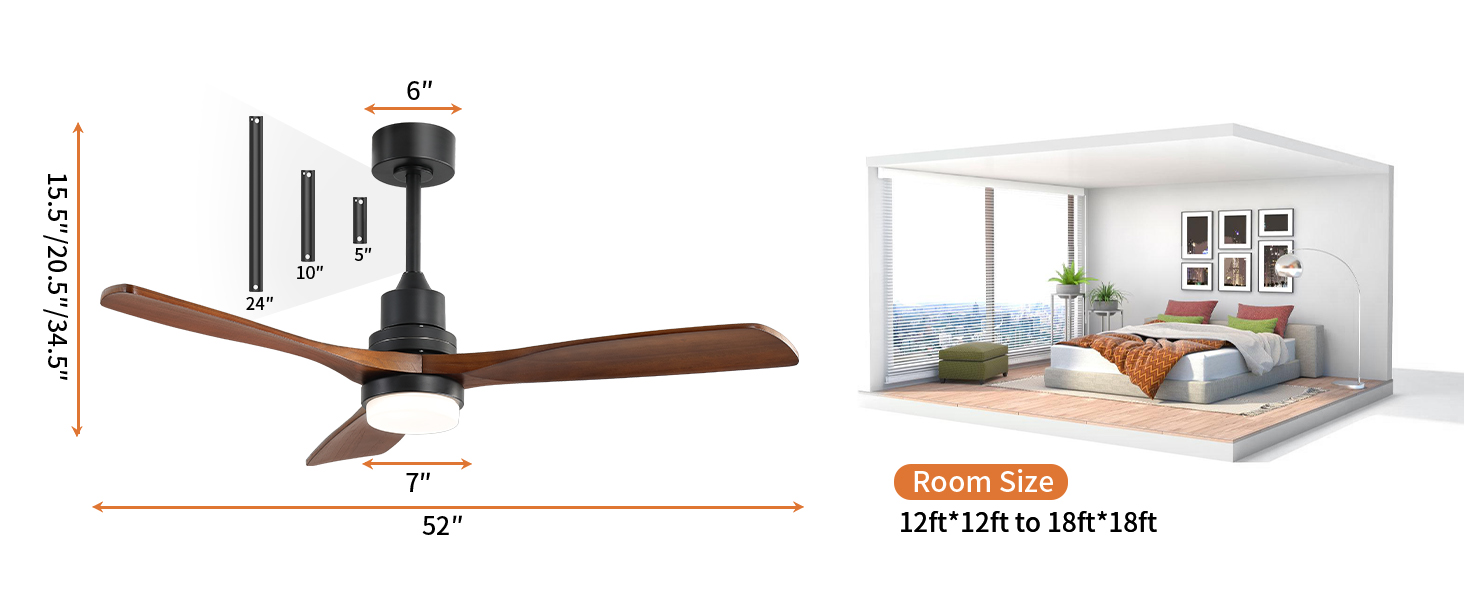
Figure 5: Layout of the remote control with labeled buttons for various functions.
- Güç Açma/Kapatma: Use the power button to turn the fan and light on or off.
- Fan Hızı: Select from 6 adjustable speeds (low/medium/high) for optimal comfort.
- Işık Kontrolü:
- Adjust light color temperature: Choose between 3000K (warm yellow), 4500K (bright daylight), and 6000K (cool white).
- Dimmable: Adjust brightness from 0% to 100%.
- Zamanlayıcı Ayarları: Vantilatörü 1, 4 veya 8 saat sonra otomatik olarak kapanacak şekilde ayarlayın.
- Reverse Airflow Function: Switch between summer mode (downward airflow for cooling) and winter mode (upward airflow for air circulation and energy saving).
- Doğal Rüzgar Modu: Activates a fluctuating fan speed to simulate natural breeze.

Figure 6: Illustration of the fan's reversible airflow function, demonstrating air movement for both summer and winter seasons.

Figure 7: The fan's customizable light feature, showing options for warm white, daylight white, and cool white, with dimmable functionality.
Bakım
Düzenli bakım, Sofucor tavan vantilatörünüzün uzun ömürlü olmasını ve en iyi performansı göstermesini sağlar.
- Temizlik: Fan kanatlarını ve motor gövdesini düzenli olarak yumuşak bir toz beziyle temizleyin.amp bez. Sert kimyasallar veya aşındırıcı temizleyiciler kullanmaktan kaçının.
- Bıçak Denetimi: Periodically check that all blade screws are tight. Loose screws can cause wobbling and noise.
- Işık Kiti: The fan features a replaceable LED light kit, ensuring long-term usability without worrying about frequent replacements.
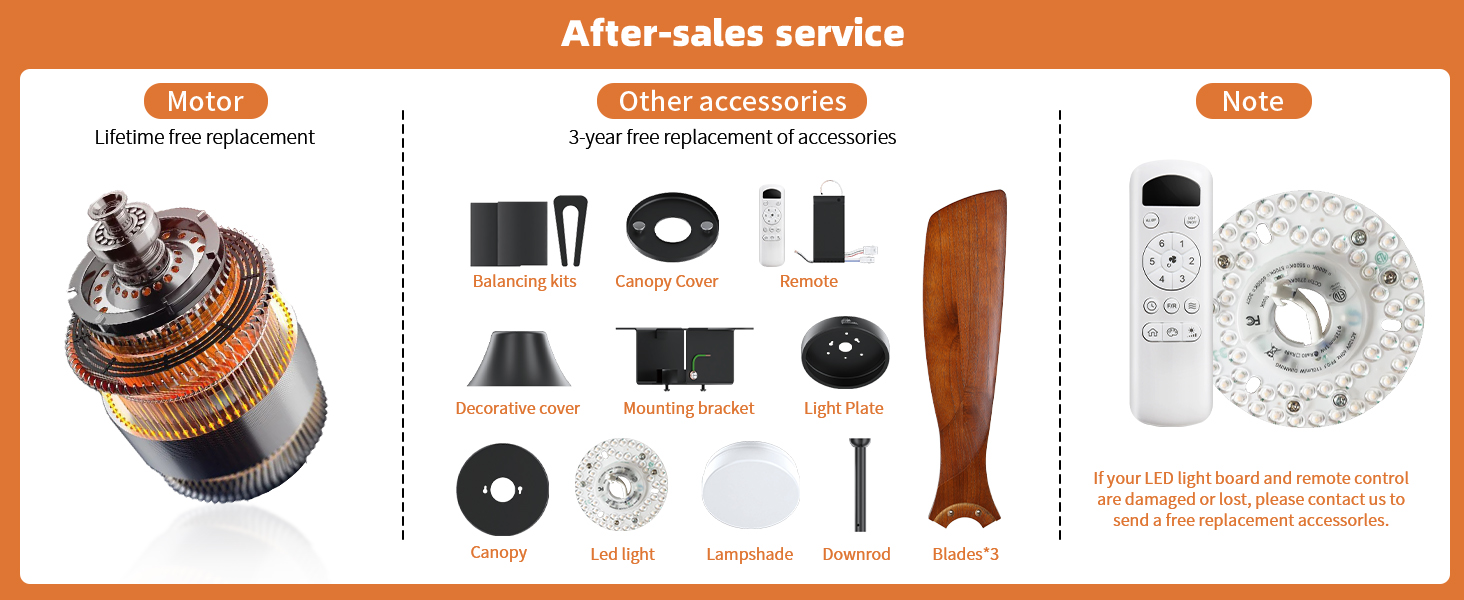
Şekil 8: Üzeriview of fan components and details on after-sales service for motor and accessories.
Sorun giderme
If you encounter any issues with your Sofucor ceiling fan, refer to the common problems and solutions below.
| Sorun | Olası Neden | Çözüm |
|---|---|---|
| Fan çalışmıyor | No power, loose wiring, remote control issue. | Check circuit breaker. Ensure all wire connections are secure. Verify remote control batteries and pairing. |
| Fan wobbles or makes noise | Loose blade screws, unbalanced blades, improper mounting. | Tighten all blade screws. Check for bent blades. Ensure mounting bracket is securely installed. |
| Işık çalışmıyor | Loose light kit connection, faulty LED. | Check connections to the LED light kit. If LED is faulty, contact support for a replacement. |
If issues persist, please contact Sofucor customer support for assistance.
Özellikler
- Marka: sofukor
- Model Adı: Sofucor ceiling fan (5247BKDCHTM)
- Renk: black+walnut+with light
- Ürün Ölçüleri: 52"D x 52"G x 12"Y
- Ürün Ağırlığı: 14.92 pound
- Güç Kaynağı: Kablolu Elektrik
- Cilttage: 120 Volt
- Netage: 35 watt
- Gürültü Seviyesi: 30 dB
- Bıçak Sayısı: 3
- Bıçak Malzemesi: light-weight solid wood
- Işık Türü: LED (3000K, 4500K, 6000K, Dimmable)
- Kontrol Yöntemi: Remote (6 speeds, timer, reverse airflow)
- Hava Akış Kapasitesi: 5800 CFM
- İç/Dış Mekan Kullanımı: Outdoor, Indoor (Not exposed to direct rain)
- Enerji Verimliliği: Typically 75% more energy-efficient than AC fans.
Garanti ve Destek
Sofucor is committed to providing high-quality products and excellent customer service.
- Motor Garantisi: Lifetime maintenance for the motor.
- Ürün Garantisi: 3-year protection plan for the ceiling fan.
- Teknik Destek: Dedicated 24-hour technical team available to assist with any issues.
- Yedek Parçalar: If your LED light board or remote control are damaged or lost, contact Sofucor for free replacement accessories.
For support, please refer to the contact information provided in your product packaging or visit the official Sofucor store on Amazon.


