1. Giriş
Satın aldığınız için teşekkür ederizasing the Lenco SPR-100BK Splash-Proof Bluetooth Speaker. This portable speaker delivers powerful sound with strong bass and features FM radio, USB, SD card playback, and integrated light effects. Designed for durability, it is splash-proof, making it suitable for various environments. This manual provides essential information for safe and optimal use of your device.
2. Önemli Güvenlik Talimatları
- Cihazı aşırı sıcaklıklara, doğrudan güneş ışığına veya yüksek neme maruz bırakmayın.
- Ensure the charging port cover is securely closed when near water to maintain splash-proof integrity.
- Cihazı sökmeyin veya değiştirmeyin. Tüm bakım işlemlerini yetkili personele yaptırın.
- Yalnızca belirtilen şarj kablosunu kullanın.
- Cihazı güçlü manyetik alanlardan uzak tutun.
- Cihazı düşürmekten veya güçlü darbelere maruz bırakmaktan kaçının.
3. Ürün Bittiview
Familiarize yourself with the components of your Lenco SPR-100BK speaker.
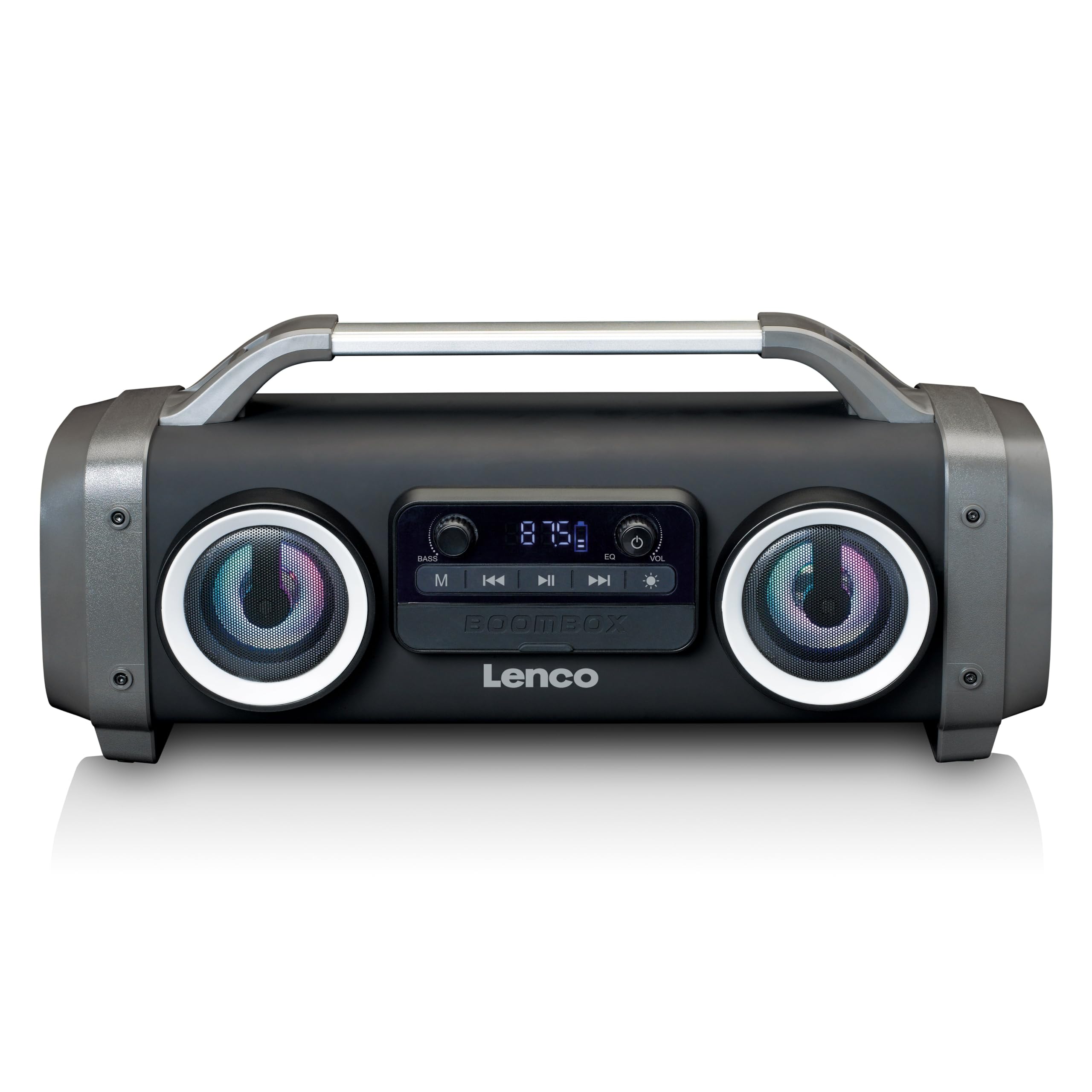
Şekil 1: Ön view of the Lenco SPR-100BK speaker, showing the main speaker grille, control panel, and integrated light effects.
3.1 Kontroller ve Bağlantı Noktaları
- Güç Düğmesi: Hoparlörü açar veya kapatır.
- Mod Düğmesi: Switches between Bluetooth, FM Radio, USB, SD, and AUX modes.
- Oynat/Duraklat Düğmesi: Sesi oynatır veya duraklatır.
- Ses Kontrol Düğmesi: Ana ses seviyesini ayarlar.
- Bass Boost Knob: Bas seviyesini ayarlar.
- Işık Efekti Düğmesi: Cycles through or turns off light effects.
- USB Bağlantı Noktası: USB flash bellekten oynatma için.
- SD Kart Yuvası: SD karttan oynatma için.
- AUX Girişi (3.5 mm): Harici ses aygıtlarını bağlamak için.
- Charging Port (Mini USB): Dahili bataryayı şarj etmek için.
4. Kurulum
4.1 Paketin açılması
Carefully remove the speaker and all accessories from the packaging. Ensure the following items are present:
- Lenco SPR-100BK Bluetooth Speaker
- USB Şarj Kablosu
- 3.5mm Audio Cable (AUX cable)
- Kullanıcı Kılavuzu
4.2 Pilin Şarj Edilmesi
- Locate the Mini USB charging port on the speaker.
- Kutu içeriğinde bulunan USB şarj kablosunu hoparlörün şarj portuna bağlayın.
- Connect the other end of the USB cable to a compatible USB power adapter (5V/1A, not included) or a computer's USB port.
- Şarj sırasında şarj gösterge ışığı yanar (genellikle kırmızı). Tamamen şarj olduğunda söner veya rengi değişir (örneğin, mavi).
- A full charge takes approximately 4-5 hours and provides up to 15 hours of playback (without light effects).
4.3 İlk Güç Açma
Basılı tutun Güç Düğmesi for a few seconds until the speaker powers on and you hear an audible prompt or see the display light up.
5. Operasyon
5.1 Güç Açma/Kapatma
- Açmak için: tuşuna basın ve basılı tutun Güç Düğmesi.
- Kapatmak için: tuşuna basın ve basılı tutun Güç Düğmesi Tekrar.
5.2 Bluetooth Bağlantısı
- Hoparlörü açın. Yanıp sönen bir LED ile belirtildiği gibi, otomatik olarak Bluetooth eşleştirme moduna girecektir.
- Mobil cihazınızda (akıllı telefon, tablet vb.) Bluetooth'u etkinleştirin.
- Arama Mevcut Bluetooth cihazlarını seçin ve "SPR-100BK" listeden.
- Once paired, the speaker will emit a confirmation sound, and the LED will stop flashing.
- Gerçek Kablosuz Stereo (TWS) Modu: If you have two SPR-100BK speakers, you can pair them for stereo sound.
- Her iki hoparlörün de açık ve Bluetooth modunda olduğundan emin olun.
- On one speaker (the master), press and hold the Mod Düğmesi until you hear a TWS pairing prompt.
- The two speakers will automatically connect. Once connected, pair your device to the master speaker as described above.
5.3 FM Radyo
- Basın Mod Düğmesi repeatedly until you select FM Radio mode.
- İstasyonları otomatik olarak taramak ve kaydetmek için: Basılı tutun. Oynat/Duraklat Düğmesi. The speaker will scan for available FM stations and save them automatically.
- To switch between saved stations: Use the Önceki/Sonraki Parça Düğmeleri (if available, otherwise it will cycle through automatically).
- Not: For better FM reception, ensure the included 3.5mm audio cable is plugged into the AUX input, as it acts as an external antenna.
5.4 USB/SD Kart Oynatma
- Insert a USB flash drive or an SD card (with supported audio files) into the respective port/slot.
- The speaker will automatically switch to USB or SD mode and begin playback. If not, press the Mod Düğmesi Doğru kaynağı seçmek için
- Kullanın Oynat/Duraklat Düğmesi Ve Önceki/Sonraki Parça Düğmeleri oynatmayı kontrol etmek için.
5.5 AUX Girişi
- Connect one end of the supplied 3.5mm audio cable to the AUX input on the speaker.
- Diğer ucunu harici cihazınızın kulaklık girişine veya ses çıkışına bağlayın.
- Basın Mod Düğmesi AUX modunu seçmek için
- Harici cihazınızdan oynatmayı ve ses seviyesini kontrol edin.
5.6 Işık Efektleri
Basın Işık Efekti Düğmesi to cycle through different light modes or to turn the lights off. The speaker features 12 color light effects.
5.7 Ses Ayarı
- Hacim: Döndür Ses Kontrol Düğmesi to increase or decrease the overall sound level.
- Bas: Döndür Bass Boost Knob to adjust the intensity of the bass.
6. Bakım
6.1 Temizlik
Wipe the speaker with a soft, dry cloth. Do not use abrasive cleaners, waxes, or solvents. For stubborn dirt, a slightly damp cloth can be used, ensuring all port covers are sealed.
6.2 Pil Bakımı
- To prolong battery life, fully charge the speaker before first use.
- Pilin sık sık tamamen bitmesini önleyin.
- If storing the speaker for an extended period, charge it to about 50% every few months.
6.3 Depolama
Hoparlörü serin, kuru, doğrudan güneş ışığından ve aşırı sıcaklıklardan uzak bir yerde saklayın.
7. Sorun Giderme
| Sorun | Olası Neden | Çözüm |
|---|---|---|
| Hoparlör açılmıyor. | Pil bitmiş. | Hoparlörü, birlikte verilen USB kablosunu kullanarak şarj edin. |
| Ses yok. | Ses seviyesi çok düşük; yanlış mod seçildi; cihaz bağlı değil. | Increase volume; press Mode button to select correct source; ensure Bluetooth device is paired or AUX cable is connected. |
| Bluetooth eşleştirme başarısız. | Hoparlör eşleştirme modunda değil; cihaz çok uzakta; parazit. | Ensure speaker is in Bluetooth pairing mode (flashing LED); move device closer; turn off other Bluetooth devices. |
| FM radyo alımı zayıf. | No external antenna; weak signal. | Plug in the 3.5mm AUX cable to act as an antenna; try moving the speaker to a different location. |
| USB/SD playback not working. | Desteklenmiyor file Biçimlendirme; kart/sürücü doğru takılmamış; bozuk files. | Emin olmak files are in a supported format (e.g., MP3); reinsert the USB drive/SD card; try a different drive/card. |
8. Özellikler
| Model Numarası | SPR-100BK |
| Marka | Lenco |
| Güç Çıkışı | 25 Watt RMS |
| Bağlantı | Bluetooth, USB, SD Card, 3.5mm AUX Input |
| Pil Türü | Lityum-iyon (4400 mAh) |
| Oynatma Süresi | Up to 15 hours (reduced with light effects) |
| Şarj Girişi | 5V/1A (Mini USB) |
| Özel Özellikler | Splash-proof design, Integrated light effects, FM Radio, TWS function |
| Boyutlar (U x G x Y) | 60x60x85 cm |
| Ağırlık | 2 Kilogram |
Not: Teknik özellikler önceden haber verilmeksizin değiştirilebilir.
9. Garanti ve Destek
9.1 Garanti Bilgileri
This Lenco product is covered by a warranty for a period of 2 yıl on parts from the date of purchase. This warranty covers manufacturing defects and workmanship under normal use. It does not cover damage caused by misuse, accidents, unauthorized modifications, or normal wear and tear.
9.2 Yazılım Güncellemeleri
Software updates for this product are guaranteed until 13 Nisan 2030.
9.3 Müşteri Desteği
For technical assistance, warranty claims, or product inquiries, please contact Lenco customer support through their official website or the retailer where the product was purchased. Please have your model number (SPR-100BK) and proof of purchase ready.
Resmi Lenco Webalan: www.lenco.com


