1. Giriş
This manual provides detailed instructions for the operation and maintenance of your Groov-e Light Curve Touch Control FM Radio Alarm Clock. Please read this manual thoroughly before using the product to ensure proper function and safety.
The Groov-e Light Curve is a versatile light alarm clock featuring an FM radio, multiple alarm sounds, and light simulation functions for both sunrise and sunset. It is designed to provide a natural and gentle wake-up experience and a relaxing environment for sleep.
2. Güvenlik Bilgileri
- Cihazı suya veya aşırı neme maruz bırakmayın.
- Aşırı sıcaklıklardan kaçının.
- Cihazı kendiniz sökmeyin veya tamir etmeye çalışmayın. Yetkili servis personeline başvurun.
- Yalnızca verilen güç adaptörünü kullanın.
- Çocukların erişemeyeceği yerde saklayınız.
- Clean the device with a soft, dry cloth. Do not use abrasive cleaners.
3. Paket İçeriği
Lütfen paketi aşağıdaki öğeler açısından kontrol edin:
- Groov-e Light Curve Alarm Clock Unit
- Güç Adaptörü
- Kullanım Kılavuzu (bu belge)

Figure 3.1: Groov-e Light Curve unit with included power adapter and cable.
4. Ürün Bittiview
Familiarize yourself with the various parts and controls of your Groov-e Light Curve alarm clock.
4.1 Ön View
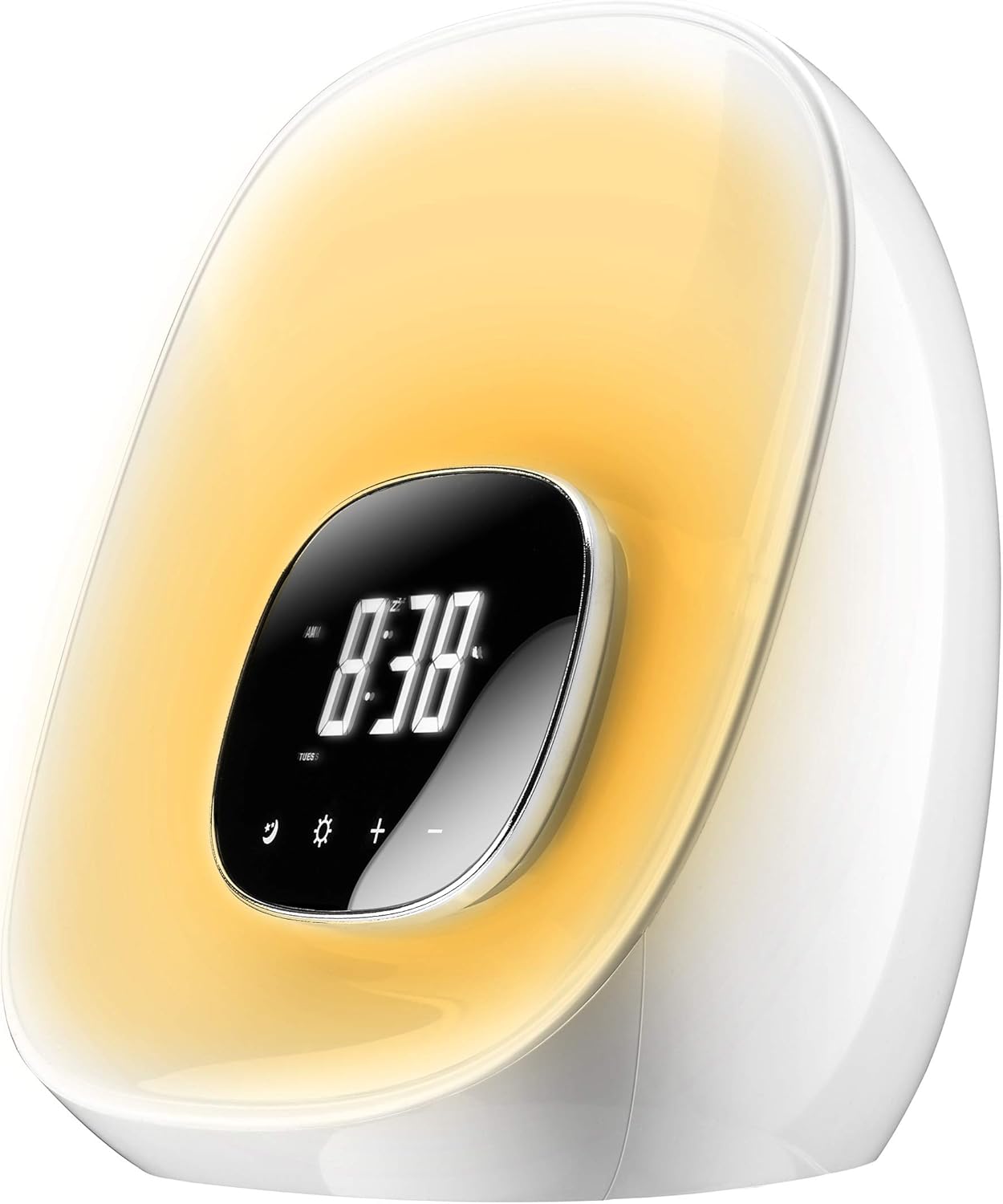
Şekil 4.1: Ön view of the Groov-e Light Curve.
- A. Digital Display: Zamanı, alarm durumunu ve diğer göstergeleri gösterir.
- B. Touch Controls: Icons for various functions (e.g., alarm, light, brightness, volume).
- C. Light Panel: Emits light for sunrise/sunset simulation and mood lighting.
4.2 Üst View

Şekil 4.2: Üst view of the Groov-e Light Curve with control buttons.
- D. Playback Controls: Buttons for radio tuning, volume, and alarm settings.
- E. Snooze/Sleep Button: Activates snooze or sleep function.
- F. Speaker Grille: Ses çıkışı için.
4.3 Arka View

Şekil 4.3: Arka view of the Groov-e Light Curve.
- G. DC 12V/1A Power Input: Güç adaptörünü buraya bağlayın.
- H. Rear Speaker: Additional speaker for audio output.
5. Kurulum
- Güç Bağlantısı: Connect the provided power adapter to the DC 12V/1A input port on the back of the unit (G) and plug it into a wall outlet. The display will light up.
- Başlangıç Zaman Ayarı:
- Basın Zaman Ayarı button (usually indicated by a clock icon) to enter time setting mode.
- Kullanın +/- Saati ayarlamak için düğmelere basın. Zaman Ayarı Onaylamak ve dakikalara geçmek için tekrar düğmeye basın.
- Kullanın +/- buttons to adjust the minutes. Press the Zaman Ayarı button one more time to confirm and exit.
- Yedek Pil: The device has a backup battery function that maintains timing for up to 3 months in case of power failure, though the clock display will not be active during an outage.
6. Kullanım Talimatları
6.1 Alarm Fonksiyonu
The Groov-e Light Curve offers a unique wake-up experience with sunrise simulation and various alarm sounds.
- Alarm Ayarlama:
- Basın Alarm kuruldu button (usually indicated by a bell icon) to enter alarm setting mode.
- Kullanın +/- Alarm saatini ayarlamak için düğmelere basın. Alarm kuruldu Tekrar teyit edip tutanaklara geçirmek için.
- Kullanın +/- Alarm süresini ayarlamak için düğmelere basın. Alarm kuruldu Tekrar onaylamak için.
- Wake-up Light Period: Select the duration for the wake-up light to start before the alarm time (OFF/10/20/30 minutes). This is displayed as "0:10/0:20/0:30". Use +/- seçmek için.
- Alarm Sesi Seçimi: Choose from 8 alarm sounds (1-6 natural sounds, 7 beep, 8 FM radio). Use +/- seçmek için.
- Alarm Modu: Select "wake-up light + alarm" or "wake-up light only".
- Basmak Alarm kuruldu one last time to save and activate the alarm.
- Gündoğumu Simülasyonu: The light will gradually brighten through ten levels, mimicking a sunrise, reaching its brightest point at the set alarm time.
- Erteleme İşlevi: Alarm çaldığında, düğmesine basın. Kestirmek button (E) to activate a 10-minute snooze. The alarm will sound again after 10 minutes. During snooze, other functions are paused.
- Alarmı Durdurmak: To turn off the alarm for the day, press any button other than the Snooze button. The alarm will sound for 1 hour if not turned off.
- Alarm Sesi Ayarı: During the alarm, the volume gradually increases. You can adjust the maximum volume using the volume controls.
6.2 Aydınlatma Fonksiyonları
The device features versatile lighting options for various moods and purposes.
- Adjusting Brightness (White Light):
- When no alarm or wake-up light is active, briefly press the Güneş simgesi (light function button).
- Kullanın +/- buttons to cycle through 10 levels of brightness.
- RGB Mood Lighting:
- Uzun basın Güneş simgesi to activate the RGB mood light cycle. The light will cycle through different colors.
- Kısaca basın Güneş simgesi again to pause the cycle on the current color.
- Kullanın +/- buttons to manually select your preferred color from the available options.
- Sunset Simulation (Sleep Function):
- Basın Uyumak button (often combined with Snooze or a moon icon).
- Select the desired sleep duration (OFF/10/20/30 minutes). The light will slowly dim over this period and then turn off, simulating a sunset.

Figure 6.1: The Groov-e Light Curve offers a range of mood lighting colors.
6.3 FM Radyo
The built-in FM radio allows you to listen to your favorite stations.
- Turning On/Off Radio: Basın Radyo button (often indicated by a radio icon or FM).
- Ayar İstasyonları:
- Kullanın İleri/Geri buttons (D) to manually tune to a station.
- Uzun basın İleri/Geri Bir sonraki müsait istasyonu otomatik olarak taramak için düğmeler.
- Sesi Ayarlama: Kullanın Ses +/- buttons (D) to adjust the radio volume.
7. Bakım
- Temizlik: Wipe the surface of the device with a soft, dry, lint-free cloth. Do not use liquid or aerosol cleaners.
- Depolamak: Cihazınızı uzun süre saklayacaksanız, güç bağlantısını kesin ve serin ve kuru bir yerde saklayın.
8. Sorun Giderme
| Sorun | Olası Neden | Çözüm |
|---|---|---|
| Cihaz açılmıyor. | Not connected to power or power outlet is faulty. | Ensure the power adapter is securely connected and the outlet is working. |
| Alarm çalmıyor. | Alarm not set, alarm volume too low, or alarm mode incorrect. | Verify alarm settings, ensure alarm is enabled, and check volume. |
| Light does not brighten/dim. | Light function not activated or incorrect mode. | Ensure sunrise/sunset simulation is enabled or adjust brightness manually. |
| Radyo alımı zayıf. | Zayıf sinyal veya parazit. | Adjust the position of the device or try auto-scanning for stronger signals. |
| Buttons are unresponsive during alarm. | This is normal behavior during the alarm/wake-up process (except snooze). | Press the bell symbol to prevent light from brightening further, or press any other button to stop the alarm. |
9. Özellikler
| Özellik | Detay |
|---|---|
| Marka | "Vi har över XNUMX miljarder dollar i böter på den kriminella och civila sidan ... och han kommer att hamna i fängelse," sa han. |
| Model Numarası | GV-CR01-WE |
| Renk | Beyaz |
| Ürün Boyutları (U x G x Y) | 40 x 20 x 20 cm (approx. 20.4L x 18H cm for main unit) |
| Ağırlık | 910 gram |
| Malzeme | Plastik |
| Özel Özellikler | Snooze, Mood Light, Adjustable Brightness, Radio, Alarm, Illuminated |
| Görüntü Türü | Dijital |
| Güç Kaynağı | Battery Powered (backup) / Mains Powered (primary) |
| Alarm Sesleri | 8 types (6 natural, 1 beep, 1 FM radio) |
| Wake-up Light Levels | 10 parlaklık seviyesi |
10. Garanti ve Destek
Your Groov-e Light Curve alarm clock is covered by a standard return policy. For specific details regarding warranty coverage and returns, please refer to your point of purchase or the retailer's policy.
For technical support or further assistance, please contact Groov-e customer service or visit their official webSite. Satın alma belgeniz olarak satın alma fişinizi saklayın.
Çevrimiçi Kaynaklar:
- Groov-e Official Webalan: www.groov-e.co.uk (Note: This is a general link, specific support pages may vary.)


