1. Giriş
This user manual provides comprehensive instructions for the operation, setup, maintenance, and troubleshooting of your TOPVISION Portable Projector, model TP-98. Please read this manual thoroughly before using the projector to ensure proper functionality and to maximize your viewdeneyim. Bu kılavuzu ileride başvurmak üzere saklayın.
2. Ürün Bittiview
The TOPVISION TP-98 projector is designed to deliver a high-quality visual experience with its advanced features and versatile connectivity. It is suitable for both home entertainment and professional presentations.
2.1 Temel Özellikler
- Yerel 1080P Full HD Çözünürlük: Provides clear and detailed images, supporting 4K video input.
- Yüksek Parlaklık: 9500 Lumens for vibrant and bright projections.
- Büyük Ekran Boyutu: Capable of projecting images up to 350 inches for an immersive viewDeneyim.
- Built-in Hi-Fi Stereo Speakers: Dual integrated speakers with SRS sound for enhanced audio.
- Genişletilmiş Lamp Hayat: LED lamp designed for up to 150,000 hours of use.
- Çoklu Bağlantı Seçenekleri: Includes HDMI, USB, AV, and 3.5mm audio output ports.
- Verimli Soğutma Sistemi: Designed for low power consumption and reduced fan noise.
2.2 Ürün Bileşenleri

Resim 2.1: The TOPVISION TP-98 Portable Projector shown with its included carrying case. The projector is white with a black control panel on top and a prominent lens on the front. The carrying case is black with the TOPVISION logo.

Resim 2.2: Yakın çekim view of the TOPVISION projector's control panel located on the top surface. It features buttons for power, menu navigation, source selection, and volume control, designed for intuitive operation.
3. Kurulum
3.1 Yerleştirme
For optimal projection, place the projector on a stable, flat surface. Ensure there is adequate ventilation around the unit. The distance from the screen will determine the image size. Refer to the "Display Adjustment" section for recommended projection distances.

Resim 3.1: Diagram illustrating the relationship between projection distance and screen size. It shows that a 45-inch display requires approximately 2 meters, a 120-inch display requires 3.5 meters, a 240-inch display requires 5 meters, and a 350-inch display requires 8 meters.
3.2 Güç Bağlantısı
- Güç kablosunu projektörün güç giriş portuna bağlayın.
- Güç kablosunun diğer ucunu standart bir elektrik prizine takın.
- The power indicator light on the projector will illuminate, indicating it is ready for use.
4. Kullanım Talimatları
4.1 Güç Açma/Kapatma
- To power on the projector, press the power button on the control panel or the remote control.
- Cihazı kapatmak için güç düğmesine tekrar basın. İstenirse kapatmayı onaylayın.
4.2 Kaynak Seçimi
After powering on, select your desired input source (HDMI, USB, AV) using the 'Source' button on the control panel or remote. Navigate through the options using the arrow keys and confirm with 'OK'.
4.3 Menü Navigasyonu
Use the 'Menu' button to access settings such as picture mode, sound settings, and system preferences. Use the arrow keys to navigate and 'OK' to select. 'Exit' or 'Return' button to go back.
5. Bağlantı
The TOPVISION projector offers a variety of ports for connecting different devices:
- HDMI (x2): For connecting laptops, game consoles (PS4, Xbox), TV boxes, and other HDMI-enabled devices.
- USB (x2): USB flash sürücüleri bağlayarak medya oynatmak için filedoğrudan s.
- AV: Eski cihazları AV kablosu kullanarak bağlamak için.
- 3.5 mm Ses Çıkışı: Harici hoparlör veya kulaklık bağlamak için.

Resim 5.1: An illustration demonstrating the various connectivity options of the TOPVISION projector. It highlights HDMI, USB, and AV inputs, along with a line out. Below, icons show compatibility with mobile phones/tablets, USB disks, laptops, Chromecast, audio devices, Fire TV Stick, Xbox/PS4, and DVD players.

Resim 5.2: A visual guide detailing how to connect various devices to the projector. It shows: (a) iOS devices requiring a Lightning to HDMI adapter, (b) iOS devices using an Airplay/Miracast dongle for wireless connection, (c) Android phones using a Miracast dongle for wireless connection, and (d) PCs/laptops/PS4/TV Boxes connecting directly via an HDMI cable.
Yayın Hizmetleri Hakkında Not: Due to copyright restrictions, direct streaming of content from apps like Netflix, Prime Video, or Hulu is not supported via direct phone connection. To view these services, connect a laptop, Chromecast, wireless dongle, TV Stick, or Roku device to the projector's HDMI port.
6. Ekran Ayarı
6.1 Odak Ayarı
Rotate the focus ring located near the projector lens until the projected image appears sharp and clear. This adjustment compensates for different projection distances.
6.2 Kilit Taşı Düzeltmesi
If the projected image appears trapezoidal (wider at the top or bottom), use the keystone correction dial (usually located near the focus ring) to adjust the image geometry. This corrects the distortion when the projector is not perfectly perpendicular to the screen. The projector supports ±30 degrees keystone correction.
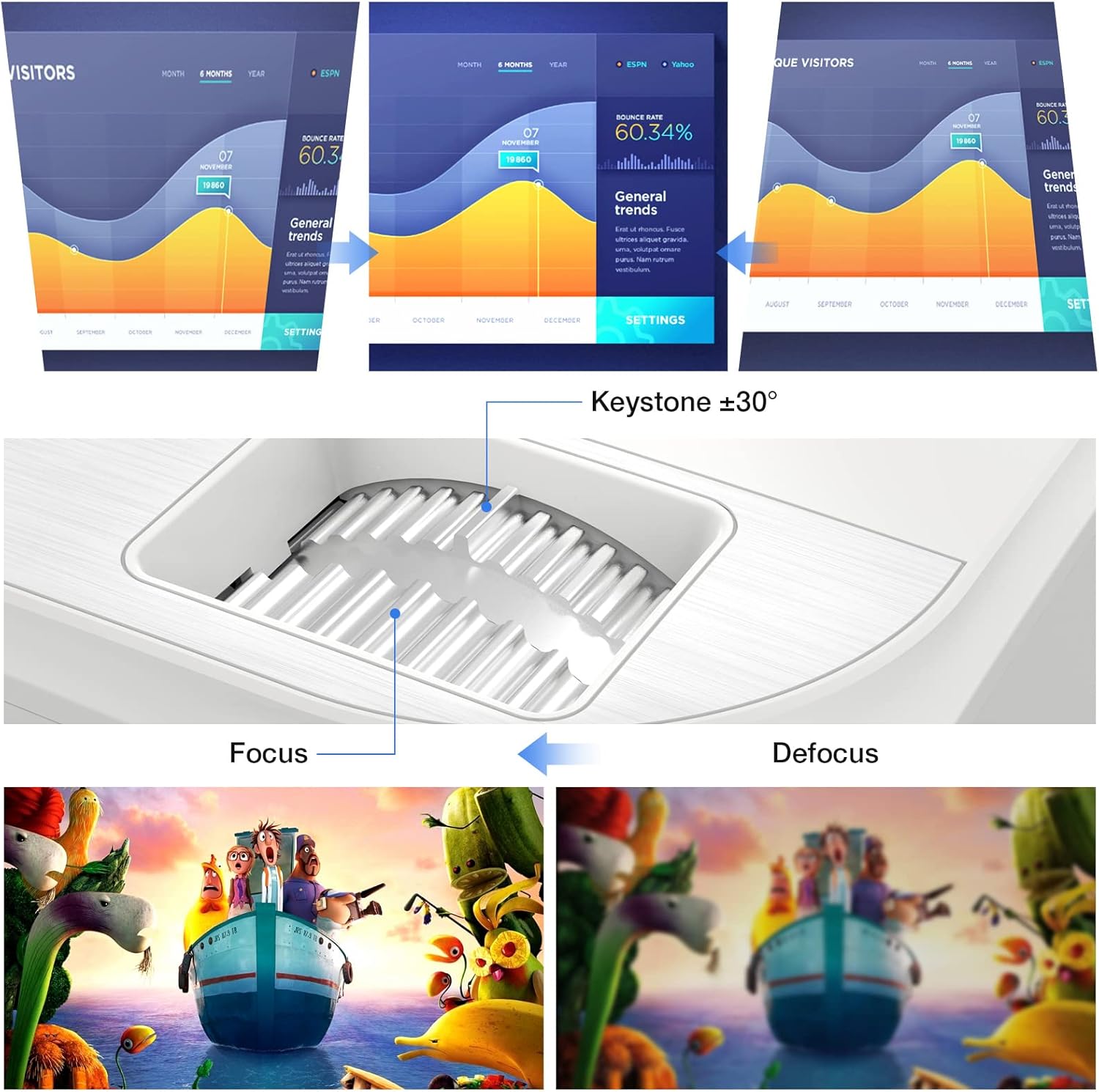
Resim 6.1: A diagram illustrating the focus and keystone adjustment mechanisms on the projector. It shows the keystone dial for correcting trapezoidal distortion (up to ±30 degrees) and the focus ring for sharpening the image, with visual examples of focused versus defocused projections.
7. Bakım
7.1 Temizlik
- Mercek: Optik lensler için özel olarak tasarlanmış yumuşak, tiftiksiz bir bez kullanın. Aşındırıcı temizleyiciler kullanmayın.
- Projektör Gövdesi: Wipe the surface with a soft, dry cloth. For stubborn marks, a slightly damp bez kullanılabilir, ancak cihaza sıvı girmemesine dikkat edin.
- Havalandırma Portları: Regularly check and clean the ventilation ports to prevent dust buildup, which can affect cooling performance. Use a soft brush or compressed air.
7.2 Lamp Hayat
Projektörün LED'iamp has an estimated lifespan of 150,000 hours, providing long-term, consistent performance without frequent lamp yedekler.
7.3 Soğutma Sistemi
The projector features an optimized cooling system to maintain stable operating temperatures and minimize fan noise. Ensure proper airflow around the projector by not blocking the ventilation openings.
8. Sorun Giderme
| Sorun | Olası Neden | Çözüm |
|---|---|---|
| Görüntü yansıtılmıyor. | Güç kablosu gevşek; Yanlış giriş kaynağı; Cihaz düzgün bağlanmamış. | Check power connection; Select correct input source (HDMI, USB, AV); Ensure source device is powered on and connected securely. |
| Görüntü bulanık | Odak ayarı yapılmamış; Projektör ekrana çok yakın/uzak. | Odak halkasını ayarlayın; Projeksiyon mesafesini ayarlayın. |
| Görüntü yamuk şeklindedir. | Projeksiyon cihazı ekrana dik açıda değil. | Use keystone correction dial to adjust. |
| Ses yok | Volume too low; Muted; External speakers not connected; Source device audio settings. | Increase volume; Unmute projector; Connect external speakers if desired; Check audio output settings on source device. |
| Uzaktan kumanda çalışmıyor | Batteries dead/incorrectly inserted; Obstruction between remote and projector. | Replace batteries; Ensure clear line of sight to IR receiver on projector. |
9. Özellikler
| Özellik | Detay |
|---|---|
| Marka | ÜST GÖRÜNÜM |
| Model Numarası | TP-98 |
| Yerel Çözünürlük | 1920 x 1080P Full HD |
| Maksimum Ekran Çözünürlüğü | Supports 4K UHD |
| Parlaklık | 9500 Lümen |
| Kontrast Oranı | 12000:1 |
| Lamp Hayat | 150,000 Saat |
| Projeksiyon Boyutu | 45 - 350 İnç |
| Anahtar Ebatı Düzeltme | ±30 Derece |
| Bağlantı | 2x HDMI, 2x USB, 1x AV, 1x 3.5mm Audio Out |
| Ürün Boyutları | 30U x 25G x 11Y cm |
| Ağırlık | 4.3 kilo |
| Görüntü Türü | LCD |
| Özel Özellikler | Built-in Stereo Speakers, Touch Sensitive Panel |
10. Garanti ve Destek
TOPVISION provides a 3-year free repair service for this product. Additionally, lifetime professional technical support is available. If you encounter any issues or require assistance, please do not hesitate to contact TOPVISION customer service.
For support, please refer to the contact information provided on the TOPVISION official website veya satın alma belgeleriniz.


