1. Giriş
This manual provides essential information for the installation, operation, and maintenance of your EVGA GeForce GTX 1050 Ti SC GAMING graphics card. Please read these instructions carefully before proceeding with installation to ensure proper functionality and to prevent damage to your system components.
The EVGA GeForce GTX 1050 Ti SC GAMING is a high-performance graphics card designed for an enhanced computing experience, featuring NVIDIA Pascal architecture and 4GB of GDDR5 memory. It is optimized for gaming at 1080p resolution and supports multiple display outputs.
2. Sistem Gereksinimleri
- Bir adet x16 grafik yuvasına sahip PCI Express uyumlu anakart.
- Minimum 300W or greater system power supply (with a minimum 18A on the +12V rail).
- 350 MB kullanılabilir sabit disk alanı.
- 4GB system memory (6GB or higher recommended).
- Microsoft Windows 10, Windows 8, or Windows 7 (32/64-bit).
- CD-ROM/DVD-ROM drive or internet connection for driver installation.
3. Donanım Kurulumu
- Sisteminizi Hazırlayın: Bilgisayarınızı kapatın ve güç kablosunu prizden çıkarın. Bilgisayarınızın kasasını açın.
- PCI Express yuvasını bulun: Identify an available PCI Express x16 slot on your motherboard. This is typically the longest slot.
- Yuva Kapağını Çıkarın: Bilgisayar kasanızın arkasındaki, seçtiğiniz PCI Express yuvasına karşılık gelen metal yuva kapağını çıkarın.
- Grafik Kartını Takın: Carefully align the graphics card with the PCI Express x16 slot. Press down firmly and evenly until the card is securely seated in the slot. Ensure the retention clip on the slot engages.
- Kartı Güvenceye Alın: Use a screw to fasten the graphics card's mounting bracket to the computer case.
- Ekran Kablolarını Bağlayın: Connect your monitor(s) to the appropriate video output ports on the graphics card (DisplayPort, HDMI, or DVI-D).
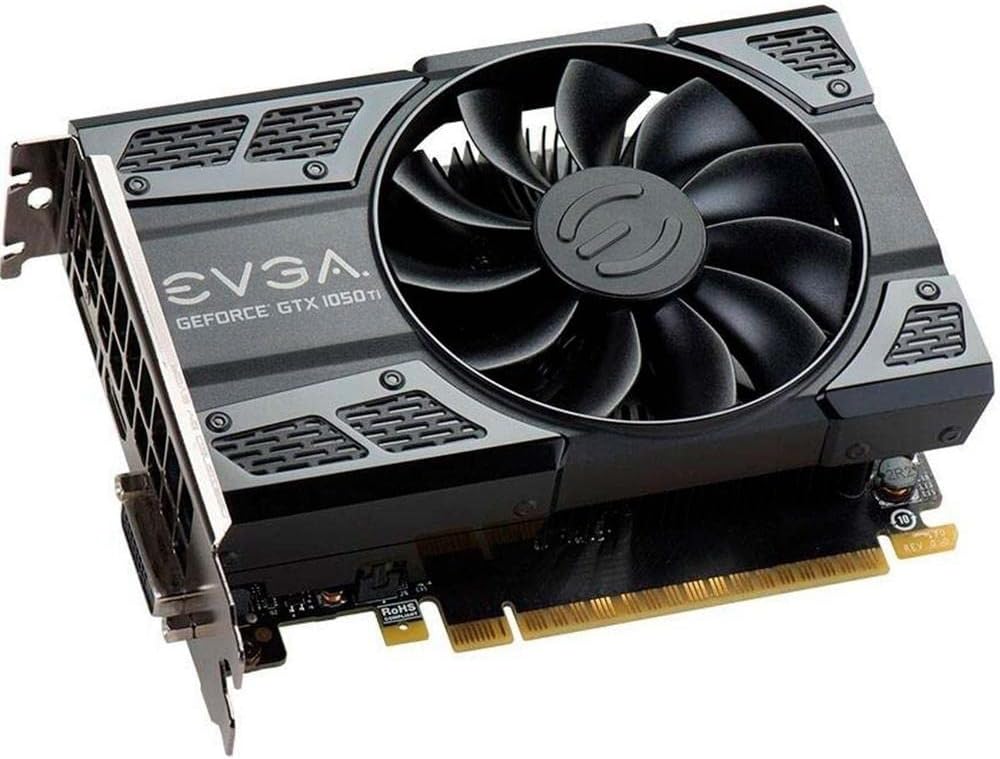
This image shows the front of the EVGA GeForce GTX 1050 Ti SC GAMING graphics card, highlighting its single cooling fan and EVGA branding.
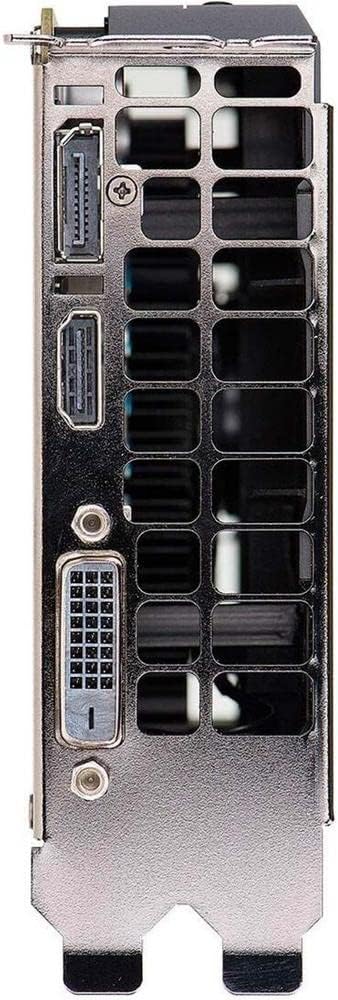
This image displays the video output ports on the graphics card, including DisplayPort, HDMI, and DVI-D connectors.
- Kasayı Kapatın ve Açın: Close your computer case, reconnect the power cable, and power on your system.
4. Sürücü Kurulumu
After hardware installation, the operating system may install generic drivers. For optimal performance and full functionality, install the latest drivers from EVGA or NVIDIA.
- Sürücüleri İndirin: Visit the official EVGA webalan (www.evga.com/drivers/) or NVIDIA webalan (www.nvidia.com/drivers).
- Ürünü seç: Choose your graphics card model (GeForce GTX 1050 Ti) and operating system.
- Download and Run: Download the recommended driver package and run the installer.
- Ekrandaki Komutları Takip Edin: Follow the instructions provided by the driver installer. A system restart may be required to complete the installation.
Consider installing EVGA Precision XOC software for advanced monitoring, overclocking, and fan control features, which supports DX12 OSD (On-Screen Display).
5. Grafik Kartınızı Çalıştırma
Once drivers are installed, your EVGA GeForce GTX 1050 Ti SC GAMING graphics card is ready for use. It will automatically handle graphics processing for applications and games. Ensure your display settings are configured correctly for resolution and refresh rate.
- Görüntü ayarları: Access your operating system's display settings to set the desired resolution (up to 1080p for optimal performance) and refresh rate (up to 240 Hz max).
- Çoklu Monitör Kurulumu: The card supports up to three monitors simultaneously. Configure extended desktop or duplicate display modes through your operating system's display settings or the NVIDIA Control Panel.
- Oyun: For gaming, ensure your game settings are optimized for your system's capabilities to achieve smooth frame rates.
6. Bakım
Düzenli bakım, grafik kartınızın uzun ömürlü olmasını ve optimum performans göstermesini sağlar.
- Sürücü Güncellemeleri: Periodically check for and install the latest graphics drivers from EVGA or NVIDIA. Driver updates often include performance improvements, bug fixes, and support for new games.
- Toz Temizleme: Over time, dust can accumulate on the fan and heatsink, reducing cooling efficiency. Carefully clean the fan and heatsink using compressed air. Ensure the system is powered off and unplugged before cleaning. Avoid touching the fan blades directly.
- Hava akışı: Aşırı ısınmayı önlemek için bilgisayar kasanızın yeterli hava akışına sahip olduğundan emin olun. Bilgisayarınızın etrafındaki alanı engellerden uzak tutun.
7. Sorun Giderme
Grafik kartınızla ilgili sorunlarla karşılaşırsanız aşağıdaki sorun giderme adımlarına bakın:
- Görüntü Çıkışı Yok:
- Ensure the monitor is powered on and the display cable is securely connected to both the graphics card and the monitor.
- Ekran kartının PCI Express yuvasına tam olarak oturduğundan emin olun.
- Mümkünse farklı bir ekran kablosu veya monitörle test edin.
- Monitörünüzün doğru giriş kaynağına ayarlı olup olmadığını kontrol edin.
- Sürücü Sorunları:
- If you experience crashes or display artifacts, try reinstalling the graphics drivers. Use a clean installation option if available in the driver installer.
- Ensure you have downloaded the correct drivers for your specific graphics card model and operating system.
- Performans Sorunları:
- Ensure your system meets the recommended requirements for the applications or games you are running.
- Monitor GPU temperatures using software like EVGA Precision XOC. High temperatures can lead to performance throttling.
- Sistem kaynaklarını boşaltmak için gereksiz arka plan uygulamalarını kapatın.
- Sistem Kararsızlığı:
- Güç kaynağı ünitenizin (PSU) minimum watt gereksinimlerini karşıladığından emin olun.tage gereksinimleri.
- Check for any loose connections inside your computer case.
8. Özellikler
| Özellik | Şartname |
|---|---|
| Grafik Eş İşlemcisi | NVIDIA GeForce GTX 1050 Ti |
| Marka | EVGA |
| Model Numarası | 04G-P4-6253-KR |
| Grafik RAM Boyutu | 4 GB GDDR5 |
| Video Çıkış Arayüzü | DVI-D, DisplayPort, HDMI |
| Grafik İşlemci Üreticisi | NVIDIA |
| Temel Saat | 1354 MHz |
| Saati Artır | 1468 MHz |
| Arayüz | PCI Express 3.0 |
| Max Monitors Supported | 3 |
| Maksimum Yenileme Hızı | 240 Hz |
| Dimensions (Height x Length) | 4.4 inch x 5.7 inch (Compact Size) |
| İşletim Sistemi Desteği | Windows 10 (32/64bit), Windows 8 (32/64bit), Windows 7 (32/64bit) |
9. Garanti ve Destek
For warranty information, technical support, and additional resources, please visit the official EVGA website or contact EVGA customer service. Keep your proof of purchase for warranty claims.
EVGA Official Webalan: www.evga.com


