1. Giriş
The Supermicro SBM-CMM-001 Chassis Management Module is designed to provide comprehensive remote management and monitoring capabilities for SuperBlade server systems. This module integrates advanced features to ensure efficient operation and maintenance of your server infrastructure.
Temel özellikler şunlardır:
- Remotely manage and monitor server blades, power supplies, cooling fans, and networking switches.
- IPMI 2.0 compliant, with KVM over LAN / KVM over IP for remote console access.
- Serial over LAN (SOL) for remote serial port redirection.
- Virtual Media Over LAN (Virtual USB Floppy/CD and Drive Redirection) for remote media access.
- LAN Alert-SNMP Trap for network-based event notifications.
2. Kurulum ve Kurulum
This section outlines the steps for installing and initially configuring your SBM-CMM-001 module within a SuperBlade chassis.
2.1 Fiziksel Kurulum
- Kapat: Ensure the SuperBlade chassis is completely powered off and disconnected from all power sources before proceeding.
- Yuvayı Bul: Identify the designated Chassis Management Module slot in your SuperBlade chassis. Refer to your SuperBlade chassis manual for exact slot location.
- Modülü Ekle: Carefully slide the SBM-CMM-001 module into the designated slot until it is firmly seated. Ensure the connectors align properly.
- Güvenli Modül: Secure the module using any retaining screws or latches provided by the chassis design.
- Ağa Bağlan: Connect an Ethernet cable from your network to the LAN port on the SBM-CMM-001 module.
- Güç Açık: Reconnect power to the SuperBlade chassis and power it on. The SBM-CMM-001 module will initialize automatically.
2.2 İlk Ağ Yapılandırması
Upon first boot, the SBM-CMM-001 may obtain an IP address via DHCP. If DHCP is not available or a static IP is required, you will need to access the module's console or use a discovery tool provided by Supermicro.
- Varsayılan Erişim: Consult the Supermicro documentation for the default IP address or method to discover the module's IP address on your network.
- Web Arayüz: Once the IP address is known, access the module's webtabanlı yönetim arayüzü aracılığıyla web tarayıcı.
- Giriş yapmak: Use the default username and password (refer to Supermicro documentation for defaults) to log in. It is highly recommended to change default credentials immediately after initial login.
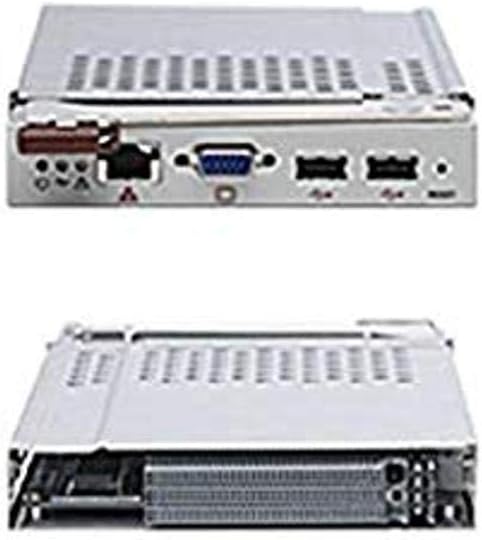
Figure 1: Supermicro SBM-CMM-001 Chassis Management Module showing its various ports and form factor.
3. Operasyon
The SBM-CMM-001 provides a robust set of tools for managing your SuperBlade environment. This section covers the primary operational aspects.
3.1 Web-Tabanlı Yönetim Arayüzü
The primary method for managing the SBM-CMM-001 is through its intuitive web interface. This interface allows you to:
- Monitor the status of server blades, power supplies, and cooling fans.
- Access KVM over IP for remote console control of individual blades.
- Perform power control operations (power on, off, reset) for server blades.
- Configure network settings, user accounts, and security parameters.
- Manage virtual media for remote OS installation or diagnostics.
- View system event logs and sensor readings.
3.2 KVM over IP
The KVM over IP feature allows you to remotely access the video, keyboard, and mouse of any server blade within the chassis. This is crucial for operating systems installation, BIOS configuration, and troubleshooting without physical presence.
- Navigate to the KVM section in the web arayüz.
- Select the desired server blade.
- Launch the KVM console viewer (typically a Java or HTML5 application).
3.3 Sanal Medya
Virtual Media allows you to redirect local CD/DVD-ROM drives or ISO image files from your client machine to a remote server blade. This is invaluable for installing operating systems or running diagnostic tools.
- Access the Virtual Media section in the web arayüz.
- Select the type of media to redirect (e.g., CD/DVD, Floppy, ISO image).
- Browse for the local media or ISO file and connect it to the remote server.
4. Bakım
Regular maintenance ensures the longevity and optimal performance of your SBM-CMM-001 module.
4.1 Firmware Güncellemesi
Supermicro periodically releases firmware updates to improve performance, add features, or address security vulnerabilities. It is recommended to keep your module's firmware up to date.
- Visit the official Supermicro webalan (www.supermicro.com) to download the latest firmware for the SBM-CMM-001.
- Follow the instructions provided with the firmware package for the update process, typically performed through the web arayüz.
- Dikkat: Do not interrupt the power supply during a firmware update, as this may damage the module.
4.2 Temizlik
Keep the module and its surrounding area free from dust and debris to ensure proper airflow and prevent overheating.
- Use a soft, dry cloth to wipe the exterior of the module.
- For internal cleaning (if necessary and only by qualified personnel), use compressed air to remove dust from vents and components.
5. Sorun Giderme
This section provides solutions to common issues you might encounter with your SBM-CMM-001 module.
5.1 Module Not Responding
- Gücü Kontrol Edin: Ensure the SuperBlade chassis is powered on and the module is receiving power.
- Reseat Module: Power off the chassis, then carefully remove and reinsert the SBM-CMM-001 module to ensure it is properly seated.
- Ağ Bağlantısı: Verify that the Ethernet cable is securely connected and that your network is functioning correctly. Try pinging the module's IP address.
- Modülü Sıfırla: If accessible, perform a soft reset of the module via the chassis management interface or by temporarily removing power.
5.2 KVM Console Not Displaying
- Tarayıcı Uyumluluğu: Sizin emin olun web browser is compatible with the KVM viewer. Some older modules may require Java.
- Güvenlik Duvarı Ayarları: Check if your local firewall or network firewall is blocking the necessary ports for KVM communication.
- Server Blade Status: Verify that the target server blade is powered on and functioning correctly.
- Yazılım: Ensure the SBM-CMM-001 firmware is up to date.
6. Özellikler
Detailed technical specifications for the Supermicro SBM-CMM-001 Chassis Management Module.
| Özellik | Tanım |
|---|---|
| Marka | Süpermikro |
| Model Numarası | SBM-CMM-001 |
| Çalışma Modu | KVM |
| Bağlayıcı Türü | USB |
| Denetleyici Türü | Remote Management Controller |
| Kontrol Yöntemi | Uzak |
| Bağlantı Protokolü | Ethernet |
| Ürün Boyutları (U x G x Y) | 17.2 x 1.7 x 14.5 inç |
| Ürün Ağırlığı | 2.2 pound |
| İlk Mevcut Tarih | 1 Ekim 2007 |
| UPC | 672042016112, 672042017928 |
7. Garanti ve Destek
For detailed warranty information and technical support, please refer to the official Supermicro websiteye gidin veya doğrudan müşteri hizmetleriyle iletişime geçin.
- Resmi Webalan: www.supermicro.com
- Destek Kaynakları: süper mikro website provides drivers, firmware, FAQs, and contact information for technical assistance.


