การแนะนำ
Thank you for choosing GOBOULT Tenet TWS Earbuds. This manual provides essential information for setting up, operating, and maintaining your earbuds. Please read it carefully before use to ensure optimal performance and longevity of your device.

ภาพ: เหนือview of GOBOULT Tenet TWS Earbuds features.
มีอะไรอยู่ในกล่อง
- GOBOULT Tenet TWS Earbuds (Left and Right)
- เคสชาร์จไฟ
- สายชาร์จแบบ USB Type-C
- แผ่นรองหูฟัง (หลายขนาด)
- คู่มือการใช้งาน
- บัตรรับประกัน
สินค้าเกินview
The GOBOULT Tenet TWS Earbuds are designed for a seamless audio experience with advanced features.
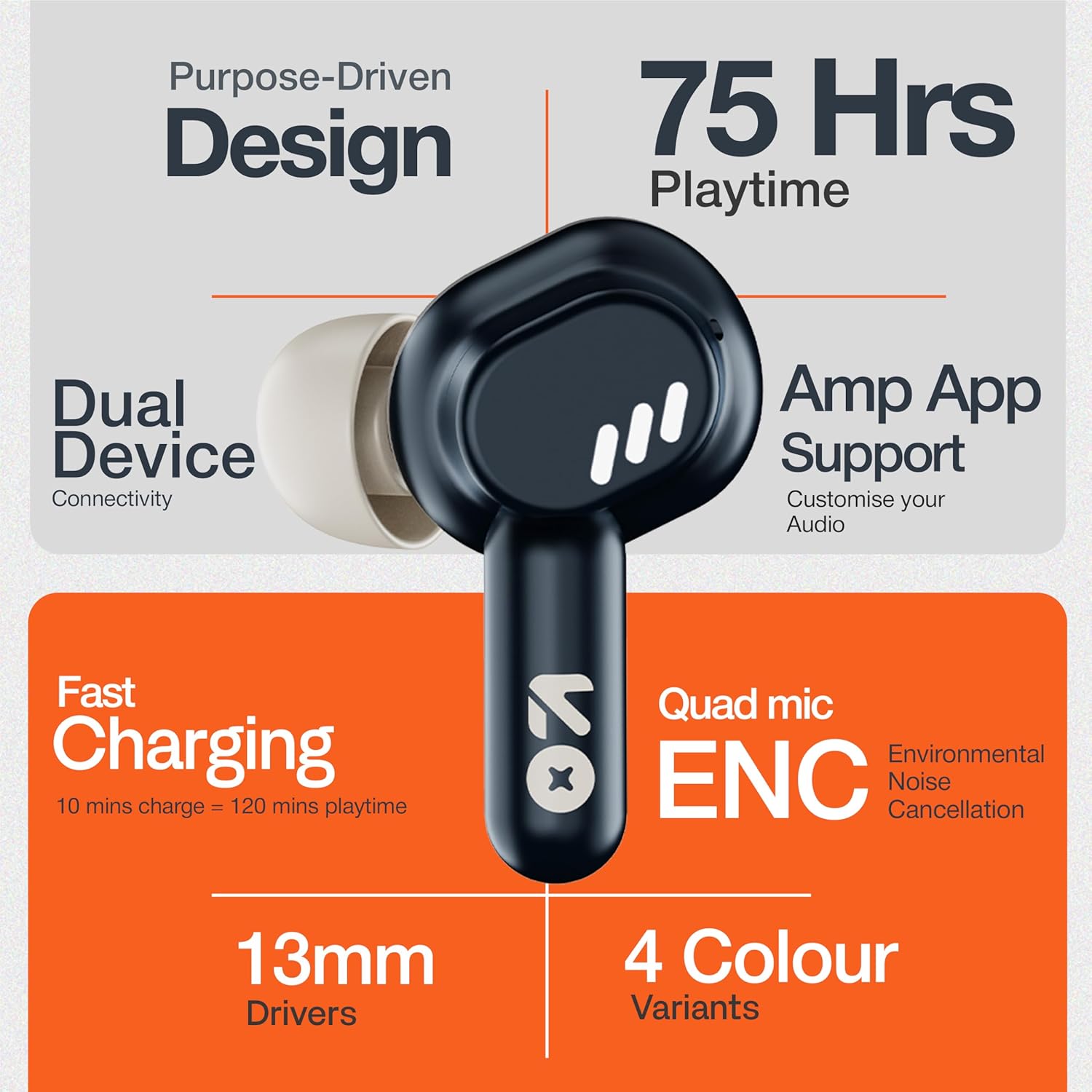
Image: GOBOULT Tenet TWS Earbuds and Charging Case.
ส่วนประกอบ:
- หูฟัง: Left and Right earbuds with touch control surfaces and built-in microphones.
- เคสชาร์จ: Stores and charges the earbuds, featuring a USB Type-C port for charging.
- ไฟ LED แสดงสถานะ: On both earbuds and the charging case to show battery status and pairing mode.

Image: Quad Mic Environmental Noise Cancellation (ENC) technology.
การตั้งค่า
1. การชาร์จหูฟังและเคส
ก่อนใช้งานครั้งแรก ควรชาร์จหูฟังและเคสชาร์จให้เต็ม
- ใส่หูฟังลงในกล่องชาร์จ ตรวจสอบให้แน่ใจว่าใส่หูฟังเข้าที่อย่างถูกต้อง
- เชื่อมต่อสายชาร์จ USB Type-C เข้ากับพอร์ตชาร์จบนเคสและแหล่งจ่ายไฟ
- The LED indicator on the case will show charging status. A full charge typically takes approximately 1.5 hours.
ชาร์จเร็ว: A 10-minute charge provides up to 120 minutes of playtime.

Image: Charging the GOBOULT Tenet TWS Earbuds.
2. การจับคู่กับอุปกรณ์
- เปิดกล่องชาร์จ หูฟังจะเข้าสู่โหมดจับคู่โดยอัตโนมัติ ซึ่งจะแสดงด้วยไฟ LED กระพริบ
- บนอุปกรณ์ของคุณ (สมาร์ทโฟน แท็บเล็ต แล็ปท็อป) ให้เปิดใช้งาน Bluetooth
- ค้นหา "GOBOULT Tenet" in the list of available Bluetooth devices and select it to connect.
- Once connected, the earbud LEDs will stop flashing.
การเชื่อมต่ออุปกรณ์คู่: The earbuds support simultaneous connection to two devices. After pairing with the first device, connect to the second device. The earbuds will intelligently switch between them.

Image: Dual Device Connectivity.
3. Amp การสนับสนุนแอป
Enhance your listening experience by downloading the GOBOULT Amp App. The app allows for custom EQ settings, control customization, and other audio preferences.
- Download the "GOBOULT Amp" app from your device's app store.
- Open the app and follow the on-screen instructions to connect your Tenet earbuds.

Image: GOBOULT Amp App for custom audio tuning.
คำแนะนำการใช้งาน
การสวมหูฟัง
Insert the earbuds gently into your ears and rotate them slightly to find a comfortable and secure fit. Choose the appropriate ear cushion size for optimal sound quality and comfort.
เปิด/ปิดเครื่อง
- เปิดเครื่อง: เปิดเคสชาร์จ หรือกดบริเวณควบคุมแบบสัมผัสบนหูฟังทั้งสองข้างค้างไว้ 3 วินาที
- หมดแรง: วางหูฟังกลับเข้าไปในกล่องชาร์จและปิดฝา หรือกดบริเวณควบคุมแบบสัมผัสบนหูฟังทั้งสองข้างค้างไว้ 5 วินาที
การควบคุมแบบสัมผัส
The GOBOULT Tenet TWS Earbuds feature intuitive touch controls on each earbud.

Image: Touch Controls and AI Assistant.
| การกระทำ | เอียร์บัดข้างซ้าย | เอียร์บัดด้านขวา |
|---|---|---|
| เล่น/หยุดเพลง | แตะเพียงครั้งเดียว | แตะเพียงครั้งเดียว |
| เพลงถัดไป | แตะสองครั้ง | แตะสองครั้ง |
| เพลงก่อนหน้า | แตะสามครั้ง | แตะสามครั้ง |
| รับสาย/วางสาย | แตะเพียงครั้งเดียว | แตะเพียงครั้งเดียว |
| ปฏิเสธการรับสาย | กดแบบยาว (2 วินาที) | กดแบบยาว (2 วินาที) |
| เปิดใช้งานผู้ช่วยเสียง | กดแบบยาว (2 วินาที) | กดแบบยาว (2 วินาที) |
การซ่อมบำรุง
การทำความสะอาด
- ทำความสะอาดหูฟังและกล่องชาร์จเป็นประจำด้วยผ้าแห้งนุ่มที่ไม่เป็นขุย
- ห้ามใช้สารเคมีรุนแรง น้ำยาทำความสะอาด หรือสารซักฟอกชนิดเข้มข้น
- ทำความสะอาดขั้วชาร์จทั้งบนหูฟังและเคส เพื่อให้แน่ใจว่าการชาร์จเป็นไปอย่างถูกต้อง
พื้นที่จัดเก็บ
- เมื่อไม่ได้ใช้งาน ให้เก็บหูฟังไว้ในกล่องชาร์จเพื่อปกป้องหูฟังและชาร์จไฟให้หูฟังอยู่เสมอ
- เก็บไว้ในที่แห้งและเย็น หลีกเลี่ยงอุณหภูมิที่สูงและแสงแดดโดยตรง
ความต้านทานต่อน้ำ
The GOBOULT Tenet TWS Earbuds are rated ทนน้ำระดับ IPX5, meaning they are protected against low-pressure water jets from any direction. This makes them suitable for workouts and light rain. However, they are not designed for swimming or submersion in water.
การแก้ไขปัญหา
If you encounter any issues with your GOBOULT Tenet TWS Earbuds, please refer to the following common solutions:
- หูฟังไม่จับคู่:
- ตรวจสอบให้แน่ใจว่าได้ชาร์จหูฟังเอียร์บัดทั้งสองข้างแล้ว
- Place earbuds back in the case, close the lid, wait 5 seconds, then open again to re-enter pairing mode.
- ปิดและเปิดบลูทูธบนอุปกรณ์ของคุณ
- Forget/delete "GOBOULT Tenet" from your device's Bluetooth list and try pairing again.
- มีหูฟังเพียงข้างเดียวที่ใช้งานได้:
- ตรวจสอบให้แน่ใจว่าได้ชาร์จหูฟังเอียร์บัดทั้งสองข้างแล้ว
- ใส่หูฟังทั้งสองข้างกลับเข้าไปในกล่องชาร์จ ปิดฝา แล้วเปิดอีกครั้ง
- Try resetting the earbuds (refer to the Amp App or GOBOULT support for specific reset instructions).
- ไม่มีเสียงหรือระดับเสียงต่ำ:
- ตรวจสอบระดับเสียงทั้งบนอุปกรณ์และหูฟังของคุณ
- ตรวจสอบให้แน่ใจว่าหูฟังเชื่อมต่อกับอุปกรณ์ของคุณอย่างถูกต้อง
- ทำความสะอาดเศษสิ่งสกปรกออกจากตาข่ายของลำโพงหูฟัง
- ปัญหาการชาร์จ:
- ตรวจสอบให้แน่ใจว่าสายชาร์จเชื่อมต่อกับเคสและแหล่งจ่ายไฟอย่างแน่นหนา
- ทำความสะอาดหน้าสัมผัสการชาร์จบนหูฟังและภายในเคส
- ลองใช้สาย USB Type-C และอะแดปเตอร์ไฟอื่น
If the issue persists, please contact GOBOULT customer support.
ข้อมูลจำเพาะ

Image: 13mm Dynamic Drivers for enhanced audio.
| คุณสมบัติ | รายละเอียด |
|---|---|
| ชื่อรุ่น | หูฟัง Airbass |
| เทคโนโลยีการเชื่อมต่อ | บลูทูธ 5.4 |
| ขนาดไดร์เวอร์เสียง | ไดรเวอร์ไดนามิกขนาด 13 มม. |
| อายุการใช้งานแบตเตอรี่ (รวม) | นานถึง 75 ชั่วโมง |
| ชาร์จเร็ว | ชาร์จ 10 นาที = เล่นได้ 120 นาที |
| พอร์ตชาร์จ | ยูเอสบี ไทป์ ซี |
| ไมโครโฟน | ไมโครโฟนสี่ตัวพร้อมระบบตัดเสียงรบกวนจากสิ่งแวดล้อม (ENC) |
| ความต้านทานต่อน้ำ | IPX5 |
| วิธีการควบคุม | สัมผัส |
| ผู้ช่วยเสียง | Built-In (Google Assistant, Siri) |
| การจับคู่อุปกรณ์คู่ | รองรับ |
| การตอบสนองความถี่ | ความถี่ 20 กิโลเฮิรตซ์ |
| ความไวต่อความรู้สึก | 105 เดซิเบล |
| น้ำหนักสินค้า | 54.5 กรัม |
| ขนาดสินค้า (กล่อง) | 6.7 x 2.2 x 5.6 ซม. |
การรับประกันและการสนับสนุน
ข้อมูลการรับประกัน
The GOBOULT Tenet TWS Earbuds come with a รับประกันจากผู้ผลิต 1 ปี นับจากวันที่ซื้อ การรับประกันนี้ครอบคลุมถึงข้อบกพร่องจากการผลิต โปรดเก็บหลักฐานการซื้อไว้เพื่อใช้ในการเรียกร้องการรับประกัน
การรับประกันไม่ครอบคลุมความเสียหายที่เกิดจากการใช้งานผิดวิธี อุบัติเหตุ การดัดแปลงที่ไม่ได้รับอนุญาต หรือการสึกหรอตามปกติ
การสนับสนุนลูกค้า
For any questions, technical assistance, or warranty claims, please contact GOBOULT customer support through their official webเว็บไซต์หรือข้อมูลการติดต่อที่ให้ไว้ในบัตรรับประกันของคุณ
Please have your product model number (Airbass Earbuds) and proof of purchase ready when contacting support.


