1. บทนำ
The COUGAR CFV235 is an innovative PC case featuring a Central Floating Ventilation (CFV) structure. This design separates the power supply unit compartment from the main chamber, utilizing the space between them as a highly effective ventilation channel to enhance cooling performance. The CFV235 combines a full panoramic view, a compact footprint, and structurally reinforced cooling capabilities to achieve superior airflow beyond traditional case designs.
This manual provides essential information for the proper installation, operation, and maintenance of your COUGAR CFV235 PC case. Please read it thoroughly before beginning assembly.
2. คุณสมบัติหลัก
- Central Floating Ventilation (CFV) Structure: Innovative design for enhanced cooling efficiency.
- Full Panoramic View: Clear tempered glass panels for showcasinส่วนประกอบภายใน g
- ดีไซน์ระบายอากาศสูง: Optimized for superior air circulation.
- ความเข้ากันได้กว้าง: Supports Mini ITX, Micro ATX, ATX, and CEB motherboards.
- Ampตัวเลือกการจัดเก็บข้อมูล: Multiple drive bays for 3.5" HDDs and 2.5" SSDs.
- ระยะห่างระหว่างชิ้นส่วนที่กว้างขวาง: Accommodates long GPUs, tall CPU coolers, and standard PSUs.
- โครงสร้างทนทาน: Built with robust materials for longevity.

รูปที่ 2.1: ด้านหน้า view of the COUGAR CFV235 PC case, highlighting its panoramic glass panels and illuminated interior.

Figure 2.2: The COUGAR CFV235 PC case showcasing its design in both black and white variants, with internal components and customizable RGB lighting.
3. คู่มือการติดตั้ง
3.1 การแกะกล่อง
- ถอดเคสพีซีออกจากบรรจุภัณฑ์อย่างระมัดระวัง
- Inspect the case for any signs of damage during transit. Contact your retailer immediately if any damage is found.
- Remove all protective films and internal packaging materials.
3.2 การติดตั้งส่วนประกอบ
Before installing components, ensure you have all necessary tools, including a Phillips head screwdriver.
- การติดตั้งเมนบอร์ด:

Figure 3.1: Interior of the CFV235 case, showing pre-installed motherboard standoffs.
- ติดตั้งแผงป้องกัน I/O ลงในช่องเปิดด้านหลังของเคส
- Align your Mini ITX, Micro ATX, ATX, or CEB motherboard with the pre-installed standoffs.
- ยึดเมนบอร์ดโดยใช้สกรูที่ให้มา
- การติดตั้งหน่วยจ่ายไฟ (PSU):
- The CFV235 features a dedicated PSU compartment. Install your ATX PSU (up to 200mm length) into this compartment.
- ยึดพาวเวอร์ซัพพลายด้วยสกรูจากด้านหลังของเคส
- การติดตั้งไดรฟ์จัดเก็บข้อมูล:

Figure 3.2: Rear interior of the CFV235, illustrating cable management options and locations for 2.5" and 3.5" drive bays.
- Install 3.5" HDDs into the designated drive bays (up to 2 drives).
- Install 2.5" SSDs into the dedicated SSD mounts (up to 4 drives, 2 of which are shared with 3.5" bays).
- Ensure all drives are securely fastened.
- การติดตั้งการ์ดจอ (GPU):

Figure 3.3: Diagram indicating the maximum GPU length of 430mm supported by the CFV235 case.
- เคสนี้รองรับ GPU ที่มีความยาวสูงสุด 430 มม.
- Insert your GPU into the appropriate PCIe slot on the motherboard and secure it with the retention clip and screw.
- การติดตั้งตัวระบายความร้อน CPU:
- The case supports CPU coolers up to 175mm in height.
- ติดตั้งพัดลมระบายความร้อน CPU ตามคำแนะนำของผู้ผลิต
- การจัดการสายเคเบิล:
- ใช้ช่องเจาะเดินสายเคเบิลและจุดผูกยึดด้านหลังถาดเมนบอร์ดเพื่อจัดการสายเคเบิลให้เป็นระเบียบ
- Proper cable management improves airflow and aesthetics.
4. คู่มือการใช้งาน
4.1 แผง I/O ด้านหน้า

Figure 4.1: The front I/O panel of the CFV235, featuring USB ports, audio jacks, and the power button.
แผง I/O ด้านหน้าช่วยให้เข้าถึงพอร์ตและการควบคุมที่จำเป็นได้อย่างสะดวก:
- ปุ่มเปิด/ปิด: กดเพื่อเปิด/ปิดระบบของคุณ
- ปุ่มรีเซ็ต: กดเพื่อรีสตาร์ทระบบของคุณ
- พอร์ต USB: เชื่อมต่ออุปกรณ์ USB
- แจ็คเสียง: เชื่อมต่อหูฟังและไมโครโฟน
4.2 การไหลเวียนของอากาศและการระบายความร้อน
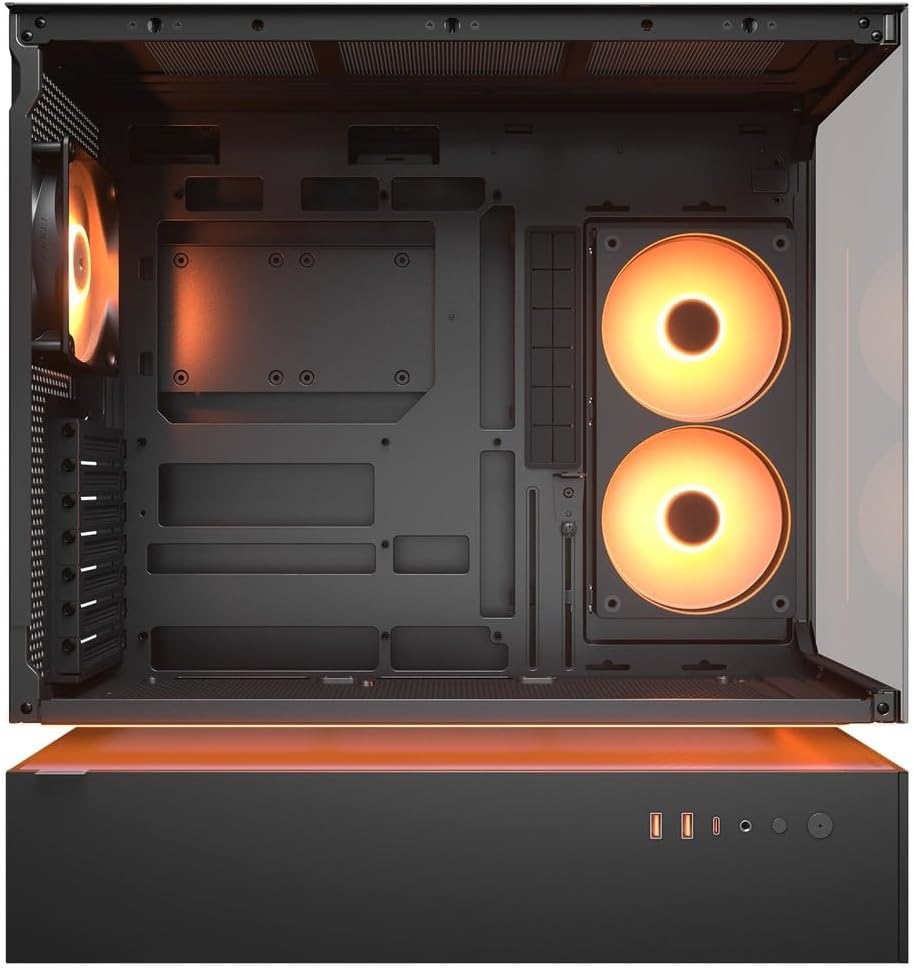
รูปที่ 4.2: ภายใน view of the CFV235 with fans installed, demonstrating the potential for high airflow.
The CFV235 is designed for optimal airflow. Ensure all fans are correctly installed and oriented to facilitate efficient cooling. The Central Floating Ventilation structure promotes direct airflow to critical components.
5. การบำรุงรักษา
5.1 การทำความสะอาดตัวกรองฝุ่น

Figure 5.1: Removable magnetic dust filter for easy cleaning.
Regular cleaning of dust filters is crucial for maintaining optimal airflow and preventing dust buildup inside your PC. The CFV235 features easily removable dust filters:
- Gently remove the magnetic dust filters located on the top and bottom of the case.
- ทำความสะอาดตัวกรองโดยใช้ลมเป่าหรือล้างด้วยน้ำ ตรวจสอบให้แน่ใจว่าแห้งสนิทก่อนประกอบกลับเข้าไปใหม่
- ติดตั้งตัวกรองกลับเข้าที่เดิม
5.2 การทำความสะอาดทั่วไป
- ใช้แบบนุ่มๆamp cloth to wipe down the exterior surfaces of the case.
- Avoid using harsh chemicals or abrasive materials that could damage the finish or tempered glass.
- For internal cleaning, use compressed air to remove dust from components and fan blades.
6 การแก้ไขปัญหา
ส่วนนี้จะกล่าวถึงปัญหาทั่วไปที่คุณอาจพบเจอ สำหรับปัญหาที่ซับซ้อนกว่านี้ โปรดดูที่ส่วนการสนับสนุน
6.1 ระบบไม่เปิดเครื่อง
- ตรวจสอบว่าสายไฟเชื่อมต่อกับแหล่งจ่ายไฟและเต้ารับที่ผนังอย่างแน่นหนาแล้วหรือไม่
- ตรวจสอบให้แน่ใจว่าสวิตช์ของแหล่งจ่ายไฟ (PSU) อยู่ในตำแหน่ง "เปิด"
- ตรวจสอบให้แน่ใจว่าสายเคเบิลปุ่มเปิดปิดด้านหน้าเชื่อมต่อกับเมนบอร์ดอย่างถูกต้องแล้ว
- Confirm that all internal power connections (24-pin ATX, CPU, GPU) are firmly seated.
6.2 ปัญหาความร้อนสูงเกินไป
- Ensure all case fans and CPU/GPU coolers are functioning correctly.
- Clean any dust buildup from fans and dust filters (refer to Section 5.1).
- Verify that fans are oriented for optimal airflow (intake and exhaust).
- Check for proper cable management to avoid obstructing airflow.
6.3 USB/Audio Ports Not Working
- Ensure the front panel USB and audio cables are correctly connected to the motherboard headers.
- Check your operating system's device manager for any driver issues.
7. ข้อมูลจำเพาะ
| คุณสมบัติ | ข้อมูลจำเพาะ |
|---|---|
| ยี่ห้อ | เสือภูเขา |
| ชื่อรุ่น | ซีเอฟวี235 |
| ขนาดผลิตภัณฑ์ (กว้าง x สูง x ลึก) | 235 x 493 x 460 มม. |
| น้ำหนักผลิตภัณฑ์ | 9.5 กก. |
| เมนบอร์ดที่รองรับ | มินิ ITX / ไมโคร ATX / ATX / CEB |
| ช่องไดรฟ์ | 5.25" x0 / 3.5" x2 / 2.5" SSD x2+2 (2 shared with 3.5" bays) |
| ความยาวสูงสุดของ GPU | 430 มม. |
| ความสูงสูงสุดของตัวระบายความร้อนซีพียู | 175 มม. |
| ความยาวสูงสุดของ PSU | 200 มม. |
| สี | สีดำ |
| คุณสมบัติ | Central Floating Ventilation, Panoramic Glass, High Airflow, Built-in Fans |
8. การรับประกันและการสนับสนุน
Your COUGAR CFV235 PC case comes with a รับประกัน 1 ปี นับจากวันที่ซื้อ การรับประกันนี้ครอบคลุมถึงข้อบกพร่องในการผลิตและข้อบกพร่องของวัสดุภายใต้การใช้งานปกติ
For technical support, warranty claims, or further assistance, please visit the official COUGAR website or contact your local retailer. Please have your product model number (CFV235) and proof of purchase ready when contacting support.
คูการ์อย่างเป็นทางการ Webเว็บไซต์: cougargaming.คอม


