1. ข้อมูลด้านความปลอดภัย
Please read all instructions carefully before installation and use. Failure to follow these instructions may result in damage to the product or other components.
- ตรวจสอบให้แน่ใจว่าคอมพิวเตอร์ของคุณปิดอยู่และถอดปลั๊กออกจากเต้าเสียบที่ผนังก่อนการติดตั้ง
- จัดการส่วนประกอบต่างๆ ด้วยความระมัดระวังเพื่อหลีกเลี่ยงความเสียหาย
- เก็บให้พ้นจากมือเด็ก
- ห้ามดัดแปลงตัวระบายความร้อนหรือชิ้นส่วนใดๆ ของมัน
- ใช้เฉพาะฮาร์ดแวร์ติดตั้งที่ให้มาเท่านั้น
2. เนื้อหาบรรจุภัณฑ์
ตรวจสอบว่ามีรายการทั้งหมดอยู่ในแพ็คเกจของคุณ:
- Ocypus Gamma A40 BK CPU Air Cooler (Heatsink and Fan assembly)
- เครื่องมือติดตั้ง
- Mounting hardware for Intel LGA 115X/1200/1700/1851
- Mounting hardware for AMD AM4/AM5
- Thermal paste packet

Image: Included accessories for the Ocypus Gamma A40 BK CPU Air Cooler, showing various mounting brackets, screws, and a thermal paste packet.
3. ข้อมูลจำเพาะ
| แบบอย่าง | Ocypus Gamma A40 BK |
| ขนาดสินค้า (กว้าง x ยาว x สูง) | 105 มม. x 93 มม. x 133 มม. (ยาว 4.13 นิ้ว x กว้าง 3.66 นิ้ว x สูง 5.24 นิ้ว) |
| วิธีการทำความเย็น | อากาศ |
| ท่อระบายความร้อน | 4 x Φ6mm Copper Direct Touch |
| ขนาดพัดลม | 100มม. |
| ความเร็วพัดลม | 600-2400 ±10% RPM (PWM controlled) |
| ความจุการไหลของอากาศ | 41 ลูกบาศก์ฟุตต่อนาที |
| แรงดันอากาศ | 2.2มม. H2O |
| ระดับเสียง | ≤29.5 เดซิเบล(เอ) |
| ประเภทตัวเชื่อมต่อกระแสไฟ | 3-Pin (PWM) |
| เล่มที่tage | 12 โวลต์ (กระแสตรง) |
| วัดtage | 1.2 วัตต์ |
| การสนับสนุน TDP | สูงสุดถึง 200W |
| ซ็อกเก็ตที่เข้ากันได้ | Intel LGA 115X/1200/1700/1851, AMD AM4/AM5 |
| วัสดุ | อะลูมิเนียม ทองแดง พลาสติก |
| น้ำหนักสินค้า | 13.7 ออนซ์ |
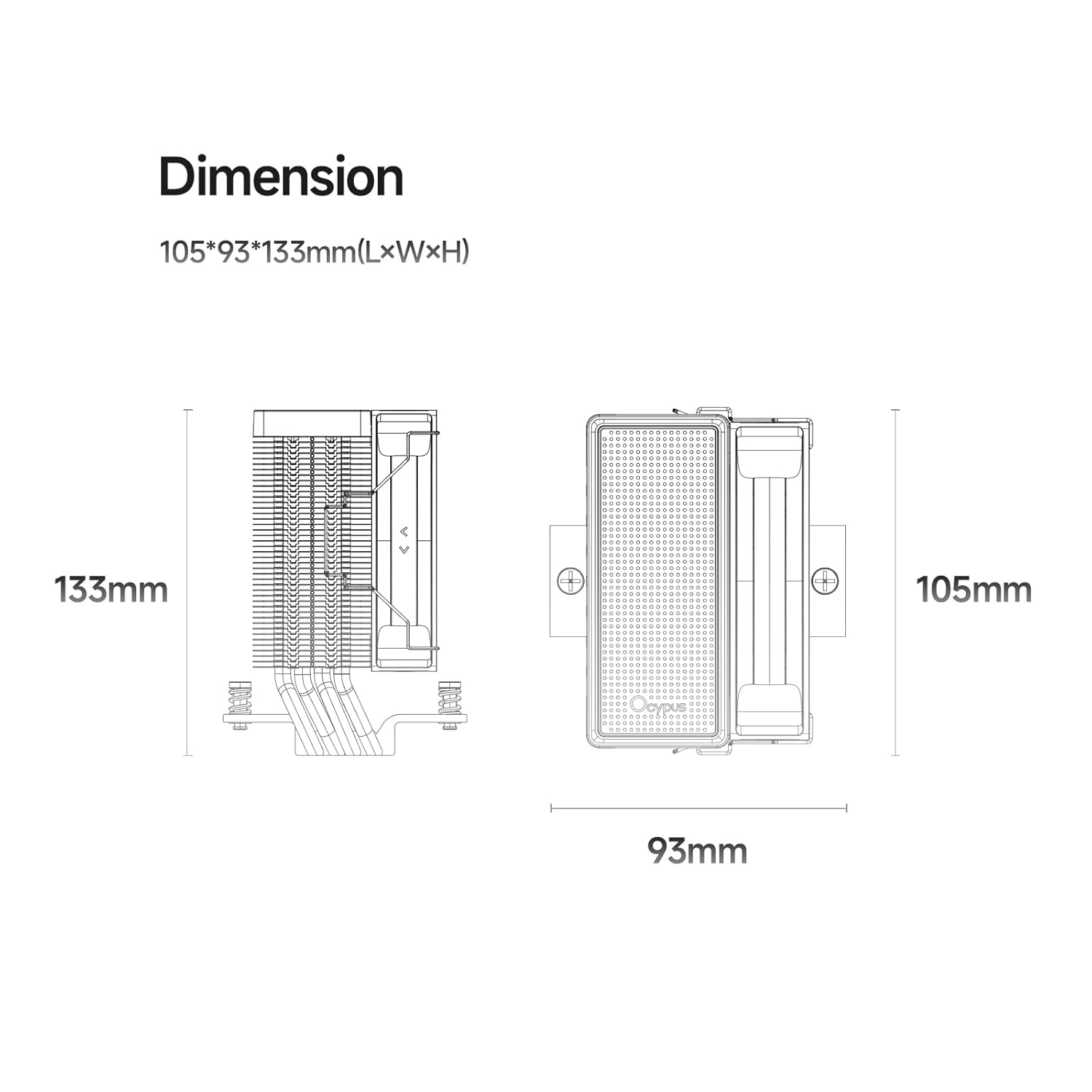
Image: Detailed dimension diagram of the Ocypus Gamma A40 BK CPU Air Cooler, showing its height of 133mm, length of 105mm, and width of 93mm.

ภาพ: ระยะใกล้ view of the CPU cooler's base, highlighting the four Φ6mm copper direct touch heat pipes, indicating a TDP support of up to 200W.

Image: Diagram illustrating the specifications of the 100mm high-performance, low-noise fan, including 41 CFM air flow, 2.2mm H2O air pressure, ≤29.5 dB(A) noise, 600-2400 ±10% PWM speed, and a 4-pin connector.
4. คู่มือการติดตั้ง
This section provides general installation steps. Refer to your motherboard manual for specific details regarding CPU socket preparation.
4.1 เตรียมความพร้อมระบบของคุณ
- ปิดคอมพิวเตอร์และถอดปลั๊กออกจากเต้าเสียบไฟ
- Open your computer case to access the motherboard and CPU socket.
- ถอดพัดลมระบายความร้อน CPU เดิมออกทั้งหมด ทำความสะอาดพื้นผิว CPU อย่างทั่วถึงเพื่อกำจัดคราบซิลิโคนระบายความร้อนเก่าออกโดยใช้แอลกอฮอล์ไอโซโพรพิล
4.2 ทาซิลิโคนระบายความร้อน
Apply a small amount of thermal paste (pea-sized dot or a thin line) to the center of your CPU's Integrated Heat Spreader (IHS). The pressure from the cooler will spread it evenly.
4.3 ติดตั้งฮาร์ดแวร์สำหรับติดตั้ง
Select the appropriate mounting brackets for your CPU socket (Intel or AMD).

Image: Illustration of the CPU cooler being installed onto a motherboard, demonstrating the ease of installation with all-metal mounting hardware.
For Intel LGA 115X/1200/1700/1851:
- Attach the Intel backplate to the rear of the motherboard, aligning the holes with the CPU socket.
- Secure the Intel mounting standoffs through the motherboard from the front.
- วางขายึดของ Intel ลงบนตัวรองรับ และยึดให้แน่นด้วยสกรูที่ให้มา
สำหรับ AMD AM4/AM5:
- Remove the existing plastic retention modules from the motherboard, but keep the original backplate.
- Attach the AMD mounting standoffs to the original backplate.
- วางขายึด AMD ลงบนตัวรองรับ และยึดให้แน่นด้วยสกรูที่ให้มา
4.4 ติดตั้งตัวระบายความร้อน
- Carefully place the heatsink assembly onto the CPU, ensuring the heat pipes make direct contact with the thermal paste.
- Align the cooler's mounting holes with the brackets.
- Using the provided mounting tool, alternately tighten the screws in a diagonal pattern until the cooler is firmly seated. Do not overtighten.
- เชื่อมต่อสายพัดลม PWM แบบ 3 พินเข้ากับหัวต่อ CPU_FAN บนเมนบอร์ดของคุณ
วิดีโอ: จบแล้วview of the Ocypus Gamma A40 Series CPU Air Cooler, demonstrating its design and features. This video provides a visual guide to the product's components and aesthetics.
Video: A detailed look at the Ocypus Gamma A40 Series CPU Air Cooler, showcasing its construction, heat pipe design, and fan. This video helps users understand the physical aspects of the cooler.
5. คู่มือการใช้งาน
Once installed, the Ocypus Gamma A40 BK CPU Air Cooler operates automatically based on your motherboard's fan control settings.
- การควบคุมพัดลมอัตโนมัติ: The 3-pin PWM fan will adjust its speed (600-2400 RPM) according to the CPU temperature, as managed by your motherboard's BIOS/UEFI settings. This ensures optimal cooling performance while minimizing noise.
- การติดตาม: You can monitor CPU temperatures and fan speeds using motherboard utility software or within the BIOS/UEFI.
- การเริ่มต้นครั้งแรก: During the first few hours of operation, the thermal paste will "cure" and achieve its full thermal conductivity. Monitor temperatures during this period.

Image: The Ocypus Gamma A40 BK CPU Air Cooler installed inside a computer case, demonstrating its compact fit and appearance.
6. การบำรุงรักษา
การบำรุงรักษาอย่างสม่ำเสมอจะช่วยให้พัดลมระบายความร้อน CPU ทำงานได้อย่างมีประสิทธิภาพสูงสุดและมีอายุการใช้งานยาวนานขึ้น
- การทำความสะอาดฝุ่น: Periodically (every 3-6 months, depending on environment) clean dust from the heatsink fins and fan blades using compressed air. Ensure the fan is held stationary during cleaning to prevent over-spinning.
- การตรวจสอบพัดลม: Check the fan for any signs of wear, unusual noises, or obstructions.
- การนำวางความร้อนกลับมาใช้ใหม่: If you remove the cooler for any reason, it is recommended to clean off the old thermal paste from both the CPU and the cooler base and apply new thermal paste before reinstallation.
7 การแก้ไขปัญหา
| ปัญหา | สาเหตุที่เป็นไปได้ | สารละลาย |
|---|---|---|
| อุณหภูมิ CPU สูง |
|
|
| พัดลมไม่หมุน |
|
|
| Unusual Fan Noise |
|
|
8. การรับประกันและการสนับสนุน
Ocypus products are designed and manufactured to the highest quality standards. For warranty information and technical support, please refer to the official Ocypus webหรือติดต่อฝ่ายบริการลูกค้าโดยตรง
เก็บหลักฐานการซื้อของคุณไว้เพื่อเรียกร้องการรับประกัน
ผู้ผลิต: โอไซปัส
Webเว็บไซต์: Ocypus Store on Amazon (สำหรับข้อมูลผลิตภัณฑ์ทั่วไป)