1. สินค้าหมดview
The LEKATO 2-in-1 Drum Looper Pedal is a versatile guitar effect pedal combining a high-sampling-rate looper with a built-in drum machine. It operates at 44.1 kHz, 24-bit, offering both looping and drum functions independently or simultaneously.

รูปที่ 1 : ด้านหน้า view of the LEKATO LP-02 2-in-1 Drum Looper Pedal, highlighting its dual functionality as a looper and drum machine.
2. คำแนะนำในการตั้งค่า
2.1 แหล่งจ่ายไฟ
This pedal requires a 9V DC negative-center power adapter (not included). Ensure the power supply provides less than 80 mA. Do not use a power supply with different specifications to avoid damage to the unit.
2.2 การเชื่อมต่อ
- เชื่อมต่อกีตาร์หรือเครื่องดนตรีอื่นๆ ของคุณเข้ากับ... อินพุตวี แจ็คอยู่ทางด้านขวาของแป้นเหยียบ
- เชื่อมต่อ V OUTPUT แจ็คทางด้านซ้ายของแป้นเหยียบไปยังของคุณ amplifier or next effect pedal.
- Connect the 9V DC power adapter to the power input jack.
2.3 Buffer Bypass
The pedal features Buffer Bypass, which helps maintain signal strength over long cable runs or when using multiple pedals. This prevents tone loss that can occur due to cable capacitance in True Bypass systems.

Figure 2: Detail of the footswitch, indicating the Buffer Bypass functionality for signal integrity.
3. การดำเนินการ
3.1 การควบคุมมากกว่าview
- ปุ่มหมุน LOOP: ปรับระดับเสียงการเล่นของลูปที่บันทึกไว้
- ปุ่มปรับกลอง: ปรับระดับเสียงการเล่นของเครื่องดรัมแมชชีน
- DRUM SELECT Knob: Selects one of the 8 available drum styles. This knob is analog and not notched, requiring careful adjustment to select the desired style.
- ฟุตสวิตช์: A multi-function switch used for recording, playback, overdubbing, undo/redo, and tap tempo.
- ไฟแสดงสถานะ LED: A single multi-colored LED indicates the pedal's status (e.g., recording, playing, overdubbing, drum tempo). Refer to the quick start guide for specific LED patterns and colors.

Figure 3: The three control knobs for adjusting loop volume, drum volume, and selecting drum styles.
3.2 Looper Module
The looper module offers up to 6 minutes of recording time and supports unlimited overdubs. Recorded tracks are automatically saved.
- การบันทึก: Press the footswitch once to start recording. The LED will indicate recording status.
- การเล่นซ้ำ: Press the footswitch again to stop recording and start playback.
- โอเวอร์ดับ: During playback, press the footswitch once to start overdubbing. Press again to stop overdubbing.
- ย้อนกลับ/ทำซ้ำ: Hold the footswitch for approximately 5 seconds to undo the last recorded layer. Repeat to redo.
- หยุด: Double-press the footswitch to stop playback.
- ชัดเจน: While stopped, hold the footswitch for an extended period (e.g., 15 seconds as per some documentation, but often shorter in practice) to clear the entire loop.
Files can be exported or imported using dedicated software (refer to manufacturer's website for software details).

Figure 4: The looper module's key features, including its 6-minute loop capacity and data management options.
3.3 Drum Machine Module
The built-in drum machine features 8 musical styles, each with real drum samples. It includes a tap tempo function.
- Selecting Drum Style: ใช้ DRUM SELECT knob to choose one of the 8 available drum styles (e.g., Blues, Rock, Pop, Country, Metal, Ballad, R&B, Dance).
- แตะจังหวะ: While the drum machine is playing, tap the footswitch at your desired tempo to adjust the drum speed. The drum speed can also automatically match the tempo of a 4/4 time phrase when used with the looper.

Figure 5: The drum machine functionality, detailing the variety of grooves and real drum sampมีไฟล์ให้เลือก
4. การบำรุงรักษา
- รักษาแป้นเหยียบให้สะอาดด้วยการเช็ดด้วยผ้านุ่มและแห้ง หลีกเลี่ยงการใช้น้ำยาทำความสะอาดหรือสารละลายที่มีฤทธิ์กัดกร่อน
- เก็บแป้นเหยียบไว้ในที่แห้ง หลีกเลี่ยงอุณหภูมิและความชื้นที่สูงหรือต่ำเกินไป
- Ensure all cable connections are secure before and after use.
- ควรตัดการเชื่อมต่อแหล่งจ่ายไฟทุกครั้งเมื่อไม่ได้ใช้งานแป้นเหยียบเป็นเวลานาน
5 การแก้ไขปัญหา
5.1 ไม่มีไฟฟ้า
- Ensure the 9V DC negative-center power adapter is correctly connected and functioning.
- ตรวจสอบว่าปลั๊กไฟใช้งานได้หรือไม่
5.2 ไม่มีเสียงออก
- ตรวจสอบการเชื่อมต่อสายเคเบิลขาเข้าและขาออกทั้งหมด
- Ensure the LOOP and DRUM volume knobs are not set to minimum.
- Test with different cables and an amplifier to rule out external equipment issues.
5.3 Difficulty with Footswitch Functions
- The single footswitch performs multiple functions based on the number, duration, and order of presses. Refer to the 'Operation' section and practice the specific press sequences for recording, playback, overdub, undo/redo, and tap tempo.
- Consistent timing is crucial for accurate loop recording and drum tempo setting.
5.4 Unclear LED Indications
- The single multi-colored LED indicates various statuses. Consult the quick start guide or manufacturer's documentation for a detailed explanation of LED color and flash patterns.
6. ข้อมูลจำเพาะ
| คุณสมบัติ | ข้อมูลจำเพาะ |
|---|---|
| หมายเลขรุ่น | BCUSM03626 |
| ขนาดสินค้า | 5.08 x 5.08 x 9.65 ซม. (2 x 2 x 3.8 นิ้ว) |
| น้ำหนักสินค้า | 176 กรัม |
| เวลา Loop | สูงสุด 6 นาที |
| Overdubs | ไม่จำกัด |
| Drum Grooves | 8 musical styles with real drum sampเลส |
| Sampลิงอัตรา | 44.1 kHz, 24 บิต |
| แหล่งพลังงาน | Corded Electric (9V DC, negative-center) |
| กระแสไฟฟ้าที่ใช้งาน | น้อยกว่า 80 มิลลิแอมป์ |
| ฮาร์ดแวร์อินเตอร์เฟซ | USB Type C (for import/export) |
| รูปแบบสัญญาณ | ดิจิตอล |
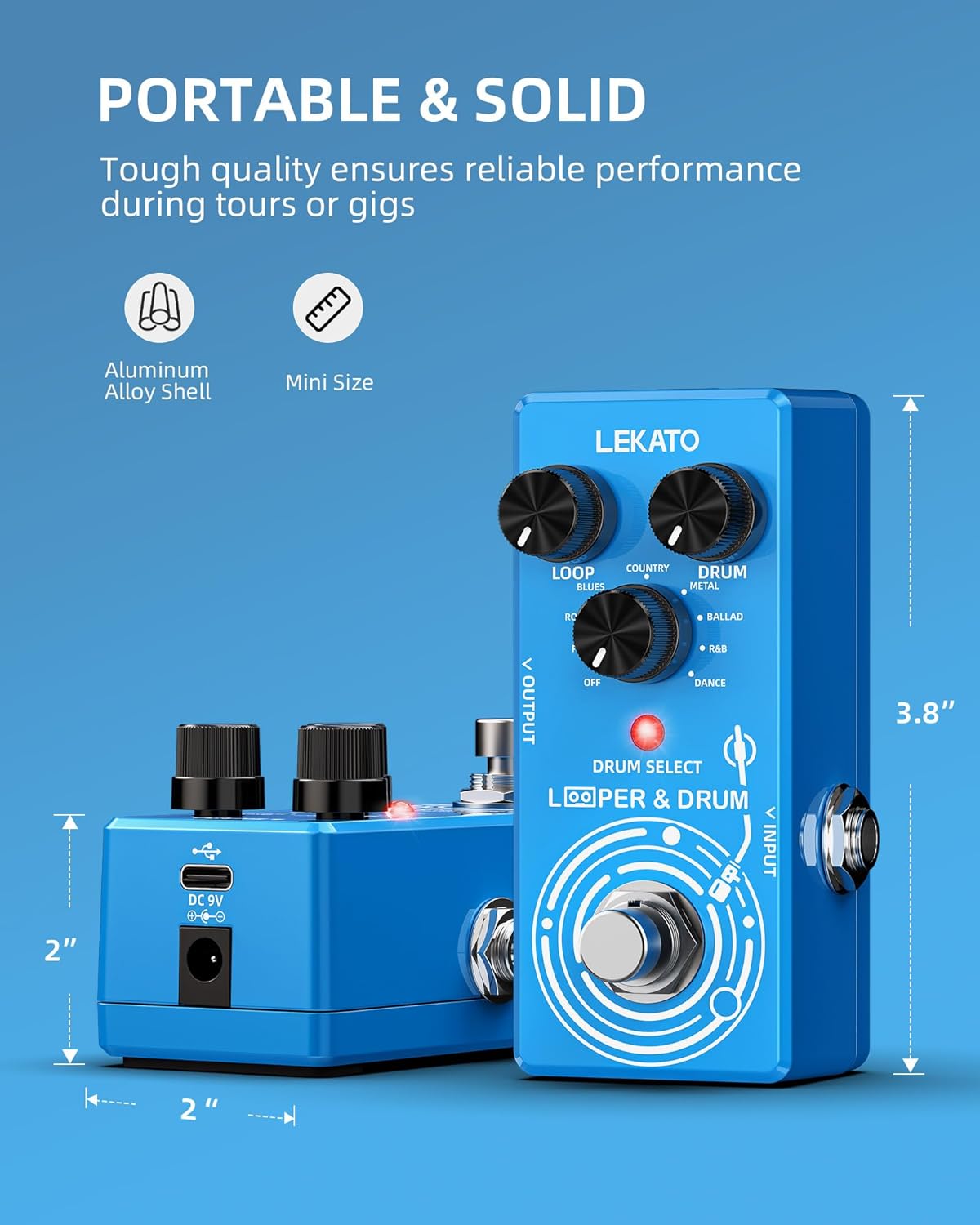
Figure 6: Physical dimensions of the LEKATO 2-in-1 Drum Looper Pedal.
7. การรับประกันและการสนับสนุน
For warranty information and technical support, please refer to the documentation provided with your purchase or visit the official LEKATO webไซต์ เงื่อนไขการรับประกันเฉพาะอาจแตกต่างกันไปตามภูมิภาคและผู้ค้าปลีก


