1. บทนำ
The DOOGEE Note56X Pro is an Android 16 smartphone designed for optimal performance and user experience. It features a sleek design, a powerful octa-core processor, a high-capacity battery, and advanced camera capabilities. This manual provides essential information for setting up, operating, and maintaining your device.

This image displays the DOOGEE Note56X Pro smartphone in light blue and black, showcasing ที่ดูเรียบหรูและทันสมัยfile and key features such as its 8.45mm ultra-thin design, 6150mAh silicon-carbon battery, integrated Gemini AI with Android 16, 128GB expandable ROM, and a 6.56-inch HD+ 90Hz display.
2. อะไรอยู่ในกล่อง
ตรวจสอบว่ามีรายการทั้งหมดอยู่ในบรรจุภัณฑ์ผลิตภัณฑ์ของคุณ:
- 1 x DOOGEE Note56X Pro Smartphone
- 1 x สายชาร์จ
- 1 x เครื่องชาร์จ
- 1 x แผ่นกันรอยหน้าจอ (นำมาใช้ใหม่)
- 1 x SIM Card Ejection Tool
- 1 x เคสป้องกัน
- 1 x กล่องบรรจุภัณฑ์
- 1 x คู่มือผู้ใช้
- 1 x Service Card
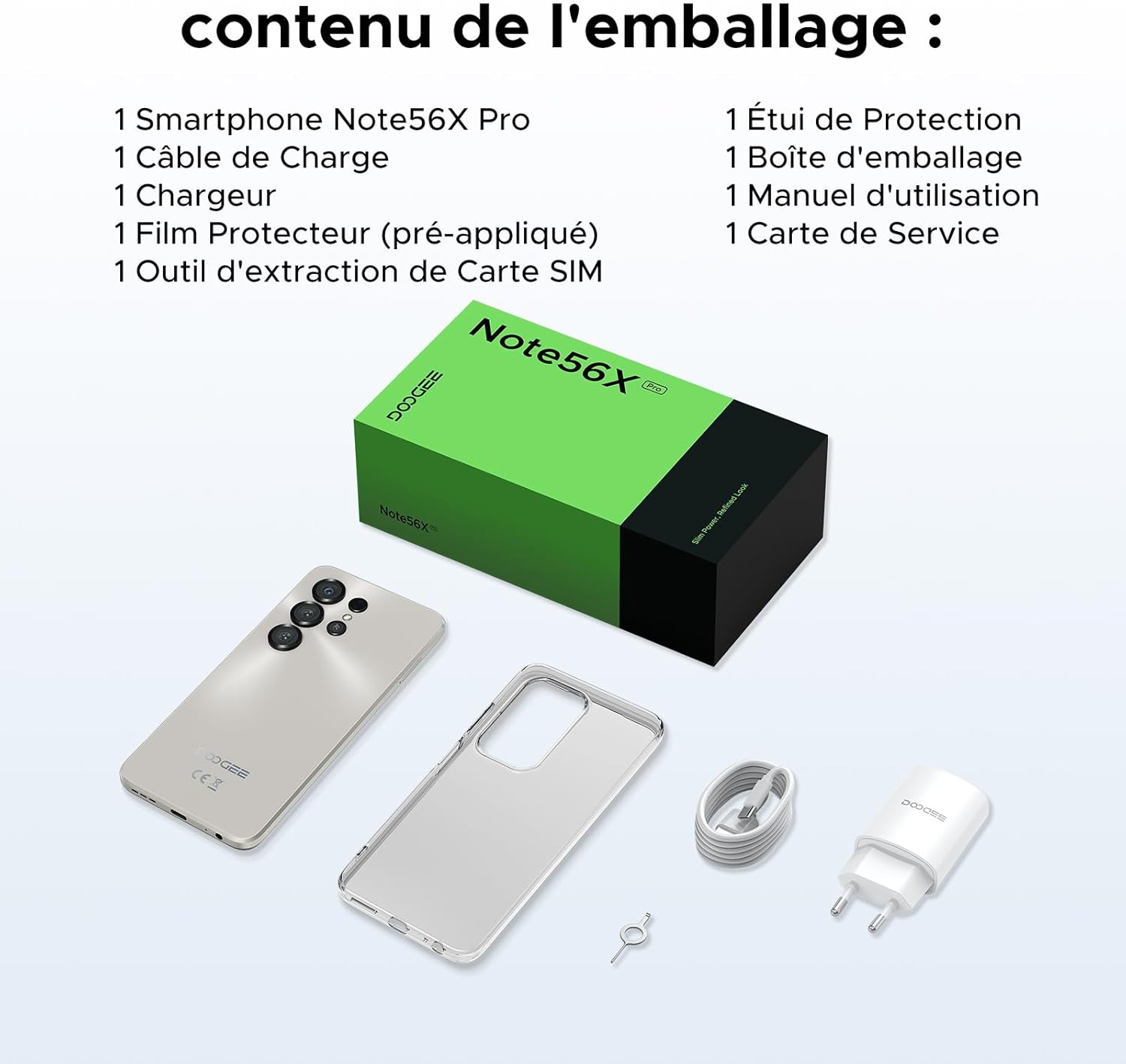
This image shows the contents included in the DOOGEE Note56X Pro packaging: the smartphone, a charging cable, a charger, a pre-applied screen protector, a SIM card ejection tool, a protective case, the packaging box, a user manual, and a service card.
3. การเริ่มต้น
3.1. การใส่ซิมการ์ด
The DOOGEE Note56X Pro supports Dual SIM functionality. To insert your SIM card(s):
- ค้นหาถาดใส่การ์ด SIM ที่ด้านข้างของอุปกรณ์
- Use the provided SIM ejection tool to open the tray.
- วางการ์ด Nano-SIM และ/หรือการ์ด microSD ของคุณลงในถาดโดยให้ด้านที่มีหน้าสัมผัสสีทองคว่ำลง
- ค่อยๆ ดันถาดกลับเข้าไปในช่องจนกระทั่งชิดกับอุปกรณ์
3.2. การเปิด/ปิดเครื่อง
- การเปิดเครื่อง: กดปุ่มเปิด/ปิดค้างไว้จนกว่าโลโก้ DOOGEE จะปรากฏขึ้น
- วิธีปิดเครื่อง: Press and hold the Power button until the power options appear on the screen, then select "Power off".
- ในการรีสตาร์ท: กดปุ่มเปิด/ปิดค้างไว้จนกว่าตัวเลือกการเปิด/ปิดจะปรากฏขึ้น จากนั้นเลือก "รีสตาร์ท"
3.3. การตั้งค่าเริ่มต้น
เมื่อเปิดเครื่องครั้งแรก ให้ทำตามคำแนะนำบนหน้าจอเพื่อดำเนินการตั้งค่าเริ่มต้นให้เสร็จสมบูรณ์:
- เลือกภาษาของคุณ
- เชื่อมต่อกับเครือข่าย Wi-Fi
- ลงชื่อเข้าใช้ด้วยบัญชี Google ของคุณหรือสร้างบัญชีใหม่
- Set up screen lock (PIN, pattern, password, fingerprint, or Face ID).
- Review และยอมรับข้อกำหนดและเงื่อนไข
4. การใช้งานอุปกรณ์ของคุณ
4.1. การแสดงผล
The Note56X Pro features a 6.56-inch HD+ IPS Waterdrop display with a 90Hz refresh rate, offering smooth visuals and vibrant colors. The 90% screen-to-body ratio provides an immersive viewการสร้างประสบการณ์

This graphic highlights the display features of the DOOGEE Note56X Pro, including a 90Hz refresh rate for smooth visuals, support for 16.7 million colors, and a 90% screen-to-body ratio for an immersive viewการสร้างประสบการณ์
A brief video demonstrating the smooth gaming experience on the DOOGEE Note56X Pro's 6.56-inch HD+ 90Hz display, showing responsive gameplay.
4.2. การปฏิบัติงาน
Powered by an UNISOC T7225 Octa-Core processor, the Note56X Pro ensures fluid multitasking and efficient application launch. It comes with 32GB of RAM (4GB physical + 28GB virtual) and 128GB of internal storage, expandable up to 2TB via a TF card (sold separately).

This image presents a technical diagram of the UNISOC T7225 Octa-Core processor, highlighting its 1.8 GHz high frequency and Mali G57 ARM GPU, ensuring smooth performance for web browsing, online learning, and chats.

This graphic illustrates the memory configuration of the DOOGEE Note56X Pro, featuring 32GB RAM (4GB physical + 28GB virtual) and 128GB ROM, expandable up to 2TB with a TF card (sold separately), providing ampพื้นที่สำหรับแอปพลิเคชันและสื่อต่างๆ
A short video highlighting the internal components of the DOOGEE Note56X Pro, specifically the Octa-Core UNISOC T7225 processor and the 32GB RAM (4GB + 28GB virtual) and 128GB ROM configuration.
4.3. แบตเตอรี่
Equipped with a 6150mAh Silicon-Carbon battery, the Note56X Pro offers extended usage time and supports 5W reverse charging. The battery is designed for durability, with up to 1000 charge/discharge cycles and an estimated 4-year lifespan.

A detailed diagram showing the internal structure of the 6150mAh Silicon-Carbon battery within the DOOGEE Note56X Pro, emphasizing its extended endurance, 1000 charge/discharge cycles, 4-year lifespan, 20% reduced size, and 5W reverse charging capability.
วิดีโอสั้นๆ แสดงให้เห็นasing the sleek design, vertical lens arrangement, ultra-thin 8.45mm body, lightweight 195g build, and available colors (Midnight Black, Glacier Blue, Titanium Grey Mist) of the DOOGEE Note56X Pro.
4.4. กล้องถ่ายรูป
Capture clear and vibrant photos with the Note56X Pro's camera system:
- กล้องหลัก: 13MP with AI recognition, HDR, Pro Mode, Smile Capture, Panoramas, Burst Mode, Night Mode, and Fun Filters.
- กล้องหน้า: 8MP with Beauty Mode and Portrait Mode for natural selfies.

This graphic highlights the features of the 13MP main camera on the DOOGEE Note56X Pro, including AI recognition, HDR, Pro Mode, Smile Capture, Panoramas, Burst Mode, Night Mode, and Fun Filters, illustrated with a landscape photo taken by the phone.

This image showcases the 8MP front camera features of the DOOGEE Note56X Pro, including Beauty Mode and Portrait Mode, designed to simplify photography and produce bright, natural selfies.

This graphic details the intelligent features of the Google Smart Camera on the DOOGEE Note56X Pro, such as displaying search results, text extraction and translation, homework analysis, plant and animal identification, and online search capabilities.
4.5. การเชื่อมต่อ
The device supports 4G cellular networks, Wi-Fi, Bluetooth 5.0, and NFC for secure contactless payments. It also includes GPS for precise navigation and OTG functionality for connecting external devices.
4.6. คุณสมบัติด้านความปลอดภัย
The Note56X Pro offers multiple security options to protect your data:
- การระบุใบหน้า: ปลดล็อกโทรศัพท์ของคุณโดยใช้การจดจำใบหน้า
- การจดจำลายนิ้วมือ: A side-mounted fingerprint sensor provides quick and secure access.
- นอกจากนี้ยังมีตัวเลือก PIN มาตรฐาน รูปแบบ และรหัสผ่านให้เลือกใช้ด้วย
4.7. Operating System and AI
Running on Android 16, the Note56X Pro provides an intuitive and secure user experience. It integrates Google Gemini AI, offering intelligent assistance for various tasks.

A visual representation of the Android 16 operating system interface on the DOOGEE Note56X Pro, showcasing various application icons and a clean, intuitive user experience.

This image shows the Google Gemini AI chat interface on the DOOGEE Note56X Pro, demonstrating its capability for planning vacations, discussing current events, and practicing interview คำถาม.
5. ข้อมูลจำเพาะ
| คุณสมบัติ | ข้อมูลจำเพาะ |
|---|---|
| ยี่ห้อ | ดูจี้ |
| ชื่อรุ่น | Note56X Pro |
| ระบบปฏิบัติการ | แอนดรอยด์ 16 |
| ขนาดหน้าจอ | 6.56 นิ้ว |
| ความละเอียดหน้าจอ | 720 x 1612 |
| อัตราการรีเฟรช | 90 เฮิรตซ์ |
| โปรเซสเซอร์ | UNISOC T7225 แปดคอร์ |
| ขนาด RAM ที่ติดตั้ง | หน่วยความจำ 32 GB (4 GB แบบกายภาพ + 28 GB แบบเสมือน) |
| ความจุของหน่วยความจำ | 128 GB (เพิ่มได้สูงสุด 2TB) |
| ประเภทแบตเตอรี่ | ลิเธียมโพลิเมอร์ |
| ความจุของแบตเตอรี่ | 6150 มิลลิแอมป์ |
| เทคโนโลยีเซลลูล่าร์ | 4G |
| ผู้ให้บริการไร้สาย | ทุกเครือข่าย (ปลดล็อคแล้ว) |
| การเชื่อมต่อ | Wi-Fi, Bluetooth 5.0, NFC |
| คุณสมบัติพิเศษ | Dual SIM, Integrated GPS, USB OTG Support, Face ID, Fingerprint Recognition |
| แจ็คเสียง | 3.5 มม. |
| ขนาด (ความหนา) | 8.45 มม. |
| น้ำหนัก | 195 กรัม |

ด้านหนึ่ง view of the DOOGEE Note56X Pro, emphasizing its ultra-thin 8.45mm profile and lightweight 195g construction, designed for easy portability and comfortable handling throughout the day.

This image displays the DOOGEE Note56X Pro in its available elegant colors: Midnight Black, Titanium Grey Mist, and Glacier Blue, showcasing the aesthetic options for the device.
6. การบำรุงรักษา
To ensure the longevity and optimal performance of your DOOGEE Note56X Pro, follow these maintenance guidelines:
- การทำความสะอาด: ใช้ผ้านุ่มไม่เป็นขุยทำความสะอาดหน้าจอและตัวเครื่อง หลีกเลี่ยงวัสดุที่มีฤทธิ์กัดกร่อนหรือสารเคมีรุนแรง
- การอัปเดตซอฟต์แวร์: Regularly check for and install system updates to benefit from the latest features, security patches, and performance improvements. Go to การตั้งค่า > ระบบ > อัปเดตระบบ.
- การดูแลแบตเตอรี่ Avoid extreme temperatures. Do not let the battery completely drain frequently. Use the original charger for optimal charging.
- การจัดการพื้นที่เก็บข้อมูล: ล้างสิ่งที่ไม่จำเป็นออกเป็นระยะๆ files and uninstall unused apps to free up storage space and maintain device speed.
- การป้องกัน: Use the provided protective case and screen protector to guard against scratches and minor impacts.
7 การแก้ไขปัญหา
If you encounter issues with your DOOGEE Note56X Pro, try the following solutions:
- อุปกรณ์ไม่เปิด: ตรวจสอบให้แน่ใจว่าแบตเตอรี่ชาร์จเต็มแล้ว เสียบที่ชาร์จและรอสักครู่ก่อนลองเปิดเครื่องอีกครั้ง
- หน้าจอไม่ตอบสนอง: Force restart the device by pressing and holding the Power button for about 10-15 seconds.
- แอปขัดข้อง/หยุดทำงาน: ล้างแคชของแอปที่มีปัญหา (การตั้งค่า > แอป > [ชื่อแอป] > ที่เก็บข้อมูลและแคช > ล้างแคช) หากปัญหายังคงมีอยู่ ให้ถอนการติดตั้งและติดตั้งแอปใหม่อีกครั้ง
- อายุการใช้งานแบตเตอรี่ไม่ดี: Check background app usage (ตั้งค่า > แบตเตอรี่). Reduce screen brightness, disable unused features like Wi-Fi, Bluetooth, GPS when not needed.
- ปัญหาการเชื่อมต่อเครือข่าย: เปิดและปิดโหมดเครื่องบิน รีสตาร์ทอุปกรณ์ ตรวจสอบการใส่ซิมการ์ด รีเซ็ตการตั้งค่าเครือข่าย (การตั้งค่า > ระบบ > ตัวเลือกการรีเซ็ต > รีเซ็ต Wi-Fi มือถือ และบลูทูธ).
- Fingerprint/Face ID Not Working: Ensure your fingers are clean and dry for fingerprint scanning. For Face ID, ensure adequate lighting and that your face is clearly visible to the front camera. Re-register your fingerprint or face if necessary.
- ประสิทธิภาพการทำงานช้า: ปิดแอปพลิเคชันที่ทำงานอยู่เบื้องหลังที่ไม่ได้ใช้งาน ล้างแคชและไฟล์ชั่วคราว files. Consider a factory reset as a last resort (การตั้งค่า > ระบบ > ตัวเลือกการรีเซ็ต > ลบข้อมูลทั้งหมด (รีเซ็ตเป็นค่าโรงงาน) - หมายเหตุ: การดำเนินการนี้จะลบข้อมูลทั้งหมดในโทรศัพท์ของคุณ โปรดสำรองข้อมูลสำคัญก่อน).
8. การรับประกันและการสนับสนุน
Your DOOGEE Note56X Pro comes with a 24-month warranty and a 30-day return policy. For any questions or assistance, please contact DOOGEE customer service via Amazon. Our dedicated support team is available to help you.

This image displays DOOGEE's customer service commitments: a 30-day money-back and free return guarantee, a 2-year limited warranty, and 24/7 online individual assistance.


