1. สินค้าหมดview
This manual provides detailed instructions for the Karcher Cordless Pressure Washer OC Handy Compact CB 1.328-125.0 and the Karcher Handheld Cleaner CVH 3 1.198-357.0. These devices are designed for convenient and efficient cleaning tasks both indoors and outdoors. The Cordless Pressure Washer offers portable high-pressure cleaning without the need for a fixed water tap or power source, while the Handheld Cleaner provides quick and easy vacuuming for various surfaces.
Key Features of the Cordless Pressure Washer:
- ความสามารถในการพกพา: Compact, palm-sized design for easy transport.
- ความเป็นอิสระ: Operates without a direct water tap connection or external power supply.
- ความอเนกประสงค์: Ideal for quick cleaning of outdoor equipment such as sports gear, camping items, fishing equipment, and bicycles.
Key Features of the Handheld Cleaner:
- น้ำหนักเบา: Extremely light, comparable to a single plastic bottle, for comfortable use.
- พลังดูดอันทรงพลัง: Efficiently cleans various surfaces.
- Large Dust Container: ความจุ 0.15 ลิตร ช่วยลดความถี่ในการเทน้ำทิ้ง
- การประยุกต์ใช้ที่กว้าง: Suitable for cleaning sofas, window sashes, bathroom floors, car interiors, stairs, kitchen counters, and more.
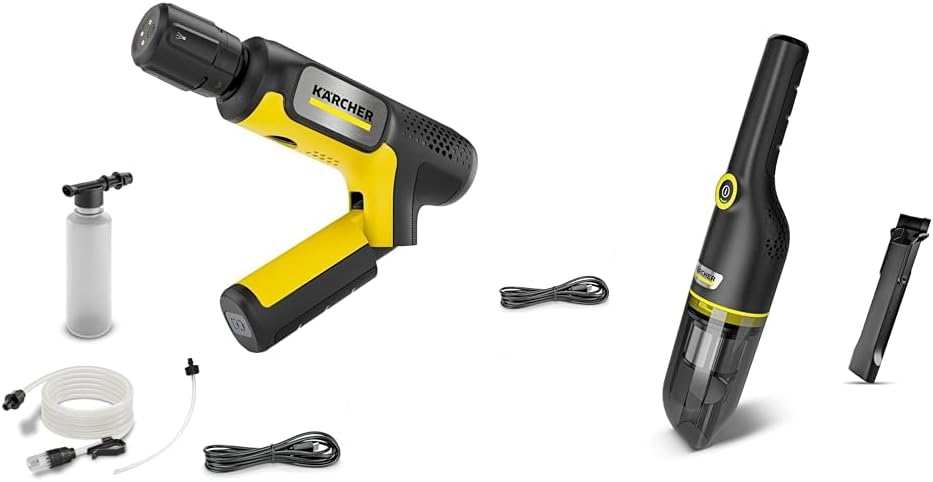
Image 1.1: The Karcher Cordless Pressure Washer OC Handy Compact CB 1.328-125.0 and Handheld Cleaner CVH 3 1.198-357.0 included in the set.
2. การตั้งค่า
2.1 Cordless Pressure Washer Setup
- ชาร์จแบตเตอรี่: Before first use, fully charge the device's battery using the provided charger. Ensure the charging indicator shows a full charge.
- เชื่อมต่อแหล่งจ่ายน้ำ:
- Using a Bucket: Place the suction hose with filter into a bucket of clean water. Ensure the filter is fully submerged.
- Using a Water Tap (Optional Adapter): If using an optional adapter for direct tap connection, attach it securely to the device and the tap.
- ติดตั้งหัวฉีดสเปรย์: Select the appropriate spray nozzle for your cleaning task and securely attach it to the spray gun.
2.2 Handheld Cleaner Setup
- ชาร์จแบตเตอรี่: Fully charge the handheld cleaner's battery before initial use. The charging status will be indicated by the device's LED.
- Assemble Attachments: Attach any desired nozzles or brushes (e.g., crevice tool, brush nozzle) to the cleaner's suction inlet as needed for your cleaning task.
- ตรวจสอบภาชนะบรรจุฝุ่น: Ensure the dust container is empty and properly secured before operation.
3. คู่มือการใช้งาน
3.1 Operating the Cordless Pressure Washer
- เปิดเครื่อง: กดปุ่มเปิด/ปิดเพื่อเปิดเครื่องฉีดน้ำแรงดันสูง
- เติมปั๊ม: If using a bucket, hold the spray gun open until water flows out steadily, indicating the pump is primed.
- เริ่มทำความสะอาด: Direct the spray nozzle towards the surface to be cleaned, maintaining an appropriate distance to avoid damage. Adjust the spray pattern if your nozzle allows.
- หมดแรง: Release the trigger and press the power button to turn off the device after use.
สำคัญ: Always test on an inconspicuous area first. Do not aim the spray at people, animals, or electrical equipment.
3.2 Operating the Handheld Cleaner
- เปิดเครื่อง: Press the power button to start the handheld cleaner.
- การดูดฝุ่น: Move the suction inlet over the area to be cleaned. Use appropriate attachments for corners, crevices, or delicate surfaces.
- หมดแรง: กดปุ่มเปิดปิดอีกครั้งเพื่อปิดเครื่อง
- ถังขยะเปล่า: Regularly empty the dust container to maintain optimal suction power.
3.3 วิดีโอแนะนำผลิตภัณฑ์
Video 3.1: Demonstration of the Karcher Cordless Pressure Washer in use (0:45 duration).
วิดีโอ 3.2: จบview of the Karcher Handheld Cleaner features (0:35 duration).
Video 3.3: Detailed usage guide for the Karcher Handheld Cleaner (1:04 duration).
Video 3.4: Comprehensive demonstration of both Karcher devices in various cleaning scenarios (2:28 duration).
Video 3.5: Quick guide to using the Karcher cleaning tools (1:12 duration).
Video 3.6: Short demonstration of the Karcher Handheld Cleaner's effectiveness (0:34 duration).
วิดีโอ 3.7: สรุปโดยย่อview of the Karcher Cordless Pressure Washer's portability (0:30 duration).
Video 3.8: Demonstration of the Karcher Cordless Pressure Washer's quick setup (0:45 duration).
4. การบำรุงรักษา
4.1 Cordless Pressure Washer Maintenance
- ทำความสะอาดหัวฉีด: After each use, rinse the spray nozzle to prevent blockages.
- การทำความสะอาดตัวกรอง: Regularly check and clean the water intake filter to ensure proper water flow and prevent debris from entering the pump.
- พื้นที่จัดเก็บ: Store the device in a dry, frost-free location. Ensure all water is drained from the pump and hoses before storing to prevent freezing damage.
- การดูแลแบตเตอรี่ Store the battery in a partially charged state if not used for extended periods. Avoid fully discharging the battery before recharging.
4.2 Handheld Cleaner Maintenance
- ถังขยะเปล่า: Empty the dust container after each use or when it reaches its maximum capacity to maintain suction power.
- ทำความสะอาดตัวกรอง: The cleaner's filter should be regularly cleaned according to the instructions in the full product manual. A dirty filter can reduce suction performance.
- เช็ดลง: เช็ดทำความสะอาดด้านนอกของเครื่องดูดฝุ่นด้วยน้ำยาทำความสะอาดamp ผ้าสำหรับเช็ดฝุ่นละอองและสิ่งสกปรก
- การดูแลแบตเตอรี่ Follow general battery care guidelines, similar to the pressure washer, to prolong battery life.
5 การแก้ไขปัญหา
5.1 Cordless Pressure Washer Issues
| ปัญหา | สาเหตุที่เป็นไปได้ | สารละลาย |
|---|---|---|
| ไม่มีน้ำไหล / แรงดันน้ำต่ำ |
|
|
| เปิดเครื่องไม่ติด |
|
|
5.2 Handheld Cleaner Issues
| ปัญหา | สาเหตุที่เป็นไปได้ | สารละลาย |
|---|---|---|
| กำลังดูดต่ำ |
|
|
| เปิดเครื่องไม่ติด |
|
|
6. ข้อมูลจำเพาะ
| คุณสมบัติ | รายละเอียด |
|---|---|
| ยี่ห้อ | คาร์เชอร์ |
| รุ่น (เครื่องฉีดน้ำแรงดันสูง) | OC Handy Compact CB 1.328-125.0 |
| Model (Handheld Cleaner) | CVH 3 1.198-357.0 |
| ASIN | B0FPX2462K |
| Handheld Cleaner Dust Container Capacity | 0.15 ลิตร |
| วันที่พร้อมใช้งานครั้งแรก | วันที่ 31 สิงหาคม 2025 |
7. การรับประกันและการสนับสนุน
For detailed warranty information and customer support, please refer to the official Karcher website or contact Karcher customer service directly. Keep your proof of purchase for warranty claims.
แหล่งข้อมูลออนไลน์: Visit the official Karcher webไซต์สำหรับการลงทะเบียนผลิตภัณฑ์ คำถามที่พบบ่อย และเอกสารสนับสนุนเพิ่มเติม
ติดต่อฝ่ายสนับสนุน: Contact information for Karcher customer service can typically be found on the product packaging or the official webเว็บไซต์.


