การแนะนำ
This manual provides detailed instructions for the installation, operation, and maintenance of your COUGAR OmnyX Mid-Tower ATX Panoramic PC Case. Please read this manual thoroughly before beginning assembly to ensure proper setup and optimal performance. The OmnyX case is designed for maximum airflow and features a panoramic tempered glass design, pre-installed 160mm fans, and advanced cable management solutions.
คุณสมบัติหลัก
- การออกแบบที่สมมาตร: Allows for omnidirectional placement, offering flexibility in setup.
- Quad 160mm PWM Fans: Includes four pre-installed 160mm PWM fans for efficient cooling and flexible intake modes.
- Zero-Visibility Cable Management: Integrated base compartment and quick-release covers for organized cable routing.
- Sliding IO Module: Allows for relocation of the I/O module and expanded port array.
- Vertical GPU Alignment: Natural alignment of vertically mounted GPUs reduces the risk of damage from displacement.
- GPU Compatibility: รองรับความยาว GPU สูงสุด 380 มม.
- Reverse Connector Motherboard Compatibility: Designed to support motherboards with reverse connectors.
- การบำรุงรักษาที่ง่ายดาย: Features magnetic dust filter panels and quick-release cable management compartment covers.
สินค้าเกินview
Familiarize yourself with the various components and design aspects of your COUGAR OmnyX PC case.
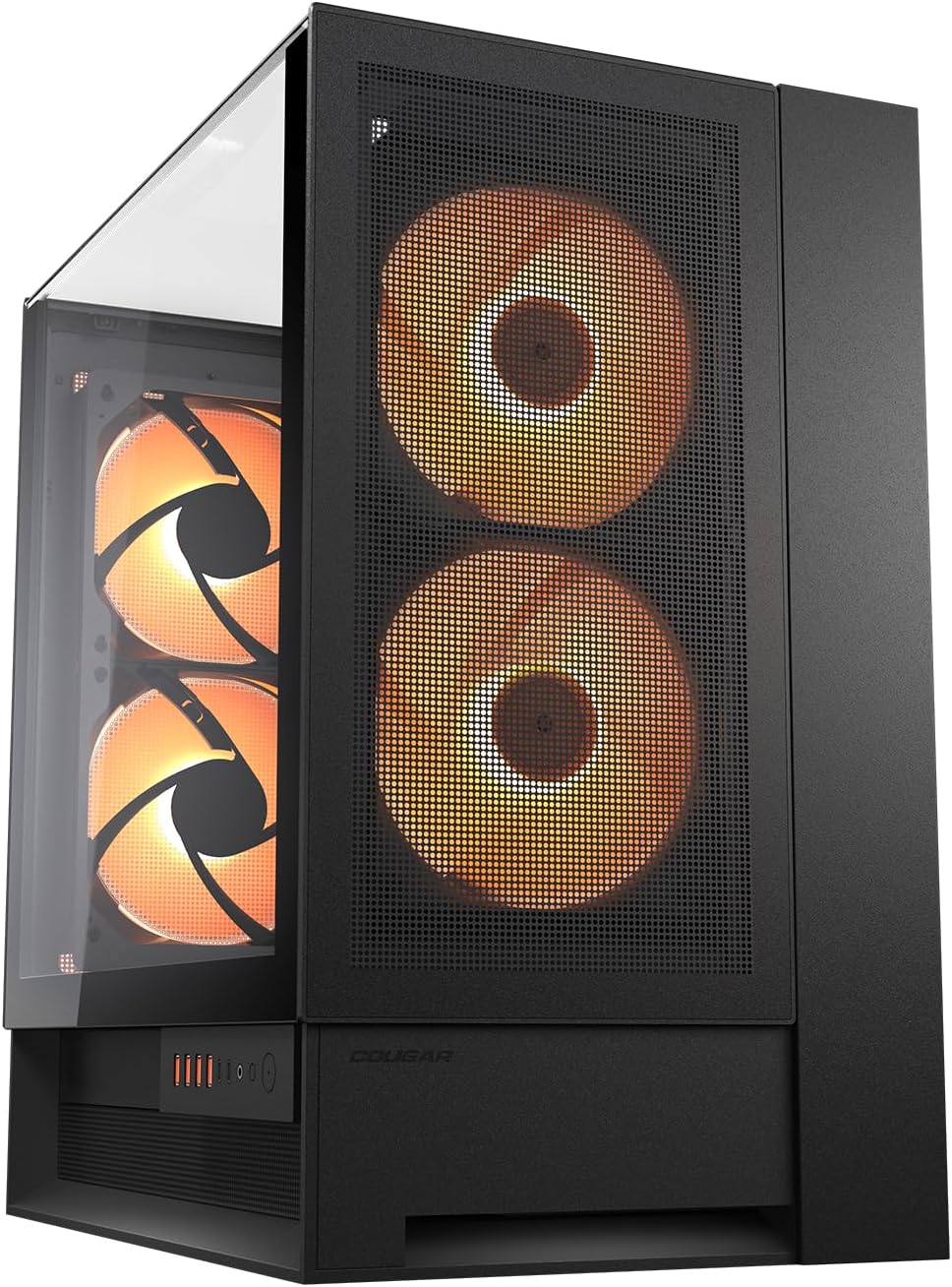
รูปที่ 1: ด้านหน้าและด้านข้าง view of the COUGAR OmnyX PC case, showcasing the panoramic tempered glass and pre-installed 160mm fans.

รูปที่ 2: Internal layout of the COUGAR OmnyX PC case, highlighting the spacious motherboard tray and component mounting areas.

รูปที่ 3: ระเบิด view of the COUGAR OmnyX PC case, illustrating the modular design and removable panels for easy assembly.

รูปที่ 4: ถอดประกอบ view of the COUGAR OmnyX PC case, showing the various components and access points for installation and maintenance.
การตั้งค่าและการติดตั้งส่วนประกอบ
Follow these general steps for installing components into your COUGAR OmnyX PC case. Always refer to your individual component manuals for specific installation details.
- เตรียมคดี: Carefully remove the tempered glass panels and any other removable panels to gain access to the interior.
- Install the Power Supply (PSU): Mount your power supply in the designated compartment at the bottom of the case. Utilize the integrated base compartment for routing PSU cables.
- ติดตั้งเมนบอร์ด: Secure your ATX motherboard to the standoffs on the motherboard tray. The OmnyX supports reverse connector motherboards for alternative cable routing.
- ติดตั้งไดรฟ์จัดเก็บข้อมูล: Mount your SSDs and HDDs in the available drive bays.
- Install the Graphics Card (GPU): Insert your graphics card into the appropriate PCIe slot. The case supports vertical GPU mounting, which naturally aligns the GPU with gravity.
- เชื่อมต่อสายเคเบิล: Route all power and data cables through the cable management channels. The zero-visibility cable management system helps keep cables tidy and out of sight.
- เชื่อมต่อพอร์ต I/O ด้านหน้า: Connect the front panel connectors (USB, audio, power button) to your motherboard. The sliding rail system allows for flexible positioning of the I/O module.
- ประกอบแผงกลับเข้าที่: Once all components are installed and cables are managed, reattach the tempered glass panels and other removable covers.
การดำเนินการ
The COUGAR OmnyX PC case is designed for straightforward operation once components are installed.
- เปิด/ปิดเครื่อง: ใช้ปุ่มเปิด/ปิดที่อยู่บนแผง I/O ด้านหน้าเพื่อเปิดหรือปิดระบบของคุณ
- พอร์ต USB: Utilize the USB ports on the front I/O panel for connecting peripherals and external devices.
- แจ็คเสียง: Connect your headphones or microphone to the dedicated audio jacks on the front I/O panel.
- การควบคุมพัดลม: The pre-installed 160mm PWM fans can be controlled via your motherboard's fan headers and software, allowing you to adjust fan speeds for optimal cooling and noise levels.
การซ่อมบำรุง
การบำรุงรักษาอย่างสม่ำเสมอจะช่วยให้เคสพีซีของคุณมีอายุการใช้งานยาวนานและทำงานได้อย่างมีประสิทธิภาพสูงสุด
- ตัวกรองฝุ่น: The OmnyX case features magnetic dust filter panels. Regularly remove and clean these filters to prevent dust buildup and maintain efficient airflow.
- การทำความสะอาดภายใน: Periodically open the case and use compressed air to remove dust from internal components and fan blades. Ensure the system is powered off and unplugged before cleaning.
- การทำความสะอาดภายนอก: Wipe down the exterior surfaces, including the tempered glass panels, with a soft, damp cloth. Avoid abrasive cleaners that could scratch the surfaces.
การแก้ไขปัญหา
If you encounter issues with your PC case, consider the following common solutions:
- ไม่มีไฟฟ้า: Ensure all power cables are securely connected to the power supply, motherboard, and components. Verify the power supply switch is in the 'On' position.
- พัดลมไม่หมุน: Check that fan cables are correctly connected to the motherboard or fan controller. Ensure fan control software settings are configured properly.
- ความร้อนสูงเกินไป: Verify that all fans are operating correctly and are not obstructed. Clean dust filters and ensure proper airflow within the case. Check component temperatures using monitoring software.
- ปัญหาความพอดีของส่วนประกอบ: Double-check that all components are installed according to their respective manuals and the case's specifications (e.g., GPU length, radiator size).
- พอร์ต I/O ด้านหน้าใช้งานไม่ได้: Ensure the front panel connectors are correctly plugged into the motherboard headers.
ข้อมูลจำเพาะ
| คุณลักษณะ | ค่า |
|---|---|
| ยี่ห้อ | เสือภูเขา |
| ชุด | ออมนี่เอ็กซ์ |
| หมายเลขรุ่น | CGR-2WA3W-RGB |
| ประเภทเคส | มิดทาวเวอร์ |
| ความเข้ากันได้ของเมนบอร์ด | เอทีเอ็กซ์ |
| น้ำหนักสินค้า | 12.6 กิโลกรัม (27.7 ปอนด์) |
| ขนาดสินค้า (กxยxส) | 18.5 x 11.81 x 20.47 นิ้ว |
| สี | สีดำ |
| วัสดุ | เหล็กอัลลอยด์ |
| ประเภทการติดตั้งแหล่งจ่ายไฟ | การติดตั้งด้านล่าง |
| วิธีการทำความเย็น | อากาศ |
| การใช้งานที่แนะนำสำหรับผลิตภัณฑ์ | การเล่นเกม |
การรับประกันและการสนับสนุน
For warranty information, technical support, or further assistance, please visit the official COUGAR webเว็บไซต์หรือติดต่อฝ่ายบริการลูกค้าของพวกเขา
- เป็นทางการ Webเว็บไซต์: https://cougargaming.com/
- ติดต่อบริการ: https://cougargaming.com/contact2/


