1. บทนำ
ขอบคุณสำหรับการซื้อasing the SENCOR SPT 3907 Bluetooth Radio Player. This compact and versatile device offers multiple audio playback options, including CD, Bluetooth, USB, and FM radio. This manual provides essential information for safe and efficient use of your new player. Please read it thoroughly before operation and retain it for future reference.
2. คำแนะนำด้านความปลอดภัย
- แหล่งพลังงาน: ตรวจสอบแหล่งจ่ายไฟ voltage matches the rating indicated on the unit. Use only the provided power cable.
- น้ำและความชื้น: อย่าให้ตัวเครื่องโดนฝน ความชื้น หรือของเหลวที่หยด/กระเด็นใส่ อย่าวางสิ่งของที่บรรจุของเหลว เช่น แจกัน ไว้บนตัวเครื่อง
- การระบายอากาศ : อย่าปิดกั้นช่องระบายอากาศใดๆ ควรมีพื้นที่รอบตัวเครื่องเพียงพอเพื่อให้อากาศถ่ายเทได้สะดวก
- ความร้อน: เก็บเครื่องให้ห่างจากแหล่งความร้อน เช่น หม้อน้ำ เครื่องทำความร้อน เตา หรืออุปกรณ์อื่นๆ (รวมถึง ampเครื่องให้ความร้อน) ที่ผลิตความร้อน
- การทำความสะอาด: ถอดปลั๊กเครื่องออกจากเต้ารับไฟฟ้าก่อนทำความสะอาด ใช้ผ้านุ่มและแห้ง ห้ามใช้น้ำยาทำความสะอาดชนิดน้ำหรือสเปรย์ทำความสะอาด
- การบริการ: อย่าพยายามให้บริการผลิตภัณฑ์นี้ด้วยตนเอง ส่งต่อการบริการทั้งหมดไปยังช่างบริการที่ผ่านการรับรอง
- แบตเตอรี่: When using batteries, ensure correct polarity. Do not mix old and new batteries, or different types of batteries. Remove batteries if the unit is not used for extended periods.
3. เนื้อหาบรรจุภัณฑ์
ตรวจสอบว่ามีรายการทั้งหมดอยู่ในแพ็คเกจ:
- SENCOR SPT 3907 Radio Player
- รีโมทคอนโทรล
- สายไฟ AC
- เอกสารประกอบ (คู่มือนี้)
4. คุณสมบัติของผลิตภัณฑ์
The SENCOR SPT 3907 is designed for versatile audio entertainment:
- กำลังขับ: 4W RMS for clear sound.
- เครื่องเล่นซีดี: Supports CD-R/RW discs with programmable playback for up to 20 songs.
- การเชื่อมต่อบลูทูธ: Bluetooth V2.1 + EDR for wireless audio streaming from compatible devices.
- การเล่น USB: USB connection for MP3 file playback with programmable playback for up to 99 songs.
- วิทยุ FM: Stereo FM radio receiver with digital tuning and 30 station presets.
- ช่องต่อสัญญาณเข้า: 3.5mm auxiliary input for connecting external audio sources.
- แสดง: Backlight LCD display for easy navigation.
- รีโมทคอนโทรล: รีโมตคอนโทรลแบบครบฟังก์ชันเพื่อการใช้งานที่สะดวกสบาย
- ตัวเลือกพลังงาน: Operates on AC 100-240V or D/LR20 batteries for portability.
- ฟังก์ชั่นเพิ่มเติม: Repeat and random playback modes.
5. การควบคุมและฟังก์ชั่น
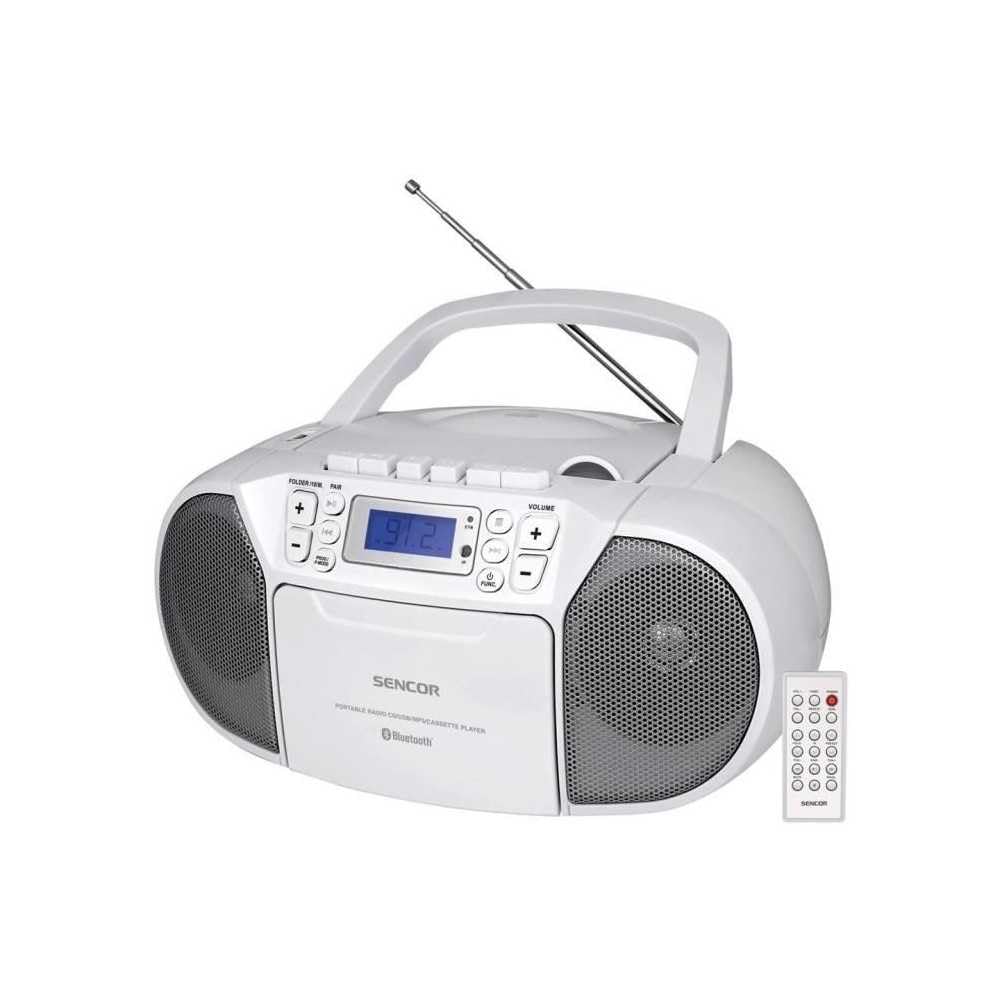
ด้านหน้า view of the SENCOR SPT 3907 unit, highlighting the control buttons, LCD screen, CD tray, and speakers. The remote control is also visible.
แผงควบคุมด้านหน้า:
- ปุ่มเพาเวอร์: เปิดหรือปิดเครื่อง
- ปุ่มโหมด: Switches between CD, Bluetooth, USB, FM Radio, and AUX-IN modes.
- ปุ่มปรับระดับเสียง +/-: ปรับระดับเอาต์พุตเสียง
- PLAY/PAUSE (►/▮▮) Button: Starts or pauses playback in CD, Bluetooth, or USB mode.
- SKIP (◀◀ / ►►) Buttons: ข้ามไปยังแทร็ก/สถานีถัดไปหรือแทร็กก่อนหน้า
- ปุ่มหยุด (■) หยุดการเล่น
- FOLDER / PAIR Button: Navigates folders in USB mode; initiates Bluetooth pairing.
- ปุ่ม FUNC: Accesses additional functions (e.g., program, repeat, random).
- จอแสดงผล LCD: แสดงโหมดปัจจุบัน หมายเลขแทร็ก ความถี่ และข้อมูลอื่นๆ
- ช่องใส่ซีดี: สำหรับการใส่แผ่นซีดีเพลง
- พอร์ต USB: สำหรับเชื่อมต่ออุปกรณ์จัดเก็บข้อมูล USB
- แจ็ค AUX-IN: สำหรับเชื่อมต่ออุปกรณ์เสียงภายนอก
- เอาท์พุตหูฟัง: สำหรับการฟังส่วนตัว
การควบคุมแผงด้านหลัง:
- อินพุตไฟ AC: เชื่อมต่อสายไฟ AC
- เสาอากาศ FM: เสาอากาศแบบยืดหดได้สำหรับรับสัญญาณวิทยุ FM
รีโมทคอนโทรล:
The remote control duplicates most of the front panel functions for convenient operation from a distance. Refer to the remote control diagram in the included documentation for specific button layouts.
6. การตั้งค่า
6.1 การเชื่อมต่อสายไฟ
The SENCOR SPT 3907 can be powered by AC mains or batteries.
ไฟฟ้ากระแสสลับ:
- ตรวจสอบให้แน่ใจว่าปิดเครื่องแล้ว
- Connect the supplied AC power cable to the AC input jack on the rear of the unit.
- เสียบปลายอีกด้านของสายไฟ AC เข้ากับเต้ารับไฟฟ้ามาตรฐาน (AC 100-240V, 50/60Hz)
พลังงานแบตเตอรี่:
- เปิดฝาปิดช่องใส่แบตเตอรี่ที่ด้านล่างของตัวเครื่อง
- Insert 6 x D/LR20 size batteries (not included), ensuring correct polarity (+/-) as indicated inside the compartment.
- ปิดฝาช่องใส่แบตเตอรี่ให้แน่น
Note: When the AC power cable is connected, battery power is automatically disconnected. Remove batteries if the unit will not be used for an extended period to prevent leakage.
6.2 การตั้งค่าเสาอากาศ
เพื่อให้รับสัญญาณวิทยุ FM ได้ดีที่สุด โปรดกางเสาอากาศ FM แบบยืดหดได้ที่อยู่ด้านหลังเครื่องออกจนสุด ปรับตำแหน่งเพื่อให้ได้สัญญาณที่ดีที่สุด
7. คู่มือการใช้งาน
7.1 การเปิด/ปิดเครื่องและการเลือกโหมด
- กดปุ่ม พลัง button to turn the unit on. The LCD display will light up.
- กดปุ่ม โหมด button repeatedly to cycle through available modes: CD, Bluetooth, USB, FM Radio, AUX-IN. The selected mode will be shown on the LCD display.
- กดปุ่ม พลัง ปุ่มอีกครั้งเพื่อปิดเครื่อง
7.2 การเล่นแผ่นซีดี
- กดปุ่ม โหมด ปุ่มเพื่อเลือกโหมดซีดี
- เปิดฝาช่องใส่ซีดี
- Place a CD (CD-R/RW compatible) with the label side facing up onto the spindle.
- ปิดฝาช่องใส่ซีดี เครื่องจะอ่านแผ่น และจำนวนแทร็กทั้งหมดจะปรากฏบนหน้าจอแสดงผล
- กดปุ่ม เล่น/หยุดชั่วคราว ปุ่มเพื่อเริ่มเล่น
- ใช้ ข้าม (◀◀ / ►►) ปุ่มสำหรับข้ามเพลง
- กดปุ่ม หยุด (■) ปุ่มเพื่อหยุดเล่น
- การเล่นโปรแกรม: ขณะอยู่ในโหมด STOP ให้กดปุ่ม ฟังค์ชั่น button to enter program mode. Use ข้าม ปุ่มสำหรับเลือกแทร็กและ ฟังค์ชั่น again to confirm. Up to 20 CD songs can be programmed.
7.3 การทำงานของบลูทูธ
- กดปุ่ม โหมด button to select Bluetooth mode. The display will show 'BT' and flash, indicating it's in pairing mode.
- บนอุปกรณ์ที่รองรับ Bluetooth ของคุณ (เช่น สมาร์ทโฟน แท็บเล็ต) ให้เปิดใช้งาน Bluetooth และค้นหาอุปกรณ์ที่มีอยู่
- Select 'SPT 3907' from the list of devices. Once paired, the 'BT' indicator on the display will stop flashing and remain solid.
- Start playing audio on your connected device. The sound will be streamed through the SENCOR SPT 3907.
- ใช้ เล่น/หยุดชั่วคราว และ ข้าม ปุ่มบนตัวเครื่องหรือรีโมทคอนโทรลใช้สำหรับควบคุมการเล่น
7.4 การเล่น USB
- เสียบแฟลชไดรฟ์ USB (ที่มีไฟล์ MP3) fileเสียบ (s) เข้ากับพอร์ต USB
- กดปุ่ม โหมด button to select USB mode. The unit will automatically read the files.
- กดปุ่ม เล่น/หยุดชั่วคราว ปุ่มเพื่อเริ่มเล่น
- ใช้ ข้าม (◀◀ / ►►) ปุ่มสำหรับข้ามเพลง
- กดปุ่ม โฟลเดอร์ ปุ่มสำหรับเลื่อนดูโฟลเดอร์ต่างๆ บนไดรฟ์ USB
- การเล่นโปรแกรม: ขณะอยู่ในโหมด STOP ให้กดปุ่ม ฟังค์ชั่น button to enter program mode. Use ข้าม ปุ่มสำหรับเลือกแทร็กและ ฟังค์ชั่น again to confirm. Up to 99 MP3 songs can be programmed.
การใช้งานวิทยุ FM 7.5
- กดปุ่ม โหมด button to select FM Radio mode. The current frequency will appear on the display.
- ขยายเสาอากาศแบบยืดหดเพื่อการรับสัญญาณที่ดีขึ้น
- การปรับจูนอัตโนมัติ: กดปุ่มค้างไว้ ข้าม (◀◀ / ►►) กดปุ่มค้างไว้สองสามวินาทีเพื่อสแกนหาสถานีถัดไปที่พร้อมใช้งานโดยอัตโนมัติ
- การปรับด้วยตนเอง: กดปุ่มสั้นๆ ข้าม (◀◀ / ►►) buttons to fine-tune the frequency step-by-step.
- สถานีที่ตั้งไว้ล่วงหน้า: หากต้องการบันทึกสถานี ให้เลือกความถี่ที่ต้องการ จากนั้นกดปุ่ม ฟังค์ชั่น ปุ่ม. ใช้ ข้าม กดปุ่มเพื่อเลือกหมายเลขที่ตั้งไว้ล่วงหน้า (P01-P30) จากนั้นกด ฟังค์ชั่น เพื่อยืนยันอีกครั้ง
- หากต้องการเรียกสถานีที่ตั้งไว้ล่วงหน้า ให้กดปุ่ม ฟังค์ชั่น กดปุ่มซ้ำๆ เพื่อวนดูสถานีที่บันทึกไว้
7.6 ช่องต่อ AUX-IN
- Connect one end of a 3.5mm audio cable (not included) to the AUX-IN jack on the SENCOR SPT 3907.
- ต่อปลายอีกด้านของสายเคเบิลเข้ากับแจ็คหูฟังหรือช่องสัญญาณเสียงออกของอุปกรณ์เสียงภายนอกของคุณ (เช่น เครื่องเล่น MP3, สมาร์ทโฟน)
- กดปุ่ม โหมด ปุ่มเลือกโหมด AUX-IN
- Start playback on your external device. The audio will be played through the SENCOR SPT 3907.
- ปรับระดับเสียงโดยใช้ปุ่ม ปริมาณ +/- buttons on the unit or remote control, and also on your external device.
8. การบำรุงรักษา
8.1 การทำความสะอาดหน่วย
Wipe the exterior of the unit with a soft, dry cloth. Do not use abrasive cleaners, waxes, or solvents as they may damage the finish. Ensure the unit is unplugged from the power source before cleaning.
8.2 ซีดี การดูแลเลนส์
If the CD player experiences reading errors, the lens may need cleaning. Use a commercially available CD lens cleaner disc. Do not touch the lens directly.
8.3 การเปลี่ยนแบตเตอรี่
When the unit operates on batteries and the sound becomes distorted or the unit stops functioning, replace all batteries with new D/LR20 batteries, ensuring correct polarity.
9 การแก้ไขปัญหา
| ปัญหา | สาเหตุที่เป็นไปได้ | สารละลาย |
|---|---|---|
| ไม่มีไฟฟ้า | ไม่ได้เชื่อมต่อสายไฟ แบตเตอรี่หมดหรือใส่ไม่ถูกต้อง | Check AC power connection; Replace batteries, ensuring correct polarity. |
| ไม่มีเสียง | ระดับเสียงต่ำเกินไป เลือกโหมดไม่ถูกต้อง เชื่อมต่อหูฟังแล้ว | Increase volume; Select correct mode (CD, BT, USB, FM, AUX); Disconnect headphones. |
| ซีดีไม่เล่น / เล่นสะดุด | แผ่นซีดีสกปรกหรือมีรอยขีดข่วน; ใส่แผ่นซีดีไม่ถูกต้อง; เลนส์ซีดีสกปรก | ทำความสะอาดหรือเปลี่ยนแผ่นซีดี; ใส่แผ่นซีดีโดยให้ด้านที่มีฉลากหงายขึ้น; ใช้เครื่องทำความสะอาดเลนส์ซีดี |
| บลูทูธไม่เชื่อมต่อ | Unit not in pairing mode; Device too far; Bluetooth not enabled on external device. | Ensure unit is in BT pairing mode; Move device closer; Enable Bluetooth on your device. |
| การรับสัญญาณ FM ไม่ดี | เสาอากาศไม่ได้ยืดออกหรืออยู่ในตำแหน่งที่ถูกต้อง สัญญาณอ่อน | ยืดและปรับเสาอากาศแบบยืดหดได้จนสุด ลองย้ายเครื่องไปยังตำแหน่งอื่นดู |
10. ข้อมูลจำเพาะ
| คุณสมบัติ | ข้อมูลจำเพาะ |
|---|---|
| แบบอย่าง | สป3907 |
| กำลังขับ | กำลังไฟ 4 วัตต์ RMS |
| สื่อที่รองรับ | CD-R, CD-RW, Bluetooth, MP3, USB |
| เวอร์ชันบลูทูธ | V2.1 + EDR |
| สถานีวิทยุ FM ที่ตั้งไว้ล่วงหน้า | 30 สถานี |
| การเชื่อมต่อ | อุปกรณ์เสริม (3.5 มม.), USB |
| แหล่งพลังงาน | AC 100-240V, 50/60Hz; 6 x D/LR20 batteries |
| น้ำหนักสินค้า | 1 กก. 960 ก. |
| ขนาด | (Not specified in provided data) |
11. การรับประกันและการสนับสนุน
SENCOR products are manufactured to high-quality standards and are warranted against manufacturing defects. For specific warranty terms and conditions, please refer to the warranty card included with your purchase or visit the official SENCOR website. For technical support, service, or inquiries, please contact your local SENCOR distributor or authorized service center.


