การแนะนำ
Thank you for choosing the GOBOULT Soniq Over Ear Bluetooth Headphones. These headphones are designed to provide a superior audio experience with features like 70 hours of playtime, 40mm bass drivers, Zen™ ENC microphone, Type-C fast charging, and dual device pairing. This manual will guide you through the setup, operation, and maintenance of your new headphones to ensure optimal performance.
มีอะไรอยู่ในกล่อง
กรุณาตรวจสอบเนื้อหาในแพ็คเกจเพื่อให้แน่ใจว่ามีสินค้าครบทั้งหมด:
- Soniq Headphone
- สายชาร์จ Type-C
- คู่มือการใช้งาน
- แผ่นรองหูฟัง (ติดตั้งไว้แล้ว)
- บัตรรับประกัน
คุณลักษณะของผลิตภัณฑ์มากกว่าview
The GOBOULT Soniq headphones come equipped with several advanced features:
- เวลาเล่นที่ขยาย: เล่นเสียงได้นานถึง 70 ชั่วโมงต่อการชาร์จเพียงครั้งเดียว
- Customizable EQ Modes: ปรับเสียงโปรfiles for bass boost, balanced audio, or vocal clarity.
- การตัดเสียงรบกวนจากสิ่งแวดล้อม (ENC): ปรับปรุงความชัดเจนในการโทรโดยลดเสียงรบกวนจากพื้นหลัง
- การจับคู่กับอุปกรณ์สองเครื่องพร้อมกัน: Seamlessly connect and switch between two devices simultaneously.
- ไดร์เวอร์เสียงประสิทธิภาพสูง: 40mm bass-boosted drivers for rich sound.
- Latest Bluetooth Technology: Bluetooth 5.4 for faster pairing and stable connections.
- การออกแบบที่สะดวกสบาย: Lightweight build with cushioned earcups for prolonged wear.
- ความต้านทานน้ำ: IPX5 rating for splash, rain, and sweat protection.
- ปุ่มควบคุมแบบสัมผัส: Easy-to-use physical buttons for volume, playback, and mode switching.
- การสนับสนุนผู้ช่วยเสียง AI: Compatible with Google Assistant and Siri.

ภาพ: เหนือview of key features including 70H battery, EQ modes, ENC, dual pairing, 40mm drivers, and Bluetooth 5.4.

Image: Close-up of the GOBOULT Soniq headphone earcup highlighting the 40mm power-packed bass neodymium drivers with BoomX™ Technology and Memory Foam.
คู่มือการติดตั้ง
1. การชาร์จหูฟัง
Before first use, fully charge your GOBOULT Soniq headphones. Use the provided Type-C charging cable to connect the headphones to a compatible USB power source.
- การชาร์จเต็มสามารถใช้งานต่อเนื่องได้สูงสุด 70 ชั่วโมง
- Fast charging feature: 10 minutes of charge provides approximately 8 hours of playtime.
- ไฟ LED จะแสดงสถานะการชาร์จ และจะดับลงหรือเปลี่ยนสีเมื่อชาร์จเต็มแล้ว

Image: GOBOULT Soniq headphones connected via Type-C cable, illustrating 70 hours playtime and fast charging capability.
2. การเปิด/ปิดเครื่อง
To power on, press and hold the Power button for approximately 3 seconds until the LED indicator lights up. To power off, press and hold the Power button again for 3 seconds until the LED indicator turns off.
3. การจับคู่บลูทู ธ
ปฏิบัติตามขั้นตอนเหล่านี้เพื่อจับคู่หูฟังของคุณกับอุปกรณ์ที่รองรับ Bluetooth:
- ตรวจสอบให้แน่ใจว่าหูฟังชาร์จเต็มและปิดเครื่องแล้ว
- กดปุ่มเปิด/ปิดค้างไว้ 5-7 วินาที จนกว่าไฟ LED จะกะพริบสลับสีแดงและสีน้ำเงิน ซึ่งแสดงว่าเข้าสู่โหมดจับคู่แล้ว
- บนอุปกรณ์ของคุณ (สมาร์ทโฟน แท็บเล็ต แล็ปท็อป) เปิดใช้งาน Bluetooth และค้นหาอุปกรณ์ที่มีอยู่
- Select "GOBOULT Soniq" from the list of found devices.
- เมื่อเชื่อมต่อแล้ว ไฟ LED แสดงสถานะจะกะพริบเป็นสีน้ำเงินช้าๆ หรืออาจติดสว่างเป็นสีน้ำเงินตลอดเวลา

Image: GOBOULT Soniq headphones highlighting Bluetooth 5.4 for fast and stable connection.
คำแนะนำการใช้งาน
1. การควบคุมพื้นฐาน
The headphones feature tactile buttons for easy control:
- ปุ่มเปิด/ปิด: กดค้างเพื่อเปิด/ปิดเครื่อง กดสั้นๆ เพื่อเล่น/หยุดชั่วคราว
- เพิ่มระดับเสียง (+): กดสั้นเพื่อเพิ่มระดับเสียง กดยาวเพื่อเล่นเพลงถัดไป
- ลดเสียงลง (-): กดสั้นเพื่อลดระดับเสียง กดยาวเพื่อเล่นเพลงก่อนหน้า
- Multi-function Button (often combined with Power or a dedicated button): Answer/End calls, activate voice assistant.

Image: Close-up of the right earcup showing tactile button controls for volume and play/pause.
2. โหมด EQ
Customize your audio experience with multiple EQ modes. Press the dedicated EQ button (or a specific combination, refer to quick start guide if available) to cycle through modes:
- โหมดเพิ่มเบส: ช่วยเพิ่มความถี่ต่ำเพื่อให้ได้เสียงเบสที่ลึกยิ่งขึ้น
- โหมดสมดุล: ให้เสียงที่เป็นกลางfile เหมาะสำหรับหลากหลายแนวเพลง
- โหมดแกนนำ: ปรับแต่งความถี่ช่วงกลางเพื่อให้เสียงร้องชัดเจนยิ่งขึ้น
- โหมดเกม: Reduces latency for a more synchronized gaming audio experience (60ms ultra-low latency).
- โหมดเพลง: ผู้เชี่ยวชาญด้านเสียงมาตรฐานfile สำหรับการฟังเพลงทั่วไป
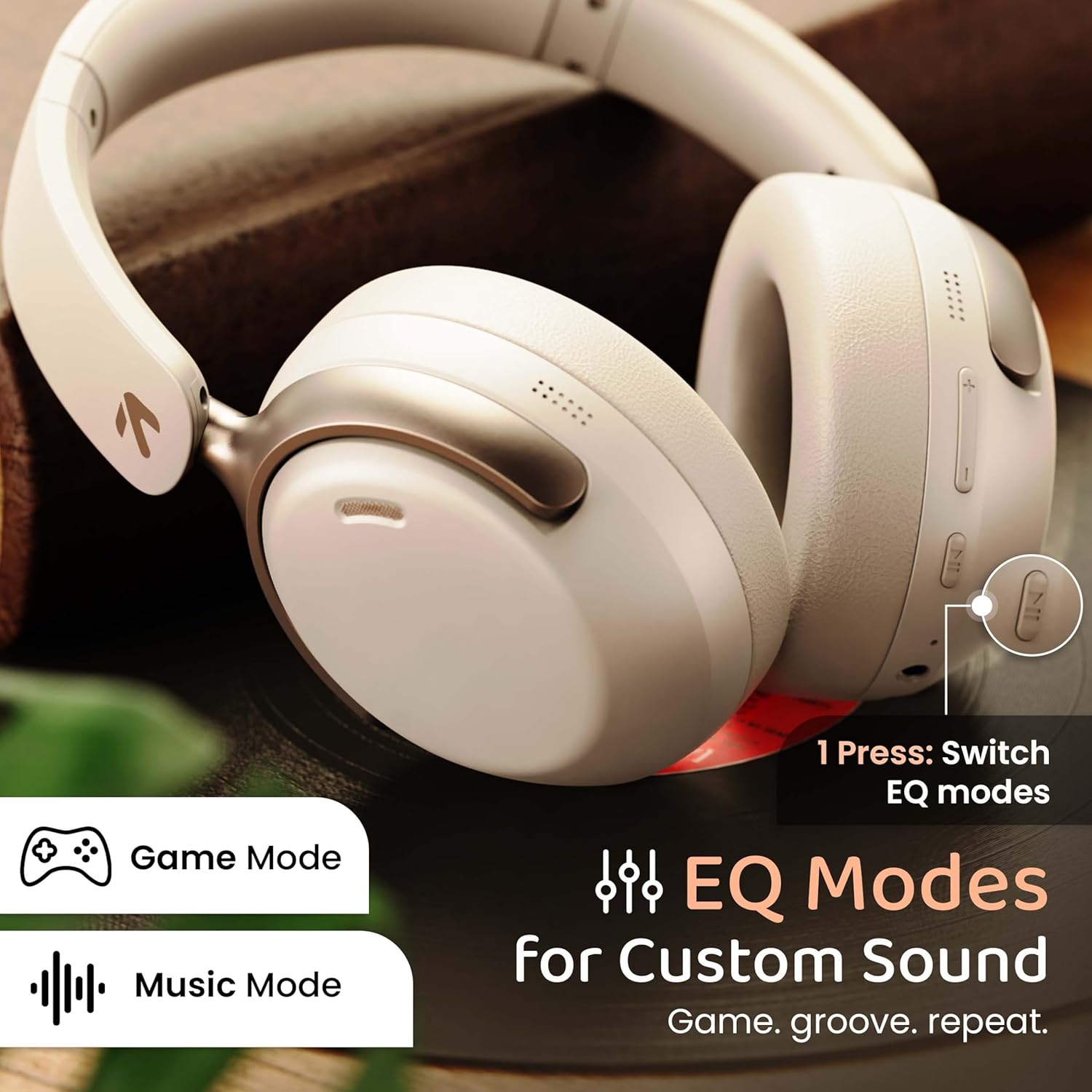
Image: GOBOULT Soniq headphones illustrating the EQ modes for custom sound, including Game Mode and Music Mode.

Image: GOBOULT Soniq headphones highlighting Combat™ Gaming Mode with 60ms ultra-low latency, tailored for mobile gaming and real-time sound accuracy.
3 การจับคู่สองอุปกรณ์พร้อมกัน
The headphones support dual device pairing, allowing you to connect to two devices simultaneously and switch between them seamlessly.
- จับคู่หูฟังกับอุปกรณ์เครื่องแรกตามที่อธิบายไว้ในหัวข้อ "การจับคู่บลูทูธ"
- ปิดใช้งานบลูทูธบนอุปกรณ์ตัวแรก
- จับคู่หูฟังกับอุปกรณ์ที่สอง
- เปิดใช้งานบลูทูธบนอุปกรณ์เครื่องแรกอีกครั้ง หูฟังควรเชื่อมต่อกับอุปกรณ์ทั้งสองเครื่องโดยอัตโนมัติ
- Audio will play from the device currently active. To switch, pause audio on the first device and start playing on the second.

Image: GOBOULT Soniq headphones demonstrating dual device connectivity with a laptop and a smartphone.
4. โหมดใช้สาย (AUX)
For a wired connection, use a standard 3.5mm AUX cable (not included) to connect the headphones to your audio source. In wired mode, the headphones operate passively, and the built-in microphone will not function.

Image: GOBOULT Soniq headphones showing the option for wireless mode and an optional wired mode via AUX cable, noting that the mic is off in wired mode.
5. Environmental Noise Cancellation (ENC) for Calls
The Zen™ ENC microphone technology helps reduce ambient noise during calls, ensuring clearer conversations. This feature is automatically active during phone calls.

Image: Close-up of the GOBOULT Soniq headphone earcup highlighting the Zen™ ENC Mic for processed calling, ambient noise isolation, enhanced call experience, and sharper voice clarity.
6. ผู้ช่วยเสียง
Activate your device's voice assistant (Google Assistant or Siri) by pressing the multi-function button (or specific button, refer to quick start guide) for approximately 2 seconds.

Image: GOBOULT Soniq headphones with icons for Google Assistant and Siri, indicating personalized AI assistant support.
การบำรุงรักษาและการดูแล
- การทำความสะอาด: เช็ดหูฟังด้วยผ้าแห้งนุ่มๆ ห้ามใช้สารทำความสะอาดที่มีฤทธิ์กัดกร่อนหรือตัวทำละลาย
- ความต้านทานน้ำ: The headphones are IPX5 water resistant, meaning they are protected against splashes, rain, and sweat. Do not submerge them in water or expose them to strong jets of water.
- พื้นที่จัดเก็บ: เมื่อไม่ใช้งาน ให้เก็บหูฟังไว้ในที่แห้งและเย็น หลีกเลี่ยงแสงแดดโดยตรงและอุณหภูมิที่สูงหรือต่ำเกินไป ดีไซน์แบบพับได้ช่วยให้จัดเก็บได้อย่างกะทัดรัด
- การดูแลแบตเตอรี่ เพื่อยืดอายุการใช้งานแบตเตอรี่ ควรหลีกเลี่ยงการใช้หูฟังจนหมดบ่อย ชาร์จหูฟังเป็นประจำ แม้จะไม่ได้ใช้งานบ่อยก็ตาม
Image: GOBOULT Soniq headphones illustrating IPX5 water resistance, indicating protection against splash, rain, and sweat.

Image: GOBOULT Soniq headphones showcasing their adjustable headband, foldable design, and movable earcups for maximum comfort and portability.
การแก้ไขปัญหา
| ปัญหา | วิธีแก้ปัญหาที่เป็นไปได้ |
|---|---|
| หูฟังไม่สามารถเปิดเครื่องได้ | ตรวจสอบให้แน่ใจว่าหูฟังชาร์จไฟเต็มแล้ว เชื่อมต่อกับแหล่งจ่ายไฟโดยใช้สาย Type-C |
| ไม่สามารถจับคู่กับอุปกรณ์ได้ |
|
| ไม่มีเสียงหรือเสียงเบา |
|
| ไมโครโฟนไม่ทำงานในโหมดสาย | The built-in microphone is not active when using the AUX wired connection. This is normal operation. |
| การเชื่อมต่อไม่ต่อเนื่อง |
|
ข้อมูลจำเพาะ
| คุณสมบัติ | รายละเอียด |
|---|---|
| ชื่อรุ่น | แอร์เบส |
| เทคโนโลยีการเชื่อมต่อ | บลูทูธ, แบบมีสาย, แบบไร้สาย |
| เทคโนโลยีการสื่อสารไร้สาย | บลูทูธ 5.4 |
| ช่วงบลูทูธ | 10 เมตร |
| ขนาดไดร์เวอร์เสียง | 40 มิล |
| ประเภทไดร์เวอร์เสียง | ไดร์เวอร์แบบไดนามิก |
| อายุการใช้งานแบตเตอรี่ | 40 ชั่วโมง |
| พอร์ตชาร์จ | ช่องเสียบชาร์จเร็ว Type-C |
| การควบคุมเสียงรบกวน | การลดเสียงรบกวนสิ่งแวดล้อม (ENC) |
| ระดับความต้านทานต่อน้ำ | IPX5 (Splash, Rain, Sweat Proof) |
| เวลาแฝงของเสียง | 60 มิลลิวินาที (โหมดเกม) |
| รูปทรงของหูฟัง | ครอบหู |
| วัสดุ | Memory Foam (Ear Cushions) |
| น้ำหนักสินค้า | 227 กรัม |
| ขนาดสินค้า (กxยxส) | 17 x 5.5 x 19 เซนติเมตร |
| ประเภทตัวควบคุม | Button, Google Assistant |
| อิมพีแดนซ์ | 32 โอห์ม |
| ความไวต่อความรู้สึก | 118 เดซิเบล |
การรับประกันและการสนับสนุน
Your GOBOULT Soniq Over Ear Bluetooth Headphones come with a รับประกันจากผู้ผลิต 1 ปี from the date of purchase. This warranty covers manufacturing defects and ensures the reliability of your product.
For warranty claims, technical support, or any inquiries, please refer to the contact information provided on the warranty card included in your package or visit the official GOBOULT support webเว็บไซต์.
โปรดเก็บใบเสร็จรับเงินไว้เป็นหลักฐานการซื้อเพื่อใช้ในการตรวจสอบสิทธิ์การรับประกัน


