1. บทนำ
This manual provides essential information for the safe and efficient use of your TCL 75T69C 75-inch QLED 4K HDR Google Smart TV. Please read it thoroughly before operating the device and retain it for future reference. This television features QLED technology for vibrant colors, 4K HDR for enhanced contrast and detail, and Google TV for a personalized smart experience with integrated Google Assistant and Alexa compatibility.
ข้อมูลด้านความปลอดภัย
- Ensure the TV is placed on a stable surface or securely mounted to a wall.
- อย่าปิดกั้นช่องระบายอากาศ
- หลีกเลี่ยงการให้ทีวีโดนฝนหรือความชื้น
- ถอดปลั๊กไฟในระหว่างที่มีพายุฝนฟ้าคะนองหรือเมื่อไม่ได้ใช้งานเป็นเวลานาน
- ส่งต่อการบริการทั้งหมดไปยังบุคลากรบริการที่มีคุณสมบัติเหมาะสม
2. การตั้งค่า
มีอะไรอยู่ในกล่อง
เมื่อแกะกล่อง ตรวจสอบว่ามีส่วนประกอบครบทั้งหมด:
- TCL 75T69C 75-inch QLED 4K HDR Google Smart TV
- สายไฟ
- รีโมทคอนโทรล
- ขาตั้ง (2 ชิ้น)
- คู่มือการใช้งาน (เอกสารนี้)
การติดตั้งทางกายภาพ
การติดตั้งขาตั้ง: Carefully attach the two stand pieces to the designated slots at the bottom of the TV, securing them with the provided screws. Ensure the TV is stable before proceeding.
การติดตั้งบนผนัง: If wall mounting, use a VESA compatible mount (300x300mm) and follow the mount manufacturer's instructions. Ensure the wall can support the TV's weight (27.3 kg).

Image: Dimensions of the TCL 75T69C 75-inch TV, showing its width, height, thickness, and VESA mounting points. The remote control model RC833A is also pictured.
การเชื่อมต่อพลังงาน: เสียบสายไฟเข้ากับช่องรับไฟของทีวี จากนั้นเสียบเข้ากับเต้าเสียบที่ผนัง
การเชื่อมต่ออุปกรณ์ภายนอก
Your TCL 75T69C TV offers various ports for connecting external devices:
- HDMI (x3): สำหรับการเชื่อมต่อเครื่องเล่นบลูเรย์, คอนโซลเกม, ซาวด์บาร์ ฯลฯ
- ยูเอสบี (x2): For connecting USB storage devices to play media or for service.
- แลน (อีเธอร์เน็ต): สำหรับการเชื่อมต่ออินเตอร์เน็ตแบบใช้สาย
- ออปติคัล (เอาต์พุตเสียงดิจิตอล): สำหรับเชื่อมต่อกับระบบเสียงภายนอก
- Cable/Satellite: For connecting antenna or satellite cables.
- สล็อต CI: For Conditional Access Modules (CAMs) from pay-TV providers.

Image: A visual representation of the various input and output ports available on the TCL 75T69C television.
3. คู่มือการใช้งาน
Initial Setup and Google TV
After connecting the power, turn on your TV. The first-time setup wizard will guide you through:
- เลือกภาษา: เลือกภาษาที่คุณต้องการ
- การเชื่อมต่อเครือข่าย: Connect to your home Wi-Fi network or use a wired Ethernet connection.
- การลงชื่อเข้าใช้บัญชี Google: ลงชื่อเข้าใช้ด้วยบัญชี Google ของคุณเพื่อเข้าถึงฟีเจอร์ แอป และคำแนะนำส่วนบุคคลของ Google TV
- การสแกนช่อง: Scan for available TV channels (if using an antenna or cable).
Google TV organizes movies, shows, live TV, and more from your apps and subscriptions, presenting them in a personalized interface.

Image: The Google TV home screen displaying a selection of popular streaming applications and content.
คุณสมบัติและเทคโนโลยีที่สำคัญ
Your TCL 75T69C TV incorporates advanced technologies for an enhanced viewประสบการณ์ด้านเสียงและการสื่อสาร:
- เทคโนโลยี QLED: Quantum Dot technology reproduces over a billion shades of color, delivering cinematic color volume and brightness.
- โปรเซสเซอร์ AiPQ: This processor optimizes content in 4K resolution, ensuring smooth images, sharp contrasts, and precise details through AI-driven enhancements for contrast, color, clarity, motion, and HDR.
- HDR Multiformat: Supports HDR10, HLG, HDR10+, and Dolby Vision for exceptional image quality from various sources, ensuring optimal brightness, contrast, and color.
- Dolby Vision และ Dolby Atmos: Experience immersive cinematic visuals with Dolby Vision and rich, moving audio with Dolby Atmos.
- แผงควบคุมระบบปรับอากาศ (HVA Panel): The innovative HVA panel provides sharper contrasts, improved energy saving, and wider viewมุมการเอียง
- Motion Clarity (MEMC): Reduces blur and judder in fast-moving scenes, providing smoother and clearer images for sports and action films.
- เกมมาสเตอร์: Optimized for gaming with HDMI 2.1, Auto Low Latency Mode (ALLM), Variable Refresh Rate (VRR), and a Game Bar for quick settings adjustments.
- การควบคุมด้วยเสียง: Compatible with Google Assistant and Amazon Alexa. Use your voice to search for content, control playback, adjust volume, and manage smart home devices.
- Google แคสต์: Easily cast your favorite music, videos, and photos from your smartphone, tablet, or computer directly to your TCL TV.

Image: A visual demonstration of QLED technology, showcasing rich and vibrant colors in a floral image.

Image: A graphic illustrating the AiPQ Processor and its capabilities in enhancing image performance.

ภาพ: โอเวอร์view of HDR Multiformat support, highlighting compatibility with major streaming platforms.

Image: The Dolby Vision logo alongside a scene from a theater, emphasizing an immersive viewการสร้างประสบการณ์

Image: The Dolby Atmos logo with a dynamic wave image, illustrating a cinematic audio experience.

Image: A visual representation of the HVA Panel's ability to deliver sharper contrasts and wider viewมุมการเอียง

Image: A side-by-side comparison demonstrating the effect of Motion Clarity (MEMC) on fast-moving images.

Image: A depiction of the Game Master feature, illustrating an optimized gaming experience.

Image: A user interacting with the TV using Google Assistant voice commands.

Image: A family enjoying content on the TV, demonstrating compatibility with Alexa voice commands.

Image: A visual representation of Google Cast functionality, allowing content sharing from mobile devices to the TV.
รีโมทคอนโทรล
The included remote control (model RC833A) provides full functionality for navigating Google TV, adjusting settings, and controlling connected devices. It features a microphone for voice commands.

Image: The TCL RC833A remote control, showing its layout and buttons.
4. การบำรุงรักษา
การทำความสะอาดทีวี
- หน้าจอ: เช็ดหน้าจอเบาๆ ด้วยผ้าเนื้อนุ่มที่ไม่เป็นขุย สำหรับคราบฝังแน่น ให้ใช้น้ำยาทำความสะอาดหน้าจอสำหรับทีวีโดยเฉพาะ โดยชโลมน้ำยาลงบนผ้าก่อนเช็ด ไม่ควรชโลมลงบนหน้าจอโดยตรง
- ร่างกาย: Wipe the TV frame and stand with a soft, dry cloth. Do not use abrasive cleaners or solvents.
- ควรถอดปลั๊กทีวีทุกครั้งก่อนทำความสะอาด
การอัพเดตซอฟต์แวร์
Your TCL TV may receive automatic software updates to improve performance and add new features. Ensure your TV is connected to the internet to receive these updates. You can also manually check for updates in the TV's settings menu.
5 การแก้ไขปัญหา
หากคุณประสบปัญหาเกี่ยวกับทีวี โปรดดูปัญหาทั่วไปและวิธีแก้ไขต่อไปนี้:
| ปัญหา | วิธีแก้ปัญหาที่เป็นไปได้ |
|---|---|
| ไม่มีไฟฟ้า | ตรวจสอบว่าสายไฟเชื่อมต่อกับทีวีและเต้ารับที่ผนังแน่นดีแล้วหรือไม่ ลองเสียบเข้ากับเต้ารับอื่นดู |
| ไม่มีภาพ / หน้าจอดำ | Ensure the correct input source is selected. Check all HDMI/AV cable connections. Try restarting the TV. |
| ไม่มีเสียง | Check the volume level and mute status. Ensure external audio devices are correctly connected and selected as output. |
| รีโมตคอนโทรลไม่ทำงาน | เปลี่ยนแบตเตอรี่ ตรวจสอบให้แน่ใจว่าไม่มีสิ่งกีดขวางระหว่างรีโมทและเซ็นเซอร์อินฟราเรดของทีวี |
| ปัญหาการเชื่อมต่อเครือข่าย | Restart your router/modem. Check Wi-Fi password. Try a wired Ethernet connection if Wi-Fi fails. |
| ปัญหาคุณภาพของภาพ | Adjust picture settings (brightness, contrast, color). Ensure the content source is high quality (e.g., 4K). |
If the problem persists, consult the TCL support webเว็บไซต์หรือติดต่อฝ่ายบริการลูกค้า
6. ข้อมูลจำเพาะ
Detailed technical specifications for the TCL 75T69C TV:
| คุณสมบัติ | รายละเอียด |
|---|---|
| ยี่ห้อ | ทีซีแอล |
| หมายเลขรุ่น | 75T69C |
| ขนาดหน้าจอ | 75 นิ้ว |
| เทคโนโลยีหน้าจอ | QLED, Direct LED, HVA Panel |
| ปณิธาน | 4K (3840 x 2160 พิกเซล) |
| อัตราการรีเฟรช | 60 เฮิรตซ์ |
| คุณสมบัติพิเศษ | AiPQ Processor, HDR Multiformat (HDR10, HLG, HDR10+, Dolby Vision), Game Master, Google TV, Google Assistant, Alexa compatibility |
| การเชื่อมต่อ | Bluetooth, Ethernet, HDMI (x3), USB (x2), Wi-Fi |
| อัตราส่วนภาพ | 16:9 น. |
| ขนาดสินค้า | 166.7 cm (W) x 102.7 cm (H) x 34.9 cm (D) with stand |
| น้ำหนัก | 27.3 กก. |
| ระดับประสิทธิภาพพลังงาน (SDR) | F (115 กิโลวัตต์ชั่วโมง/1000 ชั่วโมง) |
| ระดับประสิทธิภาพการใช้พลังงาน (HDR) | จี (170 กิโลวัตต์ชั่วโมง/1000 ชั่วโมง) |
| ลิงค์ฐานข้อมูล EPREL | View EPREL Data |
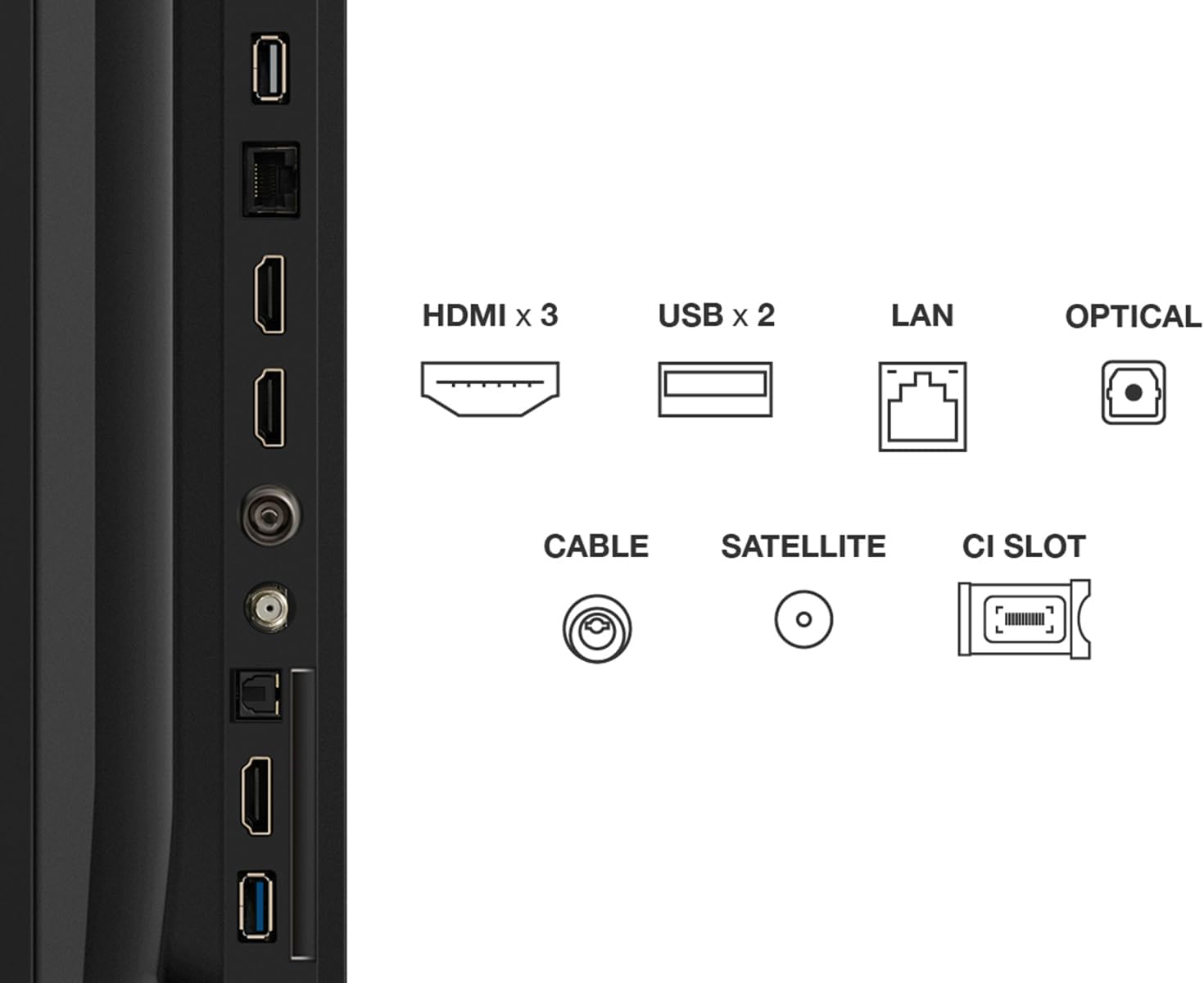
Image: The EU Energy Label for the TCL 75T69C, indicating its energy efficiency ratings.
7. การรับประกันและการสนับสนุน
ข้อมูลการรับประกัน
Your TCL 75T69C television comes with a standard manufacturer's warranty of 2 years. Please retain your proof of purchase for warranty claims. The availability of spare parts is guaranteed for 8 years, and product support is available for 8 years.
การสนับสนุนลูกค้า
For technical assistance, troubleshooting beyond this manual, or warranty inquiries, please contact TCL Customer Support. Specialized customer support is available to assist you with any product-related questions.
You can find contact information and additional resources on the official TCL webเว็บไซต์.


