1. สินค้าหมดview
The Newmen GM325Pro is a 104-key wired mechanical keyboard designed for gaming and general use. It features a durable metal panel, hot-swappable linear red switches, rainbow LED backlighting, and customizable software. This manual provides instructions for setup, operation, maintenance, and troubleshooting.

Image 1.1: Newmen GM325Pro Mechanical Keyboard. This image displays the full 104-key layout of the keyboard, highlighting its black keycaps, gray metal panel, and the included detachable USB-C cable. A single red mechanical switch is also shown separately.
คุณสมบัติหลัก:
- รูปแบบ 104 คีย์: แป้นพิมพ์ขนาดเต็มเพื่อการใช้งานที่ครอบคลุม
- แผงโลหะ: Durable construction for enhanced stability and longevity.
- การเชื่อมต่อแบบใช้สาย USB-C: Detachable cable for stable and fast data transmission.
- ไฟแบ็คไลท์ LED สีรุ้ง: 13 preset effects and RGB side-edge illumination.
- สวิตช์สีแดงเชิงเส้น: Smooth, responsive, and quiet operation with 45g actuation force and 50 million click durability.
- ดีไซน์แบบถอดเปลี่ยนได้ขณะใช้งาน: Supports 3-pin switches for easy replacement without soldering.
- Full-Key Rollover: รับประกันว่าทุกการกดแป้นพิมพ์จะถูกบันทึกอย่างแม่นยำ
- ซอฟต์แวร์ปรับแต่ง: Allows remapping keys, recording macros, and personalizing lighting.
- การออกแบบตามหลักสรีรศาสตร์: Dual-layer adjustable feet and anti-slip pads for comfortable use.
2. คำแนะนำในการตั้งค่า
2.1 เนื้อหาบรรจุภัณฑ์
- 1 x Newmen GM325Pro Wired Mechanical Keyboard
- สาย USB Type-C 1 เส้น
- 1 x คู่มือผู้ใช้ (เอกสารนี้)
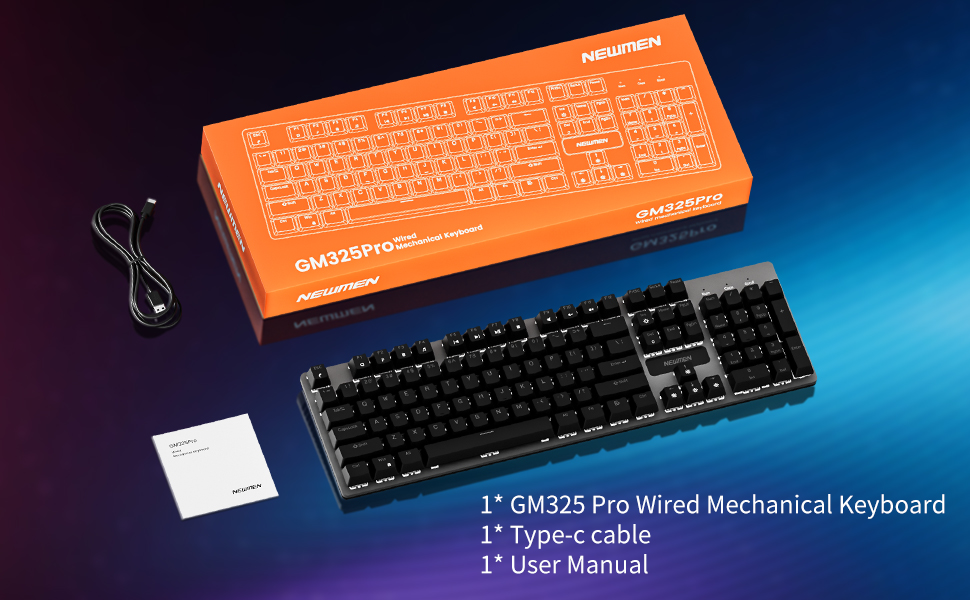
Image 2.1: Package contents of the Newmen GM325Pro Mechanical Keyboard, including the keyboard, USB-C cable, and user manual, displayed alongside the product packaging.
2.2 การเชื่อมต่อคีย์บอร์ด
- Locate the detachable USB-C cable provided in the package.
- Connect the USB-C end of the cable to the port on the Newmen GM325Pro keyboard.
- Connect the USB-A end of the cable to an available USB port on your computer (desktop PC or laptop).
- The keyboard is plug-and-play and should be automatically recognized by your operating system (Windows, macOS). No drivers are typically required for basic functionality.

Image 2.2: Detachable Wired Connection. This image shows the Newmen GM325Pro keyboard connected to a laptop via its USB-C cable, illustrating the plug-and-play setup for stable and fast transmission.
2.3 การปรับขาตั้งแป้นพิมพ์
The keyboard features dual-layer adjustable feet and four anti-slip pads on the underside. Adjust the feet to your preferred typing angle for ergonomic comfort and stability.
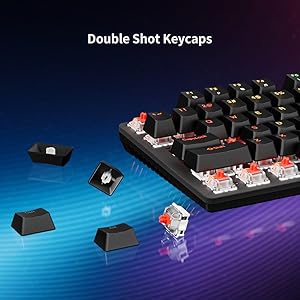
Image 2.3: Dual-Layer Feet + 4 Anti-Slip Pads. This image highlights the adjustable dual-angle feet and reinforced anti-slip pads on the keyboard's underside, designed for ergonomic typing and stability.
3. คู่มือการใช้งาน
3.1 การพิมพ์และการเล่นเกมขั้นพื้นฐาน
The Newmen GM325Pro uses linear red mechanical switches, providing a smooth and responsive keystroke. The full-key rollover feature ensures that all simultaneous key presses are registered accurately, which is beneficial for fast-paced gaming and typing.

Image 3.1: Responsive Mechanical Red Switches. This image provides a close-up of the keyboard's linear red switches, illustrating their design for smooth actuation and durability.
3.2 การควบคุมแสงสว่าง
The keyboard features rainbow LED backlighting with 13 preset effects and RGB side-edge illumination. Use the following FN key combinations to control the lighting:
- FN + PrtSc: Switch Backlight Effects
- FN + ScrLk: Toggle Side LED Effects
- FN + Pause: เพิ่มความสว่าง
- FN + อิน: ลดความสว่าง
- FN + บ้าน: Slow Down Lighting Effects
- FN + PgUp: Speed Up Lighting Effects

Image 3.2: Immersive Rainbow Backlight. This image showcases the vibrant rainbow LED backlighting across the keyboard keys.
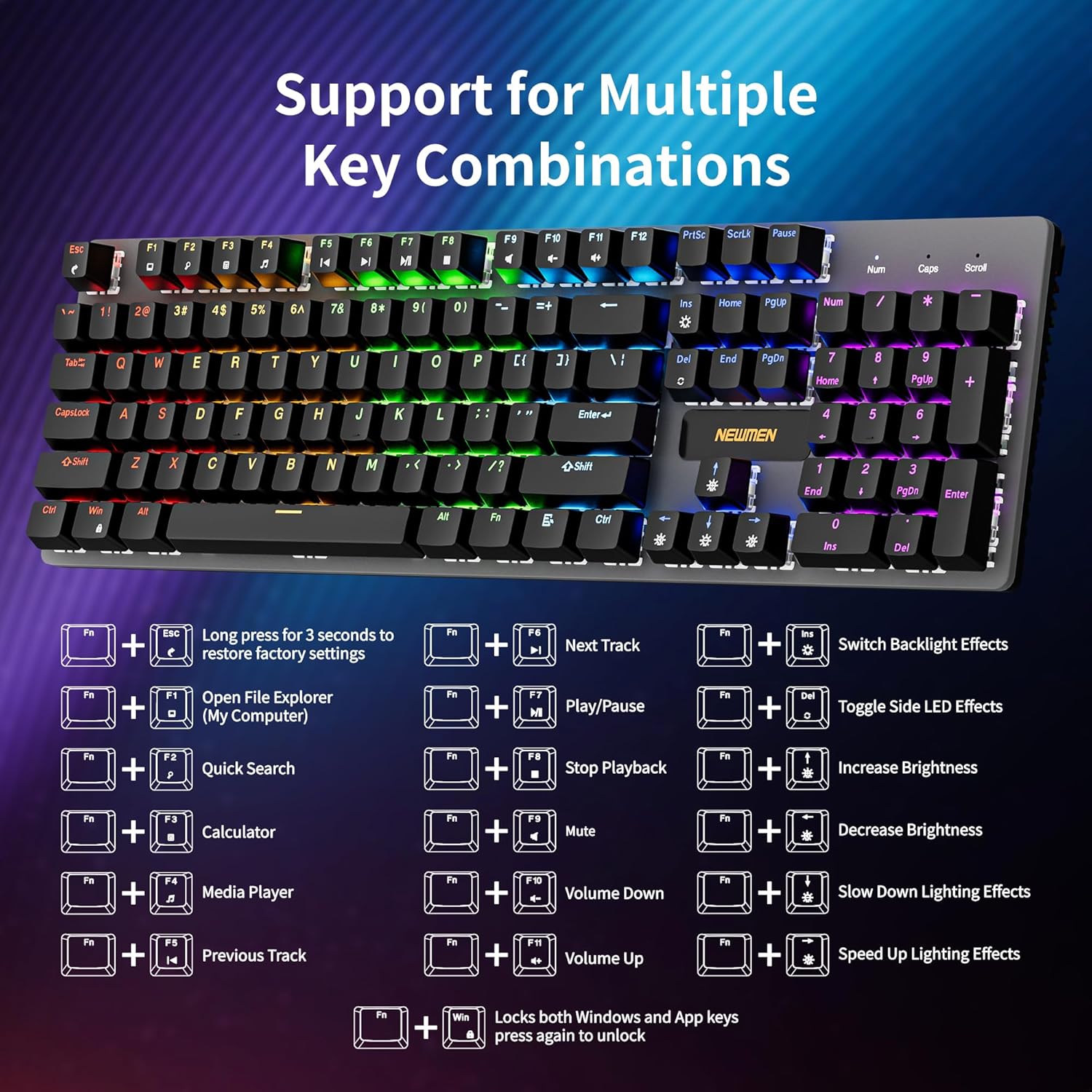
Image 3.3: Vibrant LED & Side Glow Lights. This image highlights the dynamic LED backlighting and the distinct side glow lights of the keyboard.
3.3 Multimedia and Shortcut Functions
เข้าถึงฟังก์ชันมัลติมีเดียและฟังก์ชันระบบต่างๆ โดยใช้ปุ่ม FN ร่วมกับปุ่ม F1-F11:
- FN+F1: เปิด File Explorer (My Computer)
- FN+F2: ค้นหาด่วน
- FN+F3: เครื่องคิดเลข
- FN+F4: เครื่องเล่นสื่อ
- FN+F5: เพลงก่อนหน้า
- FN+F6: เพลงถัดไป
- FN+F7: เล่น/หยุดชั่วคราว
- FN+F8: หยุดเล่น
- FN+F9: ปิดเสียง
- FN+F10: ลดระดับเสียง
- FN+F11: เพิ่มระดับเสียง
- FN + ชนะ: Locks both Windows and App keys; press again to unlock.

Image 3.4: Support for Multiple Key Combinations. This diagram visually represents the FN key shortcuts for multimedia control and lighting adjustments.
3.4 การปรับแต่งซอฟต์แวร์
For advanced customization, including key remapping, macro recording, and detailed lighting personalization, download the official Newmen software. This software allows you to tailor the keyboard's functions to your specific needs.
- เยี่ยมชมเว็บไซต์อย่างเป็นทางการของ Newmen webเว็บไซต์สำหรับดาวน์โหลดซอฟต์แวร์ปรับแต่งเวอร์ชันล่าสุด
- ติดตั้งซอฟต์แวร์ลงในคอมพิวเตอร์ของคุณและทำตามคำแนะนำบนหน้าจอ
- Use the software interface to create profiles, assign macros, and adjust lighting effects beyond the default presets.

Image 3.5: Custom Software. This image displays the user interface of the Newmen customization software, showing options for macro editing and lighting adjustments.
4. การบำรุงรักษา
4.1 การทำความสะอาดแป้นพิมพ์
- ถอดแป้นพิมพ์ออกจากคอมพิวเตอร์ของคุณก่อนทำความสะอาด
- ใช้ผ้านุ่มไม่เป็นขุยเช็ดเล็กน้อยampล้างด้วยน้ำหรือน้ำยาทำความสะอาดอ่อนๆ เพื่อเช็ดทำความสะอาดปุ่มกดและแผงโลหะ
- สำหรับฝุ่นละอองและเศษต่างๆ ระหว่างคีย์ ให้ใช้ลมอัด
- หลีกเลี่ยงการฉีดของเหลวลงบนแป้นพิมพ์โดยตรง
4.2 สวิตช์แบบ Hot-Swappable
The Newmen GM325Pro features hot-swappable sockets, allowing you to change mechanical switches without soldering. This keyboard supports 3-pin switches.
- ค่อยๆ ถอดคีย์แคปออกโดยใช้เครื่องมือถอดคีย์แคป (ไม่ได้รวมอยู่ในชุด)
- Use a switch puller (not included) to carefully extract the mechanical switch from its socket.
- Align the pins of the new 3-pin switch with the holes in the PCB and press it firmly until it clicks into place. Ensure the pins are straight to avoid bending.
- เปลี่ยนปุ่มคีย์แคป

Image 4.1: Hot Swappable Linear Switch. This image demonstrates the hot-swappable nature of the switches, showing a keycap and switch removed from the keyboard.
5 การแก้ไขปัญหา
5.1 แป้นพิมพ์ไม่ตอบสนอง
- ตรวจสอบให้แน่ใจว่าสาย USB-C เชื่อมต่อกับคีย์บอร์ดและคอมพิวเตอร์อย่างแน่นหนา
- ลองเชื่อมต่อคีย์บอร์ดกับพอร์ต USB อื่นบนคอมพิวเตอร์ของคุณ
- ลองทดสอบแป้นพิมพ์กับคอมพิวเตอร์เครื่องอื่นเพื่อตรวจสอบว่าปัญหาอยู่ที่แป้นพิมพ์หรือพอร์ต USB ของคอมพิวเตอร์
- รีสตาร์ทเครื่องคอมพิวเตอร์ของคุณ
5.2 ปัญหาเรื่องแสงสว่าง
- Verify that the lighting is not turned off or set to minimum brightness using the FN key combinations (FN + Pause/Ins).
- หากใช้ซอฟต์แวร์ที่ออกแบบเอง โปรดตรวจสอบให้แน่ใจว่าโปรแกรมควบคุมแสงนั้นถูกต้องfile is correctly applied and the software is running.
- รีเซ็ตเป็นค่าโรงงาน: กดค้างไว้ เอฟเอ็น + เอสซี for 3 seconds to restore default settings.
5.3 Key Input Errors (Ghosting/Missed Presses)
- The GM325Pro supports full-key rollover, so ghosting should not occur under normal operation.
- ตรวจสอบให้แน่ใจว่าแป้นพิมพ์สะอาดและปราศจากเศษสิ่งสกปรกที่อาจขัดขวางการทำงานของปุ่มกด
- If a specific key is consistently failing, consider replacing the hot-swappable switch for that key (refer to Section 4.2).
6. ข้อมูลจำเพาะ
| คุณสมบัติ | รายละเอียด |
|---|---|
| ชื่อรุ่น | GM325 โปร |
| ยี่ห้อ | นิวแมน |
| เค้าโครง | 104 คีย์ (ขนาดมาตรฐาน) |
| ประเภทสวิตซ์ | Linear Red Mechanical Switches (Hot-swappable, 3-pin) |
| แรงขับเคลื่อน | 45กรัม |
| ความทนทาน | 50 ล้านคลิก |
| การแบ็คไลท์ | Rainbow LED Backlit, RGB Side Lighting |
| การเชื่อมต่อ | Wired (Detachable USB-C) |
| วัสดุ | แผงโลหะ |
| อุปกรณ์ที่รองรับ | แล็ปท็อปพีซี |
| ระบบปฏิบัติการ | Windows, macOS (ฟังก์ชันพื้นฐาน) |
| น้ำหนักสินค้า | 2.18 ปอนด์ |
| ขนาดแพ็คเกจ | 17.72 x 7.48 x 1.97 นิ้ว |
7. การรับประกันและการสนับสนุน
For information regarding warranty coverage, terms, and conditions, please refer to the documentation included with your product packaging or visit the official Newmen website. For technical support or further assistance, please contact Newmen customer service through their official channels.
Newmen Official Webเว็บไซต์: Visit Newmen Store on Amazon


