1. บทนำ
This manual provides essential information for the safe and efficient installation, operation, and maintenance of your Tbest 63A 4P Automatic Transfer Switch (ATS). This device is designed to automatically switch between a normal power source and a backup power source, ensuring continuous power supply to critical loads. Please read this manual thoroughly before installation and use.
2. ข้อมูลด้านความปลอดภัย
คำเตือน: เสี่ยงต่อการเกิดไฟฟ้าช็อต การติดตั้งและการซ่อมบำรุงต้องดำเนินการโดยบุคลากรที่มีคุณสมบัติเท่านั้น
- Always disconnect all power sources before installing or servicing the switch.
- ตรวจสอบให้แน่ใจว่ามีสายดินที่เหมาะสมเพื่อป้องกันอันตรายจากไฟฟ้า
- ตรวจสอบให้แน่ใจว่าการเชื่อมต่อทั้งหมดแน่นหนาและต่อสายอย่างถูกต้องตามข้อกำหนดด้านไฟฟ้าของท้องถิ่น
- ห้ามใช้งานสวิตช์หากพบว่าสวิตช์ชำรุดหรือทำงานผิดปกติ
- ควรสวมใส่อุปกรณ์ป้องกันส่วนบุคคล (PPE) ที่เหมาะสมระหว่างการติดตั้งและบำรุงรักษา
3. สินค้าหมดview
The Tbest 63A 4P Automatic Transfer Switch is a robust device designed for reliable power management. Key features include:
- Single Motor Drive: Ensures simple structure and stable conversion with minimal noise and impact.
- Enhanced Mechanism: Features an improved inhibition mechanism for quick closing and breaking, extending mechanical life.
- โครงสร้างทนทาน: Made from flame-retardant plastic, offering good insulation, high-temperature resistance, and protection against overload, undervoltage, short circuit, and phase failure.
- Electrical Interlock Protection: Guarantees reliable and non-interfering automatic switching.
- การประยุกต์ใช้ที่กว้าง: Suitable for critical power supply needs in fire protection systems, ports, hospitals, shopping malls, banks, and industrial facilities.
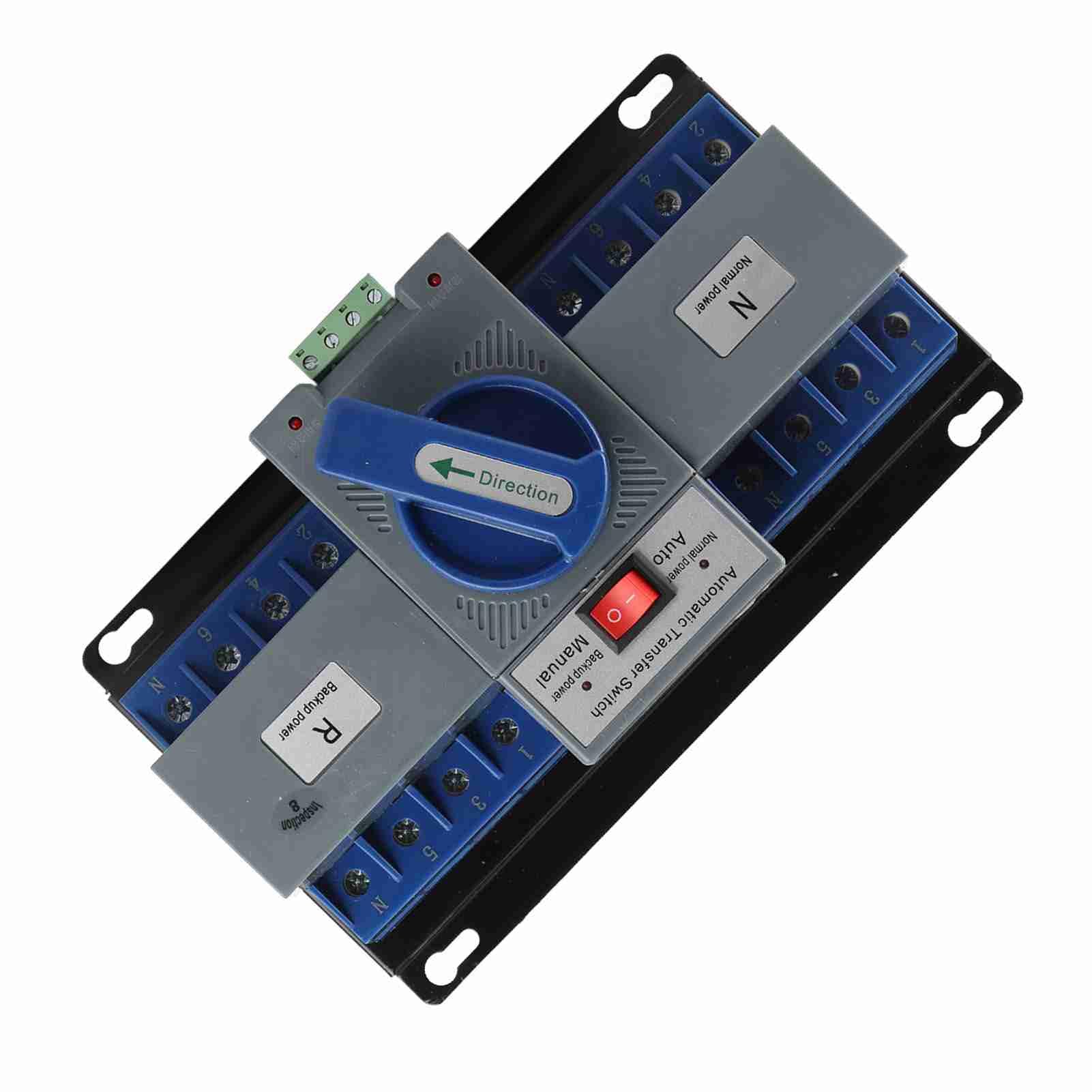
รูปที่ 1 : ด้านหน้า view of the Tbest 63A 4P Automatic Transfer Switch, showing the main controls and terminal blocks.
4. การตั้งค่าและการติดตั้ง
Follow these general steps for installing the automatic transfer switch. Consult a qualified electrician for specific wiring diagrams and local code compliance.
- การติดตั้ง: Securely mount the ATS in a suitable enclosure or panel, ensuring adequate ventilation and clearance for wiring.
- การตัดการเชื่อมต่อไฟฟ้า: Ensure all power sources (normal and backup) are completely disconnected and locked out before proceeding with wiring.
- Normal Power Connection: Connect the normal power source (utility) to the designated 'Normal Power' terminals (labeled 'N' on the device). Ensure correct phase and neutral connections.
- Backup Power Connection: Connect the backup power source (e.g., generator) to the designated 'Backup Power' terminals (labeled 'R' on the device). Ensure correct phase and neutral connections.
- โหลดการเชื่อมต่อ: Connect the electrical load (circuits to be powered) to the 'Load' terminals of the ATS.
- สายไฟควบคุม: Connect any necessary control wiring for automatic operation, if applicable.
- การตรวจสอบ: Double-check all wiring connections for tightness and correctness.

รูปที่ 2: มุม view of the ATS, highlighting the 'Normal Power' and 'Backup Power' terminal blocks for wiring connections.
5. คู่มือการใช้งาน
The Tbest Automatic Transfer Switch offers both automatic and manual operation modes.
การเลือกโหมด 5.1
The switch features a selector for operating mode:
- โหมดอัตโนมัติ: When the selector is set to 'Auto', the switch will automatically transfer the load between the normal and backup power sources based on power availability. If normal power fails, it will switch to backup. When normal power returns, it will switch back.
- โหมดแมนนวล: When the selector is set to 'Manual', the transfer switch will remain in its current position until manually operated.
5.2 Manual Transfer
In 'Manual' mode, or for testing purposes, the large blue 'Direction' handle can be used to manually switch between power sources:
- Rotate the handle towards 'N' (Normal power) to connect the load to the normal power source.
- Rotate the handle towards 'R' (Backup power) to connect the load to the backup power source.

รูปที่ 3: ระยะใกล้ view of the 'Automatic Transfer Switch' selector (Auto/Manual) and the 'Direction' handle for manual operation.
6. การบำรุงรักษา
การบำรุงรักษาอย่างสม่ำเสมอจะช่วยให้ระบบ ATS ของคุณมีอายุการใช้งานยาวนานและทำงานได้อย่างน่าเชื่อถือ
- การตรวจสอบภาพ: Periodically inspect the switch for any signs of damage, loose connections, or overheating.
- การทำความสะอาด: Keep the switch free from dust and debris. Use a dry, non-conductive cloth for cleaning.
- ตรวจสอบการเชื่อมต่อ: Annually, or as needed, verify that all electrical connections are tight and secure.
- การทดสอบฟังก์ชัน: Periodically test the automatic transfer function by simulating a normal power outage (if safe to do so) to ensure it switches correctly to backup power and back.
7 การแก้ไขปัญหา
If you encounter issues with your ATS, refer to the following common troubleshooting steps:
| ปัญหา | สาเหตุที่เป็นไปได้ | สารละลาย |
|---|---|---|
| Switch does not transfer automatically. | Selector in 'Manual' mode; no power from backup source; control wiring issue. | Set selector to 'Auto'. Check backup power source. Inspect control wiring. |
| No power to load. | No power from normal or backup source; tripped breaker; loose connections. | Check both power sources. Reset breakers. Verify all wiring connections. |
| Overheating or unusual noises. | Overload; loose connections; internal fault. | Reduce load. Tighten connections. Disconnect power and contact qualified personnel. |
If the problem persists after attempting these solutions, contact a qualified electrician or Tbest customer support.
8. ข้อมูลจำเพาะ
| คุณสมบัติ | ข้อมูลจำเพาะ |
|---|---|
| หมายเลขรุ่น | Tbest946gkyex3c |
| ASIN | B0F1D97DQB |
| ผู้ผลิต | ทีเบสต์ |
| ขนาดแพ็คเกจ | 9.06 x 5.91 x 5.12 นิ้ว |
| น้ำหนักสินค้า | 3.67 ปอนด์ |
9. การรับประกันและการสนับสนุน
For warranty information or technical support, please contact Tbest customer service through their official channels. Keep your purchase receipt and model number (Tbest946gkyex3c) handy for faster service.
คุณมักจะสามารถค้นหาข้อมูลการติดต่อฝ่ายสนับสนุนได้จากเว็บไซต์ของผู้ผลิต webไซต์หรือผ่านร้านค้าปลีกที่ซื้อผลิตภัณฑ์