1. บทนำ
ขอบคุณสำหรับการซื้อasing the LEKATO FP-10 88-Key Foldable Digital Piano. This portable digital piano is designed for musicians of all levels, offering a full 88-key experience in a compact, travel-friendly design. This manual provides essential information for setting up, operating, and maintaining your instrument to ensure optimal performance and longevity.
โปรดอ่านคู่มือนี้อย่างละเอียดก่อนใช้ผลิตภัณฑ์และเก็บไว้เพื่อใช้อ้างอิงในอนาคต
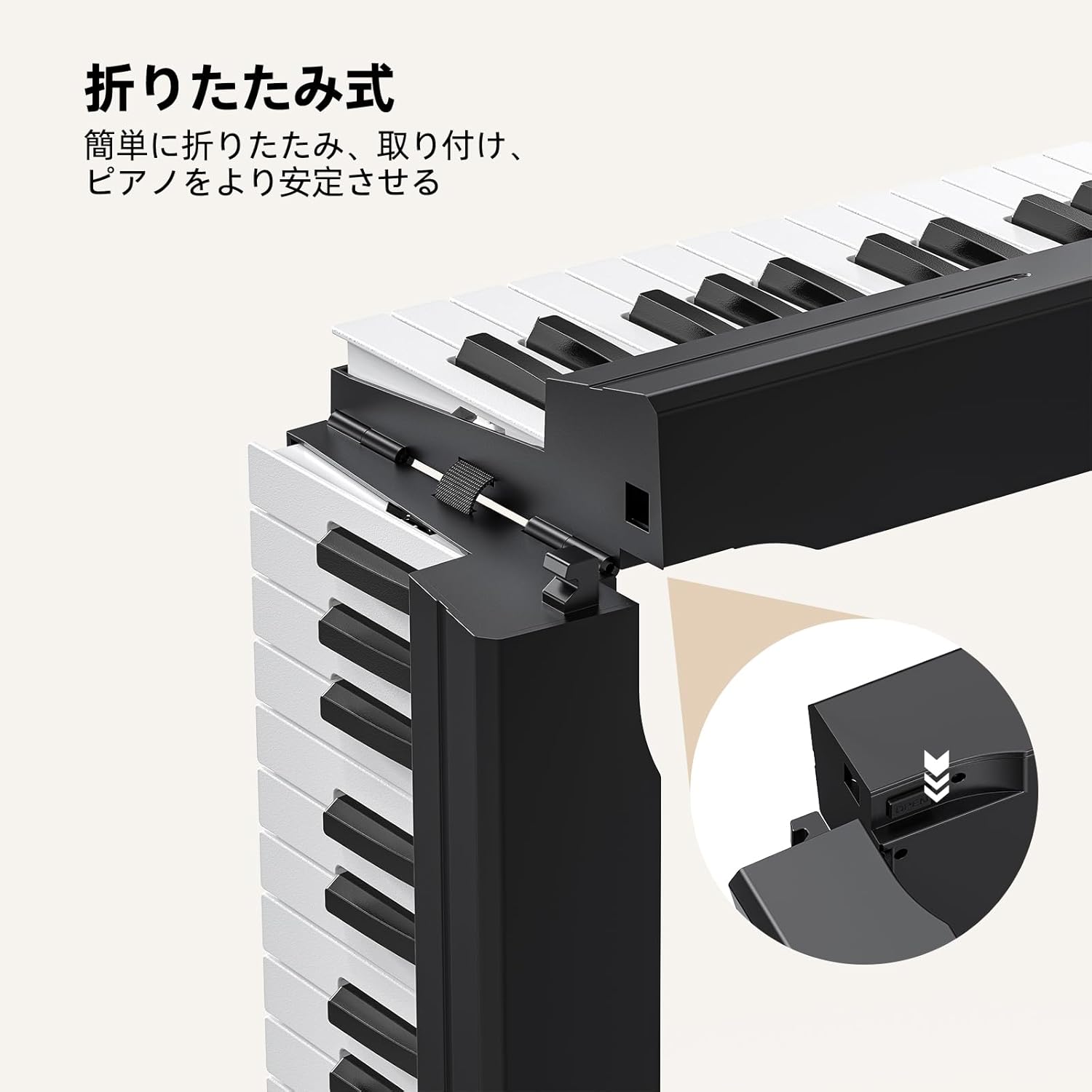
Figure 1: LEKATO FP-10 88-Key Foldable Digital Piano Overview
2. เนื้อหาบรรจุภัณฑ์
ตรวจสอบให้แน่ใจว่ามีรายการทั้งหมดอยู่ในบรรจุภัณฑ์:
- LEKATO FP-10 88-Key Foldable Digital Piano
- ขาตั้งโน้ตเพลง
- ถุงพกพาป้องกัน
- อะแดปเตอร์แปลงไฟ
- สาย USB
- ซัสเทนเพดัล
- คู่มือการใช้งาน (เอกสารนี้)
- สติ๊กเกอร์

รูปที่ 2: อุปกรณ์เสริมที่รวมอยู่
3. คุณสมบัติของผลิตภัณฑ์
- 88-Key Foldable Design: Lightweight (2.9kg / 6.3 lbs) and easily folds for portability. Extended length: 125.5cm (49.4 inches), folded length: 62.5cm (24.6 inches).
- การเชื่อมต่อที่หลากหลาย: Integrated Bluetooth for music applications and USB-MIDI for Digital Audio Workstations (DAW). Supports audio input and external headphones.
- Rich Sound and Functions: Features 128 rhythms, 128 tones, 21 demo songs, automatic chord, transpose, recording, metronome, and dual keyboard mode.
- ปุ่มตอบสนอง: Wood grain design with high-speed rebound keys for an authentic playing feel.
- อินเทอร์เฟซที่เป็นมิตรกับผู้ใช้: Quick function buttons for convenient mode adjustment and function switching.
- อายุการใช้งานแบตเตอรี่ยาวนาน: Approximately 10 hours of operation on a full charge.

รูปที่ 3: คุณสมบัติหลักเหนือview
4. การตั้งค่า
4.1 การแกะเปียโน
- วางเปียโนที่พับแล้วลงบนพื้นผิวเรียบและมั่นคง
- Gently unfold the two halves of the keyboard until they are fully extended and locked into place. Ensure the locking mechanism is secure.

Figure 4: Unfolding Mechanism
4.2 Power Connection and Initial Charge
Connect the power adapter to the DC IN port on the piano and plug it into a wall outlet. For the first use, charge the piano for at least 6 hours. Subsequent full charges typically take about 4 hours.

Figure 5: Power and Connectivity Ports
4.3 การเชื่อมต่อแป้นเหยียบ Sustain
Plug the included sustain pedal into the dedicated sustain pedal input port on the piano.
5. คู่มือการใช้งาน
5.1 เปิด/ปิดเครื่อง
Locate the power switch on the piano. Slide it to the "ON" position to power on the instrument. Slide it to "OFF" to power off.
5.2 แผงควบคุมโอเวอร์view
The control panel features various buttons for selecting tones, rhythms, demo songs, and adjusting other functions. Refer to the detailed diagram below for button identification.

รูปภาพ 6: แผงควบคุม
5.3 การปรับระดับเสียง
Use the dedicated volume buttons (usually labeled "Vol+" and "Vol-") on the control panel to adjust the master volume of the piano.
5.4 Key Touch Sensitivity
The keys are designed with touch sensitivity, meaning the volume and timbre change based on how hard you press them. This allows for expressive playing. The piano features a wood grain design and high-speed rebound keys for an authentic feel.

Figure 7: Key Touch Sensitivity
6. การเชื่อมต่อ
6.1 การเชื่อมต่อบลูทูธ
The FP-10 features integrated Bluetooth for wireless connection to music applications on your smartphone, tablet, or computer. This allows for interactive learning and practice.
- Turn on the piano and activate Bluetooth on your device.
- ค้นหา "GZUT-MUSIC" or "GZUT-MIDI" in your device's Bluetooth settings and connect. "GZUT-MUSIC" connects the piano as a Bluetooth speaker, while "GZUT-MIDI" connects it for MIDI data transfer with music apps.
- Once connected, you can use compatible music applications for learning or playback.

รูปที่ 8: การเชื่อมต่อบลูทูธ
6.2 USB-MIDI Port
The USB-MIDI port allows you to connect the piano to a computer for use with Digital Audio Workstations (DAW) or other music software. Use the provided USB cable for connection.
6.3 เอาต์พุตหูฟัง
For silent practice, connect standard headphones to the headphone jack. The piano's internal speakers will be muted automatically.

Figure 9: Headphone Use
7. ฟังก์ชั่น
The FP-10 offers a variety of functions to enhance your playing and learning experience.
- Tones (128 options): Select from a wide range of instrument sounds. Use the "Tone+" and "Tone-" buttons to cycle through available tones.
- Rhythms (128 options): Choose from various rhythmic accompaniments. Use the "Rhythm+" and "Rhythm-" buttons to select a rhythm.
- Demo Songs (21 options): Play pre-recorded demo songs for enjoyment or learning. Use the "Demo" button to start/stop and cycle through songs.
- Automatic Chord: Engages automatic chord accompaniment based on your playing.
- การเปลี่ยนตำแหน่ง: Adjust the pitch of the entire keyboard up or down.
- การบันทึก: Record your performances. Consult the control panel for specific record/playback buttons.
- เครื่องเมตรอนอม: Provides a steady beat for practice. Adjust tempo using dedicated buttons.
- โหมดแป้นพิมพ์คู่: Splits the keyboard into two identical sections, allowing two players to play simultaneously or for a teacher and student to play together.

Figure 10: Dual Keyboard Mode

Figure 11: Rich Tones and Rhythms
8. การชาร์จและแบตเตอรี่
The LEKATO FP-10 is equipped with a rechargeable battery for portable use. A full charge provides approximately 10 hours of playing time.
- การเรียกเก็บเงินครั้งแรก: For optimal battery health, charge the piano for at least 6 hours before its first use.
- การชาร์จมาตรฐาน: Subsequent full charges typically take about 4 hours.
- ไฟแสดงสถานะการชาร์จ: The display or an indicator light will show the charging status.

รูปที่ 12: อายุการใช้งานแบตเตอรี่ 10 ชั่วโมง
9. การบำรุงรักษา
- การทำความสะอาด: Use a soft, dry cloth to clean the surface of the piano. Do not use abrasive cleaners or solvents.
- พื้นที่จัดเก็บ: When not in use, fold the piano and store it in the protective carry bag in a cool, dry place away from direct sunlight and extreme temperatures.
- การจัดการ: Avoid dropping the piano or subjecting it to strong impacts.
10 การแก้ไขปัญหา
| ปัญหา | สาเหตุที่เป็นไปได้ | สารละลาย |
|---|---|---|
| ไม่มีเสียง | Volume too low; headphones connected; piano not powered on. | เพิ่มระดับเสียง ถอดหูฟังออก และตรวจสอบให้แน่ใจว่าเปียโนเปิดอยู่ |
| การเชื่อมต่อบลูทูธล้มเหลว | อุปกรณ์ไม่ได้เปิดใช้งานบลูทูธ; เปียโนไม่ได้อยู่ในโหมดจับคู่; มีสัญญาณรบกวน | Ensure Bluetooth is on; restart piano and device; try connecting again. |
| กุญแจไม่ตอบสนอง | Piano not powered on; internal issue. | Ensure piano is powered on. If problem persists, contact customer support. |
11. ข้อมูลจำเพาะ
- แบบอย่าง: FP-10 (BC3359)
- คีย์: 88, semi-weighted with wood grain texture
- เสียงเรียกเข้า: 128
- จังหวะ: 128
- เพลงเดโม่: 21
- การเชื่อมต่อ: Bluetooth, USB-MIDI, Audio Input, Headphone Output
- อายุการใช้งานแบตเตอรี่: ประมาณ 10 ชั่วโมง
- น้ำหนัก: 2.9 กก. (6.3 ปอนด์)
- ความยาวที่ขยาย: 125.5 ซม. (49.4 นิ้ว)
- ความยาวเมื่อพับ: 62.5 ซม. (24.6 นิ้ว)
12. การรับประกันและการสนับสนุน
The LEKATO FP-10 Digital Piano comes with a 1-year warranty from the date of purchase. If you encounter any quality issues with the product, exchanges are possible within the warranty period.
For any questions, concerns, or support needs, please contact our customer service. Refer to your purchase documentation for contact details.
13. วิดีโอสาธิตผลิตภัณฑ์
Watch this video for a demonstration of the LEKATO FP-10's features and sound capabilities.
Video: Demonstration of LEKATO FP-10 Digital Piano sounds and features.


